


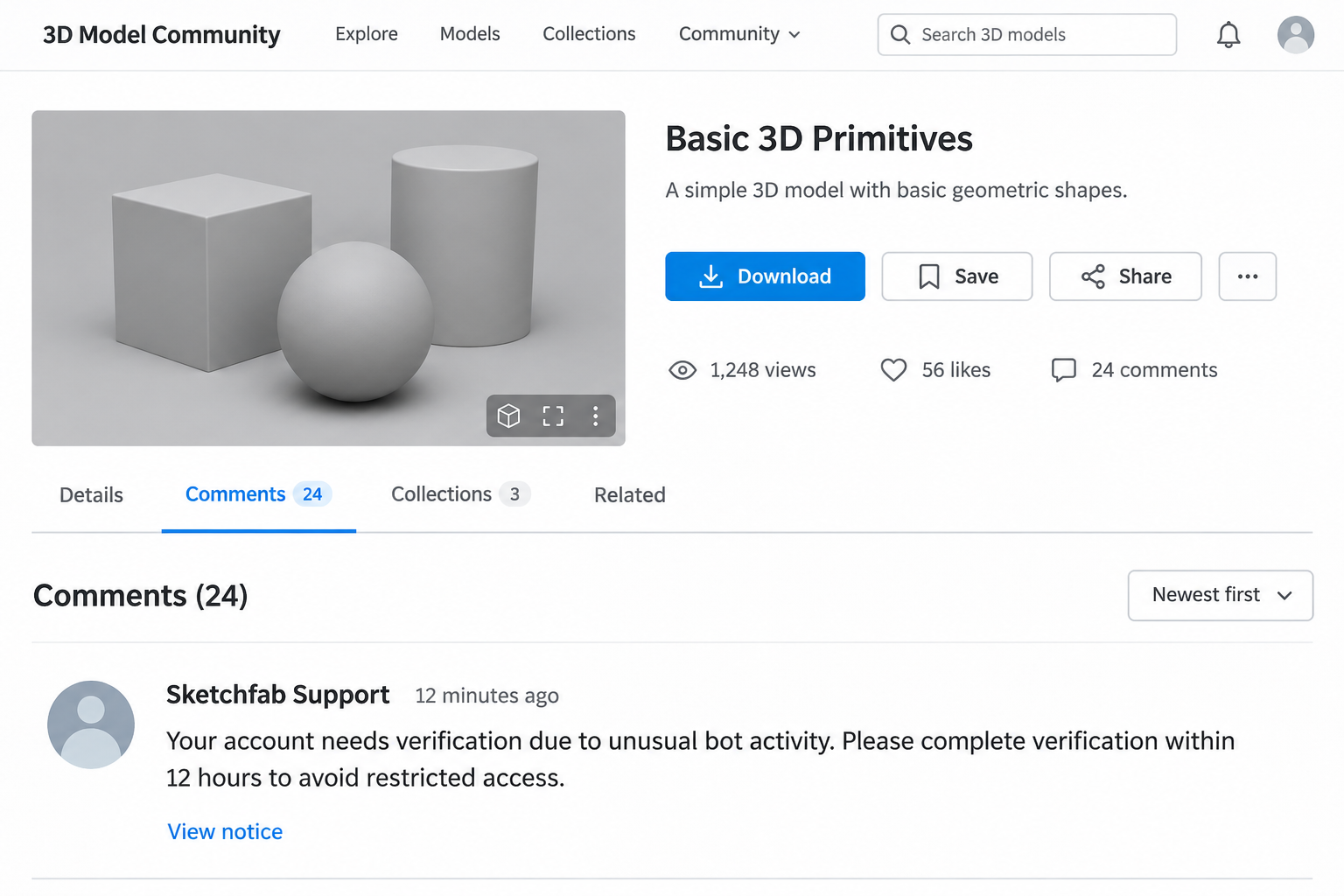
You upload a 3D model, then receive a notification about a comment from “Sketchfab Support.” It says your account needs verification before access is restricted.
The warning arrives beneath your own work, inside a site you recognize. Following it can feel like the next ordinary step after publishing.
Overview
A model comment pretends to be an account notice
The Sketchfab support-comment scam uses a public interaction to impersonate platform staff. It claims an account requires verification and directs the artist toward another site.
One version threatens restricted access because of supposed bot activity. Another claims a customer has already paid and that card verification will release the money.
The notification may come through the real platform, but the statement inside it belongs to the commenter. Those are two different sources of authority.
The verification detour asks for financial information
Separate accounts describe a support-like comment, an imitation website, and a demand for card or banking information. These requests impersonate support to obtain creators’ financial information.
A sales explanation deserves particular scrutiny because Sketchfab announced its Store closure when Fab launched in 2024.
A supposed payment waiting inside a comment is not an authenticated order. Check genuine sales records before treating any promised proceeds as real.
Respond according to what you actually supplied
Do not submit another verification to discover whether the first one worked. Stop at the current stage and protect the information or account involved.
- Only saw the comment: preserve or report it without following its link.
- Opened the page without entering anything: close it and check your genuine account directly.
- Submitted card or banking details: contact the relevant financial institution and explain the false verification request.
- Entered a password or approval code: change the exposed password using that service’s verified account security controls.
A Real Notification Does Not Turn a Commenter Into Support
The convincing part is where the message appears. A notification about your own model can feel more relevant than an unsolicited email from a stranger.
It also arrives when you expect feedback. A new creator may reasonably look for publication checks, account requirements, or responses from someone interested in the model.
The sender exploits that attention by choosing a support-like display name. A platform can deliver the comment without endorsing either the name or its instructions.
Read the notification’s actual purpose: someone commented on your work. It is not necessarily a separate administrative notice issued by the service.
Do not ask that commenter to prove their identity through another page they control. Leave the conversation and use a genuine support route instead.
The opening image reconstructs the comment lure using a fictional model and interface. It is not an authentic platform capture or a victim’s uploaded artwork.
How the Sketchfab Support-Comment Scam Works
Step 1: A support-like account comments on a model
The first contact appears where artists expect ordinary community activity. The commenter presents an account problem instead of discussing the model itself.
The display name implies staff status, while the message claims a verification requirement. Neither detail proves the profile has any administrative role.
Several recipients describe contact soon after uploading. That recurring experience is a reason to recognize the pattern, not proof of a specific operator or automation system.
Step 2: A deadline makes verification feel necessary
The comment warns about restrictions and gives the artist a short period to act. One reported version used a 12-hour deadline and mentioned bot activity.
A person may worry that ignoring the notice will hide their work or interrupt access. The scam makes continued use of the platform seem conditional on compliance.
Check the genuine account independently before accepting that premise. A demand below a model is not a reliable substitute for an authenticated account-status process.
Do not provide personal information in a public reply while asking for clarification. That can create an unnecessary exposure before you have left the original comment.
Step 3: The link moves the artist to an imitation service
The destination claims to handle account verification and may copy familiar branding. The appearance encourages the visitor to treat it as a continuation of the original platform.
The address and the claimed role still need checking. A recognizable word inside a different domain does not make it the service you intended to use.
Shortened links can make the transition harder to assess beforehand. Do not follow a suspicious notice simply to discover which site sits behind it.
The useful verification route begins separately, through your genuine account and established support. The commenter’s link should not define where that check happens.
Step 4: A chat agent supplies the explanation for card verification
Reported versions add a supposed support conversation after the warning page. That gives the artist someone to answer questions and justify the financial request.
One account described being told that a client had already paid. Card verification was presented as the remaining step before receiving those supposed proceeds.
Another described chat language about bookings and a reservations department. That mismatch with a 3D-model account is a concrete reason to stop following the conversation.
A helpful tone does not authenticate the agent. The person answering questions may be part of the same misleading route that produced the warning.
Step 5: The verification form seeks information valuable beyond the model account
The artist is asked for card or banking details despite originally trying to resolve a publishing issue. The promised outcome has changed from account access to financial verification.
Read any bank notification for yourself if you have already reached this stage. Do not approve a transaction because the chat agent calls it a verification.
If you also entered a password, treat that as a separate exposure. Protecting the payment card does not automatically secure the associated online account.
No additional payment is needed to prove that you now recognize the scam. Stop and use genuine institutional channels for the relevant recovery actions.
Why the Supposed Client Payment Deserves a Separate Check
A statement that someone already paid can change how an artist evaluates the request. It makes verification seem like collecting earnings rather than providing financial access.
Before acting, identify the actual order, buyer, and platform handling the transaction. A support chat’s statement is not the same thing as a genuine sales record.
Sketchfab’s Store-closure announcement explains that former product pages could remain visible while purchases moved elsewhere. A visible model page therefore does not establish a new Sketchfab Store sale.
Do not assume a comment about payment relates to a separate transaction on another marketplace. Reach that marketplace directly and check its own account records.
Knowing that artists sometimes sell their work is enough to construct a convincing story. The sender does not need to demonstrate any relationship with a real buyer.
If a transaction genuinely exists, handle it through the service where it occurred. Do not let an unrelated commenter replace that service’s payment or support process.
Warning Signs That Matter More Than Polished Branding
The mismatch between channel and demand is the strongest starting point. A public model comment should not become the authority for disclosing private banking details.
The next mismatch is purpose: resolving supposed bot activity should not require funding an account, approving a purchase, or sharing sensitive bank information with a stranger.
Also compare the conversation with your actual activity. A reference to reservations or bookings does not explain an ordinary 3D-model publication problem.
Do not rely solely on spelling quality. A well-written comment and a responsive chat agent can still lead to an imitation service.
Likewise, a secure connection only concerns the connection to that particular website. It does not establish that the website represents the platform it imitates.
A changed or unavailable destination does not resolve an earlier disclosure. The bank or affected service still needs to assess information already submitted.
What to Do if You Have Fallen Victim to This Scam
-
Stop interacting with the comment and verification page. Do not send another card, code, identity record, or payment because the supposed support agent asks.
Preserve the comment and profile details before removing or reporting it. Avoid opening the link again just to collect a more impressive screenshot.
-
Contact the card issuer or bank if financial details were entered. Explain that a false platform-support message led to a card-verification page.
Tell staff whether you supplied the card number, security information, bank credentials, or an approval code. Ask about appropriate blocking, replacement, and account-access protection.
If an unfamiliar transaction appears, provide its actual details and request the institution’s dispute process. A refund depends on the circumstances and cannot be promised.
-
Secure any account whose credentials were exposed. Start from the genuine service and replace the affected password, including reused copies elsewhere when relevant.
Review unfamiliar sessions and recovery details through that service’s own security controls. If your email was exposed, protect it because it may control further password resets.
Do not send replacement credentials to anyone claiming to check the cleanup. A support-like profile asking for another code needs the same scrutiny as the first.
-
Report the impersonating profile through genuine platform controls. Include the model comment, sender profile, link text, and the time you received the request.
Preserve the profile’s underlying account address, not only its displayed support name. A display name can change, while the report needs to identify a particular account.
Keep your report factual, separating what you saw from what the commenter claimed. Do not accuse the legitimate platform of operating the external verification site.
Do not delete your actual work while trying to remove the comment. Reporting a suspicious profile and removing a model have different consequences for your account.
If account access was lost, use the service’s genuine recovery process. Do not pay the commenter to restore access or attempt a second verification.
-
Preserve financial and identity evidence privately. Keep relevant transaction references, bank correspondence, the original message, and any account-security notifications involved in the incident.
Redact card details, addresses, and identifiers before asking for public advice. Share sensitive material only through a verified institution’s secure reporting process.
If identity documents were also supplied, ask the relevant authority about appropriate safeguards. Do not assume that replacing one payment card addresses every kind of disclosure.
-
Report losses through the appropriate official channel. In the United States, online-fraud reports can be filed with the FBI’s Internet Crime Complaint Center.
Use the equivalent police or cybercrime reporting service in your location when applicable. Keep the report reference and continue following the financial institution’s instructions.
Reject unsolicited promises of guaranteed recovery or account restoration for an upfront charge. A second contact knowing the story does not make them an authorized helper.
What to Tell Other Creators Without Spreading the Link
A useful warning describes the sequence: a support-like model comment, an account restriction, an external page, and a request for financial verification.
Share a redacted description or screenshot rather than a clickable scam address. That lets another creator recognize the pattern without visiting the destination.
Keep the distinction between the real platform and the impersonator clear. The problem is the false support request, not the existence of ordinary community comments.
On a shared studio account, tell other authorized users what happened and which notice was false. That can prevent a colleague from restarting the same verification.
Avoid claiming that every recipient lost money or that one particular malware infection occurred. Report the actions actually observed so people can choose the right response.
If someone feels embarrassed, help them contact the relevant bank or service first. Debating how obvious the message looked can delay a useful recovery step.
Frequently Asked Questions
Is Sketchfab itself running this verification scam?
The scam involves people impersonating support through comments and external pages. Do not treat their branding or display name as proof that the legitimate platform operates them.
Why did the warning appear in my real notifications?
A genuine notification can report a comment left by another user. It does not automatically authenticate the commenter as staff or endorse the instructions.
Should I verify a card to receive a supposed model payment?
Do not follow the commenter’s financial-verification request. Check the actual marketplace and sales record independently before treating a supposed payment as genuine.
Does opening the link mean my card was stolen?
Opening a page is different from submitting card information or approving a transaction. Identify what happened, then contact the relevant institution about any actual exposure.
What if I entered an account password as well?
Secure that account through its genuine recovery controls and review unfamiliar access. Card replacement and password recovery address different parts of the incident.
Should I keep talking to the support chat to collect evidence?
Stop the exchange and preserve what you already have. Further interaction can expose additional information or lead to another payment or verification demand.
The Bottom Line
Do not follow a model comment into card verification because its author calls themselves Sketchfab Support. Check account issues and genuine transactions through independently reached services.
If you already provided financial information or credentials, contact the bank and secure the affected account. Preserve and report the comment without continuing the impersonator’s process.

Join the discussion
0 commentsShare your experience or ask a question about this article.
Community experiences
Did this happen to you?
Your experience could help someone recognize the same scam. Submit a private report for our team to review.
I experienced this tooReports are reviewed before publication. Sharing publicly is always your choice.
Discussion
Start the conversation
Have a question or something useful to share? Add the first comment.