


You’ve just joined a Handshake AI project when a message announces that your account is under review. A verification link supposedly gets everything moving again.
The request appears inside a platform you already use, right when you’re expecting onboarding instructions. Before following it, check who actually sent that notice.
Overview
A false account restriction interrupts genuine onboarding
The Handshake restricted-access scam impersonates the platform’s team and tells users to confirm their details elsewhere. The threat is losing access to work or services.
Its timing makes the request plausible. Someone setting up a new project may already expect identity, tax, and payout checks through approved onboarding tools.
The fraudulent message borrows that expectation, then directs the recipient toward an unrelated verification process. Sensitive banking information becomes part of supposedly restoring an account.
Handshake warns about this specific kind of impersonation
Handshake’s fraud guidance identifies fake support profiles, urgent account threats, and requests for personal or financial information.
Its communications guidance also states that important account information is not delivered through in-app messages or feed posts. A support-like display name cannot override that distinction.
This is a warning about people impersonating Handshake, not an accusation that the legitimate platform or its approved payment partners are running the scam.
Your next action depends on the information exposed
A suspicious message alone is different from an exposed card, a bank connection, or a stolen login. Identify the stage you reached before choosing a remedy.
- Only received the message: leave its verification link alone and check your account independently.
- Entered a password or security code: secure the affected account through its genuine recovery process.
- Provided card or banking information: contact the financial institution promptly and explain the false verification request.
- Connected a financial account: ask the bank to review the connection and any permissions or transactions involved.
What Real Handshake AI Verification Looks Like
Handshake AI has legitimate onboarding requirements. Treating every identity check as fraudulent would create a different problem for someone trying to start genuine work.
The useful question is how you reached the check. Start from your genuine account and its documented workflow, rather than an unsolicited person’s account-warning link.
Handshake’s payout setup guide begins inside Handshake AI. It describes accessing Payments or a payout-setup option before continuing into the approved process.
That route matters more than recognizing a financial brand on a page. A logo cannot tell you whether a particular connection belongs to your actual project.
The platform also publishes guidance about identity verification and tax information. Use those current instructions to compare a request, and contact genuine support when something differs.
Do not paste passwords, identity documents, or banking secrets into a stranger’s chat to resolve the difference. Verification must remain inside an authenticated, approved process.
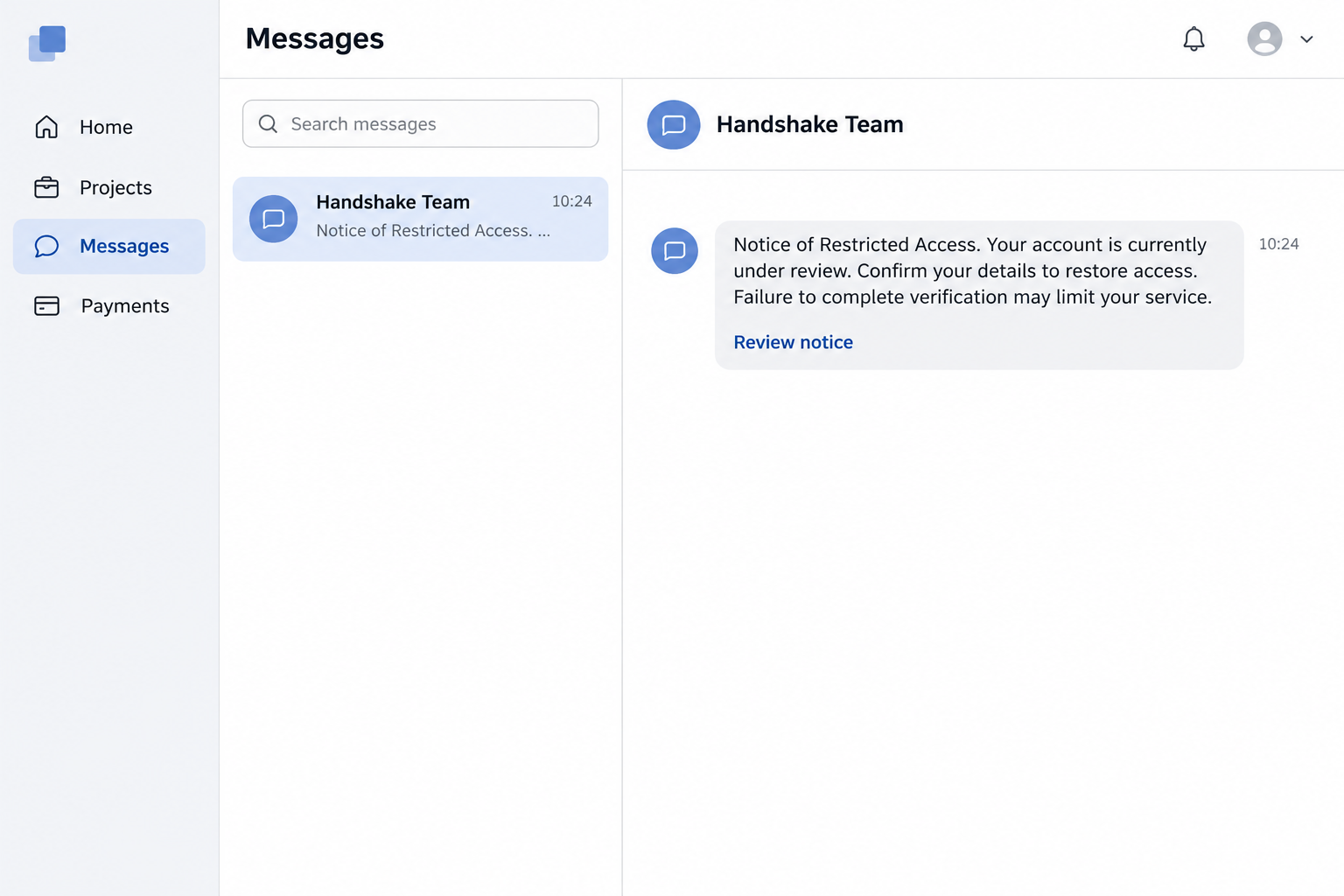
The opening inbox image is an illustrative reconstruction of the restriction lure. It is not a screenshot of a genuine Handshake account notice.
How the Handshake Restricted-Access Scam Works
Step 1: A support-like profile makes contact inside the platform
The sender adopts a name suggesting an administrator or support team. Seeing the message in an existing inbox makes the surrounding interface do some of the convincing.
But the platform is delivering a user’s message, not certifying the claims inside it. The sender’s display name and borrowed branding require their own scrutiny.
A genuine project invitation may already be in the recipient’s recent history. The scam uses that context without establishing any relationship to the actual project staff.
Step 2: An account problem creates a reason to leave the normal workflow
The message says access is restricted or under review, then presents a link as the solution. Work you were looking forward to suddenly appears at risk.
That pressure can shorten the normal checking process. You may focus on finishing setup rather than asking why an important account notice arrived from this profile.
The demand is especially misleading when it appears to explain an onboarding delay. A real delay does not authenticate a stranger’s proposed fix.
If you cannot access your genuine dashboard, use official support. Do not let someone sell you a separate verification route because the normal process feels slow.
Step 3: A separate website collects the verification details
One reported version used a domain presented as kyc-identity[.]us. Its administrative-sounding name made the link resemble a compliance service rather than a random destination.
The reported page moved beyond account access and requested financial information. That is the point where a supposed work-account problem becomes a banking exposure.
The domain now presents a parking page, so it should not be treated as a permanently active example. The misleading message pattern remains the useful warning.
Do not visit old scam links to see whether their appearance has changed. Compare the request with the genuine platform’s instructions instead.
Step 4: Familiar financial names make the request seem routine
The account describing this version mentioned familiar financial services during the connection process. That description does not independently establish which integration actually operated behind the page.
Recognizing a service name is not enough to approve a request. You still need to identify who is receiving access and what that access permits.
A real financial service can be mentioned, imitated, or reached in an unexpected context. None of those possibilities makes the original support profile authentic.
Read any genuine bank authorization separately from the sender’s explanation. Stop if the purpose, recipient, or requested permissions do not match the onboarding you intended.
Step 5: Card verification adds another financial risk
The reported process ultimately asked for debit-card verification. A recipient expecting to receive earnings can mistake that request for another administrative requirement.
Entering card information gives the person collecting it a different opportunity from obtaining a platform password. Both exposures need attention if both occurred.
Do not approve a payment or bank notification merely because the sender describes it as a verification. Read what the genuine institution says the action does.
A later charge should be reported using its actual date, amount, and description. Avoid assuming that one password change also protects an exposed payment card.
How to Check a Handshake Notice Without Using Its Link
Open Handshake through your established app or saved address. Look for the relevant project, payment setup, and any account issue within that genuine session.
If the claimed restriction appears only in someone’s message, preserve that message for support. Do not treat its presence in your inbox as independent confirmation.
Use the platform’s official communications guide when checking sender addresses and channels. Display names and partial matches are insufficient.
Handshake lists multiple recognized email subdomains, so a simplistic rule rejecting every subdomain would be misleading. Compare the complete address with the current official list.
The guide also describes optional texts for users who opted in. That does not turn a text requesting banking secrets into an approved verification process.
When uncertain, contact Handshake support through the genuine help center. Provide the message and profile details without sending passwords or banking codes.
Ask a specific question: is this profile authorized to issue this account notice, and should this verification appear in my existing onboarding workflow?
Do not ask the questionable sender to verify themselves using another link they supply. That would leave the same person controlling both the claim and its confirmation.
What to Do if You Have Fallen Victim to This Scam
-
Stop the verification process and preserve the message. Keep its wording, sender profile, link destination, and the approximate time you interacted with it.
Do not confront the sender to recover access or money. Continue through genuine support and financial institutions rather than giving the impersonator another opportunity.
-
Contact your bank or card issuer immediately when financial details were exposed. Explain that an impersonated work-platform verification led to the disclosure.
Tell staff whether you entered a card, disclosed banking credentials, connected an account, or approved a transaction. Ask which access should be blocked or replaced.
If you see a charge, give its actual transaction information and request the appropriate dispute process. Keep the institution’s case reference and follow-up instructions.
-
Review any financial connection separately from the payment card. Ask the bank which third-party permissions, linked services, or new access arrangements need investigation.
Disconnecting a service does not necessarily reverse an existing transaction. Replacing a card also does not automatically resolve a separate online-banking credential exposure.
Use the bank’s genuine instructions for the specific connection involved. Do not grant new access to someone who promises to remove the earlier permission.
-
Secure accounts whose credentials were entered. Change exposed passwords from a trusted device, including reused copies on other services where applicable.
Review recovery details and unfamiliar sessions through the account’s genuine security settings. Enable appropriate multifactor protection without sharing its codes with the supposed support agent.
If your email account was exposed, prioritize its recovery too. It may control password resets and communications needed to regain access elsewhere.
-
Report the impersonating profile to genuine Handshake support. Use the help center or the available message-reporting controls, identifying the profile and the false account restriction.
Explain any genuine access problem separately from the scam. A later account restriction does not, by itself, prove the attacker controls the platform’s moderation process.
Keep copies of your support correspondence. Do not create replacement accounts or bypass verification on instructions from someone whose role has not been established.
-
Respond to identity information exposure when it occurred. If you supplied identifying documents or sensitive numbers, follow the relevant identity-theft process for your location.
In the United States, IdentityTheft.gov provides recovery guidance. Tell institutions what was actually disclosed rather than assuming every kind of identity information was stolen.
Keep identity records out of public posts seeking help. Use verified secure reporting routes when an institution needs a document to investigate your case.
-
Report financial fraud and reject paid recovery offers. Handshake’s safety guidance directs affected users to their financial institution and the FBI’s IC3 reporting service.
Preserve supporting records for the report, including payment references and account notices. Filing a report helps document the incident but does not guarantee reimbursement.
Anyone requesting an upfront recovery fee, another verification payment, or remote access deserves fresh scrutiny. Knowing details about the original scam is not proof of authority.
Before Returning to Your Genuine Project
After reporting the message, make sure you can distinguish the project’s actual onboarding tasks from the impersonator’s requests. Keep the genuine support response available.
Open the account through your established route and review the payout destination shown there. Ask support about anything unfamiliar before submitting another correction.
A wrong payment destination requires attention even if no unauthorized debit appears. Incoming earnings and money already leaving a bank account are separate concerns.
Handshake’s payout instructions say changes can require selfie re-verification. Follow the genuine dashboard’s process when needed, rather than sending a photograph to a support-like profile.
Tax and identity tasks should also remain within their approved workflows. A new private message cannot establish which documents are missing from your actual application.
Keep a short record of the legitimate steps already completed. It helps genuine support identify an unfinished task without relying on the impersonator’s account of events.
Do not bypass a genuine restriction on a stranger’s advice. Buying another account or creating an unapproved replacement can introduce problems unrelated to the original fraud.
Ask support how to proceed if project access remains unavailable. The person who issued the false warning should not become your contact for resolving that separate issue.
Resume only the work and onboarding steps you can confirm through the genuine service. An attractive project does not require trusting an unauthenticated banking demand.
Frequently Asked Questions
Can a message inside Handshake still be fraudulent?
The platform warns about impersonating profiles and false support messages. An inbox notification confirms delivery, not that the sender represents the Handshake team.
Does Handshake AI have genuine identity and payout checks?
Legitimate onboarding exists, including approved verification and payment tools. Reach those processes through your genuine account and current official instructions, not a stranger’s restriction link.
Does a familiar financial-service logo prove the request is safe?
A recognizable name cannot authenticate the person directing you there. Check the actual recipient, purpose, permissions, and connection to your genuine onboarding before approving access.
Should I cancel my card if I only read the message?
Reading alone is different from supplying card details. Explain your actual exposure to the issuer if uncertain, rather than assuming every recipient needs identical financial action.
Will changing my Handshake password reverse a bank charge?
A password change protects an affected login, not an existing payment. Report unauthorized charges and financial access separately through the bank’s genuine process.
What if the sender says verification is needed to keep my job?
Ask genuine Handshake support about the claimed restriction before proceeding. A threat to project access does not authenticate a request for banking secrets.
The Bottom Line
Do not follow an in-app account-warning link to disclose banking information. Check the restriction through your genuine Handshake account and independently reached support.
If you already exposed financial details or credentials, contact the relevant institution immediately. Secure the bank connection, payment card, and affected logins according to what actually happened.

Join the discussion
0 commentsShare your experience or ask a question about this article.
Community experiences
Did this happen to you?
Your experience could help someone recognize the same scam. Submit a private report for our team to review.
I experienced this tooReports are reviewed before publication. Sharing publicly is always your choice.
Discussion
Start the conversation
Have a question or something useful to share? Add the first comment.