

Can a random website really bypass iPhone encryption and show you deleted texts, call logs, and other private data from any phone number? Sites like SMSpeak.org certainly make this claim. But is it cutting-edge digital espionage or an elaborate scam?
Strap in, because we’re going behind the curtain to uncover the truth about SMSpeak.org. You may be shocked by what we find. This website has all the hallmarks of an ingenious hacker tool – slick graphics, technical lingo, promised access to hidden information. However, a closer look reveals something much more sinister.
SMSpeak.org is not just smoke and mirrors – it’s a dangerous fraud. This review will walk you through how SMSpeak.org ensnares victims, exposes them to identity theft, and fleeces them for profit through an intricate sequence of tricks and traps. Once you understand the deception, you’ll be equipped to steer clear of this online scam.
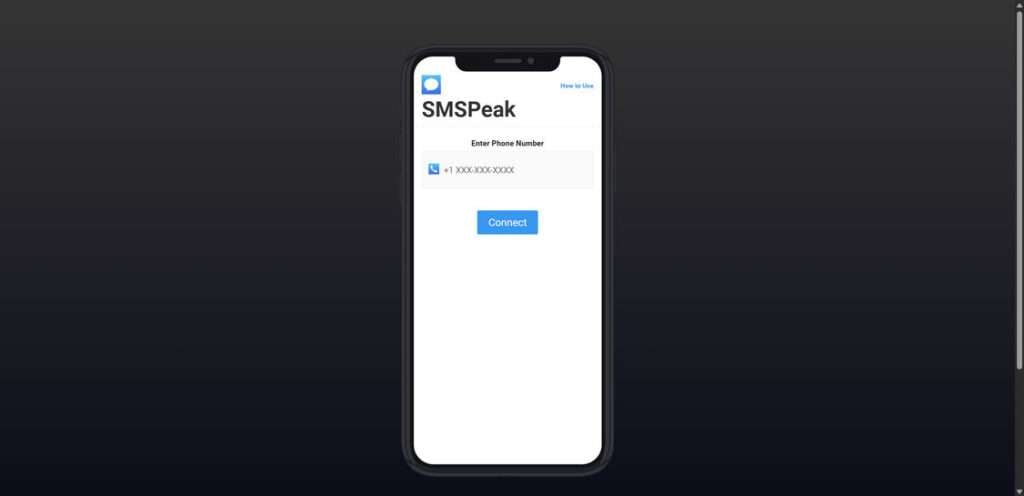
Scam Overview
SMSpeak.org is a website that claims it can bypass encryption and access deleted messages, call logs, and other private data from any phone number. At first glance, it seems legit – with its professional design, technical jargon, and promises to unlock secret information. But in reality, SMSpeak.org is an elaborate scam designed to steal your time, money, and personal data.
Here are some of the red flags that indicate SMSpeak.org is not what it claims to be:
- Outlandish claims – No website or app can actually bypass encryption protocols like those used by iMessage, WhatsApp, etc. So promises to uncover deleted texts are simply impossible.
- Fake loading screens – The site uses meaningless animations and progress bars to look like it’s hacking a phone. But these are totally fictional and designed to string users along.
- Endless verification – After entering a number, you’re prompted to complete “verification” by installing apps, signing up for subscriptions, etc. This is a tactic to get your personal information.
- Aggressive upselling – Even after completing verification, you’re prompted for “one last step” over and over. This tricks users into spending more time and money.
- No actual results – No matter how many hoops you jump through, you’ll never get any real data from SMSpeak.org. It’s a complete waste of time.
- Spam risk – Entering your personal info exposes you to spam emails, texts, and potential identity theft. Numerous users have reported this after using the site.
It’s clear SMSpeak.org is an elaborate ruse designed to extract data and money from unsuspecting users. The technical presentation hides its true nature as an aggressive scam.
How the SMSpeak.org Scam Works
So how exactly does SMSpeak.org operate? Here’s a step-by-step look at how this scam ensnares victims:
1. Generate interest with outlandish claims
SMSpeak.org is promoted online through ads, social media posts, and search results. The site makes bold claims like “Unlock Any iPhone” and “Access Messages Your Carrier Doesn’t Want You To See.” This language sparks curiosity and lures people in.
2. Get users to input a phone number
A prominent form front-and-center on the site lets users enter any phone number they want to “hack.” Users are led to believe this grants access to the chosen number’s texts, logs, etc. In reality, number entry only identifies the next target.
3. Display convincing fake loading sequences
After entering a phone number, complex animations with tech lingo like “BYPASSING IMESSAGE SECURITY” and “ACCESSING HIDDEN LOGS” make it appear that hacking is underway. This adds to the illusion that SMSpeak.org does what it claims.
4. Prompt users to “Verify” through ads and subscriptions
Before any results are shown, users must complete a “necessary verification.” This involves installing random apps, signing up for fishy offers, completing spam surveys, etc. Each time, verification fails and users have to complete another task.
5. Upsell at every opportunity
Within the verification process, additional popups promote paid subscription plans for SMSpeak.org’s “full version”, enticing users to spend even more. There’s always “one last step.”
6. Never provide any actual results
After countless verification rounds, users eventually realize it’s all a farce. SMSpeak.org never reveals any texts, logs, or data. The victim’s time and personal info have been extracted for profit, however.
7. Retarget users for more scams
Once entered, your phone number is added to lists then sold to other scammers. This exposes victims to additional spam calls, texts, and potential identity theft down the road.
This sequence maximizes how much time, information, and money can be extracted from each victim. The promise of accessing secret data hooks users while convoluted verification processes and endless upsells waste their time and exploit personal data. It’s an intricate scam with a highly-engineered funnel aimed at tricking users out of their own valuable resources. Stay vigilant against such deceptive sites.
What to Do If You’ve Fallen Victim to SMSpeak.org
If you’ve been ensnared by the SMSpeak.org scam, don’t panic. Here are some important steps to take right away:
1. Contact your bank or credit card company. If you paid for any premium services on the site, contact your bank immediately to report fraudulent charges. Your bank can block additional charges and assist with recovering lost money.
2. Reset all passwords. If you entered any actual passwords during the verification process, change them immediately. Assume your data is compromised. Enable two-factor authentication wherever possible.
3. Run antivirus software. Scan all your devices with updated antivirus software in case any malware was downloaded during “verification.” Delete anything suspicious.
4. Place fraud alerts and monitor your credit. Contact the major credit bureaus to place fraud alerts on your accounts. This makes it harder for scammers to open new accounts in your name. Also monitor your credit reports for signs of identity theft.
5. Block unwanted communications. Use call/text blocking tools to stop phone spam. Configure email filters to block messages from suspicious domains. Reduce your overall digital footprint.
6. Report the site. File complaints with the FTC, IC3, BBB, and even the web host. The more reports against SMSpeak.org, the more likely it will get shut down.
7. Educate yourself and others. Learn more about online safety and common scam tactics. Share your experience to help friends and family avoid similar deceptions. Knowledge is one of your best defenses.
Falling for digital scams can be embarrassing, but try not to beat yourself up. These sites invest major resources into looking legitimate. Now that you know the inner workings of SMSpeak.org, you’ll be far less likely to be fooled again. Stay vigilant!
The Bottom Line
SMSpeak.org falsely promises impossible access to private data in order to extract money, information, and time from users. Smooth designs and technical illusions trick victims into completing endless verification tasks which only benefit the scammers. No real information is ever revealed.
Protect yourself by recognizing the red flags: outlandish claims, fake loading screens, aggressive upsells, spam risks, and lack of actual results. No website can bypass robust encryption and security measures from Apple, telecoms, and other tech companies. Avoid entrusting random sites with your valuable personal data at all costs.
Stay safe online by thinking critically, managing passwords carefully, monitoring accounts, and always reporting suspicious sites. If something seems too good to be true, it almost always is. With vigilance and safety awareness, we can avoid falling victim to insidious scams like SMSpeak.org. Spread the word so others don’t get duped.

Join the discussion
0 commentsShare your experience or ask a question about this article.
Discussion
Start the conversation
Have a question or something useful to share? Add the first comment.