M62 AI Translator Earbuds – Should You Buy It? Read This
Written by: Lapain Epuran
Published on:
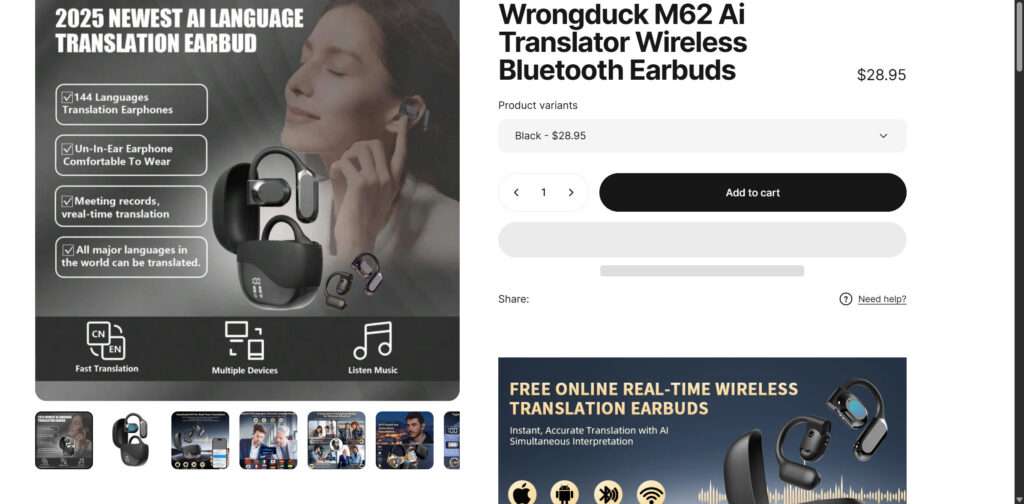
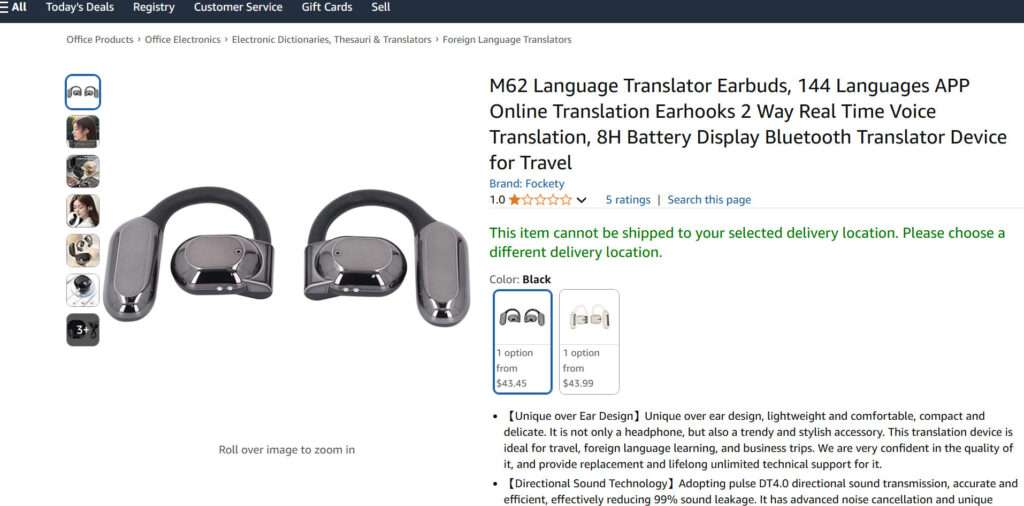
The M62 AI Translator Earbuds have been making big promises as revolutionary translation earbuds that allow real-time conversation across languages. Marketed as high-tech devices for travelers, professionals, and language learners, do these earbuds really deliver on their claims? After looking closer at customer reviews and experiences, the truth is underwhelming.
Overpromising Features That Don’t Deliver
The main selling point of the M62 earbuds is real-time translation powered by AI technology. However, many customers report major issues getting the translation feature to actually work. Glitches, delays, and outright failures are common complaints. Some users can’t even get the feature started, rendering the earbuds useless for their main purpose.
The earbuds rely heavily on a mobile app for the translation capabilities. But problems with the app abound – if it’s even available. Syncing issues between the app and earbuds are rampant. Many find the app buggy or completely non-functional. Without a working app, the earbuds cannot provide their advertised translation services.
Hidden Costs and Confusing Instructions
While the earbuds appear as a one-time purchase, a paid subscription is required after a short free trial to keep using the translation feature. This hidden recurring cost catches many customers by surprise.
Instructions for setup and use are unclear at best, with many buyers resorting to YouTube tutorials just to figure out basic functions. For such an expensive high-tech product, a steep learning curve is unacceptable.
Mediocre Audio Performance
Even ignoring translation, the M62 earbuds come up short as standard wireless earbuds. Sound quality disappoints for the price point. Noise cancellation does not measure up to competitors. Bluetooth connectivity can be spotty. For customers just seeking audio earbuds, the performance is underwhelming.
Our Verdict: Not Worth the Cost and Frustration
The M62 AI Translator Earbuds promise an innovative product that enables cross-language conversation. Unfortunately, poor execution fails to deliver on that vision. Unreliable translation, hidden costs, and lackluster audio make these earbuds a frustrating experience. With so many customer reviews detailing disappointment and an overall lack of quality, we cannot recommend these earbuds.
For translation needs, users are better off with a free mobile app like Google Translate and a separate high-quality pair of standard Bluetooth earbuds. This avoids the aggravation of dealing with the M62 earbuds’ technical issues while still providing useful translation ability. Unless significant improvements are made, the M62 earbuds are simply not worth the high price tag given the myriad problems reported.
10 Rules to Avoid Online Scams
Here are 10 practical safety rules to help you avoid malware, online shopping scams, crypto scams, and other online fraud. Each tip includes a quick “if you already got hit” action.
Stop and verify before you click, log in, download, or pay.
Most scams win by creating urgency. Verify using a trusted method: type the website address yourself, use the official app, or call a known number (not the one in the message).
If you already clicked: close the page, do not enter passwords, and run a malware scan.
Keep your operating system, browser, and apps updated.
Updates patch security holes used by malware and malicious ads. Turn on automatic updates where possible.
If you saw a scary “update now” pop-up: close it and update only through your device settings or the official app store.
Use layered protection: antivirus plus an ad blocker.
Antivirus helps block malware. An ad blocker reduces scam redirects, phishing pages, and malvertising.
If your browser is acting weird: remove unknown extensions, reset the browser, then run a full scan.
Install apps, software, and extensions only from official sources.
Avoid cracked software, “keygens,” and random downloads. During installs, choose Custom/Advanced and decline bundled offers you do not recognize.
If you already installed something suspicious: uninstall it, restart, and scan again.
Treat links and attachments as untrusted by default.
Phishing often impersonates delivery services, banks, and popular brands. If it is unexpected, do not open attachments or log in through the message.
If you entered credentials: change the password immediately and enable 2FA.
Shop safely: research the store, then pay with protection.
Be cautious with brand-new stores, “closing sale” stories, and prices that make no sense. Prefer credit cards or PayPal for dispute options. Avoid wire transfers, gift cards, and crypto payments.
If you already paid: contact your card issuer or PayPal quickly to dispute the transaction.
Crypto rule: never pay a “fee” to withdraw or recover money.
Common patterns include fake profits, then “tax,” “gas,” or “verification” fees. Another is a “recovery agent” who demands upfront crypto.
If you already sent crypto: stop paying, save evidence (wallet addresses, TXIDs, chats), and report the scam to the platform used.
Secure your accounts with unique passwords and 2FA (start with email).
Use a password manager and unique passwords for every account. Enable 2FA using an authenticator app when possible.
If you suspect an account takeover: change passwords, sign out of all devices, and review recent logins and recovery settings.
Back up important files and keep one backup offline.
Backups protect you from ransomware and device failure. Keep at least one backup on an external drive that is not always connected.
If you suspect infection: do not connect backup drives until the system is clean.
If you think you are a victim: stop losses, document evidence, and escalate fast.
Move quickly. Speed matters for disputes, account recovery, and limiting damage.
Stop payments and contact: do not send more money or respond to the scammer.
Call your bank or card issuer: block transactions, replace the card if needed, and start a dispute or chargeback.
Secure your email first: change the email password, enable 2FA, and remove unfamiliar recovery options.
Secure other accounts: change passwords, enable 2FA, and log out of all sessions.
Scan your device: remove suspicious apps or extensions, then run a full malware scan.
Save evidence: screenshots, emails, order pages, tracking pages, wallet addresses, TXIDs, and chat logs.
Report it: to the payment provider, marketplace, social platform, exchange, or wallet service involved.
These rules are intentionally simple. Most online losses happen when decisions are rushed. Slow down, verify independently, and use payment methods and account controls that give you recourse.
Hello! I'm Lapain Epuran, your go-to source for detailed and honest product reviews. From tech gadgets to miracle cures, I provide insights to help you make informed choices. Join me as we discover what's truly worth your time and money.