


An email says Spotify Premium has expired, but it offers an inexpensive way to keep the whole family listening. The price is low enough to settle without asking anyone else.
Before you renew, open the account you use to listen. What Spotify shows you there matters more than what the message says you lost.
Overview
The email says free, then quotes $9.95
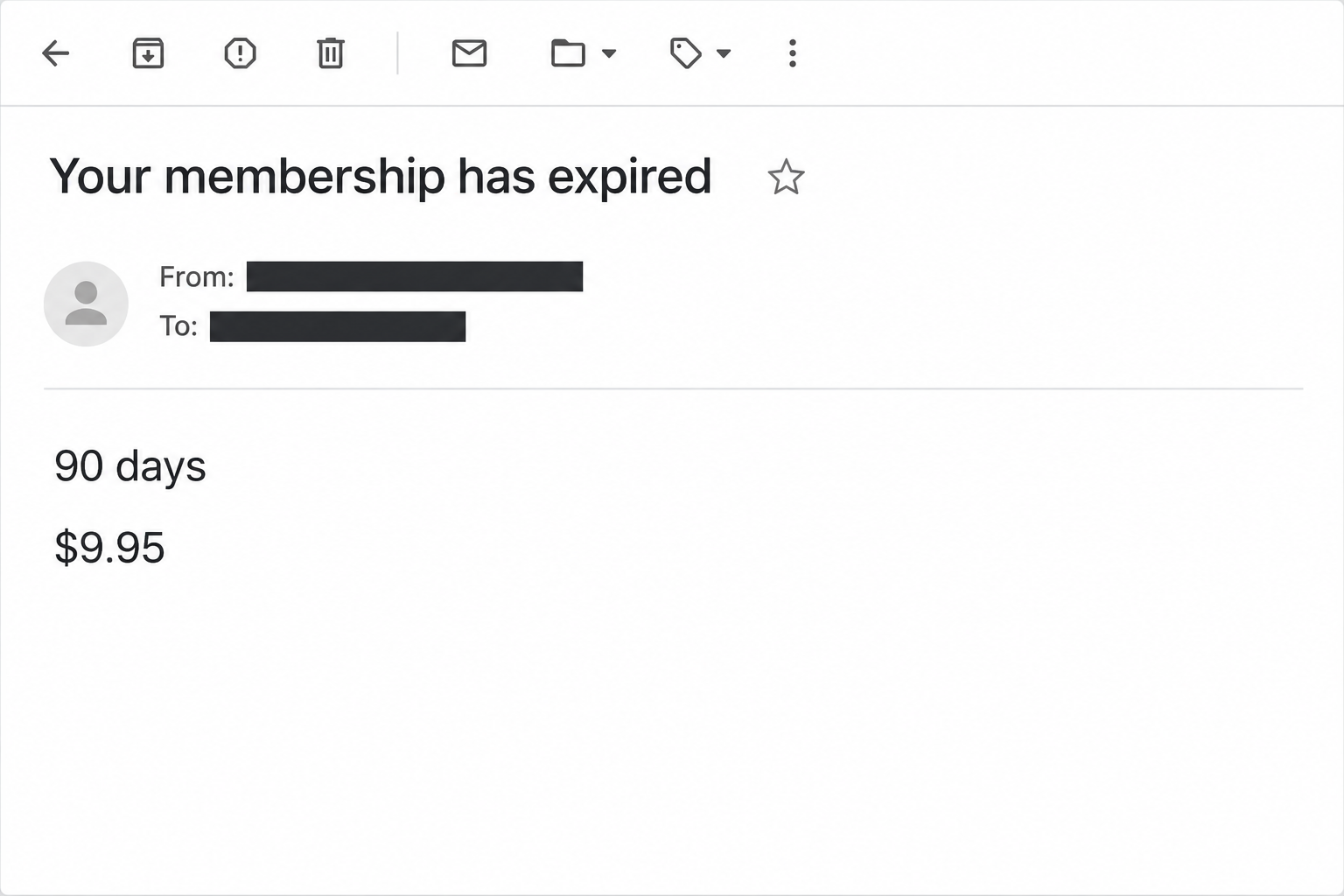
The Spotify membership expired email scam starts with two claims that don’t sit together. The subject promises a free extension, while the body asks for $9.95.
That amount supposedly buys 90 more days under a loyalty offer. The message also promises six Premium accounts for family members at the same address.
A line about canceling anytime makes the proposal sound like an ordinary plan. None of these terms comes from a confirmed offer in the recipient’s account.
The image recreates the expiration wording and price from the email. It doesn’t show a Spotify receipt, actual account status, or a live offer.
The checkout asks for a household’s contact details
The main message sends readers to an imitation checkout. The reported first screen asks for a name, street address, ZIP code, city, mobile number, and email address.
That’s already useful information to a fraudster, even before any payment. Together, the fields tie a person and location to working contact details.
A later card request would be consistent with the checkout story, but the reported material doesn’t confirm a completed payment or what every later screen collected.
Separate versions use a plain renewal reminder or say access will stop shortly. The $9.95 price and 90-day promise identify the main example, not every renewal message.
Check the plan you actually have
Spotify is a legitimate service with paid plans and genuine account notices. The fraud is the offer and checkout presented through this message, not a claim about Spotify itself.
Spotify’s email safety guidance explains its reporting route and warns against supplying sensitive information or interacting with suspicious messages.
For a family plan, the account manager is the best person to check billing. A household member who sees a disruption may not be the person who controls payment.
Start with questions the email cannot answer reliably:
- Is your account still on the plan you expect when you open Spotify independently?
- Does the account manager recognize an upcoming, failed, or canceled renewal in the account’s records?
- Is Spotify billing you directly, or did you purchase access through a separate provider?
- Did the email promise a special that isn’t shown anywhere in your verified account?
- Does the destination ask for personal details before it shows a genuine plan or any existing billing history?
How the Spotify Membership Expired Email Scam Works
Step 1: A normal entertainment bill gets your attention
People rarely remember the date a music plan renews. The email can sound plausible simply because the recipient has used the service or lives with someone who pays for it.
The scam doesn’t have to predict when your account will expire. It only needs you to believe somebody’s card might have failed or somebody forgot to renew.
Ask which Spotify account received the notice before assuming it concerns the one you use. Old addresses and family accounts can make the situation seem less obvious than it is.
If playback changes around the same time, that’s a reason to check the app. It is not evidence that a discount link is connected with the change.
Step 2: Specific family benefits make the offer seem familiar
Six memberships sound more believable than an undefined gift. The message borrows a detail readers may associate with a genuine family plan and wraps it in a much cheaper-looking offer.
The contradiction can get missed because people look at the price after they agree with the story. The free wording attracts attention, and the small amount feels like a compromise.
Don’t try to reconcile it by clicking through to see which price wins. First establish whether the company has given you any offer at all.
A promotion can vary by location or account. Comparing an email’s price with a public list alone cannot establish that your specific account qualifies.
Step 3: The extension button leaves the real billing records behind
The invitation sounds like it will extend an existing membership. The destination instead begins gathering information as if the visitor were making a new purchase.
Watch for the change in context. You started with a question about an existing plan, but the next screen acts as though it knows nothing you can review.
A secure-looking label is not an account history. The page asks you to trust its fields before it shows any verified connection to the membership mentioned in the email.
Leave the site rather than using its Back button to compare screens. Open the account you intended to renew from your usual route.
Step 4: The form can gather useful data before any charge
You may be thinking about the cost, while the form is building a contact record. A name and phone number can make a later message sound like customer service.
A street address can help someone make that second approach feel personal. The caller might refer to a plan adjustment or say they need to verify a cancellation.
Neither follow-up is required for the original form to be dangerous. The recorded fields are reason enough not to submit your information.
Do not assume a form error means nothing was sent. If you entered information and aren’t sure where it went, make recovery decisions based on what you supplied.
Step 5: A false receipt or follow-up can keep the story going
A checkout page can display a confirmation without changing your real membership. A receipt should match the account and payment record you see through services you trust.
If the page stops after collecting an address, that may leave you expecting another legitimate step. Treat later requests to retry, confirm, or pay an adjustment as separate messages.
If a charge appears, record the actual merchant and amount. Don’t assume it will be $9.95, and do not use a number shown on the suspect receipt.
You can resolve the two questions separately. Spotify or its billing partner can confirm your plan, while your issuer can review exposure or an unfamiliar transaction.
What to Do if You Have Fallen Victim to This Scam
-
Close the offer and ask the plan manager to verify it. Open Spotify through the app or a trusted account route and check the current plan.
If billing belongs to another provider, ask that provider about renewal directly. The account that plays your music may not be the service taking the payment.
-
If you only received the message, report it without using its links. Spotify’s official help page explains where to send a suspicious email.
Tell household members if you shared the original offer with them. Send a description of the bait, not a working link that someone could try on another device.
-
If you entered contact details, watch for calls and texts that use them. A person who knows your street name or plan preference has not authenticated themselves.
Keep notes on suspicious follow-ups and report them through the mail, phone, or account provider as applicable. Never read out a code to someone who calls you unexpectedly.
Don’t change a password merely to hide an address. Do change it promptly if you also submitted or reused a credential that may be exposed.
-
If you supplied card details or approved a payment, call the issuer. Use the app or the number on the back of your card.
Explain what you entered even if the charge was declined or no receipt appeared. Ask whether the issuer recommends replacing the card, restricting transactions, or opening a dispute.
For an actual charge, give the issuer the date, amount, and merchant as shown in its records. Don’t call the scam page to ask for a cancellation.
-
If you submitted a password, secure the account it belongs to. Use the genuine account, change the password, and replace it anywhere else you reused it.
Spotify has an account recovery guide for unfamiliar sign-ins or changed details. If you supplied an email account password instead, start with that email provider.
Review unfamiliar Family or Duo changes with support if the account shows them. A strange plan change is worth checking even when you haven’t found an unfamiliar card payment.
-
Save proof without sharing new sensitive details. Keep the email, the date, what you remember entering, and any transaction shown by your issuer.
Don’t include full card numbers, security codes, passwords, or account recovery codes in a screenshot. Use a verified support upload route if the issuer needs evidence.
-
Treat an unexpected download as a separate event. The recorded offer focused on a form, not an established installer. If you ran a file, tell your device support team.
Explain what the file was and whether you opened it. Don’t reopen the site or file just to make the original sequence happen again.
Verify Your Plan Without Trusting the Discount
Find the account that controls the membership
Households may have several individual Spotify accounts tied to one plan. Somebody who can listen on a family account may not see the same billing controls as the manager.
Check the account address you’re actually signed in with. If it’s different from the recipient on the email, let the manager verify the plan instead of using the emailed shortcut.
An unfamiliar receipt in the inbox does not become accurate because someone’s music stopped. Look at the provider’s records and the actual payment account before connecting those events.
If you bought Premium through another company, open that company’s billing service separately. An imitation Spotify checkout can’t answer for a payment managed by somebody else.
Judge the offer by the checked terms, not the email’s headline
Look for the current plan, renewal status, and payment method in the verified service. If you see a real offer, read the amount and its terms there.
Check both what you’ll pay today and what, if anything, follows the promotional period. A line saying you can cancel does not explain the price or the billing schedule.
Someone who guessed the right plan name can still send the wrong offer. If you cannot reproduce it from a verified account, there is no need to use it.
You also don’t owe a scammer a cancellation request. End any genuine plan through the real billing provider, and handle a fraudulent card charge separately with your issuer.
A Family address check is not a renewal checkout
The same-household requirement sounds familiar because Spotify uses it on its genuine Family plan. A phishing message can quote a real eligibility rule without offering a real membership.
The review question is not whether Spotify ever wants an address. It’s whether you’re giving it through Spotify’s own account process for something you meant to do.
Spotify’s Family plan payment guidance distinguishes the manager’s payment from other members’ access. A message delivered to one member doesn’t make that person responsible for paying.
If a teenager or another household member got the email, let them send its subject to the manager instead of filling out a form on the family’s behalf.
If the real plan changed, check why before trying to restore it
A paid plan can disappear from the app for reasons unrelated to the notice. Start with the account identifier and look for the plan the manager expects.
If the account shows an unfamiliar change, record what appears there. A missing family member and a surprise payment are separate issues, even when they arrive on the same day.
For a failed payment inside the genuine account, follow that provider’s displayed steps. Don’t let an unverified promotion dictate which card to use after a legitimate payment failed.
If someone in the household reports a strange call about the renewal, ask whether they shared contact details. An accurate address is not proof a caller can fix the plan.
Let the account owner check the subscription and the issuer handle the exposed card. Neither conversation needs to involve the email’s checkout.
Frequently Asked Questions
Is the $9.95 Spotify loyalty extension legitimate?
That amount was part of the fake 90-day offer described here. Verify any real promotion independently from your Spotify account before sharing information or paying.
Why does the subject say the extension is free?
The wording attracts attention before the body introduces the price. That contradiction is part of the example, not an instruction for finding a genuine discount.
Did the fake checkout definitely charge everyone?
No confirmed payment follows from the recorded first form. If you supplied card details or approved a transaction, ask the issuer to check your specific exposure.
What if I gave only my address and phone number?
Be alert for follow-up calls or texts that use those details to sound credible. Contact any company named in them through a verified route you find independently.
Could my Premium plan really have expired?
Yes, but the surprise message doesn’t establish that. Check the plan and billing status directly with Spotify or the provider that collects your payment.
Should a Family member pay the email to restore the plan?
Let the plan manager verify what happened in the genuine account. Nobody in the household should enter payment information through the email’s checkout.
The Bottom Line
Don’t use the Spotify expiration email to extend a membership. Its $9.95 loyalty offer sends readers to a form that collects personal information outside the normal account process.
Check your plan directly with Spotify or its billing partner. If you gave the form a password or card details, secure the affected account or contact the card issuer.

Join the discussion
0 commentsShare your experience or ask a question about this article.
Community experiences
Did this happen to you?
Your experience could help someone recognize the same scam. Submit a private report for our team to review.
I experienced this tooReports are reviewed before publication. Sharing publicly is always your choice.
Discussion
Start the conversation
Have a question or something useful to share? Add the first comment.