


A subscription payment sounds easy to fix on the way out the door. A warning about losing Spotify Premium makes it feel like something you should do now.
Before you act, check which account is paying for Premium. That question can save you a longer detour than a missed renewal ever would.
Overview
The billing email that leads to a sign-in
The Spotify update billing details scam is an impersonation email that threatens the loss of Premium.
It directs the reader to a counterfeit sign-in page instead of a verified billing screen.
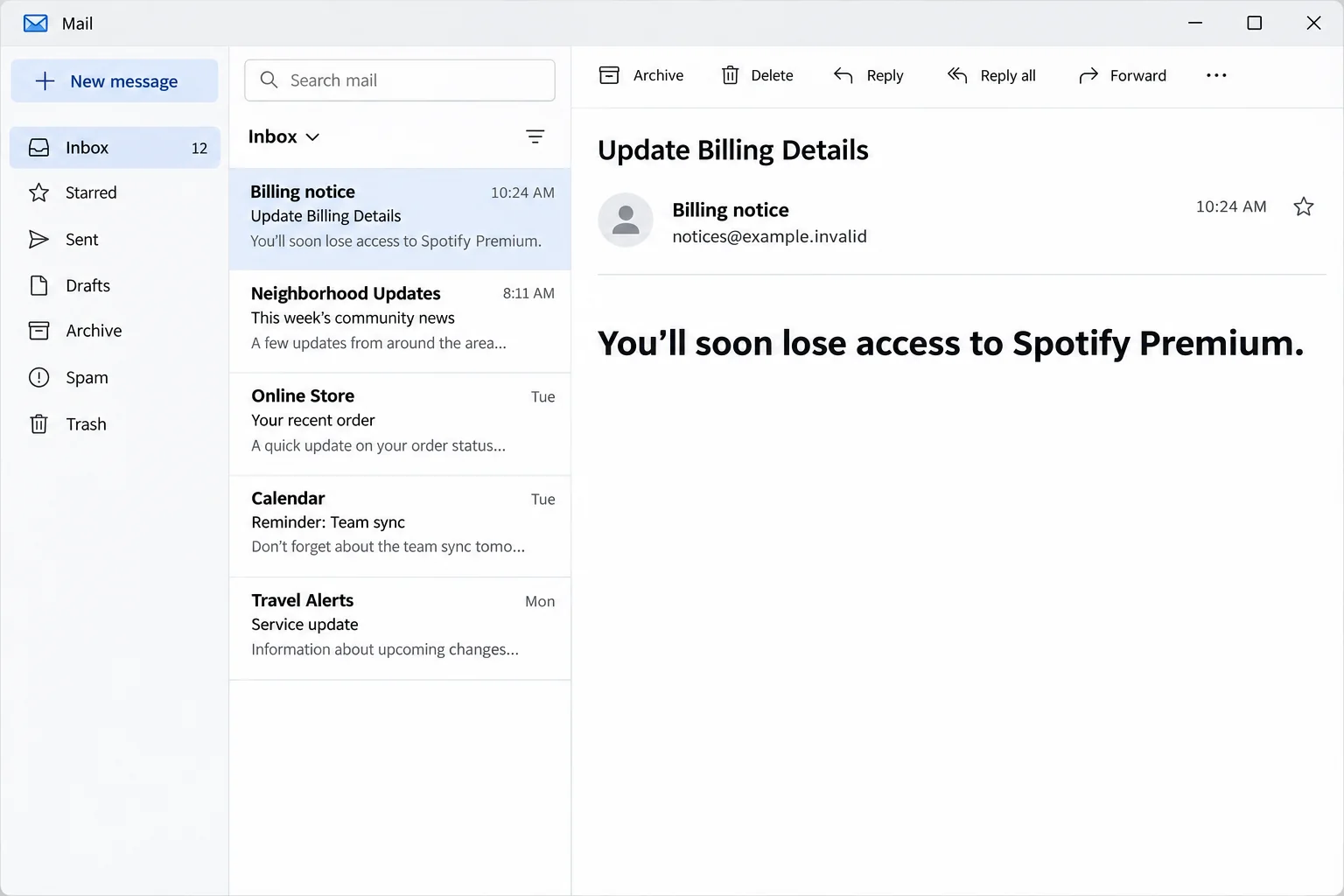
The recorded subject was “Update Billing Details.” The warning said the reader would soon lose access to Spotify Premium and invited them to retry the payment.
The image above reconstructs that opening warning. The unrelated destination and its password prompt are separate findings, not details inferred from the image.
The distinction between the email and the page is important. The subject sounds like a card issue, but the documented form is for account credentials.
For this sample, there is no record of a completed payment, a second card form or a stolen card. Act on what you actually entered.
Why a canceled plan sounds like an everyday problem
Subscriptions renew quietly. If a credit card has expired, been replaced or changed recently, an email about a payment can fit a story you already believe.
People on a family plan may not recognize who handles the renewal.
Someone paying through a partner may not be able to change the card in Spotify in the first place.
And plenty of people have more than one Spotify account.
A browser can be logged in under an old email while the phone is using the account that actually has Premium.
Those are legitimate reasons for a billing status to be confusing. None is a good reason to sign in through the first payment message that shows up.
Spotify says a failed monthly payment does not end Premium immediately. Its failed payment guidance explains what to check without the email’s shortcut.
What the page did and did not establish
The reported destination showed Spotify-style sign-in fields and displayed several familiar ways to continue. Those included options associated with Google, Facebook, Apple or a phone number.
Their appearance does not establish that those login paths worked. A recognizable logo on a copied screen has no authority to ask for an outside account’s password.
A separately documented version called itself a subscription renewal notice. It listed common reasons for a failed payment and claimed Premium would pause after seven days.
The changed wording doesn’t give you a new way to verify the story. A deadline in either email is less useful than the payment record in your actual account.
Check the issue by separating these questions:
- Which Spotify account actually has Premium, and who pays for it?
- Does the plan page or the billing partner show any payment issue?
- Did you enter a Spotify password, an outside provider’s password or any card details?
- Have you noticed a real account change, such as an unexpected email, plan change or playlist activity?
How the Spotify Update Billing Details Scam Works
Step 1: The message picks a problem familiar to subscribers
The sender doesn’t need to invent a new Spotify feature or persuade you to switch services. It only needs you to believe a routine charge failed.
The subject is deliberately mundane. It resembles something you might expect after replacing a bank card, changing addresses or trying a different plan.
The email may arrive when your own payment really did fail. Coincidence doesn’t establish who sent the notice, and it doesn’t authorize the link.
If you’re an invitee on someone else’s plan, ask the person who manages the subscription. You may not have a billing issue to fix yourself.
Step 2: The warning makes a small decision feel time sensitive
The message focuses on what you’ll lose rather than giving you an independent way to look up a charge. It asks you to think about losing a familiar feature.
Someone headed out with downloaded music or listening on a shared account may want a quick answer.
That is exactly when a single button feels more convenient than checking the plan.
A genuinely missed renewal doesn’t make that button necessary. You can still sign in independently to see your plan or get guidance from the company that bills you.
The urgency is especially out of place when the email went to an address you don’t use for Spotify. Compare it with the account you’re already signed into.
Step 3: The retry action becomes a password request
The payment prompt takes the reader away from the expected account route. The reported landing page is a lookalike on a different host.
That jump is the heart of the scam. It trades on the expectation that an account login is a normal checkpoint before updating a subscription.
It’s easy to remember the design instead of the address. If the page feels familiar, don’t let that feeling substitute for opening Spotify yourself.
A saved password that does not fill as expected can be a useful reason to pause.
It is not conclusive, since browser settings and normal sign-in changes can also affect autofill.
Step 4: Familiar sign-in options make the form look complete
A copied sign-in page can display choices that match the real service. They make it look like a full account system rather than a single form.
The visible choices do not tell us what would happen after selecting each one. It would be misleading to say every button went to a verified second theft page.
For recovery, the practical question is which credential you entered and whether you granted any access. A Google or Apple login is not secured by changing only a Spotify password.
If you use a provider account for sign-in, inspect security events through that provider directly. Do not follow a security alert sent by the same suspicious thread.
Step 5: The effects depend on what the reader gave the site
Someone who received the email but did nothing has a suspicious message to report. Someone who supplied the password has a possible account takeover to address.
Watch for unfamiliar changes to the registered address, password, playlists or devices. Some ordinary activity can be explained by shared devices, so use account records to resolve what’s unclear.
A reused password can also create a problem elsewhere. Start with the mailbox and important services where the same password was used.
The fake reminder itself doesn’t prove a charge. If you see a withdrawal or gave away payment details, contact your bank with that separate evidence.
How to Check Your Real Spotify Premium Status
Find the subscription before touching payment information
Start in the Spotify app you already have or open the account site yourself. Look for the email on the account, the current plan and the billing arrangement.
If the account shows Free but you pay for Premium, check whether you logged in using a different email or sign-in option.
Don’t create another paid plan just to test it.
A payment receipt can help distinguish accounts. Compare its date and amount with your actual statement, but do not open links from unfamiliar new receipts to do the comparison.
On a household plan, talk to the owner using a channel you already have. A member’s inability to change payment details may be normal rather than evidence of a restriction.
Ask the party that really bills you
If your phone or internet provider manages your plan, access that provider using its regular app or verified address.
A payment retry on an unknown Spotify-looking page won’t resolve partner billing.
Direct billing and partner billing can leave different records. Work from the provider named in your established payment records, not just the brand on the warning.
If your own records show a real decline, check the card expiry and available funds independently. Then use the verified provider’s billing screen if you need to update payment information.
Do not send full card details by email to prove that you paid. A provider’s secure support channel can tell you which reference it needs.
Work out what the charge on your statement represents
If two people in your home signed up separately, one payment may come from a different account. Compare the date, card and subscriber before assuming the latest email explains it.
Don’t infer a successful renewal from a pending card authorization alone. If the plan status and statement don’t agree, ask the verified party that bills you to check.
Keep an eye on genuine changes, too. If the official account says your plan changed and you didn’t make that change, deal with access as well as the charge.
One household member can check the account while another checks the statement. Avoid exchanging passwords or screenshots with full card details just to compare notes.
What to Do If You Fell Victim
-
If you did not enter anything, leave the page closed.
Report the email as phishing. Check Premium or billing independently if the notice made you unsure about the plan.
Keep the original only if needed for a report. You don’t need to ask the sender to prove the charge or click again to copy its address.
-
Change the affected Spotify password from the real account.
Pick a unique password you don’t use anywhere else. If you can’t get in or the account email changed, follow Spotify’s account takeover help.
If another site uses the same password, change that copy too. Prioritize the email account used to receive account recovery and password reset messages.
Confirm the address registered to your Spotify account. A password change alone is less helpful if the recovery information is already wrong or out of your control.
-
End sessions and check for unfamiliar devices or changes.
Use Spotify’s official account controls to sign out sessions. Review connected apps and any partner devices separately if they are not covered by that action.
Check changes to your plan, playlists and contact details. A misplaced playlist is not as urgent as recovering the address that controls access to the account.
On a shared plan, coordinate with the owner before disconnecting devices intended for other members. Let them know if the issue affects a payment they manage.
-
Secure the provider you used if you entered an outside password.
Open Google, Apple or Facebook through a trusted route and check account sessions, recovery information and recent activity. Change the password or remove unfamiliar permission where appropriate.
If you entered a one-time code or approved an unexpected prompt, record which provider it belonged to. Report it through that provider’s account security process.
The reported Spotify lookalike displayed provider choices. That alone doesn’t mean an outside account was compromised, so use the action you actually took to guide this step.
-
Contact the card issuer if you exposed card details or see a charge.
Start with the number on the card or your banking app. Explain which information you entered and what the statement shows. Ask about locking, replacement and disputes.
Don’t rely on a confirmation page to judge whether the number stayed private. A card number that didn’t produce a successful payment can still be exposed.
If you separately installed a file or suspicious extension, get help securing that device before using it for recovery. The recorded sign-in page didn’t establish a download.
-
Report the message using Spotify’s verified instructions.
Follow Spotify’s suspicious email guidance rather than hitting reply. Don’t send the reporter your password, verification code or full card number.
If you shared the email with someone before spotting the problem, tell them why not to use the link. Send a fresh warning without the clickable destination.
Check your real account again after recovery. Save any relevant case references in case another payment or login issue appears later.
Frequently Asked Questions
Is the Spotify “Update Billing Details” email real?
This documented version pointed to a fake sign-in. Genuine payment issues can exist, but the right check is the account or billing partner you opened independently.
Does Spotify Premium end as soon as a payment fails?
Spotify says you don’t lose Premium immediately when a monthly payment fails. Check the account’s plan information instead of following the message’s threat.
Can I be billed through someone other than Spotify?
Yes. Some plans are managed by a partner. Check where your subscription is billed and ask that provider about changes using an established support channel.
What if the page asked me to sign in with Google or Apple?
If you entered that provider’s details or approved access, inspect its security settings directly. If you merely saw the button, its presence is not proof of compromise.
Should I cancel my card after opening the email?
Not just for opening it. Contact the issuer promptly if you entered financial information or see an unfamiliar charge. Use account recovery if you only supplied a password.
Can a fake email make Spotify remove my playlists?
The email itself doesn’t remove playlists. If someone obtained account access, changes are possible. Recover the account and ask Spotify about missing content if needed.
The Bottom Line
The Spotify billing email makes a failed renewal sound like one quick fix. The documented link led to a page asking for your login instead.
Check your plan wherever you actually pay for it. If you entered a password, secure that account first, then deal with any separate billing problem.

Join the discussion
0 commentsShare your experience or ask a question about this article.
Discussion
Start the conversation
Have a question or something useful to share? Add the first comment.