

An email says your Norwegian driver’s license needs updating. A 280 kr fee and a login button make it look like a small task worth finishing now.
The Statens Vegvesen email scam borrows the familiar paperwork around driving. The important detail is where that apparently routine update asks you to go.
Overview
The 280 kr update request is an officially documented fake
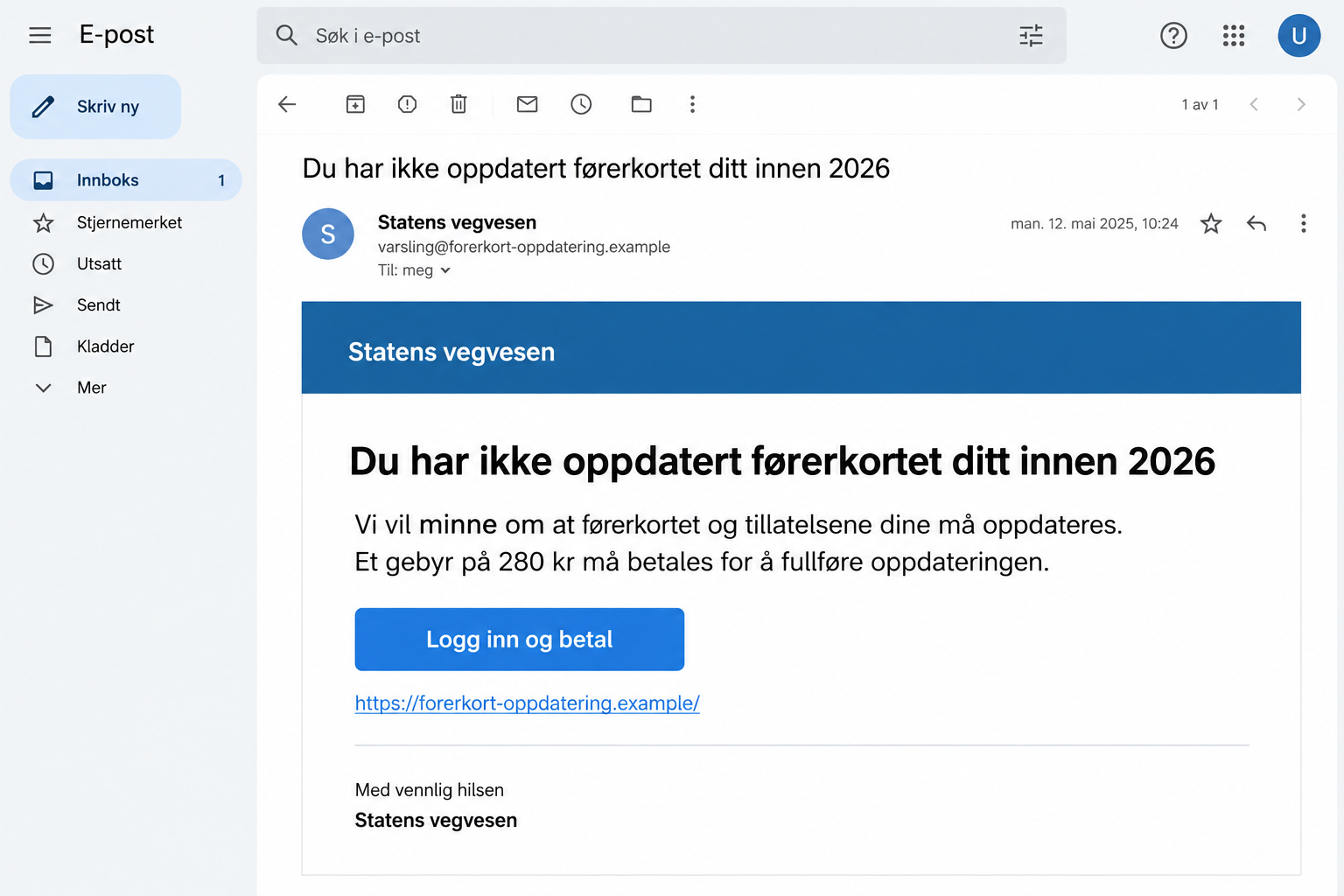
Statens vegvesen, Norway’s road authority, lists a fraudulent email claiming that the recipient has not updated their driver’s license and permissions for 2026.
Its current scam-warning page describes a 280 kr fee and a link leading to a fake Statens vegvesen website.
This is confirmed impersonation. The authority’s real name does not authenticate the email, and the advertised fee is not proof that your license needs attention.
The lead image is a fictional illustration of that payment request. Its example address is deliberately nonfunctional and should not be treated as a campaign indicator.
Check license matters through the real road-authority service. You do not need to complete the email’s form to find out whether a legitimate task exists.
The broader campaign family also targets financial access
The official warning includes other false notices about vehicles, alleged violations, and AutoPASS. Some SMS examples lead through a registration-number prompt to counterfeit BankID pages.
That is a separate documented variant, not proof that every 280 kr license email follows the same screens. Avoid assuming all messages have one identical script.
What they share is an administrative excuse that moves the recipient onto a website chosen by the sender. The next information request deserves careful scrutiny.
An apparent sign-in screen does not become safe because you expected a driving-related service. Check the destination before disclosing a password or approving a request.
If you already acted, identify what you entered or approved. Paying a card fee, sharing identification details, and exposing BankID require different responses.
Use the real service to check the alleged requirement
- Open vegvesen.no independently rather than entering through the unexpected email.
- For a toll-related question, reach the official AutoPASS route yourself and identify the relevant real provider.
- Do not approve an authentication request you did not intentionally start through a verified service.
- Keep the 280 kr amount in context: it identifies one reported lure, not every possible scam message.
- Contact your bank promptly if a fake page received card information or BankID credentials.
There can be real license fees and genuine vehicle administration. The test is whether the demand comes from an authenticated service and matches its actual records.
A Small Fee Makes the False Task Feel Ordinary
Driving involves enough documents that an unfamiliar administrative request can sound plausible. A license, vehicle record, toll agreement, and renewal are easy to mix together.
The email uses that uncertainty. Its payment sounds like a minor requirement attached to a bigger responsibility: keeping your permission to drive in order.
The reader may focus on whether the fee is affordable, rather than whether the task exists. A small sum can lower the motivation to investigate.
But the displayed amount is only the invitation to interact. You still need to know who receives the payment and what the page requests along the way.
A request for personal information can feel normal within a license process. That makes verifying the process before filling it in particularly important.
You may also be expecting genuine communication about a vehicle. An unrelated scam can arrive during that period without having any connection to your real case.
Do not use coincidence as authentication. Compare the claimed requirement with information obtained inside the genuine service or from the authority’s independently published contact details.
The goal is not to memorize every possible fee. It is to confirm that the organization asking for your action is actually the organization you recognize.
How the Statens Vegvesen Email Scam Works
Step 1: A notice claims your driving records are incomplete
The reported email says the driver’s license and permissions have not been updated for 2026. The statement creates a problem the recipient may not know how to disprove.
That can make the email seem useful rather than suspicious. It appears to tell you about an overlooked requirement before the situation becomes inconvenient.
Notice the difference between an account showing a real task and a message asserting one. Only the first provides an independently verified starting point.
If you are concerned, check through the authority’s real website. Do not ask the sender to reassure you about the task it introduced.
Step 2: The fee gives the process an easy finish
The 280 kr demand makes the issue sound resolvable. The recipient is encouraged to imagine that signing in and paying will complete the update.
Before considering payment, establish whether the alleged requirement applies to you. An amount that looks administrative is still a request from an unverified source.
The wording may connect payment with continuing access or keeping records valid. A claim about consequences is not proof that the sender can enforce them.
Do not assume that refusing this particular email means ignoring your license. You can handle legitimate responsibilities through the real service.
Step 3: The link replaces your normal entry point
The official warning identifies the linked destination as a counterfeit site. A familiar institution heading can disguise the fact that the operator has changed.
This is where the routine task becomes risky. The message has selected the website, and that website now supplies the instructions.
Read the full address rather than trusting the page’s visual presentation. If it is unfamiliar, leave and reopen the service through a known route.
Do not try a password to see whether the page accepts it. Acceptance does not authenticate a login form; it may simply hand over the password.
Step 4: Payment or identification can expose more than the fee
A false payment page can request information with value beyond the amount displayed. Treat card details and authentication information as distinct from the initial payment claim.
The related SMS examples on the authority’s warning page show counterfeit BankID routes. That risk should be considered if your own interaction reached such a screen.
If it did not, describe what actually happened instead. A precise account helps your bank avoid treating an unobserved step as a completed compromise.
Record any approval separately from information typed into a page. What an approval authorizes may matter more than the label the email attached to the process.
Step 5: The recipient must verify the outcome elsewhere
A successful-looking page does not prove that the real authority received a payment or updated a record. The operator controls the reassurance shown afterward.
Look for the actual status through your genuine account. If there is an unexpected charge, the bank’s transaction record becomes important evidence.
If the page displayed an error, do not keep retrying with additional information. Explain the first attempt to the appropriate support team.
A website disappearing later does not retrieve information already supplied. Your protection steps should depend on the interaction, not whether the page remains online.
Keep License, Toll, and Police Claims Separate
The institution names in a message can make unrelated duties appear connected. Ask which organization would actually handle the issue being described.
A license update is different from an AutoPASS agreement. An alleged traffic violation is different again. Do not let one familiar brand name stand in for every service.
The authority’s warning specifically notes that police, rather than Statens vegvesen, handle speeding violations. That matters when a message mixes official identities.
For your own check, begin with the underlying issue. Is the message about a license, a toll account, a vehicle, or a penalty?
Then find the relevant organization’s genuine route independently. This is more dependable than using the same link to ask what the link is supposed to concern.
A historical October 2024 warning documented another license-fee lure. Changing the amount or wording does not make a fresh version authentic.
That older warning is context, not evidence that the current sample uses the old sum. The 280 kr example comes from the authority’s current warning collection.
Keep dates in perspective as well. A reference to 2026 can make a message sound timely without connecting it to a valid rule or a personal case.
What to Do if You Have Fallen Victim to This Scam
-
Call the bank if card or BankID information was exposed. Explain the driving-related message and the exact information or approval involved.
Ask whether the affected card, credentials, or authentication access needs blocking. A device scan should not delay this conversation.
Use a trusted banking contact you already have or obtain through the genuine bank. Avoid help numbers supplied by the suspicious email.
-
Give the bank the actual payment details. If you paid, report the amount, time, payment method, and recipient information shown in your transaction history.
Ask what action remains possible. Norway’s police guidance on fraud recommends immediate bank contact when a transfer has just happened.
-
Check authentication activity through a verified route. If BankID was involved, follow your bank’s advice about suspicious requests and account protection.
The official BankID security guidance is a useful reference. Do not approve an unexpected request simply to cancel an earlier one.
-
Change a password disclosed on the fake page. Do that on the authentic website, and review other important accounts where you reused that password.
Do not assume the fake login’s error message means the password was rejected safely. Your next step should reflect that it was entered there.
-
Keep the message and relevant receipts. Save its sender address, subject, link, amount, and any screenshots you already have.
Keep separate notes about typing information, pressing a button, and approving something in an app. This makes the incident easier to reconstruct.
Do not expose personal identification numbers or authentication details in a public warning. Redacted evidence can still show the deception clearly.
-
Tell the real road authority about the impersonation. Use its official warning and contact routes, particularly if the message claims to concern your specific record.
Ask about the actual license status independently. Reporting a fake message and resolving a genuine administrative question can both be necessary.
-
Report suspected fraud or identity theft to police. Explain what the false notice asked you to do and whether money or information was provided.
Include the bank’s case information when available. Save the acknowledgment so you can connect later suspicious activity to the original incident.
-
Investigate unwanted downloads or installations. If the linked site led you to install software, check that device and remove untrusted access according to appropriate guidance.
Malwarebytes can help examine possible unwanted software. AdGuard can add protection against some deceptive ads and risky web destinations during subsequent browsing.
These tools do not replace a bank’s handling of disclosed credentials, card exposure, or payments. Complete both tasks when both kinds of exposure occurred.
Helping Someone Who Is Worried About Losing Their License
Start by acknowledging the concern. A person who needs to drive may see the message as a threat to work, family care, or everyday independence.
Help them open the real service and check the record. The useful answer is whether a genuine task exists, not whether the email looks professional.
If they already paid, get the transaction details before the conversation becomes a debate about blame. Those details can support immediate bank action.
Ask whether they signed in anywhere or approved a request on another device. Someone may remember paying but overlook the authentication step that came first.
Keep a short timeline together. A calm, chronological account makes support calls easier and reduces the need to retell a stressful incident repeatedly.
Afterward, establish one reliable route for future license matters. A verified bookmark is useful because it removes the need to choose between links in unexpected messages.
Frequently Asked Questions
Is the 280 kr license-update email legitimate?
The road authority lists that particular email as fraudulent. Verify any actual license requirement through vegvesen.no independently instead of following its payment link.
Does this mean real driver’s license fees never exist?
No. Genuine fees and administrative tasks can exist. The problem is the confirmed counterfeit email and website, not the existence of license-related payments.
Does every version ask for BankID?
That is not established. Official warnings describe BankID phishing in related SMS variants. Report the actual fields and approvals involved in your own interaction.
Can a genuine bank app make the email safe?
No. The app’s authenticity does not establish the origin or purpose of a payment request. Verify the recipient and obligation before paying or approving.
What if I clicked but never entered information?
Close the page and check for downloads, permissions, or installations. A click alone does not prove your BankID or bank account has been compromised.
Should I pay again if the page says the update failed?
No. Stop using that route. Check your banking records and the real license service, then discuss any exposure or payment with the appropriate genuine support team.
The Bottom Line
The Statens Vegvesen email scam makes an unverified license update look like a routine 280 kr chore. The fake link is where that convenience becomes dangerous.
Check the record through the real authority. If payment or authentication information was exposed, contact the bank and preserve a clear account of what happened.

Join the discussion
0 commentsShare your experience or ask a question about this article.
Discussion
Start the conversation
Have a question or something useful to share? Add the first comment.