

A game keeps crashing, and a reply on a community forum offers a quick fix. The instructions look like the kind of workaround players share every day.
Before copying anything into Windows, look at what the advice asks your computer to do. One reported “repair” had a purpose unrelated to the game.

Overview
The reply presents itself as help from another player
Researchers described Steam community posts that answered game problems with a Windows PowerShell command. The suggestion looked like technical support from a fellow gamer.
The targeted questions concerned crashes, missing items, and similar frustrations. A person already searching for a fix may be willing to try an unfamiliar instruction.
Steam is a legitimate gaming platform. The malicious element was the advice placed in forum discussions, not the existence of Steam itself.
The reported payload was a hidden crypto miner
Kaspersky reviewed the script and described a fake repair sequence masking installation of XMRig, a cryptocurrency mining program, without the user’s consent.
XMRig is a legitimate open-source tool when someone chooses to run it. Secretly installing it on another person’s computer is the abuse.
The reviewed script also attempted a Microsoft Defender exclusion and a startup task. Those details describe the investigated sample, not every future forum reply.
The safe answer to a command you do not understand
Do not run terminal commands copied from strangers, especially when they fetch code from an external site and request administrator privileges.
- A real troubleshooting reply should explain what each change does.
- Administrator access gives a script broad control over Windows.
- Fake progress messages are not proof a repair occurred.
- Unexpected mining processes and security exclusions need investigation.
If you already ran the command, stop using the machine for sensitive activity and work through the recovery steps below.
Why This Kind of Forum Advice Travels
Game forums hold years of practical fixes. Players often reach them through search results after seeing a crash code or a broken update.
A reply under the exact problem feels more credible than a random advertisement. It appears where an affected player expects to find peer support.
People may also be frustrated. If several ordinary fixes failed, a short “run this” instruction can feel efficient.
The attacker does not need to contact every player. One post can sit beneath a popular discussion and be encountered repeatedly through search.
A forum account name, badges, or friendly tone do not validate the script. Community platforms allow users to publish content that moderators have not technically audited.
This is why the danger belongs to the particular command. It is not a claim that all Steam discussions or all PowerShell troubleshooting are unsafe.
How the Steam Forum Repair Scam Works
Step 1: A gamer searches for a fix
The player may be dealing with a crash, missing inventory, or performance issue. They find an existing discussion that appears relevant.
The malicious reply is placed where it benefits from that context. It does not need a flashy banner when the visitor already wants instructions.
A question-and-answer layout encourages quick skimming. The person may read the claimed result while overlooking what the instruction actually executes.
The post can also be copied or paraphrased by others, extending its reach beyond the original thread.
Step 2: The reply instructs the user to run PowerShell as administrator
Administrator mode is a warning sign when the author is unknown. It allows changes to protected folders, security settings, and scheduled tasks.
The reported command fetched a script from an external server and ran it immediately. We are not reproducing the command because readers do not need it to recognize the pattern.
A label that resembles a Windows utility can make the address look harmless. What matters is the operation: download remote instructions and execute them.
The user performs the final action themselves, which is why this style of social engineering is often called ClickFix.
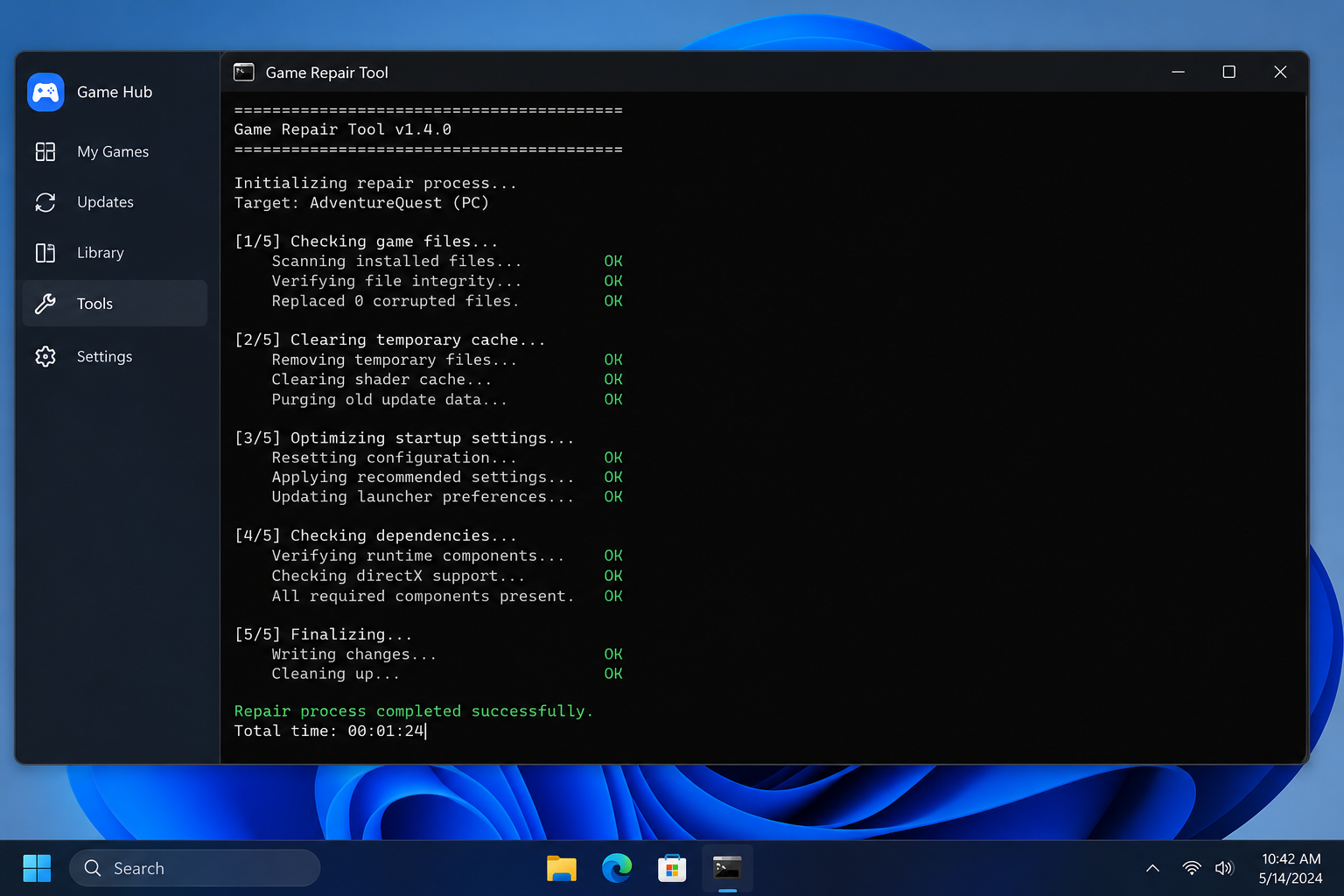
Step 3: A convincing repair show runs in the terminal
Kaspersky observed status messages claiming to clear temporary files, check disks, adjust settings, and repair Windows components.
That theater gives the player something to watch. It can make an unexplained pause feel like useful maintenance rather than a hidden installation.
Terminal text is easy for a script to print. A line saying “system repaired” is not an independent diagnosis of the computer.
Even if the game appears to improve afterward, that does not validate the command. Performance can change for many reasons, while the added task remains.
Step 4: The script changes protection and installs the miner
In the sample Kaspersky analyzed, the script checked for administrator privileges and created a working folder under Windows.
It attempted to exclude that folder from Microsoft Defender scanning. The next downloaded executable was XMRig, saved under an ordinary-sounding filename.
The miner uses the computer’s processing power to generate cryptocurrency for the operator. The owner may notice extra heat, fan noise, power use, or slowdown.
Those symptoms are clues, not a diagnosis. A proper scan and task review are needed to determine what actually ran on a particular device.
Step 5: A startup task brings it back
The reviewed script created a scheduled task intended to launch the miner after Windows starts. That persistence explains why simply closing PowerShell is not enough.
A reboot may briefly change the visible symptoms, yet the task can restart the unwanted program. It can also keep the Defender exclusion in place.
Do not manually delete random Windows files based on a forum post. A wrong removal can damage the system while leaving the real persistence behind.
Use current security tools or qualified help to remove the miner, undo security changes, and verify the system afterward.
The Difference Between Technical Help and Code Execution
Not every terminal instruction is bad. Developers and experienced users rely on command lines daily. The problem is executing unknown remote code with elevated rights.
A useful repair guide should identify the affected game, explain the cause it addresses, and link to a publisher or platform instruction where possible.
It should also tell you what will change and how to reverse it. “Paste this and trust me” does not meet that standard.
If an instruction asks you to disable protection, add antivirus exclusions, or run a web-hosted script, stop and seek a second opinion.
Check the game’s official support page, verified developer announcement, and Steam’s own help resources. Compare the advice before changing Windows.
A legitimate support team may ask for logs or troubleshooting steps. It should not require an unexplained script from a stranger’s personal domain.
What a Hidden Miner Can Do to a Gaming PC
Mining consumes computing resources. On a gaming computer, that can compete with the game for processor time and raise power use.
The resulting heat may make fans run harder and performance feel inconsistent. Laptops can drain quickly; desktops may become noisy even when no game is open.
Those signs have many innocent causes. Dust, updates, and normal background jobs can produce similar behavior, so avoid diagnosing from fan noise alone.
The Defender exclusion is more concerning than a temporary slowdown. It can leave the designated folder less visible to routine scanning.
The scheduled task adds another persistence point. Security checks should inspect both the program and the settings that allowed it to keep running.
While this case centered on mining, running an unknown script can have broader effects. Treat the machine as potentially compromised until checked.
What to Do if You Have Fallen Victim to This Scam
- Stop following the forum instructions. Do not run the command again or install another “cleaner” offered by the same poster.
- Disconnect the computer if you suspect active compromise. Use another trusted device for sensitive accounts while you work on cleanup.
- Update and run Microsoft Defender. Check protection history, antivirus exclusions, and detected items. Record what you find before making changes.
- Run a reputable second-opinion scan. Malwarebytes can help identify unwanted miners and related components. Keep it updated and review each finding before removal.
- Inspect persistence with qualified help if necessary. The investigated sample used a startup task and a Windows folder. Do not remove unrelated tasks merely because their names look unfamiliar.
- Recheck security settings after cleanup. Remove unauthorized Defender exclusions, update Windows, and scan again. A clean scan before reversing an exclusion may miss affected files.
- Protect important accounts. If you used the machine for banking, email, or Steam during the incident, change passwords from a clean device and review sessions.
- Report the forum post. Share the thread and timing with Steam moderators. AdGuard may block some malicious destinations, but it cannot undo a script already executed.
How to Get Game Help More Safely
Begin with the game’s official troubleshooting guide and update notes. A known issue may already have a patch or documented workaround.
Use Steam’s built-in file verification when applicable. It does not require downloading a mystery script from a reply.
When community advice is useful, prefer explanations that other knowledgeable users can inspect. A command’s purpose should be understandable before it is run.
Ask what the command changes, what source it contacts, and why administrator privileges are needed. If no one can answer, skip it.
Keep backups of saves and important files. That makes it easier to recover from both ordinary game bugs and malicious troubleshooting suggestions.
Report suspicious posts even if you did not run anything. Removing one reply may prevent another frustrated player from taking the same risk.
What the Fake Repair Messages Conceal
The reviewed script printed ordinary maintenance claims while performing very different actions. That contrast is the central deception in this case.
A person watching the terminal sees progress about Windows housekeeping. They may believe the commands are diagnosing a driver or corrupted game file.
In the background, the script checked its privilege level. Administrator access determined whether it could make broader system changes.
It then prepared a Windows folder and attempted to exclude that location from Defender scans. That exclusion is not a standard step for fixing a game crash.
The miner download followed, with a filename that could be mistaken for a system component. The filename did not make the executable part of Windows.
A scheduled task supplied persistence. On future startups, it could relaunch mining without the player reopening the forum or PowerShell.
These details explain why a quick reboot is not a reliable cleanup. The unwanted task and changed protection settings may remain after the visible window closes.
They also explain why one antivirus result should be interpreted carefully. A folder excluded from scanning needs to be addressed as part of recovery.
The practical response is not to hunt for a filename from a news report and delete the first match. Attackers can change names, and legitimate files may sound similar.
Use a trusted scanner and inspect findings with context. If the computer contains important work or financial accounts, ask a professional for help.
After cleanup, watch whether the high resource usage returns. A recurring process can signal that a persistence mechanism was missed.
Also review backups and restore points. They may be useful if the system was altered beyond the visible miner, although restoring blindly can reintroduce unwanted changes.
The safest lesson comes before execution. A forum reply that asks for a remote script to run as administrator deserves independent verification every time.
That habit protects against more than miners, because the same command pattern can deliver a different payload tomorrow.
If you are helping another player, do not repost an untested command simply because it appeared to work for someone else.
Explain the source of each step and what the user should expect. A safe answer leaves room for the reader to decline a risky change.
Moderators can remove obvious abuse, but they cannot independently test every technical fix before someone discovers it through search.
That makes your own pause before pressing Enter important. It is the last point at which the remote script has no access to your computer.
For affected users, the first priority is containment and cleanup. Performance testing can wait until the machine is trusted again.
A miner may have produced no visible account theft, but unknown code ran with substantial privileges. Review the device accordingly.
Frequently Asked Questions
Is Steam itself installing cryptocurrency miners?
No. The reported incident involved malicious advice posted in community discussions. Steam is a legitimate platform being misused as a delivery context.
Is XMRig always malicious?
No. It is a legitimate mining tool. Installing and running it on someone’s computer without permission is the harmful behavior in this case.
Does closing PowerShell remove the miner?
Not necessarily. The reviewed script created a scheduled task to relaunch it, so a full security check is needed.
Can I recognize this by high fan speed alone?
No. Fans can run for many reasons. Check processes, security alerts, exclusions, and scheduled tasks before drawing a conclusion.
What if I copied the command but never pressed Enter?
Copying text is different from executing it. Do not run it, and report the suspicious post if you can.
Should I turn off antivirus to improve game performance?
Do not disable protection because an unknown forum reply says to. Use official game guidance and investigate any performance issue separately.
The Bottom Line
The fake forum fix turned a player’s search for help into a way to run an unwanted miner and alter Windows protections.
Never execute a stranger’s remote script as administrator to fix a game. If you already did, check the machine, undo unauthorized changes, and protect your accounts.

Join the discussion
0 commentsShare your experience or ask a question about this article.
Discussion
Start the conversation
Have a question or something useful to share? Add the first comment.