

The Steam platform is hugely popular among PC gamers, offering thousands of titles across various genres. Like most gamers, you likely fund your Steam wallet using gift cards for purchasing games and in-game items. Unfortunately, scammers are now leveraging Steam gift cards to defraud unsuspecting users.
This emerging scam involves messages promising free Steam gift cards to lure victims onto phishing sites designed to steal login credentials or distribute malware. With convincing messaging and legitimate-looking links, even savvy users risk falling for these criminal tactics.
This guide will explore this scam in detail, providing insights into how it works, who’s affected, and most importantly, how to steer clear of it.
An Overview of the Steam Gift Card Scam
In recent years, Steam gift card scams have emerged as a popular phishing tactic targeting the platform’s massive user base. This scam revolves around users receiving messages offering free Steam gift cards, typically $50 in value. The catch is that the links contained in these messages redirect to fraudulent websites designed to steal login credentials, payment information, or install malware.
With over 125 million users on Steam, scammers have a huge pool of potential targets for this scam. Anyone enthusiastic about Steam games and items is likely to be enticed by the prospect of getting a free gift card code. This enthusiasm makes it easier for scammers to bypass users’ skepticism.
The messages used in this scam are intentionally designed to appear credible. They often seem to come directly from Steam or a familiar contact on platforms like Discord. The phishing links are similarly crafted to closely resemble and mimic legitimate Steam domains. These tactics make it easier to fool even experienced Steam users into believing the offer is authentic.
For example, a user may receive a Discord message stating: “Here is a $50 Steam gift card code to celebrate our friendship! Claim it quickly before it expires here: steam-wallet-rewards[.]com.” While the message appears to be from a friend and the URL looks initially legitimate, it actually redirects to a fake phishing site to harvest login data.
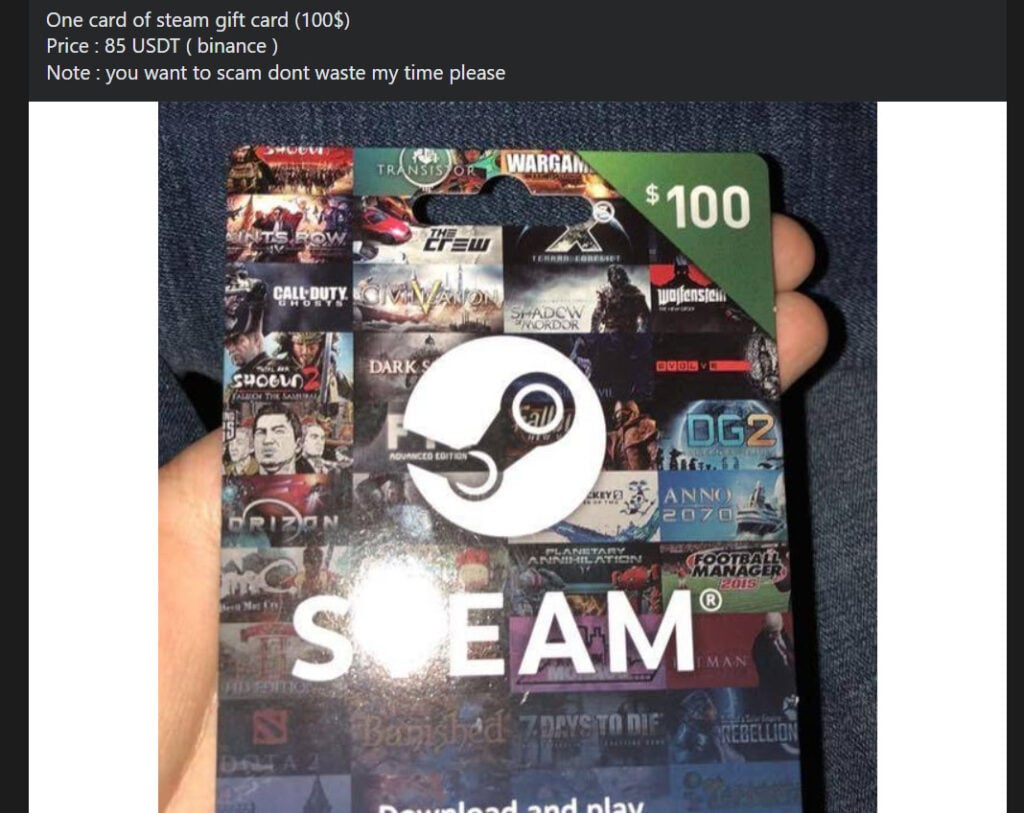
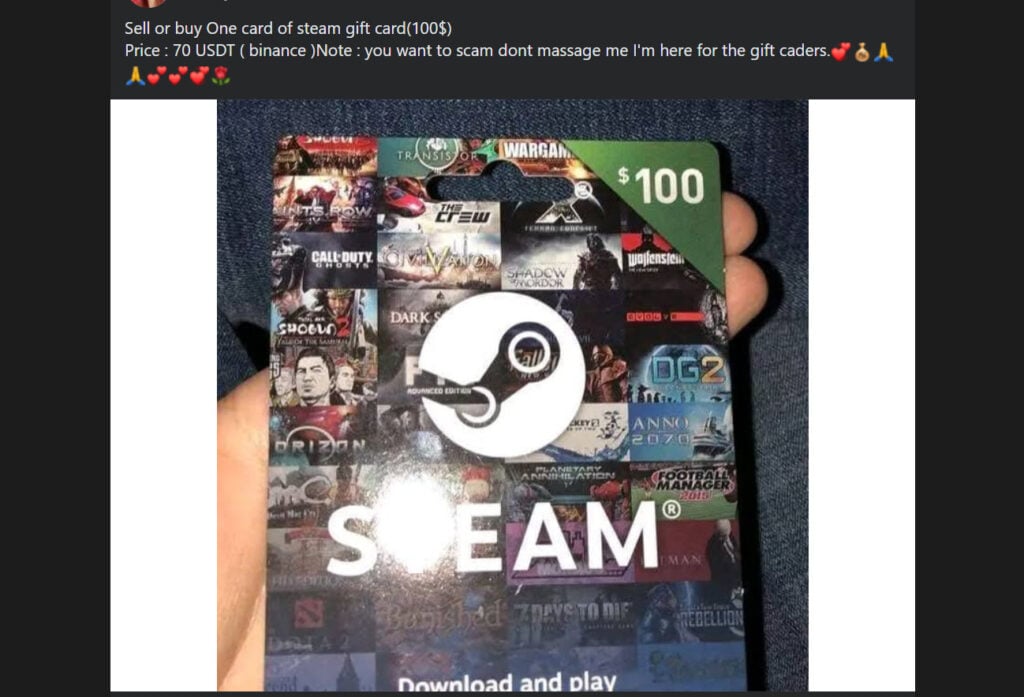
In other cases, the scam starts with very believable social media ads promoting Steam gift card deals, such as “$100 Steam gift cards for just $80!” The listing convinces buyers to pay through QR code, gift card code, or cryptocurrency transfer. However, the discounted gift cards don’t exist, and buyers end up losing their money while scammers profit.
These tactics allow scammers to rake in money and sensitive personal data from Steam users. With access to Steam accounts, they can steal payment info, purchase games fraudulently, resell high-value inventory items, and spread their scam further by posing as friends. There are also indications compromised accounts get sold online.
Malware strains like Spyware, Trojans, and Keyloggers are often used in tandem with these phishing scams to extract additional data from infected devices. Once installed, this malware can monitor browsing activity, capture screenshots and credentials, or lock down access completely until a ransom is paid.
Ultimately, this scam preys on people’s desire for deals and virtual goods. But no matter how appealing a Steam gift card offer seems, it’s essential to exercise caution before clicking on links or providing any personal information.
How the Steam Gift Card Scam Works
The Steam gift card scam employs simple but effective social engineering tactics to reel in victims. Here is a step-by-step overview of how this scam unfolds:
Step 1 – Unsolicited Message Promising Free Gift Card
The scam starts with the victim receiving a message claiming to offer a $50 Steam gift card for free. This message typically arrives via gaming chat platforms like Discord, with the sender posing as a friend.
The offer seems credible since it appears to come from a familiar contact. The message contains a URL supposedly linking to a Steam store page for claiming the gift card.
Step 2 – Victim Clicks on Disguised Phishing Link
If the user clicks the link, it redirects to a phishing site impersonating a legitimate Steam page. The site resembles an official Steam login portal or gift card claiming page.
Hacked accounts are often used for propagating these messages to exploit user trust. The URLs also tend to mimic actual Steam sites using misspelled or slightly altered addresses.
Step 3 – Entering Login Credentials on Fake Sites
The fake Steam page prompts the user to sign in to claim their gift card. If victims enter their username and password here, the credentials immediately end up with the scammers running the phishing site.
In other cases, the site may attempt to trick users into downloading malware masquerading as a Steam extension required for the gift card. This malware then compromises the machine.
Step 4 – Account/Device Takeover and Spreading the Scam
With access to login details, the criminals can hijack Steam accounts, steal any stored payment information, and purchase games fraudulently. Compromised accounts also let them perpetuate the scam by sending out more fake gift card offers.
If malware infected the device, it can monitor activity, steal Steam credentials upon entry, and siphon other sensitive data. Occasionally, scammers also hold devices ransom by restricting access until a payment is processed.
Targets and Victims of the Steam Gift Card Scam
The Steam gift card scam casts a wide net, targeting Steam’s diverse 125 million-strong user base. Any Steam user is a potential target, although some demographics seem more susceptible. These include:
- Younger gamers – Typically aged 13 to 25, younger Steam users tend to be less informed about cyber threats. Their enthusiasm to get something for free also overrides caution.
- Newer users – Recent Steam joiners are less informed about past scams or phishing techniques targeting the platform. Long-time users are likelier to identify red flags.
- Active social media users – Since social platforms are propagation vectors, users more active on sites like Discord are at higher risk of encountering scam messages or posts.
- Auction/sale seekers – Scam gift card listings on sites like eBay or Craigslist entice those seeking discounted games or items. This demographic is also more open to alternative payment options like cryptocurrency.
Essentially, any Steam user hungry for a deal or lacking cybersecurity awareness could become ensnared by this scam. Vigilance and skepticism are critical, even when receiving offers from familiar handles.
What to Do If You Are a Victim of This Scam
Falling victim to the Steam gift card scam can compromise accounts, finances, and devices. If you suspect you’re affected, follow these immediate damage control steps:
1. Reset Your Steam Password
Your number one priority is regaining sole access to your Steam account. Change your password immediately using a different uninfected device to lock out scammers. Enable two-factor authentication for added security, if not already active.
2. Scan Devices for Malware
If your device clicked on a fake Steam link, it may have malicious programs like keyloggers or trojans. Download security software like Malwarebytes to scan all connected devices and remove any threats detected.
3. Contact Steam Support
Notify Steam Support about the compromise, providing relevant details about unauthorized access or purchases. Steam may rollback changes or issue refunds for fraudulent transactions in some cases. Provide any information requested to Steam during the investigation.
4. Monitor Financial Accounts
If your Steam account stored payment information, monitor linked financial accounts closely for signs of unauthorized charges. Notify your bank or card issuer immediately about potential compromise of card data.
5. File Police Reports if Needed
For severe account or financial impacts from fraud, file police reports about the scam with local law enforcement or through the FTC. These reports create an official record that may help support investigations or recovery efforts.
6. Increase Security Across Accounts
Take this opportunity to boost security across all your accounts. Update passwords, set up two-factor authentication, check privacy settings, and be more vigilant against potential phishing attempts going forward.
Staying alert and taking swift action offers the best chance to contain damages and recover from Steam gift card scam impacts. Don’t hesitate to seek help from Steam, financial providers, or authorities to stabilize accounts and finances.
Is Your Device Infected? Run a Free Malware Scan
Slow performance, constant pop-ups, or strange behavior? These are classic signs of a malware infection. The fastest way to find out is to scan your device with Malwarebytes Free — one of the most trusted malware removal tools available.
The free version detects and removes the most common threats, including:
- Adware — the cause of those annoying pop-ups
- Browser hijackers — unwanted redirects and changed homepages
- Trojans and spyware — hidden programs stealing your data
- Potentially unwanted programs (PUPs) — software you never asked for
👉 Select your device below — Windows, Mac, or Android — then follow the simple steps to download Malwarebytes, scan your system, and remove any threats it finds. The scan usually takes 5 to 20 minutes.
Run a Malware Scan with Malwarebytes for Windows
Malwarebytes is one of the most popular and trusted anti-malware tools for Windows — and it’s completely free for removing infections. It catches threats that many antivirus programs miss, including adware, browser hijackers, and trojans. Follow the steps below to scan and clean your PC in just a few minutes.
Download Malwarebytes
Click the button below to download the latest version of Malwarebytes for Windows from the official source. The free version is all you need — it will scan your computer and remove adware, browser hijackers, and other malicious software at no cost.
Download MalwarebytesOfficial installer for Windows 11 and 10. Your download starts right away.Want real-time protection? See Malwarebytes Premium Malwarebytes Free for WindowsScans and removes malware at no cost
-
Install Malwarebytes
When the download finishes, open your Downloads folder and double-click the MBSetup file. If Windows shows a User Account Control pop-up, click “Yes” to allow the installation.

Follow the On-Screen Prompts to Install Malwarebytes
The setup wizard will walk you through a few quick screens:
-
Choose where you’re installing the program — “Personal Computer” or “Work Computer” — then click Next.

-
Malwarebytes will now install on your device. This usually takes under a minute.

-
When installation is complete, the “Welcome to Malwarebytes” screen will open automatically.

-
On the final screen, click Open Malwarebytes to launch the program.

-
Enable “Scan for Rootkits”
Before scanning, turn on rootkit detection so Malwarebytes can find even the most hidden threats. Click the Settings gear icon on the left side of the screen.

In the settings menu, find “Scan for rootkits” and click the toggle so it turns blue.

Done? Click “Dashboard” in the left pane to return to the main screen.
Start the Scan
Click the blue Scan button. Malwarebytes will automatically update its virus database and start checking your computer for malware.

-
Wait for the Scan to Finish
The scan checks your entire system for browser hijackers and other malicious programs, so it can take 5 to 20 minutes depending on your computer. Feel free to do something else — just check back occasionally to see the progress.

-
Quarantine the Detected Threats
When the scan is done, you’ll see a list of everything Malwarebytes found — malware, adware, and potentially unwanted programs. Click the “Quarantine” button to remove all of them at once.

Malwarebytes will now remove the malicious files and registry entries and move them safely into quarantine.

-
Restart Your Computer
Some threats can only be fully removed after a reboot. If Malwarebytes asks you to restart, click Yes. Once you’re logged back in, Malwarebytes has finished removing the threats it found.

That’s it — your Windows PC is now clean of trojans, adware, and other malware, and should be back to running smoothly.
If you are still having problems with your computer after completing these instructions, then please follow one of the steps:
- Run a computer scan with ESET Online Scanner
- Ask for help in our Windows Malware Removal Help & Support forum.
Run a Malware Scan with Malwarebytes for Mac
Malwarebytes for Mac is a free on-demand scanner that removes the malware other security software tends to miss — adware, browser hijackers, and unwanted programs included. Cleaning an infected Mac with Malwarebytes has always been completely free, and it’s our go-to recommendation. Follow the steps below to scan and clean your Mac in just a few minutes.
-
Download Malwarebytes for Mac
Click the button below to download the latest version of Malwarebytes for Mac.
Download MalwarebytesOfficial installer for macOS. Your download starts right away.Want real-time protection? See Malwarebytes PremiumMalwarebytes Free for MacScans and removes malware at no cost -
Open the Malwarebytes setup file
When the download finishes, open your Downloads folder and double-click the setup file to begin the installation.

-
Follow the On-Screen Prompts to Install Malwarebytes
The Malwarebytes for Mac Installer will guide you through a few quick screens. Click “Continue” and keep following the prompts until the installation completes.



When the installation is complete, Malwarebytes opens to the Welcome to Malwarebytes screen. Click “Get started“.
-
Select “Personal Computer” or “Work Computer”
Malwarebytes will ask what type of computer you’re installing it on. Click either Personal Computer or Work Computer, whichever applies.

-
Start the Scan
Click the “Scan” button. Malwarebytes will automatically update its detection database and begin checking your Mac for malware.

-
Wait for the Scan to Finish
Malwarebytes will scan your Mac for adware, browser hijackers, and other malicious programs. This can take a few minutes, so feel free to do something else — just check back occasionally to see the progress.

-
Quarantine the Detected Threats
When the scan is done, you’ll see a list of everything Malwarebytes found. Click the “Quarantine” button to remove all the threats at once.

-
Restart Your Mac
Malwarebytes will now remove all the malicious files it found. Some threats can only be fully removed after a reboot — if Malwarebytes asks you to restart, allow it. Once you’re logged back in, your Mac is clean.

That’s it — your Mac is now free of adware, rogue browser extensions, and other potentially harmful software.
If you are still experiencing problems while trying to remove a malicious program from your computer, please ask for help in our Mac Malware Removal Help & Support forum.
Run a Malware Scan with Malwarebytes for Android
Malwarebytes for Android automatically detects and removes dangerous threats like malware and ransomware so you don’t have to worry about your most-used device being compromised. Aggressive detection of adware and potentially unwanted programs keeps your Android phone or tablet running smooth.
-
Download Malwarebytes for Android.
You can download Malwarebytes for Android by clicking the link below.
Get Malwarebytes for AndroidOpens Google Play in a new tab.Want real-time protection? See Malwarebytes Premium for AndroidMalwarebytes for AndroidScans your phone and removes malware at no cost -
Install Malwarebytes for Android on your phone.
In the Google Play Store, tap “Install” to install Malwarebytes for Android on your device.

When the installation process has finished, tap “Open” to begin using Malwarebytes for Android. You can also open Malwarebytes by tapping on its icon in your phone menu or home screen.

-
Follow the on-screen prompts to complete the setup process
When Malwarebytes will open, you will see the Malwarebytes Setup Wizard which will guide you through a series of permissions and other setup options.
This is the first of two screens that explain the difference between the Premium and Free versions. Swipe this screen to continue.
Tap on “Got it” to proceed to the next step.
Malwarebytes for Android will now ask for a set of permissions that are required to scan your device and protect it from malware. Tap on “Give permission” to continue.
Tap on “Allow” to permit Malwarebytes to access the files on your phone.
-
Update database and run a scan with Malwarebytes for Android
You will now be prompted to update the Malwarebytes database and run a full system scan.

Click on “Update database” to update the Malwarebytes for Android definitions to the latest version, then click on “Run full scan” to perform a system scan.

-
Wait for the Malwarebytes scan to complete.
Malwarebytes will now start scanning your phone for adware and other malicious apps. This process can take a few minutes, so we suggest you do something else and periodically check on the status of the scan to see when it is finished.

-
Click on “Remove Selected”.
When the scan has been completed, you will be presented with a screen showing the malware infections that Malwarebytes for Android has detected. To remove the malicious apps that Malwarebytes has found, tap on the “Remove Selected” button.

-
Restart your phone.
Malwarebytes for Android will now remove all the malicious apps that it has found. To complete the malware removal process, Malwarebytes may ask you to restart your device.
That’s it — your Android phone is now clean — no more malicious apps, adware, or browser redirects.
If you are still having problems with your phone after completing these instructions, then please follow one of the steps:
- Restore your phone to factory settings by going to Settings > General management > Reset > Factory data reset.
- Ask for help in our Mobile Malware Removal Help & Support forum.
Stay Protected: Block Ads and Malicious Sites
Now that your device is clean, keep it that way. Most infections start with a malicious ad or a fake download button — so blocking them at the source is your best defense.
We recommend AdGuard, which blocks malicious ads, phishing pages, and dangerous redirects before they can reach you.
👉 Download AdGuard and browse safely
Frequently Asked Questions About the Steam Gift Card Scam
The Steam gift card scam is ensnaring more users across the platform. If you are unsure about a gift card offer you encountered or want to learn how to stay safe, this FAQ can help.
What Exactly is the Steam Gift Card Scam?
The Steam gift card scam involves recipients getting unsolicited messages offering free Steam wallet codes, typically $50. The links in these messages redirect to phishing sites designed to steal Steam account credentials and payment information or install malware on devices.
How Does the Scam Work?
Scammers send messages containing links to mimic Steam login portals or gift card claiming sites. Users get tricked into entering their Steam username and password on these fake sites, handing over their credentials to scammers. In other cases, clicking the link secretly downloads malware posing as a required Steam extension.
What Happens If I Fall Victim to This Scam?
If you input your Steam login details on a phishing site, scammers gain full access to your account. They can then steal any saved payment info, buy games fraudulently, sell your items on the Community Market, and spread the scam further. Downloaded malware may also steal data, take screenshots, and lockdown devices.
Who is Behind These Scam Attempts?
Individual hackers and organized cybercrime groups perpetrate these scams to make quick money through phishing, distributing malware, and reselling compromised Steam accounts and inventory items. Some scammers are also based overseas, making them harder to prosecute.
What Tactics Are Used to Trick Users?
- Fake messages from hacked friend accounts on platforms like Discord
- Phishing links mimicking legitimate Steam URLs
- Fake Steam login portals replicas
- Malware masquerading as vital Steam extensions
- Promises of free gift cards worth $50 to $100
What Information Do Scammers Obtain?
By phishing Steam credentials, scammers can gain usernames, passwords, email addresses, birthdates, payment details, billing info, phone numbers, game licenses and more. Installed malware also extracts screenshots, keystrokes, network data, and other sensitive information.
Who is Most at Risk of This Scam?
Younger gamers, newer Steam users, active social media users, and deal/sale seekers are most likely to fall victim. But anyone eager for free Steam credit or games can be manipulated into clicking phishing links or providing account access.
How Can I Avoid Falling Victim to This Scam?
- Never enter Steam login credentials on any site except steamcommunity.com and store.steampowered.com
- Don’t trust unsolicited gift card offers, even from friends
- Watch for typos or odd URLs in links promising free codes
- Verify gift card sellers carefully before paying
- Use strong unique passwords and enable two-factor authentication
- Install and run updated antivirus software on all devices
What Should I Do if My Account is Compromised?
Immediately change your password from a clean device, contact Steam Support, monitor financial accounts for fraud, scan devices for malware, and consider filing a police report based on the extent of the breach.
How Can I Stay Updated on Current Steam Scams?
Check Steam discussions and forums regularly, follow gaming news sites, don’t ignore Steam security alerts, and report any scam attempts you encounter to raise awareness.
By staying vigilant and skeptical, you can avoid becoming another victim of the Steam gift card scam. Remember, if an offer seems too good to be true, it usually is.
The Bottom Line – Recognizing and Avoiding Steam Gift Card Scams
The Steam gift card scam exploits people’s enthusiasm for deals and virtual goods on the popular platform. By mimicking official communication channels and sites, scammers convince even seasoned users to click on their deceptive links.
The safest approach is to maintain vigilance about unsolicited offers, no matter how appealing. Any message offering Steam codes for free from unknown contacts should raise red flags. Resist clicking on links from such messages, even if the sender appears to be a friend.
On social media, thoroughly validate gift card sellers before transacting, especially involving alternative payment methods. Only buy directly from authorized Steam partners.
Fundamentally, remember that Steam gifts cards are never free. Avoid entering your Steam credentials anywhere except the official steamcommunity.com and store.steampowered.com sites.
Saving a few dollars is not worth having accounts drained or devices infected due to rushed decisions. Stay informed about the latest Steam scams making the rounds within the community. With greater awareness, gamers can collectively reduce the success of these frauds and keep accounts secure.

Join the discussion
0 commentsShare your experience or ask a question about this article.
Discussion
Start the conversation
Have a question or something useful to share? Add the first comment.