

Subaru’s EyeSight Driver Assist Technology has been a major selling point for many models, promising enhanced safety features like Pre-Collision Braking, Rear Automatic Braking, and Lane Keep Assist. However, not all owners have had a flawless experience. Reports of malfunctions and underperforming safety systems have led to a class action lawsuit, ultimately resulting in the Subaru EyeSight Settlement.
In this article, we’ll break down what this settlement means, how you can check if your vehicle qualifies, the compensation you might receive, and whether filing a claim is actually worth your time.
What is the Subaru EyeSight Settlement?
The lawsuit, Sampson, et al. v. Subaru of America, Inc., alleged that certain Subaru vehicles equipped with EyeSight technology suffered from defects that caused features like Pre-Collision Braking, Rear Automatic Braking, and Lane Keep Assist to fail or perform inconsistently. While Subaru denies any wrongdoing, the company agreed to a settlement to avoid prolonged litigation.
What You Could Get:
- 75% reimbursement for past EyeSight-related repairs you paid for out of pocket.
- Extended warranty coverage for EyeSight components going forward.
Important Deadlines:
- Coverage begins: July 29, 2025
- Claim submission deadline: September 27, 2025
How to Check if Your Vehicle Qualifies
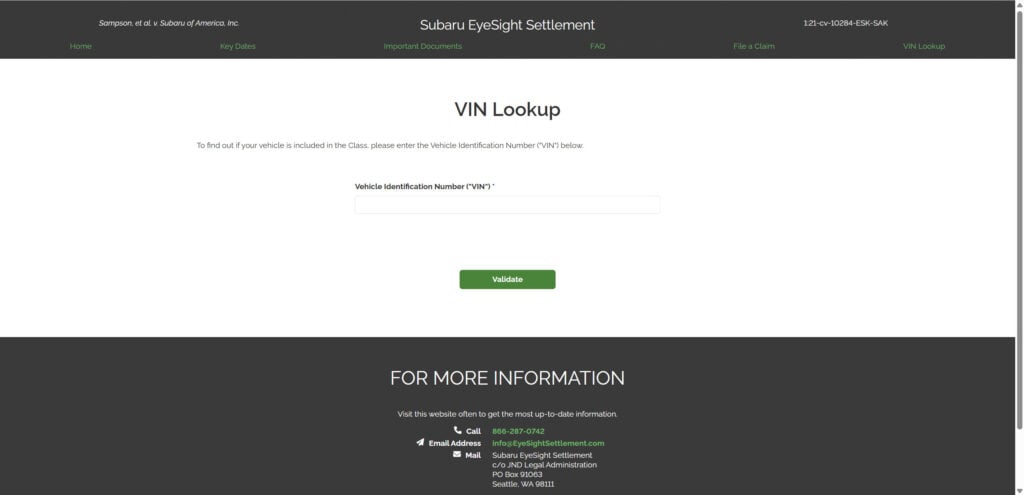
- Go to the official settlement website: eyesightsettlement.com
- Use the VIN lookup tool to see if your Subaru is part of the settlement.
- Review eligibility details based on your model year and repair history.
How to File a Claim
If you’re eligible, you can file a claim online via the official website:
- Gather documentation: Repair invoices, receipts, and proof of payment.
- Submit your claim: Follow the guided form on eyesightsettlement.com.
- Wait for approval: The settlement administrator will review your case.
Is the Subaru EyeSight Settlement Legit?
Yes. This is a court-approved class action settlement, not a scam. The official website is secure and managed by the appointed settlement administrator. No legitimate claim will ever ask for payment to participate.
Is It Worth Claiming?
Absolutely — if you’ve experienced issues with your EyeSight system or paid for related repairs, you could get substantial reimbursement and extra warranty coverage at no cost. Even if you haven’t yet had problems, extended protection for a safety-critical system is valuable.
Final Thoughts
This settlement is a real opportunity for Subaru owners to recoup costs and gain peace of mind. If your vehicle qualifies, don’t miss the chance to file a claim before the deadline. It’s a legitimate, court-approved process that could save you hundreds of dollars.
Check your VIN and file your claim today at eyesightsettlement.com before September 27, 2025.
AQ: Subaru EyeSight Settlement
1. What is the Subaru EyeSight Settlement?
The Subaru EyeSight Settlement is a court-approved class action settlement resulting from allegations that certain Subaru vehicles equipped with EyeSight Driver Assist Technology experienced malfunctions. The lawsuit claimed issues with Pre-Collision Braking, Rear Automatic Braking, and Lane Keep Assist. Subaru denies any wrongdoing but agreed to compensate eligible owners and lessees.
2. Which vehicles are included in the settlement?
Eligible vehicles are specific Subaru models equipped with the EyeSight Driver Assist System during certain production years. To check eligibility:
- Visit eyesightsettlement.com
- Use the VIN lookup tool to see if your vehicle qualifies.
3. What benefits can I receive?
Qualified claimants may receive:
- Up to 75% reimbursement for prior EyeSight-related repairs paid out-of-pocket.
- Extended warranty coverage on affected EyeSight components for future protection.
4. How do I file a claim?
To file a claim:
- Collect repair invoices, receipts, or other documentation.
- Submit your claim through the official website form.
- Wait for confirmation and settlement administrator review.
5. What are the important deadlines?
- Coverage Start Date: July 29, 2025
- Claim Submission Deadline: September 27, 2025 Late submissions may not be accepted, so act promptly.
6. Is the Subaru EyeSight Settlement website legitimate?
Yes. The official site (eyesightsettlement.com) is court-approved and managed by the settlement administrator. You should never be asked for payment to participate. Beware of third-party websites imitating the official page.
7. Do I need a lawyer to file a claim?
No. You can file a claim yourself at no cost. If you prefer, you can consult an attorney, but legal representation is not required to participate in the settlement.
8. How long will it take to receive payment?
Processing time can vary. Once your claim is reviewed and approved, reimbursements are typically issued within a few months after the settlement’s final approval date.
9. What if I already sold my Subaru vehicle?
If you previously owned or leased a qualifying Subaru vehicle, you may still be eligible for reimbursement for past repairs. You’ll need proof of ownership and repair documentation.
10. Is it worth filing a claim even if my EyeSight system hasn’t failed yet?
Yes. Eligible owners benefit from extended warranty coverage at no cost, which can save you significant expenses if problems arise in the future.

Join the discussion
0 commentsShare your experience or ask a question about this article.
Discussion
Start the conversation
Have a question or something useful to share? Add the first comment.