

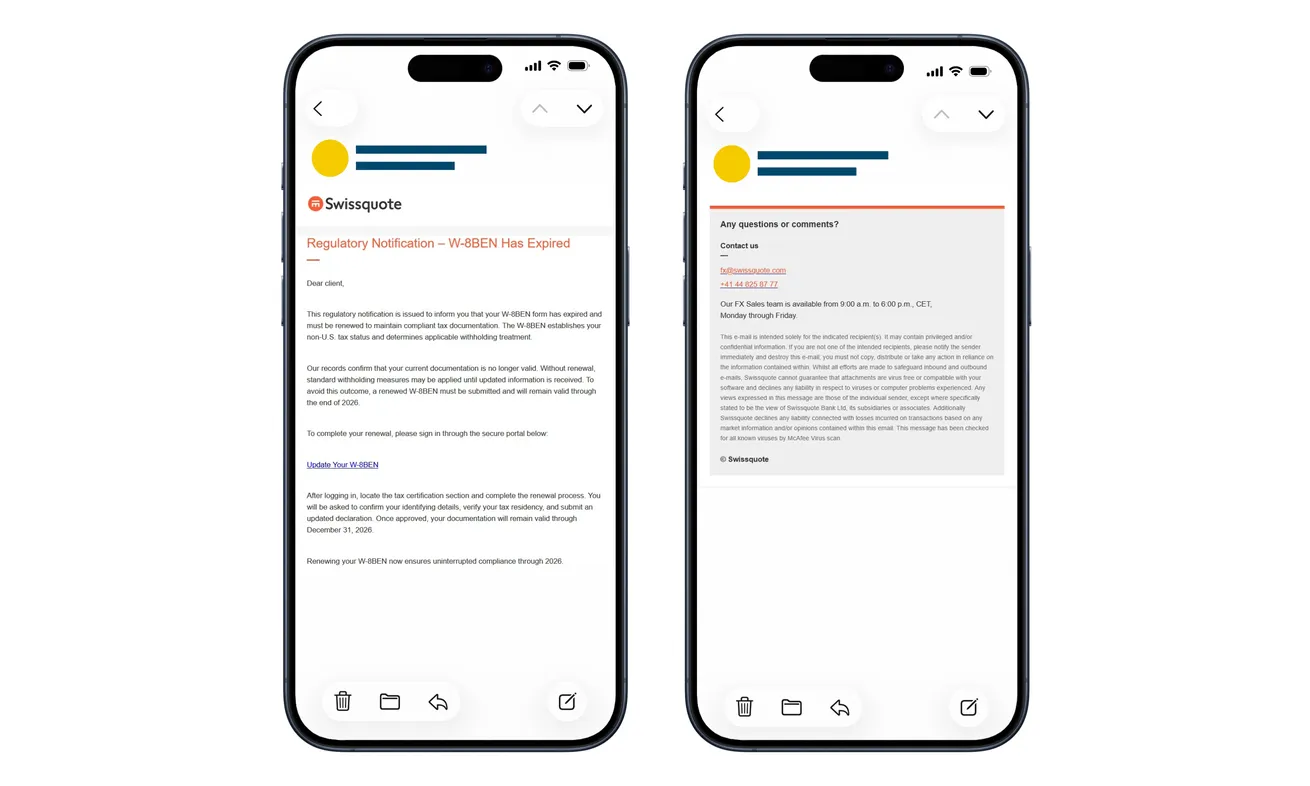
A Swissquote email says your W-8BEN has expired. The notice looks like routine tax paperwork, with a link to put your investment account back in order.
You may not remember when you last completed that form. Before following the reminder, check where its seemingly ordinary administrative task is taking you.
Overview
A real tax form supplies the cover story
The Swissquote W-8BEN email scam claims that tax documentation needs renewing, then directs the reader toward an imitation account sign-in.
The police warning describes the email and counterfeit login. The attackers also seek multifactor authentication codes to help access the targeted account.
Swissquote is the genuine institution being impersonated. The fraud concerns the false message and login route, not the existence of legitimate tax-document requirements.
The dangerous request comes before any useful paperwork
The email’s update link makes a banking login seem like the first step in renewing a form. That shift is easy to miss when you’re concentrating on compliance.
The original example above contains an expired-form notice and a copied contact footer. Its official appearance doesn’t establish who operates the linked page.
A genuine-looking authentication request can also be misrepresented. Judge it by the account action it describes, rather than the tax story on another screen.
Verify the form and secure access separately
Open your usual Swissquote app or trusted account route yourself. Check actual documentation requirements there instead of accepting the email’s expiry claim.
- Don’t use the unexpected update link to enter banking credentials.
- Don’t pass an authentication code to someone coordinating a supposed renewal.
- Tell Swissquote promptly about a disclosed password or approved login.
- Review real account activity, not the false site’s completion message.
- Handle genuine tax paperwork through the verified provider process.
Why W-8BEN Sounds More Convincing Than a Generic Security Alert
A notice naming a particular form sounds informed. It appears to concern a technical account requirement rather than a promotion you can simply ignore.
The IRS identifies W-8BEN as a real foreign-status form. Its existence explains why the name can sound familiar to an investor.
It does not tell you whether your particular form has expired or what your provider needs now. Those questions belong to the actual account process.
The false notice relies on that uncertainty. You may be more comfortable clicking a renewal link than admitting you don’t remember the paperwork.
There is nothing unusual about checking. Ask Swissquote whether the account has a pending requirement and how to complete it from the genuine service.
Don’t take a withholding threat or end-of-year date in the email as personal tax advice. A copied statement doesn’t determine the rules for your circumstances.
If a real deadline is approaching, get verified help promptly. You can treat the paperwork seriously without trusting a stranger’s shortcut to it.
For advice about your tax position, use the appropriate qualified adviser. This phishing warning cannot decide residency, treaty eligibility, or an applicable withholding rate.
How the Swissquote W-8BEN Email Scam Works
Step 1: An expiry notice turns a routine form into an urgent task
The message claims that the account’s W-8BEN is no longer valid. It warns of adverse consequences unless the reader updates the documentation.
That makes doing nothing feel costly. Instead of first checking the source, the reader may focus on getting the form submitted correctly.
A precise form name doesn’t authenticate the sender. Someone can know the vocabulary of an investment account without having access to your genuine records.
Check for a matching task inside the account you normally use. Don’t rely on another statement in the same email to confirm the first.
Step 2: The update link introduces a copied Swissquote sign-in
The link promises to begin the renewal, but the destination imitates the provider’s login. The sensitive disclosure happens before any genuine form is handled.
Familiar colors, branding, or field names can make that page feel continuous with the email. None establishes who receives the information you type.
The copied contact footer is another distraction. An accurate company number or public address elsewhere in the message cannot authenticate its embedded login link.
Don’t test the page using your actual password. Move to your own trusted banking route before entering anything.
Step 3: A second-factor request is folded into the supposed renewal
After collecting the login details, the attackers try to obtain authentication codes. Those codes can help them complete access to the account.
You may believe the request confirms tax-document access. Read the actual banking message instead, including any displayed action, device, or location.
A real code can be requested under a false explanation. Its arrival does not mean the webpage or person asking for it is genuine.
If the request wasn’t initiated through your verified account session, stop. Contact the provider rather than letting the renewal page explain away the mismatch.
Step 4: The attacker seeks account access while the form story continues
The risk is not simply that a tax update goes unfinished. Credentials and authentication information can enable someone else to use your financial account.
Keep multifactor authentication switched on. The attacker wants you to hand over the extra protection’s code, not help you renew a form.
A success screen on the false site doesn’t prove that a document reached Swissquote. An error screen doesn’t prove that your information wasn’t collected.
After exposure, verify both access and activity through the institution. Don’t wait for an obvious withdrawal before explaining the login and code disclosure.
What to Check in the Real Account
Start with the route you already trust, such as your normal app or established bookmark. Avoid searching for a replacement login through advertisements.
If you’re uncertain about the destination, obtain support through Swissquote’s genuine website. Don’t ask the disputed message for a safer link.
Once inside, check whether a documentation task or secure message actually exists. Match it to the particular account involved.
You may have more than one service or account relationship. A notice about one product shouldn’t become permission to submit credentials for another.
If no matching request appears, ask support whether anything is required. You don’t need to send a complete tax return to explain the suspicious reminder.
If a genuine update is needed, complete it through that verified process. Finding a real task does not retroactively make the email’s destination safe.
If an adviser helps with your paperwork, ask them to confirm the requirement without sharing login credentials or live authentication codes.
If tax identifiers or a completed form were actually supplied, tell support about that separate disclosure. A reset password doesn’t retrieve a document already copied elsewhere.
Ask who should handle the exposed record and which safeguards apply. Don’t assume that a request involving W-8BEN means your entire tax return was accessed.
For a jointly managed financial matter, involve the authorized account holder. Someone preparing paperwork may not have authority to arrange the bank’s protective measures.
Keep any genuine renewal confirmation separate from the fraud report. The account may need both secure access and completed documentation, and one doesn’t automatically finish the other.
If the provider temporarily restricts access, ask how verified updates will arrive. Don’t use a surprise caller’s instructions to bypass the recovery checks you just requested.
Swissquote’s Own Security Guidance Gives You a Better Response
Swissquote’s phishing guidance warns against disclosing account credentials, card details, and security codes to people claiming to represent it.
It also describes an Emergency Lock feature. For the account covered by that guidance, the route begins at the Security shield and then Emergency Lock.
The provider says reactivation requires customer support. Read the instructions for your actual account before using it; a protective lock is not a completed fraud investigation.
If you can’t reach the feature or no longer have access, contact verified support immediately. Don’t keep retrying through the email while hoping the account will unlock.
Explain which credentials and approvals were involved. Ask support what access, account settings, devices, or transactions need checking.
If a card or separate bank account was additionally exposed, identify it clearly. Securing Swissquote access doesn’t automatically secure every other payment method you entered.
Don’t move investments or transfer money to a new account because an unexpected helper calls it protection. Continue through the institution’s established recovery process.
Make a Useful Incident Record Without Reopening the False Page
Begin with the actions you remember: opened the email, visited the page, entered a password, supplied a code, or approved a request.
Record approximately when each action happened. The sequence can help the provider compare your recollection with its account records.
Include approvals you refused, not only those you accepted. Don’t guess which transaction or device they concerned if the message is no longer available.
Preserve existing screenshots and the original email. You shouldn’t need another visit to the suspicious destination to build a usable report.
Keep live codes and complete identifiers out of shared notes. Record that a code was supplied rather than circulating it among everyone helping.
Separate the supposed tax issue from any observed account event. The bank needs to know whether you saw an unfamiliar login, contact change, trade, or payment.
If nothing unusual is visible, report the exposure accurately. An absence of visible loss isn’t a guarantee, but it isn’t a reason to invent a transaction either.
Keep the genuine support reference and response instructions. That gives you a trusted way to follow up if a later caller claims the incident needs another approval.
What to Do if You Have Fallen Victim to This Scam
-
Stop the tax-renewal session. Leave the linked page and don’t request another code, repeat the sign-in, or try a replacement link supplied by the sender.
Retain the email while preserving useful evidence. Don’t reply with financial records to ask whether the form was accepted.
-
Contact Swissquote after disclosing account access information. Use genuine support or your established app, not the footer of the suspicious message.
Say that a W-8BEN reminder led to an imitation sign-in. Identify any password, multifactor code, or authentication approval you supplied.
Ask about urgently protecting access and using the appropriate account-blocking option. Follow the provider’s recovery instructions rather than assuming a password change finishes everything.
-
Change exposed passwords through the real services. Address reused credentials on other accounts, especially an email account connected to financial recovery.
If the genuine service refuses access, tell support. Don’t use a reset page introduced by the same unverified message.
Review recovery details and unfamiliar access as directed. A working login by itself doesn’t establish that every setting remains correct.
-
Report actual account activity. Note unfamiliar transfers, trades, payees, devices, or contact changes using genuine records.
Ask the institution what can be disputed or investigated and which deadlines apply. A protective lock does not automatically reverse completed activity.
Don’t make a test transaction or send money to a safe account proposed by a caller. Financial recovery should stay within verified support.
-
Preserve and report the false message. Keep its sender information, destination, existing screenshots, and the timeline of the authentication interaction.
Use the fraud-reporting route on Swissquote’s official guidance and your mail provider’s phishing controls. After loss or misuse, consider a report to local police.
Don’t publish account statements, complete tax documents, or identity numbers with a public warning. Share necessary evidence privately through verified channels.
-
Resolve the genuine paperwork question separately. Ask Swissquote whether your actual account needs a W-8BEN update and where it belongs.
Obtain qualified tax advice if your circumstances require it. Rejecting a false reminder doesn’t decide what documents you legitimately need.
-
Assess anything else that happened during the interaction. A password disclosure is different from installing an application, opening an unusual file, or allowing remote control.
Tell verified support about those additional events if they occurred. The documented email doesn’t establish a malware infection merely because it was received.
Frequently Asked Questions
Is W-8BEN itself a scam?
No. It is a genuine tax form. This scam uses an alleged renewal to move Swissquote users onto an imitation login.
How do I know whether my form really needs updating?
Check through your genuine Swissquote account or verified support. The email cannot establish your individual documentation status or deadline.
Why would a tax reminder ask for a multifactor code?
The attackers seek account access. Don’t provide a code to the false page or a supposed helper because they describe it as tax verification.
Does the copied contact footer make the email trustworthy?
No. Genuine public contact information can be copied. Independently reach the provider before discussing the request or entering account credentials.
What if I entered a password but refused the code?
Report the password exposure and change it through the real service. Refusing a code is useful, but doesn’t make the disclosed password private again.
Does Emergency Lock recover stolen money automatically?
No. It is a protective feature, not a guaranteed reversal. Contact Swissquote about actual activity and follow its investigation and recovery process.
The Bottom Line
Don’t renew tax documents through the false Swissquote W-8BEN email. Its administrative wording hides a counterfeit login and a request for account authentication information.
If you supplied credentials or an approval, contact Swissquote promptly to secure access. Complete any genuine paperwork separately through the verified account process.

Join the discussion
0 commentsShare your experience or ask a question about this article.
Discussion
Start the conversation
Have a question or something useful to share? Add the first comment.