

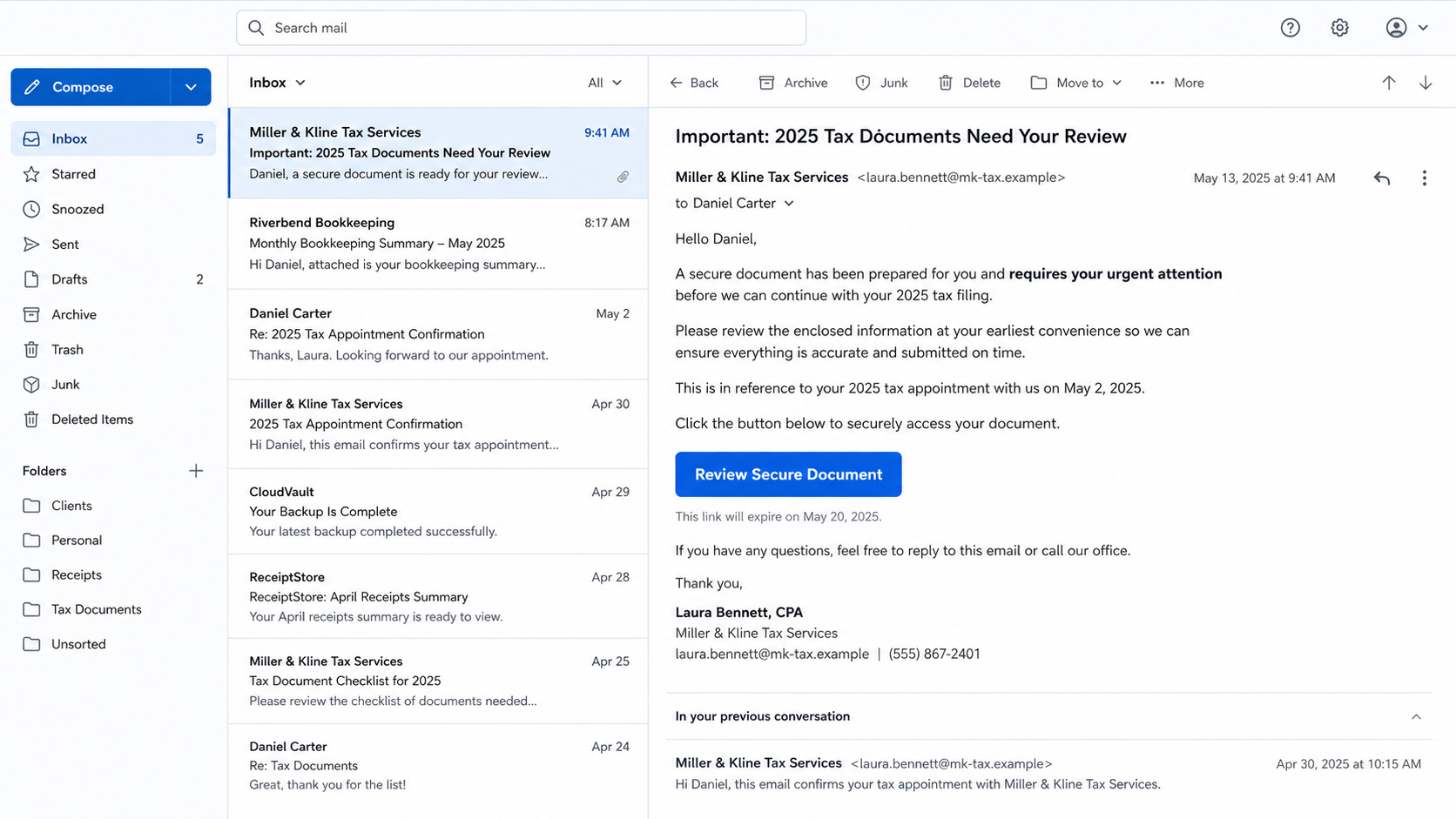
The message lands inside a familiar conversation. It comes from the accountant’s real address, mentions tax documents, and may even refer to an appointment you actually had.
The compromised accountant email scam removes the obvious warning of an unknown sender. The criminal has borrowed a mailbox that clients already trust and uses a document button to reach the information hidden behind their own email accounts.
The request looks routine because the dangerous part happened before the client ever received it.
Overview
The phishing message can come from a real accountant’s account
The compromised accountant email scam begins after criminals gain access to a CPA, bookkeeper, tax preparer, or accounting employee’s mailbox. Instead of immediately locking out the owner, the attacker may quietly read conversations and contact clients from the legitimate address.
This changes the normal risk calculation. The sender passes authentication checks because the message really did leave the compromised account. The display name, address, signature, and previous thread can all be genuine while the new request is fraudulent.
A recent example involved clients receiving an “important document” from an accountant’s actual email address. The same lure reached more than one client, which is the scalable pattern: compromise one trusted professional, then use that position to reach an entire client list.
The document link is a gateway to credential theft
The email claims a return, tax organizer, invoice, refund file, or secure message requires urgent review. Clicking the button opens a page that resembles a cloud-storage or secure-document portal and asks the client to sign in with email.
The document is bait. The page is controlled by the attacker, so the username, password, and any one-time code entered there can be captured. The criminal may use those credentials in real time before the victim realizes the file never opened.
The IRS warns that criminals who compromise tax professionals can use the hacked email account to target clients. Tax firms hold exactly the relationships and sensitive context that make these messages persuasive.
A stolen client mailbox can expose tax and financial data
Once the client email is compromised, the attacker can search for W-2 forms, tax returns, Social Security numbers, bank statements, payroll files, identity documents, and password-reset messages. The mailbox may also unlock shopping, cloud, social, and financial accounts.
The attacker can repeat the same method from the client’s account. Coworkers, relatives, customers, and vendors receive a new “secure document” from someone they know. One compromised tax office can therefore start several layers of trusted-sender phishing.
Warning signs include:
- An unexpected tax document is marked urgent without explaining what changed.
- The email asks you to sign in to view a file you did not request.
- The link opens a domain unrelated to the accountant or known document provider.
- The page requests your email password rather than an account created for the portal.
- A one-time email login code is described as document verification.
- The message arrives inside an old thread but does not match the earlier conversation.
- The accountant cannot confirm the file by phone.
- The reply-to address differs from the visible sender.
- The password manager does not recognize the supposed email login.
- A login alert appears from an unfamiliar location after you click.
How the Compromised Accountant Email Scam Works
Step 1: The attacker targets the tax professional
Accounting practices are attractive targets because one mailbox may connect to hundreds of people and years of financial records. Criminals send the firm fake client inquiries, tax-software notices, cloud-storage alerts, or account-security messages.
An attachment may install malware, while a copied login page steals the employee’s email or document-platform credentials. The IRS lists urgent messages from trusted-looking sources among the spearphishing signs tax professionals should recognize.
Step 2: The criminal studies the mailbox before sending
A patient attacker reviews sent messages, signatures, client names, upcoming deadlines, shared-file habits, and the language the accountant uses. That information allows a lure to fit the relationship instead of sounding like generic spam.
The criminal may also create forwarding rules or filters that copy replies and hide security alerts. Staying quiet preserves access and prevents the accountant from warning clients too early.
Step 3: Clients receive a trusted-looking document request
The attacker sends a message from the real account or replies within an existing thread. The subject may mention a return, amended filing, signature request, secure tax organizer, invoice, or documents that need review.
Urgency is modest but effective. “We cannot continue filing until you review this” sounds like an administrative problem, not a threat. Tax deadlines make the request even harder to postpone.
Step 4: The link opens a counterfeit document portal
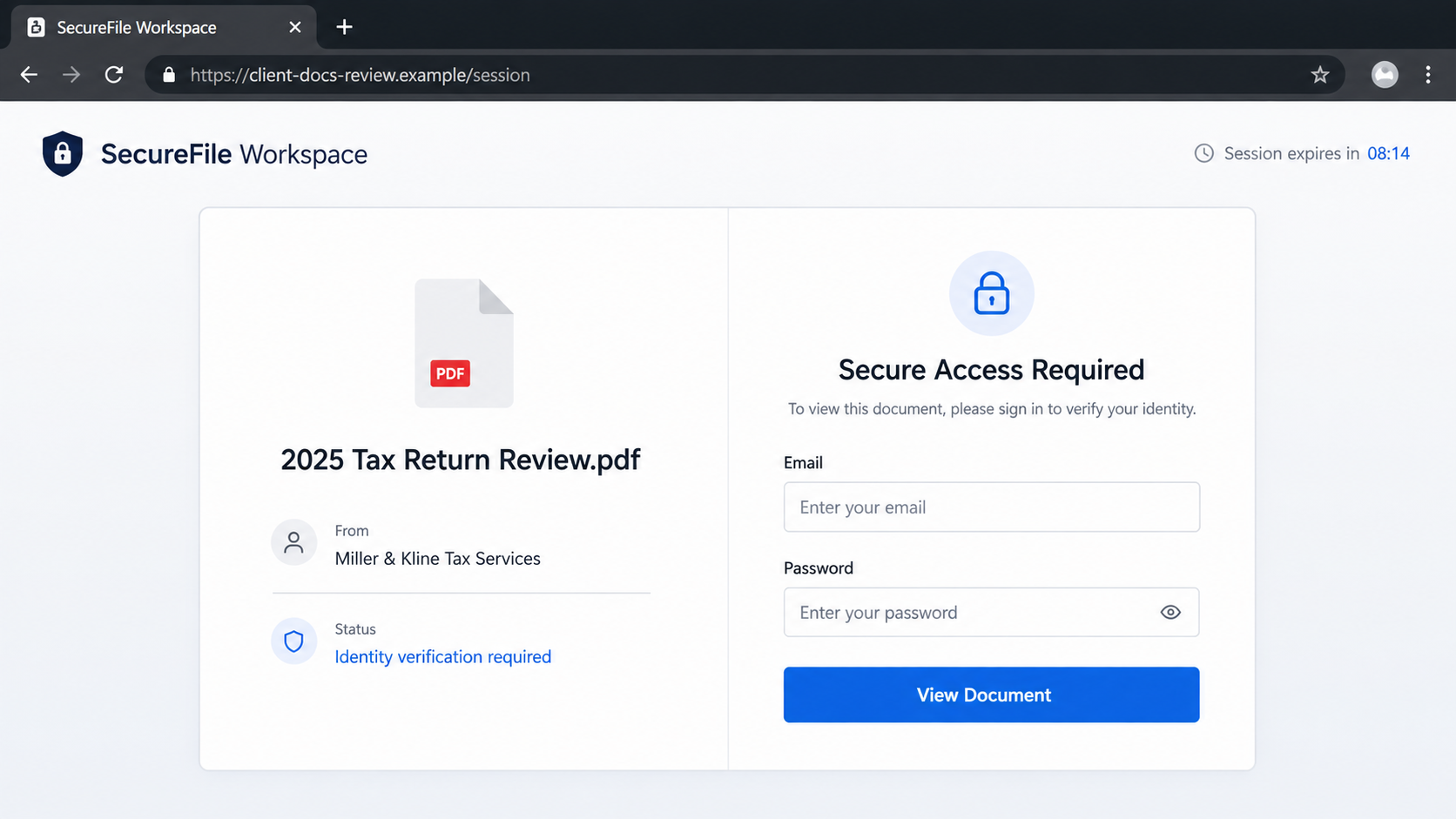
The landing page shows a PDF name, the accounting firm’s name, and a lock icon. It may claim the file is protected because it contains tax information. These elements explain why the victim cannot see the document immediately.
The browser address exposes the deception. The registered domain belongs to neither the accountant nor the claimed storage service. A padlock shows encryption to that domain, not the identity of its owner.
Step 5: The victim enters email credentials
The page says the recipient must verify the address that received the file. It may offer generic buttons for several providers and then ask for the full email password.
A secure-document service does not need the password to an unrelated mailbox. It can authenticate through its own account, send a one-time access link, or use a legitimate provider authorization page hosted on that provider’s real domain.
Step 6: Real-time phishing requests the second factor
The criminal may immediately try the stolen credentials on the real email service. If a login code or approval prompt appears, the fake portal asks the victim to enter it as a document access code.
Read the original security message. If it says the code signs in to email, resets a password, or must not be shared, the document page is attempting to hijack the account.
Step 7: The attacker searches, persists, and impersonates
Inside the mailbox, the criminal looks for tax records, bank details, identity documents, invoices, and reset links. They may add a recovery address, app password, forwarding rule, or connected application to keep access after a password change.
Messages can then be sent to the new victim’s contacts or used to alter payment instructions in a real business conversation. The original document lure becomes a broader identity and payment fraud operation.
Step 8: Tax identity theft may follow later
Stolen taxpayer data can be used to file fraudulent returns, open accounts, or answer identity checks. The first visible sign may be an unexpected IRS notice or a legitimate return rejected because another return already used the Social Security number.
The delay makes rapid reporting important. The accountant, email provider, IRS, financial institutions, and affected clients may need to act before the next filing or payment attempt.
Why the Sender Address Is Not Enough
Checking the sender remains useful, but it answers only one question: which account sent the message? It does not prove who controlled that account at the time. In an account-takeover campaign, the address is genuine and the person behind it is not.
Look at the request in context. Did you expect a document? Would this accountant normally share files through that service? Does the link use the established portal? Would they ask you to enter an email password rather than the portal password?
Thread history also has limits. An intruder can reply to a real conversation and see the details needed to make the new message fit. A call to a number already on file is stronger verification than another email reply to a compromised mailbox.
Digital signatures and authentication results can show that a message came through the accountant’s domain. They cannot identify which human was operating the mailbox. Technical legitimacy at the sending layer can coexist with criminal intent at the account layer.
What Criminals Search for in a Tax-Related Inbox
Tax returns combine identity, income, address, dependent, and banking data in one document. W-2 and 1099 forms identify employers and earnings. Scans of driver’s licenses or Social Security cards can support account opening and identity verification.
Email search makes this material easy to find. Keywords such as tax, W-2, refund, routing, payroll, return, Social Security, invoice, wire, and statement can surface years of sensitive conversations in minutes.
Password-reset messages reveal which services use the address. Travel receipts and calendar events reveal when the victim may be unavailable. Sent mail shows vendors, relatives, and coworkers who may trust a financial request.
Do not focus only on the latest tax year. An older return can still contain a birth date, prior address, dependent information, and signature. Assume the attacker could read whatever the mailbox account could read during the compromise.
If tax files were stored in a linked cloud drive, the damage may extend beyond email. Review connected storage, document-sharing permissions, download activity, and recent files, then revoke unfamiliar sessions and applications.
Company, Address, and Fulfillment Checks
Call the accountant through a known number
Use the number from an earlier statement, engagement letter, established website, or contact entry you already had. Do not use a number added to the suspicious email.
Confirm the document and delivery method
Ask for the file name, purpose, and normal client portal. If the firm did not send it, tell them their mailbox or identity may be compromised so they can warn other clients.
Inspect the final domain
Hover over the button or press and hold without opening it. Compare the registered domain with the accountant’s official site and the known document provider. Similar words do not establish ownership.
Reject unrelated email authentication
A tax portal may have its own account. It should not collect the password or one-time sign-in code for your independent email provider on an unfamiliar domain.
What to Do if You Have Fallen Victim to This Scam
- Change the email password now. Use the provider’s official app or type its known address. Choose a unique password you have never used elsewhere.
- End unauthorized sessions. Review recent devices, locations, browser sessions, and sign-in history. Remove everything unfamiliar and sign out other sessions if the provider allows it.
- Repair two-factor authentication. Remove unknown phone numbers, authenticators, security keys, recovery addresses, and backup codes. Create new backup codes.
- Inspect forwarding and filtering. Delete rules that copy, hide, archive, or delete mail without your knowledge. Check trash, spam, and blocked-sender lists for missing warnings.
- Revoke connected access. Review app passwords, mail delegates, third-party applications, cloud-storage connections, and OAuth grants. Remove anything you do not recognize.
- Call the accountant. Use a trusted number and report the exact message, link, time, and credentials entered. Ask what tax or identity data may have been exposed on their side.
- Protect tax identity. Discuss an IRS Identity Protection PIN and other appropriate steps. Watch for unexpected tax-account activity, authentication letters, or rejected filings.
- Protect financial accounts. Change reused passwords and contact banks if the mailbox contained banking details or if you entered information beyond the email login.
- Warn contacts separately. Tell recipients not to open recent document links from your account. Use phone, SMS, or another trusted channel because email replies may still reach the attacker.
- Scan the device when needed. If the page downloaded an attachment, extension, or software, disconnect from sensitive accounts and run a full Malwarebytes scan.
- Reduce repeat phishing exposure. AdGuard can block many known malicious-ad and phishing destinations after cleanup. It cannot verify a trusted sender whose mailbox has been compromised.
- Report the incident. Tax professionals can follow the IRS reporting instructions. Victims should also notify the email provider, FTC, financial institutions, and local authorities when appropriate.
- Ignore recovery agents. Anyone demanding money, credentials, or remote access to recover the account or tax data is creating a second risk.
Frequently Asked Questions
Can a phishing email pass normal sender checks?
Yes. If a criminal controls the accountant’s real mailbox, the message can be sent through legitimate servers and pass authentication. Verify unusual requests separately.
Should I reply and ask whether the document is real?
No. The attacker may read and answer replies. Call the accountant using a number you already trust or one found independently.
What if I entered my password but changed it immediately?
That helps, but also review active sessions, forwarding rules, recovery methods, app passwords, and connected applications. The attacker may have created persistence before the change.
Does a real PDF name make the portal legitimate?
No. File names, firm names, and lock icons are easy to copy. The domain, expected workflow, and independent confirmation matter more.
Could the attacker file a tax return in my name?
Stolen tax and identity data can support fraudulent filings. Contact the accountant and IRS promptly, monitor your tax account, and consider an Identity Protection PIN.
Is the accountant responsible for every suspicious message?
Responsibility depends on facts and law. The immediate priority is containment: secure both accounts, identify exposed data, warn clients, and follow required breach and tax reporting steps.
The Bottom Line
The compromised accountant email scam works because a real sender address feels like the end of verification. In this campaign, it is only the beginning. The familiar mailbox is the asset the criminal stole first.
No tax document needs the password to your unrelated email account. Confirm unexpected files by phone, inspect the final domain, and treat any request for an email login or security code as an account-takeover attempt.

Join the discussion
0 commentsShare your experience or ask a question about this article.
Discussion
Start the conversation
Have a question or something useful to share? Add the first comment.