

The cryptocurrency sphere has seen its fair share of scams seeking to defraud crypto holders of their digital assets. The latest scheme observed targeting the crypto community is the “SyncAI Wallet Connection” phishing scam.
This threat is hosted on blockchainmiddleware.pages.dev but could be promoted through other domains too. It impersonates the legitimate SyncAI platform (syncai.network) to trick users into providing their wallet passphrases and steal their funds.
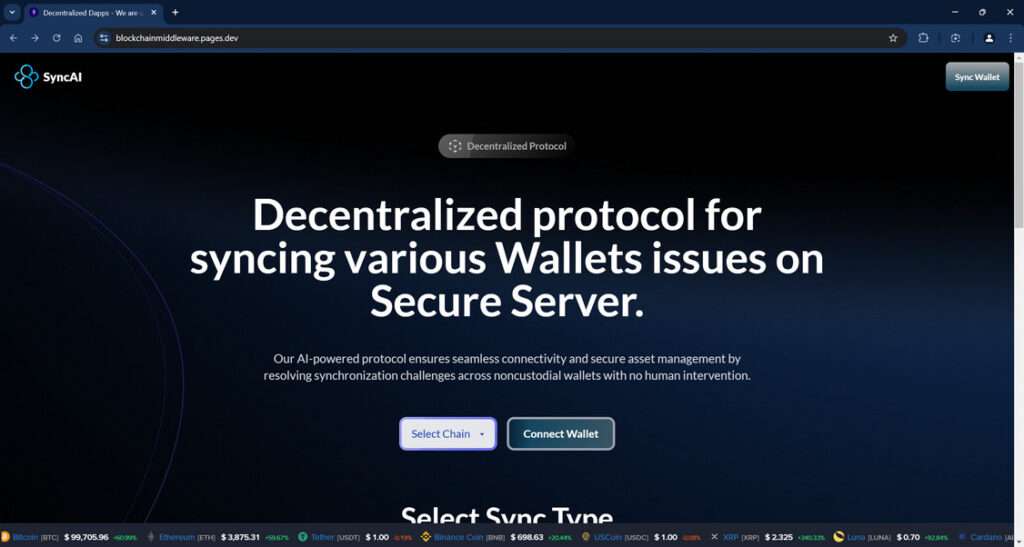
Overview of the SyncAI Wallet Connection Scam
The SyncAI Wallet Connection scam is a dangerous phishing threat observed actively targeting the cryptocurrency community. This fraudulent scheme aims to trick unwitting crypto asset holders into surrendering their wallet login credentials under the false premise of syncing, migrating or validating their wallets.
In reality, the fake website is designed to harvest and steal the secret passphrases and private keys required to access digital currency wallets. Once obtained, the scammers can easily drain any funds held in the compromised wallets given the irreversible nature of cryptocurrency transactions on the blockchain.
The elaborate ruse manages to appear credible by cloaking itself in the likeness of the legitimate SyncAI platform. SyncAI offers a decentralized infrastructure framework to seamlessly connect various blockchains, users, and decentralized applications.
However, the SyncAI Wallet Connection phishing site has zero affiliation with the real SyncAI or any other existing entity. It simply impersonates their interface and brand to take advantage of their reputation in order to trick victims more easily.
We initially uncovered the scam hosted on a lookalike domain called blockchainmiddleware[.]pages[.]dev. But the fraudsters frequently switch up domains and hosting providers to avoid takedowns. They are known to register throwaway domains resembling the names of popular cryptocurrency companies and platforms.
The scammers heavily promote the fake wallet sync links across cryptocurrency forums, social media platforms, messaging apps like Telegram and Discord, email spam campaigns, and more. They pose as representatives, admins or support staff of SyncAI to get users to click.
For example, a post may claim “The SyncAI Wallet Connection is undergoing upgrades. Please sync your wallet to avoid disruption.” Another tactic is for scammers to directly message forum members prompting them to validate their wallet via an official-looking link.
These social engineering techniques psychologically manipulate victims into accessing the scam site and inputting their passphrase thinking it is required for a legitimate reason like a wallet upgrade, validation or migration.
By far the most dangerous element of this scam is the theft of the wallet credentials. The passphrases and private keys enable full access to crypto wallets, allowing the transfer of funds out. Once scammers initialize transfers from drained wallets, it’s virtually impossible for victims to recover their stolen digital assets.
So this scam poses severe financial risk to anyone tricked into visiting the fake site and surrendering their wallet credentials. The SyncAI name and likeness simply acts as an effective lure due to their reputation. This forces the real SyncAI team to continuously warn users about ongoing impersonation.
How the SyncAI Wallet Connection Scam Works
Here is an outline of how the scam operates to compromise cryptocurrency wallets:
Step 1 – Promoting the Fake Site
The fraudsters promote the phishing site online to drive traffic. They post links on forums, social media, and messaging platforms posing as legitimate SyncAI staff.
Step 2 – Victims Access the Scam Page
Targeted crypto asset owners click the link and land on the phishing site. The scam site copies the design of the real SyncAI site to look authentic.
Step 3 – Prompting Victims to Connect Their Wallet
The site prompts visitors to connect their wallet to sync, migrate or validate it. An official-looking form asks users to enter their wallet passphrases.
Step 4 – Capturing the Passphrases
When victims enter their secret wallet passphrases and click Submit, the credentials are recorded and sent to the scammers.
Step 5 – Draining the Wallets
Using the captured passphrases, the fraudsters gain access to the victims’ wallets and drain the funds within. As crypto transactions are irreversible, retrieving the stolen assets is nearly impossible.
What to Do If You’ve Fallen Victim to This Scam
If you suspect you’ve been targeted by the fake SyncAI Wallet Connection scam and surrendered your passphrase, take these steps:
- Move any remaining funds from the compromised wallet to a brand new crypto wallet immediately.
- Reset the passphrase for the old wallet to prevent further losses.
- Scan your device for malware in case the scam site infected your system.
- Notify your crypto exchange about the security breach.
- Report the scam website to hosting providers and authorities. Provide any emails from the scammers.
- Alert cybersecurity experts and the crypto community to raise awareness about the threat.
- Seek professional help from forensic investigators specialized in blockchain to trace the transactions.
Frequently Asked Questions about the SyncAI Wallet Connection Scam
1. What is the SyncAI Wallet Connection scam?
The “SyncAI Wallet Connection” scam is a phishing threat designed to steal cryptocurrency wallet login credentials and drain user funds. It masquerades as the legitimate SyncAI platform to trick victims into surrendering their wallet passphrases under the guise of syncing, migrating or validating their wallets.
2. How does the SyncAI Wallet Connection scam work?
The fraudsters promote fake wallet sync links on forums, social media, and messaging apps posing as SyncAI representatives. Victims click the links, land on the phishing site imitation SyncAI’s design, and are prompted to connect their wallet. When users enter their secret passphrases and click submit, the credentials are captured and used by scammers to access and empty their wallets.
3. What details are captured in this scam?
The fake SyncAI Wallet Connection site tricks victims into entering their wallet addresses and passphrases/private keys required to access cryptocurrency wallets. These credentials allow scammers to log in and initiate irreversible transfers out of the compromised wallets.
4. Which cryptocurrency wallets are being targeted?
The SyncAI scam appears to target a broad range of cryptocurrency wallets including MetaMask, Trust Wallet, Coinbase Wallet, and other non-custodial wallets. Any wallet that requires a passphrase or private key to access is at risk.
5. How can I identify the fake SyncAI Wallet Connection site?
Look out for wallet sync links promoted on social media, Slack, Telegram, Discord, Reddit, or suspicious emails. The phishing site copies elements of the real SyncAI site design but uses a different domain like blockchainmiddleware[.]pages[.]dev. Real SyncAI links should go to syncai.network.
6. I entered my wallet details on the fake site. What should I do now?
If you surrendered your passphrase, immediately transfer any remaining funds to a brand new wallet. Also, reset your compromised wallet’s passphrase, scan devices for malware, notify exchanges, and contact authorities to report the scam.
7. Can victims recover funds lost in this scam?
Unfortunately, recovering stolen cryptocurrency is very rare due to the irreversible and semi-anonymous nature of blockchain transactions. But reporting the scam can help prevent further losses by exposing the threat.
8. How can I stay safe from the SyncAI phishing scam?
Avoid clicking wallet sync links unless you initiated the action. Use complex passphrases, enable two-factor authentication, verify links lead to legitimate sites, and keep antivirus software updated to detect phishing scams.
9. Where can I report cases of the SyncAI Wallet Connection scam?
Report phishing sites to hosting providers, crypto exchanges, cybersecurity teams, and authorities such as the FBI’s Internet Crime Complaint Center (IC3). Provide as many details as possible to expose the threat.
10. How can the cryptocurrency community combat this scam?
Raising awareness in crypto forums, social platforms, and messaging channels about phishing techniques can help users identify and avoid these scams. Also, pressure hosting providers to swiftly take down reported fake wallet sync sites.
The Bottom Line
The SyncAI Wallet Connection scam exemplifies why extra vigilance is warranted when dealing with cryptocurrencies. Look out for fake sites impersonating legitimate platforms and never enter your passphrase unless you initiated the action to connect your wallet.
With crypto scams on the rise, it pays to take security precautions. Always verify links, use secure passphrases, enable two-factor authentication, and keep your antivirus software up to date.
Staying informed about the latest cryptocurrency phishing threats like this fake SyncAI site allows you to recognize and avoid falling victim. Spreading awareness can help protect the crypto community from fraudulent schemes targeting their assets.

Join the discussion
0 commentsShare your experience or ask a question about this article.
Discussion
Start the conversation
Have a question or something useful to share? Add the first comment.