

Shoes that allow people to float in the air? As futuristic as it sounds, humanity is not quite at the stage of defying gravity with wearable footwear. Yet social media has recently been flooded with videos claiming to showcase “Tesla Glide” flying shoes — sneakers supposedly capable of lifting the wearer several inches off the ground.
The clips show a presenter stepping onto a stage, rising effortlessly into the air, and gliding smoothly above the floor while a cheering audience watches in amazement. The backdrop displays a large “TESLA GLIDE – The Future of Motion” logo, making the entire demonstration appear like an official Tesla product launch.
But is any of this real? Let’s break down the facts.
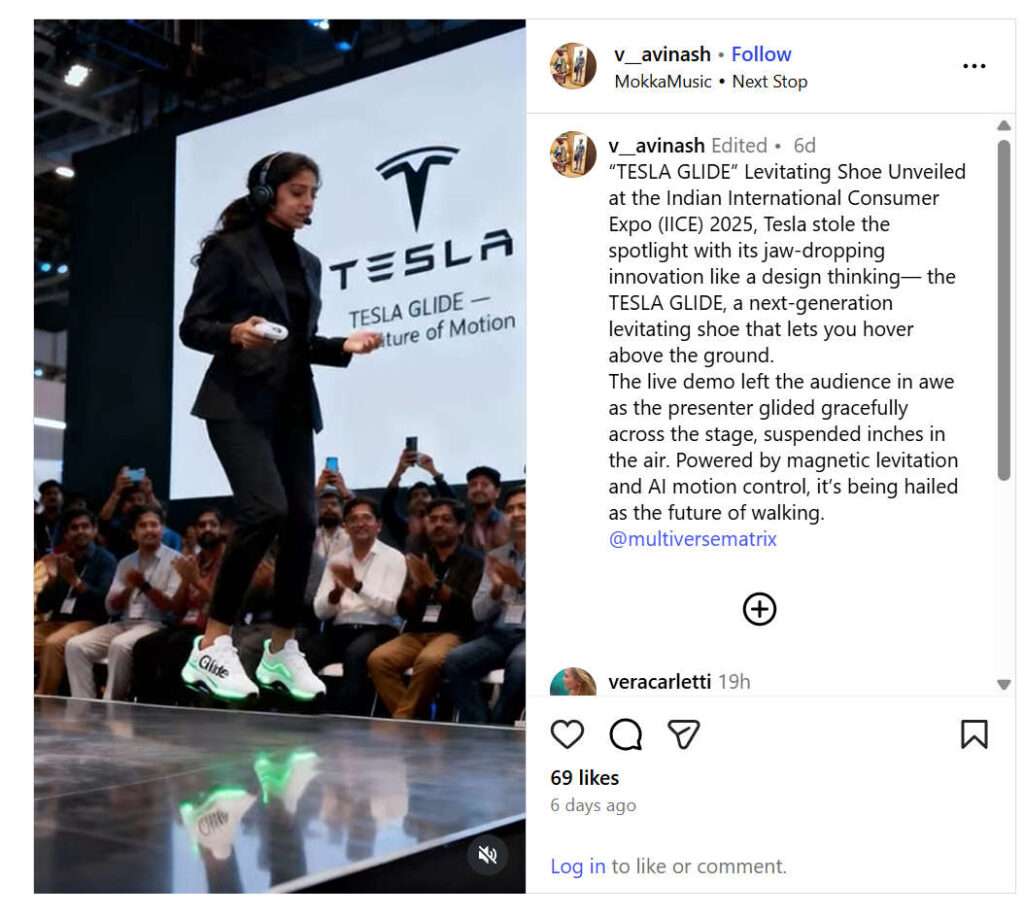
What the Viral Video Claims to Show
The viral clips, circulating on Instagram, TikTok, and YouTube, appear to be filmed at a major tech event. They show:
- A woman wearing glowing white and green sneakers labeled “Glide”.
- The presenter hovering several inches above the stage.
- Smooth gliding motions that resemble anti-gravity levitation.
- A crowd of spectators watching and applauding.
- A giant Tesla logo projected behind the stage.
To a casual viewer, it looks like Tesla has invented flying footwear powered by magnetic levitation or advanced AI-driven propulsion.
However, a closer examination reveals several signs that expose the video as digitally manipulated.
The Truth: The Tesla Glide Shoes Are Not Real
The viral “Tesla Glide” shoes are entirely fake.
The videos are AI-generated deepfakes, not a real Tesla product demonstration.
Here is the verifiable evidence:
1. No Announcement From Tesla or Elon Musk
Tesla’s official channels, including their website and verified social media accounts, have made no announcements about flying shoes, levitating footwear, magnetic propulsion sneakers, or anything similar.
Elon Musk, who announces even experimental ideas publicly, has never mentioned such a product.
A real Tesla innovation would be covered by major outlets like Reuters, TechCrunch, Bloomberg, or CNBC. None have reported anything of the kind.
2. The Audience in the Video Is AI-Generated
A closer look at the spectators reveals:
- Faces morphing unnaturally.
- Background people shifting positions frame by frame.
- Expressions that distort as if melting or blending.
- Movements that do not match real human behavior.
These are classic signs of AI-generated audience models, not real attendees at an actual tech expo.
3. The Levitation Physics Look Unrealistic
The presenter’s movement in the air is too:
- Smooth
- Weightless
- Gliding
- Without body adjustments or balance correction
Humans cannot float in this manner even with advanced robotics or magnetic systems. The animation resembles CGI motion tracking, not real physics.
4. Deepfake Art Accounts Are the Source
The video originates from creators known for producing AI concept videos, including Multiverse Matrix and other digital-art pages.
These accounts frequently post fictional products such as:
- Hover shoes
- Flying cars
- Anti-gravity backpacks
- Magnetic lift furniture
The creators typically mention in the caption or comments that the videos are concept art or AI demonstrations.
No Tesla Connection Whatsoever
Tesla has not:
- Filed patents for levitating shoes
- Revealed prototypes
- Mentioned wearable motion technology
- Announced any product called “Glide”
There is zero evidence linking the viral video to Tesla, its engineers, or its product development teams.
The branding in the video is simply digitally inserted to make the illusion more convincing.
Not the First Flying Shoe Hoax
The Tesla Glide video follows a growing trend of fake tech inventions created using AI and CGI.
Recent viral examples include:
“Aerofoot Shoes”
An AI-generated video by digital artist Jyo John Mulloor, showing a man walking several feet above the ground, supposedly at “Gitex 2029.”
Mulloor later confirmed it was pure digital art, not a real invention.
“Tata Float Shoes”
Another deepfake video showed levitating shoes with Tata branding.
The creator admitted the clip was AI-generated.
“Maglev Sneakers”
Fabricated concept videos claimed to show sneakers floating over magnetic rails — also proven to be CGI.
The Tesla Glide clip fits perfectly into this pattern of viral AI concept hoaxes.
Can Flying Shoes Exist in the Future?
While fascinating, levitating footwear faces enormous scientific challenges:
- Human weight requires extremely powerful magnets or propulsion systems.
- Levitation requires a controlled magnetic surface, not regular floors.
- Battery technology cannot currently power personal lift devices of this size.
- Stability, balance, and safety would be major engineering obstacles.
Even advanced prototypes of hoverboards require special magnetic tracks, making flying shoes impractical with present technology.
So while future breakthroughs may one day enable limited levitation, consumer flying shoes do not exist today in any form.
The Bottom Line
The Tesla Glide flying shoes are fake.
The viral videos are AI-generated deepfakes, not a real Tesla product, not a live demonstration, and not an innovation announced by Elon Musk or the company.
The technology shown in the clip does not exist, and the audience, branding, and levitation effects are digitally created for entertainment and viral engagement.
In a digital world where AI visuals look increasingly realistic, viewers must be cautious and verify sensational claims before believing or sharing them.








