

Tetherly WiFi claims to be a revolutionary portable 4G LTE hotspot device offering blazing fast internet in over 75 countries, without contracts or hidden fees. It promises speeds up to 150 Mbps and the ability to connect up to 10 devices simultaneously. On the surface, it sounds like the perfect solution for travelers, remote workers, and anyone tired of unstable Wi-Fi. But many are beginning to ask: is Tetherly WiFi actually a scam?
In this in-depth article, we’ll explore the red flags, dissect the tactics behind the operation, and walk you through what to do if you’ve been caught in the trap.
Let’s begin by taking a closer look at the scam signs that should make you pause before hitting “buy.”

Scam Overview
Tetherly WiFi, marketed through get-tetherlywifi.com, is widely advertised as a compact, ultra-fast global hotspot. But a deeper look into the company and its marketing strategy reveals a series of red flags that point to a classic dropshipping scam.
1. Aggressive Marketing Tactics
The website bombards visitors with flashing discounts, countdown timers, and urgent popups like “Only 3 Left in Stock” or “John from Texas just bought one!” These techniques are psychologically designed to create a sense of urgency and fear of missing out (FOMO).
But urgency isn’t always a bad thing — unless it’s being used to pressure you into making a decision before verifying the product’s legitimacy. This tactic is especially common in scams where the goal is to convert as many customers as possible before negative reviews begin surfacing online.
2. Recently Registered Domain
The website was only registered on March 11, 2025 — a major warning sign. A new domain combined with massive discount offers and bulk deals is typical of fraudulent operations. Scammers rely on these short bursts of traffic before they shut down and relaunch under a new name.
3. Reused Contact Information
The customer support phone number listed on the site is also used on multiple unrelated websites. This suggests the number may be generic or even completely fake, providing no real method of customer support.
Legitimate companies rarely reuse phone numbers across different businesses unless they are part of a larger network — which Tetherly WiFi does not appear to be.
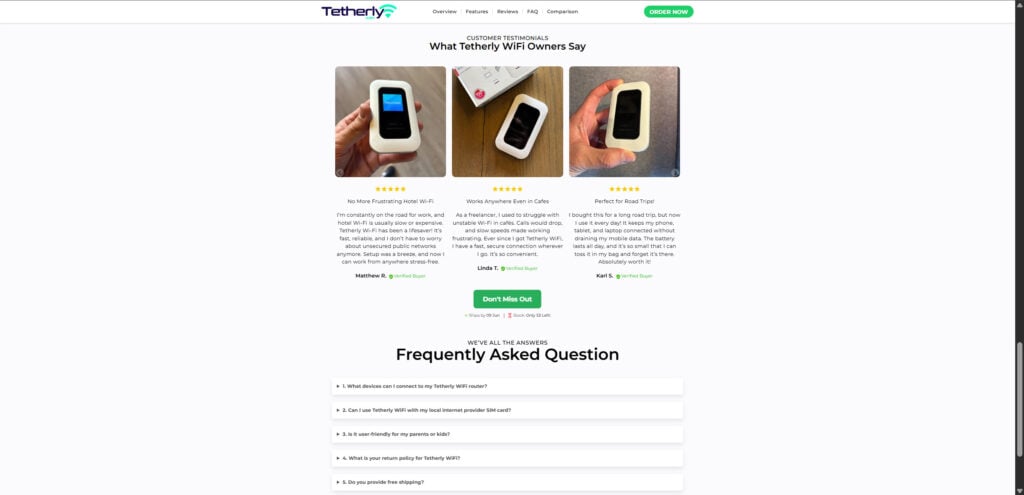
4. Fake and Controlled Reviews
The Tetherly WiFi site only displays glowing 5-star reviews, all of which are housed on their own platform. There are no legitimate third-party reviews on trusted consumer review sites like Trustpilot, SiteJabber, or Reddit.
Additionally, the testimonial images are highly staged and repeated in multiple formats — another indicator that they could be stock photos or entirely fabricated.
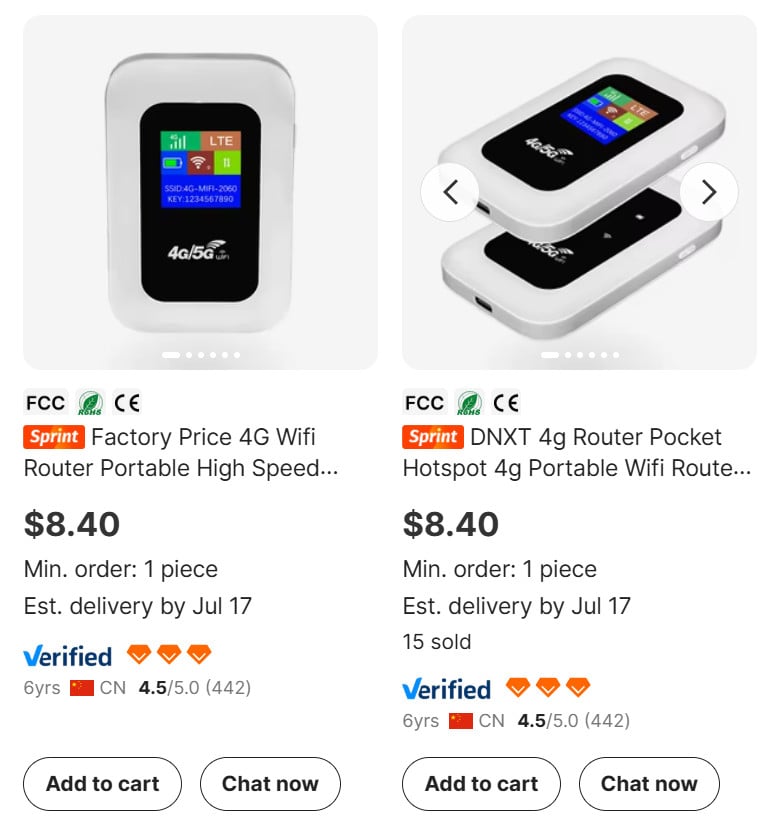
5. Dropshipping From Alibaba
An identical device is available on Alibaba for $8.40, advertised as a generic 4G router. This confirms that Tetherly WiFi is simply dropshipping cheap products from overseas suppliers and marking them up dramatically — in this case, up to $79.95 per unit.
When companies fail to disclose this business model transparently, it’s often because they are masking the fact that their product has not been tested, certified, or supported in any meaningful way.
6. Too-Good-to-Be-True Promises
The marketing claims are overly ambitious:
- “Connect up to 10 devices”
- “Works in 75+ countries”
- “No contracts, no roaming fees”
- “Up to 150 Mbps download speeds”
While technically possible, such claims usually depend on robust SIM cards, premium networks, and regulatory approvals — none of which are backed up by Tetherly WiFi with verifiable evidence.
7. No Refund Accountability
Buyers who have attempted to get refunds report being ignored or redirected endlessly. There is no real return infrastructure in place, and customer complaints online indicate that once the product is delivered (often weeks later), you’re unlikely to get your money back if it doesn’t work as advertised.
How The Scam Works
Step 1: Creation of a Hype Website
Scammers set up a clean, modern-looking eCommerce site with high-conversion elements: 5-star reviews, professional product videos, testimonials, and a limited-time offer banner.
They usually register the domain recently, just like get-tetherlywifi.com, to begin a short-term, high-volume sales cycle.
Step 2: Fabricated Social Proof
All customer reviews and testimonials are internally controlled. There are no verifiable purchase records, and images often show generic or stock product photos.
The goal is to simulate trust and legitimacy. Without third-party reviews or consumer feedback, potential customers are misled into believing the product is universally loved.
Step 3: Dropshipping Cheap Tech
Once an order is placed, the seller buys the product directly from a Chinese supplier, such as the listings seen on Alibaba. The wholesale price is under $10, and it’s shipped via low-cost carriers that can take several weeks.
There’s often no quality control, no custom firmware, and no real tech support behind these devices.
Step 4: Over-Promise, Under-Deliver
The device arrives, often poorly packaged and lacking instructions. Buyers quickly discover:
- It doesn’t work in many regions
- The speed is nowhere near 150 Mbps
- SIM compatibility is questionable
- It overheats or stops working entirely
By the time the buyer realizes the product isn’t what was promised, the return window is effectively closed.
Step 5: No Support, No Refunds
When buyers reach out for help, they’re met with silence or vague automated responses. If they request a refund, they’re often told:
- The product must be returned to a warehouse overseas
- Refunds are only possible for unopened boxes
- The support team is “escalating” the case
These tactics stall and exhaust the buyer until they give up or run out of time to file a claim with their credit card company or PayPal.
Step 6: Rinse and Repeat
Once complaints catch up or sales slow down, the operation shuts down the website and opens another one under a new name, using the same tactics. Because of the dropshipping model and lack of accountability, the scam can be restarted in days.
What To Do If You’ve Fallen Victim to the Tetherly WiFi Scam
If you’ve already purchased a Tetherly WiFi device and feel you’ve been scammed, here’s what you should do immediately:
1. Stop Further Charges
If you paid with a credit card, contact your bank immediately to dispute the transaction. Explain that the product was misrepresented and that the seller is unresponsive. Ask them to initiate a chargeback.
If you paid through PayPal, file a dispute under “Item Not as Described” as soon as possible.
2. Document Everything
Save all email correspondence, screenshots of the website, your order confirmation, and pictures of the device once it arrives. This documentation can strengthen your case during a dispute.
3. File a Complaint
Report the scam to the following organizations:
- FTC Complaint Assistant
- Internet Crime Complaint Center (IC3)
- Your local consumer protection agency
- Better Business Bureau (if applicable)
4. Leave Honest Reviews
Help warn others by posting your experience on platforms like:
- Trustpilot
- Reddit (subreddits like r/scams or r/tech)
- ProductReview.com
- Your social media
5. Check for Identity Theft
If you entered any sensitive data during checkout, consider monitoring your bank accounts or placing a temporary credit freeze. Some scam sites harvest more than just your payment.
6. Alert Others
Share this article and your experience with others. These scams thrive in silence. Even a simple post on Facebook or a review can help someone avoid a costly mistake.
The Bottom Line
Tetherly WiFi might look impressive at first glance, but behind the flashy marketing and big promises lies a textbook dropshipping scam. With aggressive sales tactics, suspicious contact details, untraceable reviews, and cheap imported devices marked up to sky-high prices, it’s clear this operation prioritizes profit over trust.
If you’re considering buying a portable WiFi hotspot, look for well-reviewed models from reputable tech brands with a clear return policy, genuine customer support, and transparent pricing. When a deal looks too good to be true — especially from a company that didn’t exist a few months ago — it usually is.
Stay informed, stay skeptical, and always research before you buy.
Frequently Asked Questions About Tetherly WiFi
Is Tetherly WiFi a legitimate product?
No, there is strong evidence to suggest that Tetherly WiFi is not a legitimate product. It is part of a dropshipping operation using aggressive marketing and exaggerated claims to sell low-cost devices at a significant markup. The company offers little to no customer support and has a history of refusing refunds.
How much does Tetherly WiFi actually cost to manufacture?
The same device marketed as Tetherly WiFi is available on wholesale platforms like Alibaba for as low as $8.40. The Tetherly website sells it for up to $79.95, indicating a massive markup with no added value in support, warranty, or technical features.
Why are the reviews on the website so positive?
All the reviews shown on the Tetherly WiFi website appear to be controlled, filtered, or fabricated. They are not found on trusted third-party platforms. There is no independent verification of these testimonials, and many show signs of being written by the company itself.
Can I get a refund if I bought this and it doesn’t work?
Most buyers report that refunds are difficult or impossible to obtain. The company often ignores support tickets, uses stalling tactics, or claims that products must be returned to difficult overseas locations, often at the buyer’s expense. This is a hallmark of scam-based operations.
What makes this a scam rather than just a bad product?
A scam involves deliberate deception. Tetherly WiFi uses misleading claims about speed, coverage, and features, offers fake urgency tactics, and withholds truthful information about the product’s origin. When complaints arise, they avoid responsibility and deny support or refunds, which crosses the line from poor service to fraudulent activity.
What should I do if I already bought one?
You should immediately dispute the charge with your bank or PayPal. Gather all documentation related to the purchase and report the company to relevant authorities like the FTC and IC3. Sharing your experience online can also help warn others.
Does the Tetherly WiFi device even work?
Some buyers report that the device turns on, but performance is inconsistent at best. It often fails to connect to networks as advertised, and speeds rarely approach the promised 150 Mbps. It may not work at all depending on your country or mobile provider.
Is Tetherly WiFi available in retail stores?
No, Tetherly WiFi is only sold through its own website. It is not backed by any reputable retailer or verified third-party seller. This limits consumer protection options significantly.
Are there safer alternatives to Tetherly WiFi?
Yes. Brands like Netgear, TP-Link, and Huawei offer portable WiFi hotspots with verified reviews, proper tech support, and transparent return policies. Always purchase from reputable vendors with clear warranty and customer service channels.
How can I avoid scams like this in the future?
Always research a product before buying. Look for third-party reviews, check the domain registration date of the website, and investigate the company’s online presence. Be wary of new websites offering deep discounts, high-pressure sales tactics, and promises that sound too good to be true.

Join the discussion
0 commentsShare your experience or ask a question about this article.
Discussion
Start the conversation
Have a question or something useful to share? Add the first comment.