

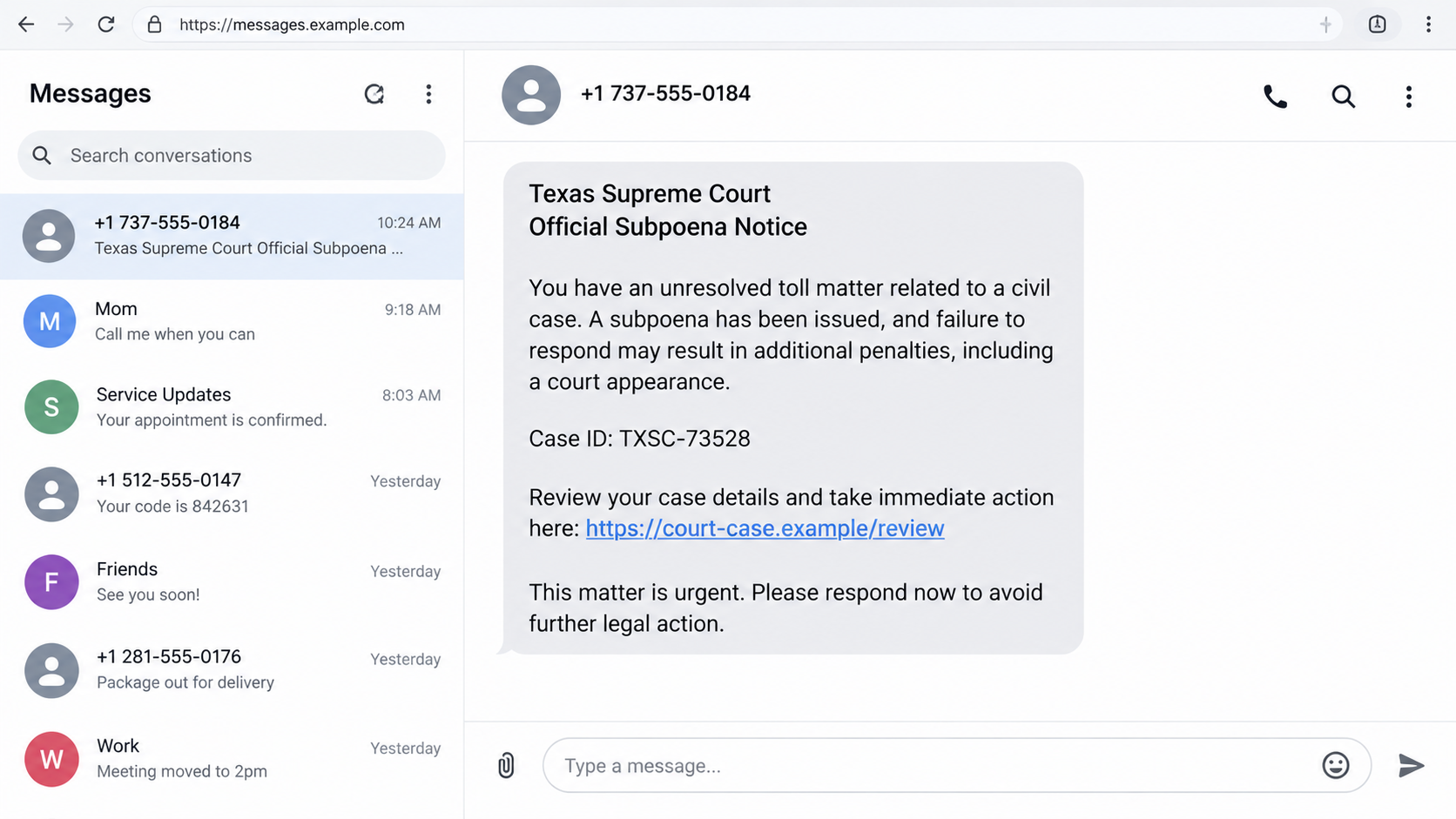
A text says the Texas Supreme Court has issued an “Official Subpoena Notice” about an unpaid toll. It includes a case number and tells you to review the matter before it escalates.
Legal language can make a small-screen message feel much bigger than it is. The safest next move is to check whether the sender, the court, and the alleged case fit together at all.
Overview
The text borrows the authority of Texas’s highest civil court
The Texas Supreme Court is a real institution. A surprise text using its name can sound serious, especially when it mentions a subpoena, penalties, or a required response. Scammers use that authority to make a link feel like a legal obligation.
The Texas Judicial Branch has warned about scam text messages and advises people to avoid suspicious links and report the messages. Its guidance is a useful starting point when a text claims to speak for a court.
An unpaid toll is used as the hook
Toll notices are common enough in Texas that a recipient may wonder whether a payment was missed. The message then jumps from an ordinary toll concern to a supposed Supreme Court subpoena, a leap that deserves independent verification.
The illustration above is a reconstruction of the tactic, not a genuine court communication. Actual wording and links can differ. A case number in a text does not establish that a court has opened a real matter against you.
The link may seek payment or identity details
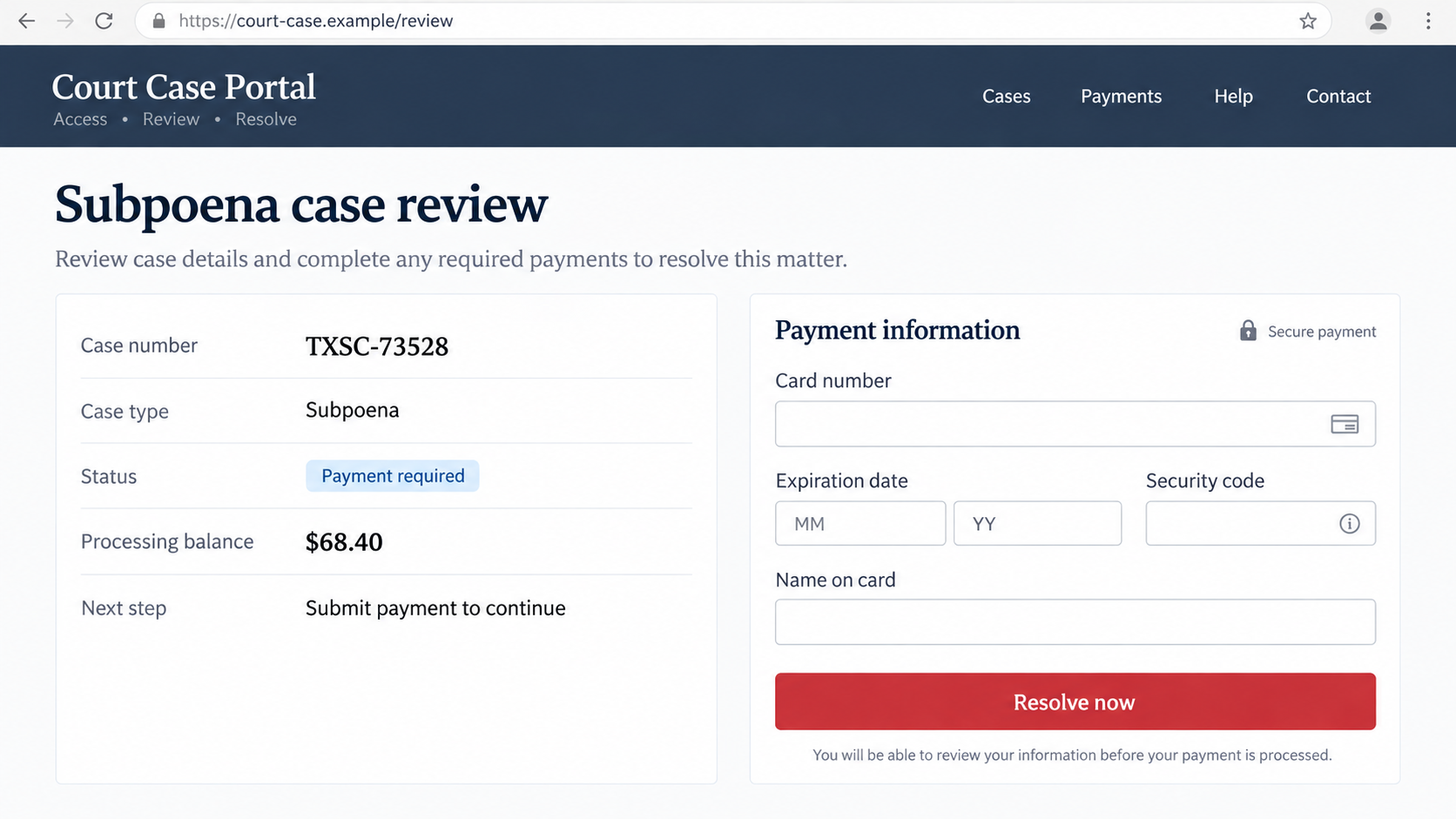
The destination can be styled as a case-review page. It might demand a processing fee, card details, an address, or other personal information before showing any meaningful case record. A paid confirmation does not turn a fake case into a real one.
Look for the pattern rather than one exact sentence:
- An unsolicited text claims a Supreme Court subpoena concerns a routine toll bill.
- It threatens legal penalties unless you use a link immediately.
- The link points to an unfamiliar domain instead of a verified court or toll authority.
- The page asks for a card before providing independently verifiable case information.
- The sender discourages calling the court through a published number.
Why “Official Subpoena Notice” Is So Effective
A subpoena is not a casual reminder. It can require a person to appear or provide information in a legal proceeding. That seriousness is exactly why the word is useful in a scam text: it raises the cost of ignoring a message in the reader’s mind.
The sender may combine several institutions in one short note: a court, a toll agency, a traffic violation, and a vehicle registration consequence. This pileup can sound comprehensive even when the claims do not fit a plausible legal process.
Most recipients are not expected to know Texas court procedure. That does not mean they must decide from the text alone. An authentic case can be checked through official court contact information and records, without clicking a link supplied by a stranger.
A logo or a case number adds surface detail, not proof. The browser page can display a seal-like graphic, a formal case format, or a “secure” payment label. Those elements can be created by whoever controls the page.
There is a nuance here: some legitimate courts and agencies use electronic reminders. It would be inaccurate to say that no court ever sends a text. The red flag is an unsolicited Supreme Court-branded demand to settle a toll or subpoena through an unverified link.
If you have a real unpaid toll, that separate fact does not validate the text. Find the toll operator’s official payment route yourself. A scammer can send a broad message to many drivers and rely on a few people having a genuine outstanding balance.
How the Texas Supreme Court Subpoena Text Scam Works
Step 1: The scammer sends a legal-sounding text
The message arrives from an ordinary number or short code while claiming to represent the Texas Supreme Court. It may say “Official Subpoena Notice,” list an invented case ID, and refer to a toll violation the recipient does not remember.
Because toll charges can arrive after a trip, uncertainty works in the attacker’s favor. The message does not need a detailed travel history if it can make the reader wonder whether a small bill has escalated.
Step 2: The text threatens a near-term consequence
The sender warns of a court appearance, additional fees, a default judgment, or registration trouble. The point is to make the recipient prioritize speed over verification. Legal-sounding words can be frightening even when no docket exists.
Do not judge a threat by its intensity. A real court process has an identifiable case, jurisdiction, and method of service. Confirm those facts with the court through its published contact route before treating a text as a legal notice.
Step 3: A link moves the conversation to a fake portal
The link might contain words like court, case, toll, or Texas. A page can then show a status such as “pending review” and a number copied from the text. Matching numbers only show that the same operator made both screens.
As the reconstruction illustrates, a browser may display a padlock. That indicates an encrypted connection to the site, not that the site belongs to the Texas Judicial Branch. The full domain and independent court records matter more.
Step 4: The portal asks for a processing payment
A modest charge may be framed as a way to view a case file, avoid a penalty, or close the matter. The amount can feel small compared with the threatened legal consequences, making the card form easier to accept.
A card number, expiration date, and security code are valuable even if the displayed fee is low. A dishonest site may also ask for a driver’s license number or home address. Do not provide information to “learn” whether the case exists.
Step 5: A receipt creates false reassurance
The page may issue a confirmation code after payment. That code is generated by the site; it does not prove a court received anything. The sender can claim the issue is resolved while retaining the card details.
If a real toll or court matter exists, it still needs to be addressed through its true issuer. Paying the fake portal cannot reliably satisfy an unrelated obligation.
Step 6: Additional contact may follow
The scammer may report that the payment failed, demand another fee, or ask the recipient to call a supposed clerk. Each step keeps verification inside the same fraudulent channel and may extract more information.
Stop there. Save the messages and use the official Texas courts site, the relevant county court, or the actual toll operator’s independently located contact details to check what, if anything, is real.
Court, Toll, Case, and Payment Checks
Identify the court and jurisdiction
The Texas Supreme Court is the state’s court of last resort for civil matters. A routine unpaid toll message should not be accepted as a Supreme Court subpoena without a verifiable case and process. Ask which court supposedly issued it and where the docket can be checked.
Use the Texas Judicial Branch’s official directory to find the court or clerk. Do not call a number inside the suspicious text, because it may lead to the same scammer who sent it.
Confirm any toll balance separately
Locate the official toll operator for the roads you actually used. Visit its site directly or call a number from a previous statement. Ask whether a balance exists and which payment methods are approved.
A legitimate toll bill can be mistaken, delayed, or unpaid; none of those possibilities confirms a Supreme Court text. Treat the toll account and the court claim as separate questions until an official source connects them.
Check a case through court records
Ask the relevant clerk how to verify the case number, party names, and any scheduled appearance. If the text has no court location or the clerk cannot find the matter, do not let the sender invent a new explanation for the mismatch.
Do not send identity documents just to see a claimed case. Official procedures vary, but a surprise payment page is not a reliable docket search. Preserve the message so the court can see exactly what was claimed.
Verify the domain and payment route
Compare the full address with an official court or toll authority page you reached independently. Government-looking words and HTTPS do not establish ownership. A payment processor can be legitimate when an authority links to it from its own site.
If you cannot trace the processor back to the issuer, stop before entering a card. Do not assume that a low fee is safe to test. The data collected can be worth more than the displayed charge.
What a Real Legal Notice Would Let You Verify
A genuine legal matter has a responsible court, case information, and a way to check status through that court’s established process. The details may be unfamiliar, but they should not depend entirely on a text message’s private link.
Service rules differ by case and jurisdiction. Some matters involve formal delivery, while others may include electronic notices. That complexity is another reason to contact the court directly instead of making a blanket assumption from the delivery channel.
Ask the clerk what the case number refers to and whether any response deadline is recorded. If you receive a paper document as well, compare its court name and contact information with the official directory before calling.
If you are genuinely concerned about a subpoena, seek qualified legal advice in your jurisdiction. A general scam article cannot interpret a real case or tell you to ignore legal papers. It can, however, help you avoid paying a stranger to make a text disappear.
Give yourself permission to slow down. Verifying a court claim is a reasonable response, not a refusal to cooperate. Anyone who insists you may only resolve it through their link is making independent confirmation harder.
What to Do if You Have Fallen Victim to This Scam
- Keep the text and page details. Save the sender number, full message, URL, case identifier, screenshots, payment receipt, and any follow-up contact. Do not delete everything out of embarrassment. The exact wording helps a bank, court, or investigator understand what happened.
- Contact your card issuer if you paid. Explain that the website impersonated a court and ask about disputing the charge, replacing the card, and monitoring additional transactions. A small processing fee can be followed by other charges.
- Verify the legal claim independently. Use the Texas Judicial Branch’s official site or the relevant county court’s published number. Ask whether the case exists and whether any response is required. If a real toll balance is involved, confirm it with the actual toll operator separately.
- Protect identifying information. If you entered a driver’s license number, date of birth, address, or Social Security number, note exactly what was exposed. Review the appropriate guidance at IdentityTheft.gov and ask the relevant agency about any account or credential protections.
- Secure accounts and devices according to your actions. Change any password you entered on the fake portal through the genuine service. If you downloaded or ran a file, scan with Malwarebytes. AdGuard may block some future scam pages, but it cannot reverse a card transaction or confirm a subpoena.
- Report the text. The Texas courts reporting guidance explains how to forward suspicious texts to 7726 and report them. You can also file a report with the FTC. Include the impersonated court and website.
- Ignore recovery and legal-help impersonators. A follow-up caller may promise to erase the supposed case or recover your payment for another fee. Do not send money or documents to that person. Work only through your bank, real court, toll operator, or your own qualified adviser.
Frequently Asked Questions
Did the Texas Supreme Court send this subpoena text?
Do not assume so. The Texas Judicial Branch warns about scam texts. Verify any claimed case through the court’s official directory and published contact details, not the link in the message.
Can an unpaid toll become a court matter?
Rules depend on the toll authority and circumstances. A genuine unpaid balance should be checked with the operator. A real toll issue does not automatically validate a Supreme Court-branded text or payment page.
Does a case number in the text prove anything?
No. A sender can invent a plausible number. Confirm it with the relevant court’s own records, including the jurisdiction, parties, and status.
Are all court text messages fake?
No. Some jurisdictions may use electronic reminders. The red flag here is an unsolicited legal threat directing you to an unverified page for a supposed subpoena or toll payment.
What if I clicked but did not pay?
Close the page and do not enter information. If you supplied a password or downloaded software, address that separate risk. A click alone does not prove your card was charged.
What should I do if I entered my card?
Contact your issuer promptly, explain the court impersonation, and ask about a dispute and card replacement. Keep the message and any receipt while monitoring for more charges.
The Bottom Line
The fake Texas Supreme Court subpoena text turns an ordinary toll worry into a legal emergency. Its case number, deadline, and portal are meant to keep you inside the scammer’s process.
Verify the court claim with the real court and any toll balance with the real operator. Do not pay or share identity details through a link in an unsolicited text.

Join the discussion
0 commentsShare your experience or ask a question about this article.
Discussion
Start the conversation
Have a question or something useful to share? Add the first comment.