

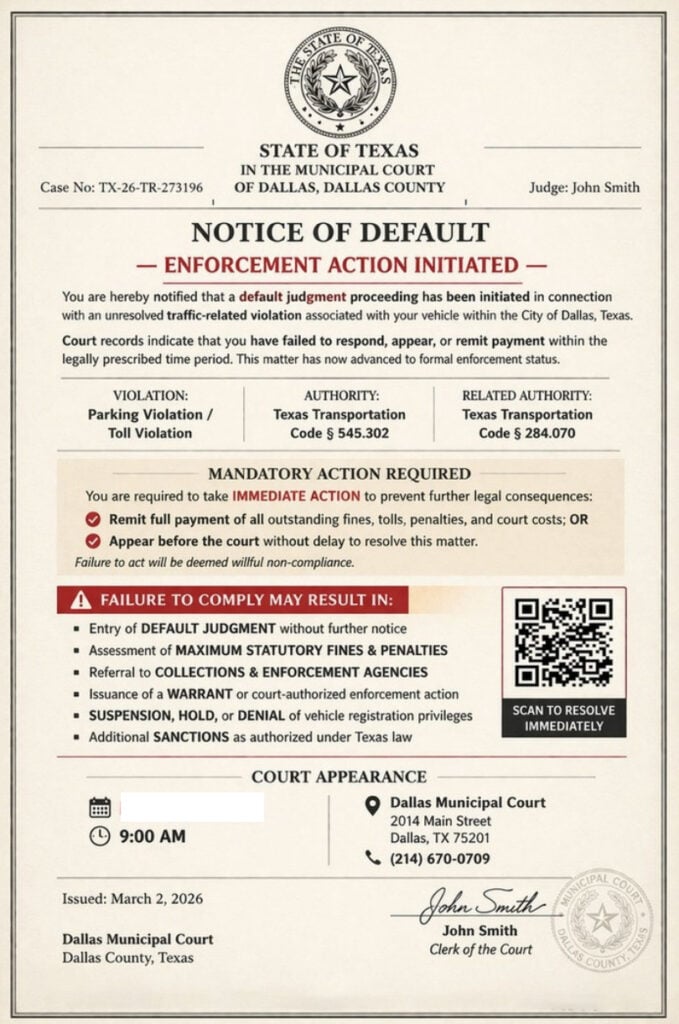
A text message arrives with what looks like an official State of Texas court notice. It claims a traffic-related violation has entered default, warns of enforcement action, and tells you to scan a QR code to resolve the matter immediately.
It looks serious. It uses court language. It may even list a Dallas court address.
But it is not a real court notice. It is a scam designed to steal your money, credit card details, and personal information.
Scam Overview
The State of Texas Court Notice scam texts are part of a wider wave of fake traffic, toll, and court notice scams targeting drivers across Texas and the United States. These messages typically arrive as a text with an attached image that looks like a formal legal document.
The fake notice may claim to come from:
- State of Texas
- Municipal Court of Dallas, Dallas County
- Dallas Municipal Court
- Traffic Division
- Court Enforcement Office
- Clerk of the Court
The document usually includes a case number, a judge or clerk name, a warning about default judgment, and a QR code that says something like “Scan to resolve immediately.”
The goal is simple: scare you into scanning the code or clicking a payment link before you verify whether the notice is real.
The Federal Trade Commission has warned about this exact type of traffic violation text scam. These messages often include an official-looking image, a fake case number, a QR code, and threats of default judgments, fines, or enforcement action. The FTC says scammers use them to steal money and personal information.
What the Texas scam notice often says
The version shown in your image claims to be from the State of Texas and the Municipal Court of Dallas, Dallas County.
It includes:
- Case No.: TX-26-TR-273196
- Judge: John Smith
- NOTICE OF DEFAULT
- ENFORCEMENT ACTION INITIATED
- A fake parking or toll violation
- Texas Transportation Code references
- A QR code labeled “Scan to resolve immediately”
- A Dallas Municipal Court address and phone number
- A signature from “John Smith, Clerk of the Court”
The notice claims that a default judgment proceeding has been initiated because of an unresolved traffic-related violation associated with a registered vehicle in Dallas, Texas.
It then threatens consequences such as:
- Default judgment
- Maximum fines and penalties
- Collections referral
- A warrant or court-authorized enforcement action
- Vehicle registration suspension, hold, or denial
- Additional sanctions under Texas law
This is designed to feel urgent, official, and frightening.
Why the notice looks believable
Scammers are not sending sloppy text messages anymore. Many of these scams now use polished image-based notices that imitate legal paperwork.
They may include:
- State seals
- Court-style formatting
- Legal headings
- Case numbers
- Transportation code references
- Court addresses
- QR codes
- Signatures
- “Final notice” language
That presentation is meant to make you stop thinking critically.
Most people are not familiar with the exact format of a municipal court notice. If the document looks official and includes scary legal language, many recipients assume it must be real.
That is the scammer’s advantage.
The Dallas court angle
This scam has specifically been reported in connection with fake Dallas court notices. The City of Dallas and Dallas Municipal Courts have warned that they do not request payments through unsolicited text messages or QR codes
That is one of the clearest signs this notice is fraudulent.
A real court matter should be verified through official court websites or phone numbers you find yourself. It should not be handled by scanning a QR code from a random text message.
Why the QR code is the trap
The QR code is the most dangerous part of the notice.
It may say:
- “Scan to resolve immediately”
- “Scan to pay”
- “Official payment portal”
- “Settle your unpaid balance”
But the QR code does not make the notice official. It simply hides a link.
Once scanned, it can take you to a fake payment website that may look like a court, DMV, toll, or traffic citation portal.
That fake site may ask for:
- Full name
- Address
- Phone number
- Vehicle details
- Credit card number
- Expiration date
- CVV
- Billing ZIP code
The payment amount may be small, but the real target is your card data and identity information.
The FCC has warned that toll and payment scam texts commonly claim the recipient owes a balance and must pay immediately to avoid suspension or penalties.
Why scammers mention Texas Transportation Code
The fake notice references sections of the Texas Transportation Code, such as:
- Texas Transportation Code § 545.302
- Texas Transportation Code § 284.070
Scammers use legal citations to make the notice feel legitimate.
But a real law reference does not prove the message is real.
Scammers often mix real legal terms with fake case details, fake QR codes, and fake payment portals. The law may exist, but the notice is still fraudulent.
Why the case number is suspicious
The case number in the image appears as:
TX-26-TR-273196
This format is suspicious because similar numbers have appeared in fake traffic notices across multiple states, with only the state prefix changed.
Examples include:
- CA-26-TR-273196
- NJ-26-TR-273196
- IN-26-TR-273196
- KS-26-TR-273196
- TX-26-TR-273196
Real court case numbers are tied to specific courts and actual cases. Scam campaigns reuse templates because they are mass-produced.
Why “Judge John Smith” is another red flag
The notice names Judge John Smith, which is highly generic.
Scam templates often use placeholder-style names like:
- John Smith
- Michael Rodriguez
- Robert Sullivan
- Robert Kline
A generic judge or clerk name does not prove the notice is real. It often shows that scammers are recycling the same document layout and changing only a few fields.
How this connects to Texas DMV and toll scams
Texas agencies have also warned about fake traffic and toll-related text messages.
TxDOT has warned drivers about scam texts targeting TxTag customers and says TxTag does not send emails or text messages to customers regarding balances due.
The Texas Department of Motor Vehicles has also warned that scam texts may claim unpaid traffic violations, tolls, or registration issues and threaten prosecution, registration suspension, or loss of driving privileges. TxDMV says it is not a law enforcement agency and does not issue or collect fines for tolls or traffic infractions.
That pattern matches the State of Texas Court Notice scam: official-sounding language, urgent threats, and a payment path designed to collect information.
How The State of Texas Court Notice Scam Works
Step 1: You receive a text with an attached “court notice”
The scam usually starts with a text message from an unknown number.
The message may include an image that looks like a legal document. It may claim to be from a Dallas municipal court, Texas court, traffic division, or enforcement authority.
The image is designed to scare you before you have time to verify anything.
Step 2: The notice claims you are in default
The fake document says a default judgment proceeding has started.
That phrase is important.
It makes the recipient feel like the situation has already escalated. Instead of thinking, “Is this real?” the victim may think, “How do I stop this?”
That is the psychological trap.
Step 3: The notice lists scary consequences
The document may claim failure to act could lead to:
- Default judgment
- Maximum statutory fines
- Late penalties
- Court costs
- Collections referral
- Warrant issuance
- Vehicle registration problems
- Additional sanctions
This list is meant to overwhelm you.
The scam does not need every threat to make legal sense. It only needs to create enough fear that you act quickly.
Step 4: The QR code offers a fake solution
After creating fear, the notice provides a simple action:
Scan to resolve immediately.
This is where the scam moves from intimidation to theft.
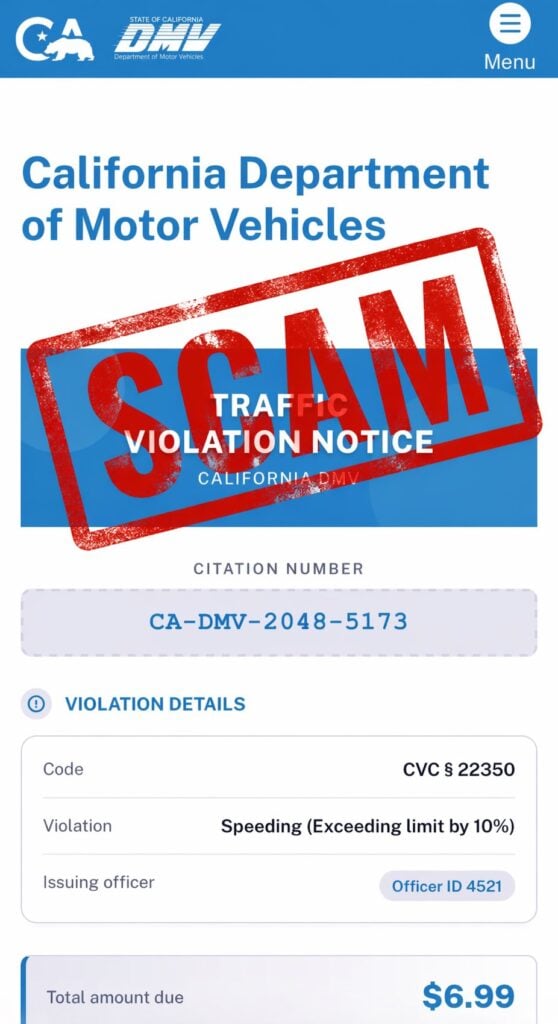
The QR code may take you to a fake site that looks official. It may show the same case number, violation details, and a payment amount.
Step 5: The fake website collects personal details
Before payment, the site may ask you to confirm:
- Your name
- Address
- Phone number
- ZIP code
- Vehicle or plate details
This information can be used for identity theft or future targeted scams.
Step 6: The payment page steals your card information
The fake portal then asks for card details.
Usually:
- Card number
- Expiration date
- CVV
- Billing address
- Billing ZIP code
Once entered, your card should be considered compromised.
Even if the website shows a confirmation page, the scammers may already have your information.
Step 7: Fraud may happen later
The damage may not appear immediately.
Scammers may:
- Run small test charges
- Attempt larger purchases later
- Sell the card data
- Reuse your details in other scams
- Send more fake court, DMV, or toll notices
That delay is why it is important to act quickly if you entered payment information.
Red Flags in State of Texas Court Notice Scam Texts
The notice arrives by random text
A real court matter should not appear as a surprise text with a QR code payment demand.
The QR code demands fast payment
A QR code from an unexpected legal notice is a major red flag.
The language is aggressive
Phrases like “Notice of Default,” “Enforcement Action Initiated,” “Mandatory Action Required,” and “Failure to Comply” are used to scare you.
The judge or clerk name looks generic
Names like John Smith are common in scam templates.
The case number looks reused
The format TX-26-TR-273196 resembles fake case numbers used in similar scams across different states.
The notice mixes legal threats with an instant payment shortcut
Real legal processes do not normally work by sending an image in a text and asking you to scan a code to avoid enforcement.
What To Do If You Receive This Scam Text
Do not scan the QR code
Do not scan it out of curiosity.
A QR code is just a hidden link, and in this scam it may lead to a fake payment site.
Do not click any links
If the message includes a link, do not open it.
Do not reply
Replying can confirm that your phone number is active.
Do not pay
Do not enter card details through the QR code or any link from the message.
Verify independently
If you are worried there may be a real court or traffic matter:
- Go directly to the official court website
- Use official Dallas Municipal Court contact information
- Check through official case lookup tools
- Call the court using a number you find on an official site
- Do not use phone numbers or links from the text
The Dallas warning says not to respond, not to send money, and to delete the message if you receive one of these unsolicited QR code payment demands.
What To Do If You Fell for the Scam
1. Call your card issuer immediately
If you entered card information, call the number on the back of your card.
Tell them:
- You entered your card details on a fraudulent court payment site
- The site came from a scam text
- You need the card blocked and replaced
- You want recent transactions reviewed
2. Review recent transactions
Look for:
- Small test charges
- Unknown online purchases
- New subscription charges
- Declined attempts
- Charges from unfamiliar merchants
Dispute anything you do not recognize.
3. Turn on transaction alerts
Enable alerts for:
- Every purchase
- Online purchases
- Charges over $1
- International activity, if available
4. Save evidence
Take screenshots of:
- The original text
- The sender information
- The fake notice
- The QR code
- The fake website
- Any payment confirmation or error screen
5. Watch for follow-up scams
Scammers may contact you again pretending to be:
- A court clerk
- A collections agency
- A refund department
- A bank fraud team
- A police or enforcement officer
Do not trust follow-up messages just because they reference the same fake case.
6. Report the scam
You can:
- Mark the text as spam or junk
- Block the sender
- Forward it to 7726 (SPAM) if your carrier supports it
- Report the incident through official fraud reporting channels
The Bottom Line
The State of Texas Court Notice scam texts are fake legal notices designed to scare people into scanning QR codes and paying through fraudulent websites.
They may include a Texas seal, Dallas Municipal Court references, a fake case number, legal code citations, a QR code, and threats of default judgment or enforcement action. But those details are part of the deception.
Official warnings from Dallas, TxDOT, TxDMV, the FTC, and the FCC all point to the same conclusion: unexpected texts demanding traffic, toll, or court payments through links or QR codes should be treated as scams.
If you receive one, do not scan, do not click, do not reply, and do not pay. Verify only through official government channels you access yourself.








