

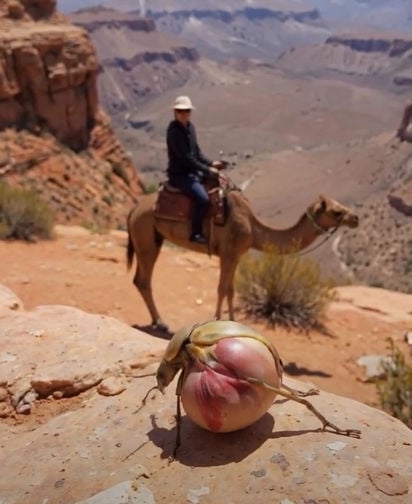
Another viral video is making waves across TikTok, YouTube Shorts, Instagram Reels, and Facebook. This time, it is not a child and a zoo animal but something straight out of science fiction. The clip claims to show a rare insect known as the Rosa Flora Sahara beetle that blooms into a flower under the hot Moroccan sun. According to the captions, this beetle crawls across the desert, and when sunlight hits its shell, it opens up like petals, revealing a vibrant blossom.
At first glance, the video feels magical, like something out of Pokémon or a fantasy film. But is it real? The answer is simple. No beetle like this exists. The video is completely AI-generated and designed to go viral by playing on people’s love for extraordinary nature stories.
What the Viral Clip Shows
The viral clip typically begins with a close-up of a beetle crawling across sand or perched on a rocky ledge. Suddenly, its hardened back splits open—not to reveal wings, as real beetles do, but to unfold colorful petals that bloom into a full flower. The captions claim this is the Rosa Flora Sahara beetle, supposedly native to the cliffs of Morocco’s High Atlas region. Viewers are left stunned, with many commenting on how beautiful and mysterious nature can be.
The idea of a living insect that doubles as a plant is fascinating, and that is exactly why the video spread so quickly. But it is also why it deserves a closer look.
Why the “Flower Beetle” Cannot Exist
Nature is full of surprising adaptations, from camouflage to bioluminescence, but a beetle blooming into a flower is not biologically possible.
- Plants and insects are fundamentally different organisms. Plants use photosynthesis and grow leaves, petals, and stems. Insects belong to the animal kingdom and have exoskeletons, muscles, and nervous systems. No species can merge the two in this way.
- Beetles’ wings are not petals. What the video shows is the beetle’s hard outer shell (elytra) opening like petals. In reality, beetles use their elytra to protect delicate wings used for flight. They do not turn into blossoms.
- No scientific record exists. If such a beetle were real, it would be headline news in biology and ecology journals. There are no scientific classifications, museum specimens, or documented evidence of a beetle-plant hybrid.
The Rosa Flora Sahara beetle is not just rare—it is entirely fictional.
How AI Art Tools Created This Illusion
The viral beetle video is not the work of a nature photographer. It is the product of AI art tools and digital artists who specialize in creating hyper-realistic fantasy creatures.
Modern AI systems like MidJourney, Stable Diffusion, and Runway can combine prompts such as “a beetle that blooms into a flower” to generate ultra-detailed images and videos. Artists can then refine these clips, making them look lifelike enough to trick casual viewers into thinking they are authentic.
The Rosa Flora Sahara beetle is one such creation. According to some sources, the video originated from a digital artist experimenting with AI-generated insects and flowers. It was never meant to be mistaken for a real biological species. But once uploaded to social media with misleading captions, it quickly spread as supposed “real footage.”
Why Viral Hoaxes Like This Matter in the Age of AI
At first, a beetle that turns into a flower may seem like harmless entertainment. But the spread of fake AI-generated nature clips carries bigger consequences.
Misleading the Public
People who believe the Rosa Flora Sahara beetle is real may share it as fact, spreading misinformation across platforms. This contributes to a culture where it becomes harder and harder to distinguish between reality and digital illusion.
Exploiting Curiosity for Engagement
Creators know that people love stories about hidden wonders of the natural world. By producing AI clips that look believable, they farm likes, shares, and follows. These accounts often pivot to promoting unrelated products, scams, or misleading advertisements once they build large audiences.
Eroding Trust in Science
When fake nature videos go viral, they blur the line between real discoveries and digital fakes. This can damage public trust in actual scientific research and make it harder for genuine discoveries to be taken seriously.
Setting a Dangerous Precedent
Today it is a beetle blooming into a flower. Tomorrow it could be fabricated videos of “newly discovered” species, fake medical footage, or even AI-generated breaking news. Each viral hoax makes it easier for misinformation to gain traction.
The Bottom Line
The viral Rosa Flora Sahara beetle video is 100% fake. No insect turns into a flower under the desert sun. The clip is an AI-generated creation designed to capture attention and rack up views on social media. While entertaining to watch, it highlights the growing problem of AI hoaxes flooding online platforms.
The next time you see a video that looks too magical to be true, take a moment to question it. Real nature is full of wonders, but a beetle blooming into a rose is not one of them. In the age of AI, skepticism and fact-checking are more important than ever.








