

You follow a link in a technical guide and get a page that looks like a routine security check. It says you are almost through. There is just one more step to prove you are human.
That step does not stay in the browser. It asks you to press keys on your Windows computer and paste something the page has quietly placed on your clipboard.
The third-party.com ClickFix scam turns a familiar placeholder address into a trap at precisely that handoff.
Overview
A placeholder became an active destination
Software documentation often uses example addresses. A developer may write a domain such as third-party.com to stand in for some future integration. It reads like generic sample text, so a link to it can slip into guides, comments, or code examples without much thought.
Manifold Security documented that this particular address was not safely reserved as an example. It was a real domain serving a malicious page to Windows visitors. Malwarebytes also reported the abuse. This was an observed deceptive flow, not a customer complaint about an ordinary business.
The domain itself is shown here as text so readers can recognize the pattern. Do not visit it to test whether the trap is still active. A campaign can change or disappear, and a live link would expose curious readers for no benefit.
The page pretends to be a human check
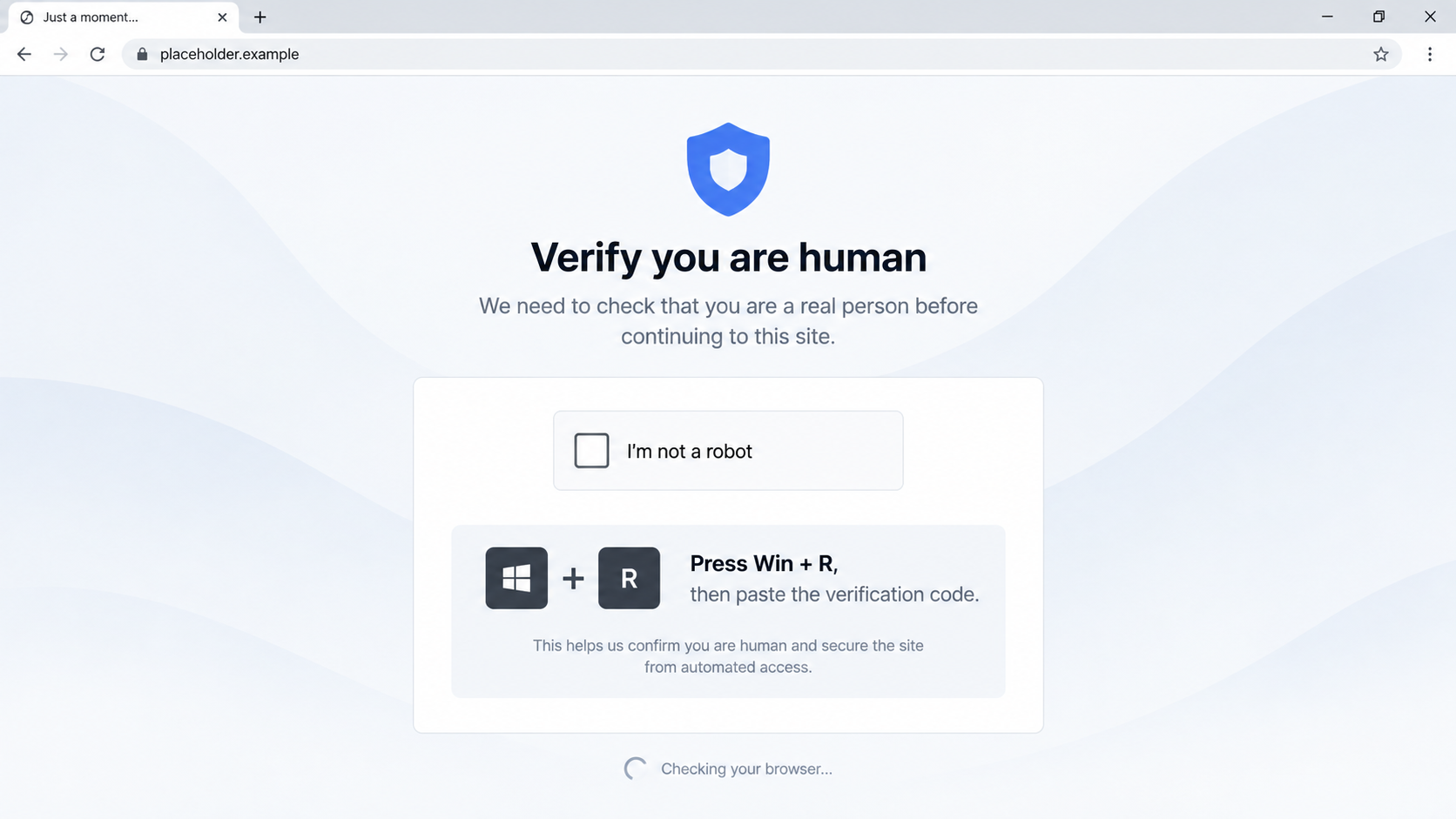
The Windows-facing page resembled a Cloudflare verification prompt. It instructed visitors to use the Windows Run dialog and paste clipboard contents. The site had already copied a PowerShell command to the clipboard. If the person followed the instruction, the “verification” became an instruction to run code locally.
This is a ClickFix technique. The page claims that a normal browser problem has a quick fix. The real purpose is to make the user perform the execution step that browsers and antivirus tools would otherwise make harder.
- The visitor reaches a real, unreserved placeholder domain.
- Windows users see a fake verification message.
- A hidden command is copied to the clipboard.
- The page asks for keyboard actions outside the browser.
- Pasting and running the command may fetch further content.
- The second-stage host was offline when researchers tested it, so successful infections were not demonstrated in that investigation.
The evidence is strong, but the outcome has a limit
Manifold Security observed the page’s device targeting and clipboard behavior. It identified a PowerShell one-liner intended to retrieve a second stage. The second-stage server did not respond during testing. The public evidence confirms a malicious delivery attempt; it does not prove that every visitor downloaded malware or that a working payload reached a particular computer.
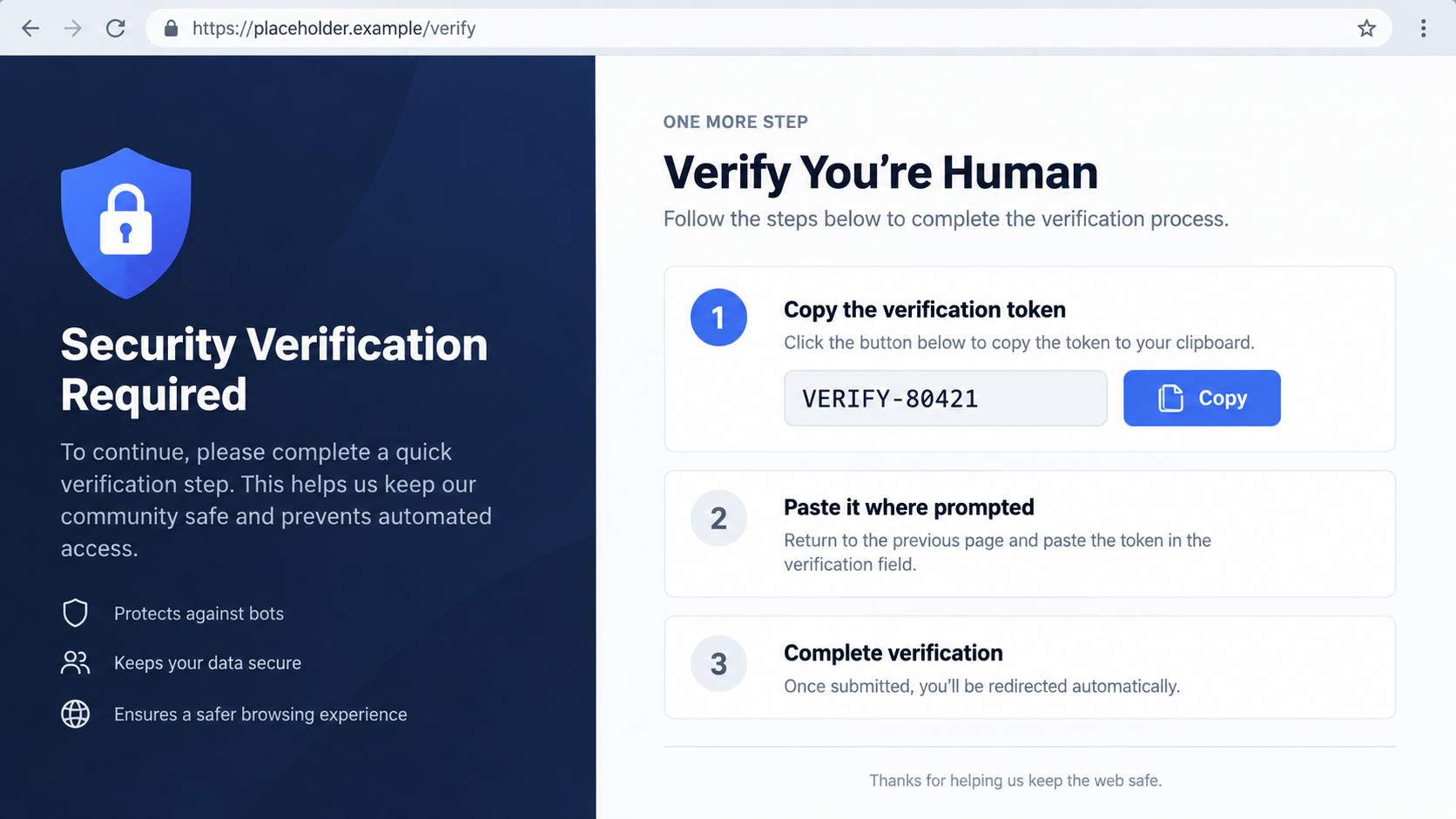
The illustrations here are safe reconstructions. They omit the command and use harmless text so a reader can recognize the trick without being given an executable recipe.
There is an important distinction between landing on the page and running its instructions. If you only saw the fake challenge, close it. If you pasted and executed what it supplied, treat the device as potentially compromised even if the page later showed an error.
Why This Link Can Look More Trustworthy Than an Ad
Many scam pages arrive through an obvious ad, a dubious email, or a message from a stranger. This one could be encountered in the middle of apparently useful technical material. A link inside a developer guide feels like part of the documentation, especially if the surrounding instructions are accurate.
That context is borrowed trust. The guide’s author may have intended an example, not a recommendation. If a placeholder has been turned into a link, the domain owner can later decide what visitors see. The safety of the surrounding article does not extend to a destination it does not control.
The trap also exploits a habit formed by genuine security checks. People routinely see “verify you are human” pages and click a box before entering a site. The operator copies the look but changes the requested action. A real browser challenge does not need you to open Windows Run and execute a command.
Clipboard substitution is easy to miss. The page may display a reassuring instruction while placing completely different content in the clipboard. The dangerous moment is not the click on the checkbox; it is trusting invisible copied text enough to run it.
Operating-system targeting can hide the behavior during casual review. Manifold observed that Windows visitors received the ClickFix page while Mac and Linux visitors saw a different, less suspicious decoy. A reviewer on another device could incorrectly conclude that the domain was harmless.
The exact text of a fake verification page can change. Some variants may say to repair a browser, install a certificate, or finish a “human test.” The shared warning sign is the same: a website tells you to run commands outside the browser to continue reading.
Even an HTTPS padlock would not settle the question. Encryption means the browser connected to that domain; it does not mean the domain is an approved service or that its instructions are safe. In this case, the relevant question is why a placeholder link is asking for system-level action at all.
The visible domain is useful as an example of a failure mode, not as the only address to avoid. Treat any page that combines a verification claim with Win+R, a terminal, or pasted script as suspect, no matter how ordinary the URL looks.
The “Human Check” Is the Red Flag
Readers may recognize this trick from our guide to fake Cloudflare verification pages. The placeholder-domain route is distinctive, but the boundary is the same: a page that moves verification into Windows Run is asking you to execute code, not to prove you are human.
Closing the page may feel unsatisfying if you were trying to finish a tutorial. That inconvenience is small beside the risk of running an unseen script. Return to the guide and find the actual service address through its owner or maintainer.
How the third-party.com ClickFix Scam Works
Step 1: A reader follows what appears to be an example link
The entry point can be a guide, repository, or other page where the address was used as sample text. Not every mention is clickable and not every reader will visit it. The risk arises when a real domain is treated as if it were a reserved example and someone follows it.
The operator does not need to compromise the original guide to benefit from that mistake. Owning or controlling the linked destination is enough to present a new page to whoever arrives.
Step 2: The domain filters the visitor
In Manifold’s testing, the malicious challenge was aimed at Windows users. Mac and Linux visitors saw a benign-looking decoy. This split makes the page seem inconsistent if two people compare notes, but it also concentrates the attack on the operating system for which the copied command was built.
Do not use a clean-looking screen on one device as proof that a coworker’s Windows warning was imagined. Device and browser differences are common in malicious traffic routing.
Step 3: A fake challenge claims to need a manual fix
The page borrows the design language of browser verification and asks the visitor to do something unrelated to proving humanity: open a system dialog and paste. The words “verification” and “security” invert the real risk, making a dangerous action feel like a protective one.
There is no legitimate reason for an unrelated website to require Windows Run just to view documentation. You can close the tab and revisit the original guide without following its example link.
Step 4: The clipboard carries the instruction
The malicious page copies a PowerShell command. The article intentionally does not reproduce it. The victim may see an instruction to paste, not the full command’s purpose or the remote address it references.
Pasting alone exposes the text in the Run box; executing it is the critical action. If you noticed a strange command before pressing Enter, cancel the dialog and clear the clipboard. Do not run it just to see what it does.
Step 5: The command attempts a second-stage download
Manifold’s analysis found that the one-liner was intended to fetch additional content. The second-stage host was offline during its test, so the researchers could not show a completed download from that infrastructure at that time.
Offline infrastructure is not a safety guarantee. It may later return, and related pages can rotate hosts. If you executed the command, investigate the endpoint based on what happened on your machine, not on the status researchers saw during one test.
Domain, Page, Support, and Device Checks
Is the address an official service?
A generic third-party placeholder is not an endorsement by the author of the page that mentions it. Check whether the documentation actually identifies the organization that owns the destination and why you need to visit it. In the reported case, the unreserved example address was serving an attacker-controlled challenge.
For your own documentation, use domains reserved for examples rather than a plausible commercial address. That editorial fix is useful, but it does not undo a command someone has already executed.
Does the “verification” stay in the browser?
Ordinary site checks may ask you to click a box or wait for a browser challenge. This page crossed into Windows Run and a pasted command. That is the decisive warning sign. A page that asks you to run code is no longer merely checking a browser session.
Do not be reassured by a familiar logo or a clean-looking layout. A scammer can copy an interface more easily than they can make a website’s request for system-level execution reasonable.
Who can verify the page’s instruction?
Ask the guide’s publisher or your workplace IT team through a known channel. Do not rely on a chat box at the destination page. The operator who wrote the fake challenge can also write a convincing “support” answer.
If the link appears in a repository or documentation site, report the unsafe placeholder to its maintainers. Give them the location of the link without encouraging other people to visit the live domain.
What evidence exists on the computer?
If a command was run, record the time, the visible command if safely available in history, any new processes, downloaded files, alerts, and network connections. Your security team can examine those traces without relying on the webpage’s claim that verification completed.
If you are not sure whether Enter was pressed, say exactly that. Responders can distinguish a page visit, a clipboard copy, a pasted command, and an executed command. Those are different levels of exposure.
What to Do if You Have Fallen Victim to This Scam
- If you only reached the page, close it. Do not interact with its verification instructions. Tell the publisher of the guide where the unsafe link appeared.
- If you copied the text but did not run it, cancel the dialog. Clear the clipboard and avoid pasting its contents anywhere else. Merely having a command copied is not the same as executing it.
- If you ran the command, disconnect the device from the network. Contact your security team immediately if it is a work computer. Avoid using the machine for passwords or payments while it is being assessed.
- Preserve details before cleaning up. Save the page URL as text, the guide that led there, the time, browser history, and any security alerts. Do not publish the full command in a public forum where someone else may execute it.
- Run an updated security scan. Malwarebytes can help look for unwanted software. A clean scan is useful but cannot by itself prove that no code ran or that no credential was exposed.
- Review accounts from a separate trusted device. If you signed in after running the command, change important passwords and review recent sessions. Prioritize work, email, banking, and password-manager accounts based on what was used on that computer.
- Let IT inspect persistence and network activity. A company endpoint may need process history, scheduled tasks, browser artifacts, and connection logs reviewed. Reinstalling immediately can erase evidence before the scope is understood.
- Warn coworkers without spreading the trap. Explain that a placeholder link is unsafe and that the fake challenge asks for Windows Run. Do not send a clickable link to the live destination as the warning.
- Report the malicious page. Send the evidence to the site owner, hosting provider, browser safe-browsing service, or relevant national cybercrime reporting center. AdGuard may block known malicious destinations in future, but blocking is not a substitute for assessing a command already run.
Frequently Asked Questions
Is third-party.com itself a real domain?
Yes. That is the problem: it looks like example text but was not a reserved example domain. In Manifold’s investigation, its Windows-facing page served a ClickFix lure.
Was malware definitely installed on every visitor’s computer?
No. The second-stage server was offline during the published test, and the report did not establish a victim total. The page still attempted to make visitors run a malicious command.
Does clicking the fake verification box infect me?
The critical documented step was executing the copied command. If you only viewed or clicked the page, stop there and close it. If you ran something outside the browser, investigate the device.
Why did someone on a Mac see a normal page?
Manifold observed different behavior by operating system. Windows visitors were shown the ClickFix challenge, while Mac and Linux visitors saw a decoy. A harmless view on one device does not clear the Windows page.
Can an HTTPS padlock prove the page is safe?
No. HTTPS protects the connection to the domain; it does not judge the site’s instructions. A fake verification page can use HTTPS too.
What should a documentation maintainer do?
Remove unsafe clickable placeholders, replace them with reserved example domains, and warn readers if the link was widely viewed. Do not tell readers to visit the live domain to confirm the issue for themselves.
The Bottom Line
The third-party.com ClickFix scam exploited a believable link context and a familiar “verify you are human” design to get Windows users to run a copied command. Researchers confirmed the attempt; they did not confirm successful second-stage infections in the published test.
No website needs Windows Run to prove you are human. If a page tries to move a verification step from the browser into a command box, close it. If you already executed the command, treat the computer as an incident and get help promptly.

Reviews & discussion
0 commentsShare a firsthand experience, or ask a question.
Community reviews
third-party.com
Moderated reader experiences, not an editorial verdict.
Reviews
Be the first to review
Approved reviews for this site or product will appear here.