


A new TikTok contact says they want to bless you with money. They sound generous, ask which payment apps you use and promise a surprisingly large gift.
Then screenshots start arriving, and the conversation becomes harder to follow. Before you try to help the sender finish the transfer, check what has actually reached your account.
Overview
The gift turns into a demand for your money
The TikTok blessing scam begins with an unsolicited offer of financial help. Once you’re interested, the stranger says you must pay before receiving the promised gift.
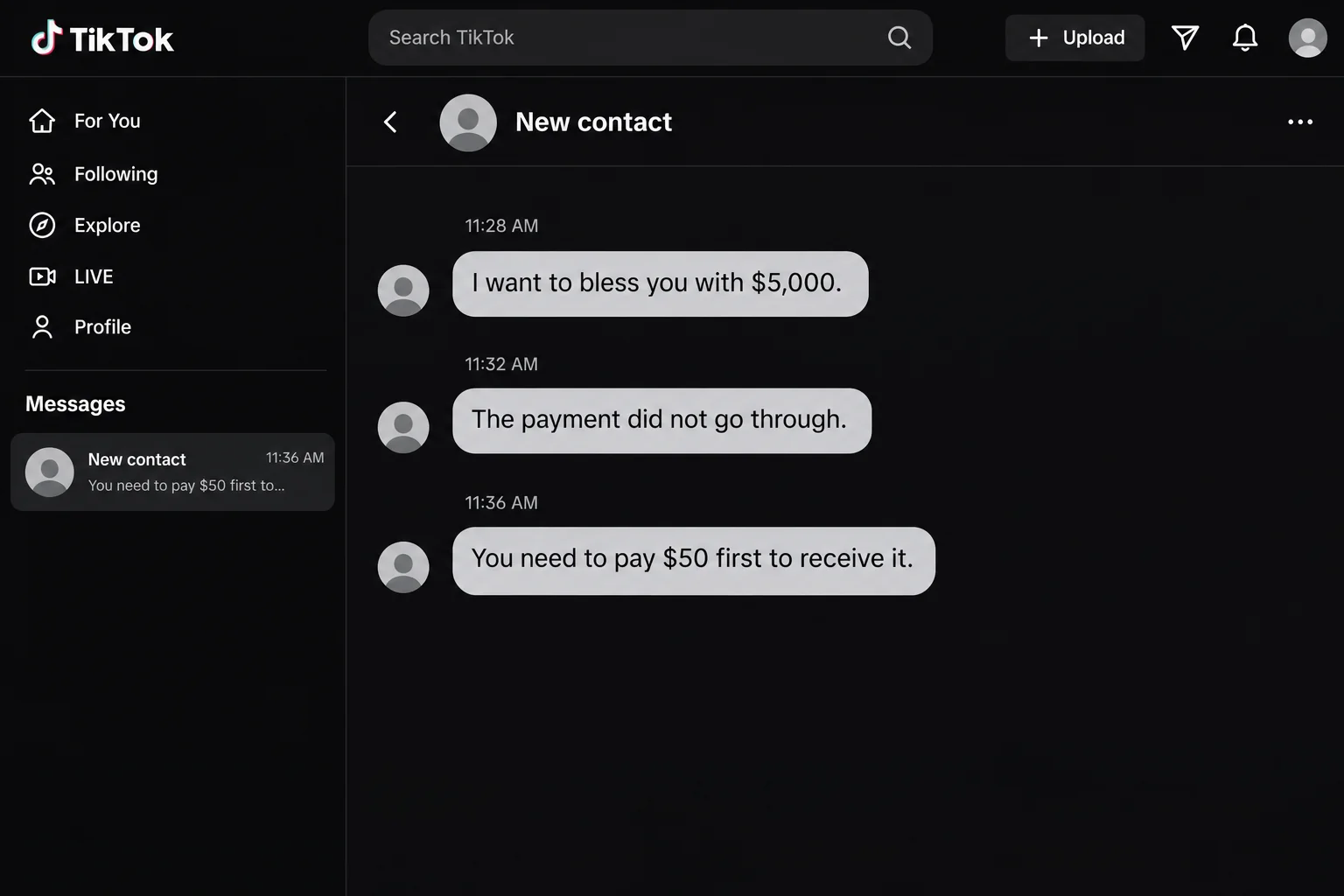
In one detailed report, the promise was $5,000 and the requested advance was $50. No incoming payment appeared in the recipient’s account.
The scam is the advance-payment demand, not the existence of online generosity. A stranger’s promise doesn’t make sending them money a necessary step in receiving a gift.
Payment screenshots keep the promise looking close
The sender showed supposed failed transfers, other people’s payments and an impressive balance. The images encouraged the recipient to believe money was available and almost on its way.
That is different from seeing a payment inside your own account. The person offering the gift controls what they show you in a direct message.
Cash App independently warns about social-media money schemes that use convincing screenshots and promises of receiving more money after sending an amount first.
Stop when receiving depends on paying the stranger
- Don’t send a processing or release payment to the contact.
- Check incoming activity in the actual payment app.
- Keep sign-in codes and account credentials to yourself.
- Ignore websites supplied to complete the supposed gift.
- Report any payment you already made through genuine support.
The $50 is a real financial decision. The promised $5,000 remains only a claim until an actual incoming transaction can be checked independently.
What Happened in the Reported TikTok Conversation
The recipient’s account of the exchange began with a new follower offering a blessing. The sender asked about Cash App, Apple Pay and PayPal.
The recipient shared a PayPal link and phone number. The conversation then moved to messages associated with an email address, where supposed Cash App payment images appeared.
The sender repeatedly asked whether the money had arrived, then claimed the recipient needed to pay $50 to receive it.
The recipient put $50 into their own Cash App account and asked which feature they needed to buy. The stranger instead wanted that money sent to them.
When asked for a payment handle, the sender supplied an unfamiliar website. The original account describes postponing the decision, rather than completing that payment.
The fictional chat illustration condenses the promise, failed-transfer claim and advance-fee demand. It isn’t a screenshot of the original conversation or evidence that money was delivered.
The important outcome is easy to miss in the confusion: the recipient had no $5,000 payment to unlock. The stranger was asking for a new outgoing payment.
How the TikTok Blessing Scam Works
Step 1: A stranger offers help before you ask for it
The opening sounds like kindness rather than a business proposal. The person says they want to help, bless you or share money with someone who needs it.
That can make questions feel awkward. You may worry that examining the offer too closely will offend the sender and cause them to choose somebody else.
You don’t owe financial cooperation in exchange for an unsolicited promise. A gift offer doesn’t require you to prove gratitude by making a payment.
Keep the original profile information if you become concerned. A display name and avatar can change, while a saved account link can help identify the conversation you report.
Step 2: The sender moves between apps and contact methods
Asking which services you use helps the stranger keep the conversation going. If one app is unfamiliar, they can discuss another that you already recognize.
The conversation can become confusing as different payment services are mentioned. Pause and identify which account is actually supposed to receive money before proceeding.
Don’t let a familiar logo substitute for a transaction record. A picture of one app’s payment doesn’t establish that money reached an account you hold elsewhere.
Each move also creates another opportunity to ask for contact details. Sharing a handle is different from sharing a password, but neither should lead to paying a stranger.
Step 3: Screenshots make the payment seem almost complete
The sender presents images of attempted transfers or previous gifts. Instead of asking whether the offer is real, you start trying to resolve the apparent technical obstacle.
Images of other recipients don’t tell you what happened in their accounts. Your own payment activity is the record you can check directly.
Cash App’s warning about cash-flip scams describes the use of fabricated payment evidence and large balance screenshots to make money promises look credible.
A blessing offer may be framed as charity instead of an investment. When the instruction becomes sending money to receive more, the practical danger is the same.
Open your payment app yourself and check its activity. Don’t use the stranger’s screenshot to decide whether a transfer exists or what you supposedly owe.
Step 4: A small fee is placed in front of a much larger promise
The contrast does much of the work. Paying $50 can seem manageable when you’re thinking about receiving $5,000 immediately afterward.
But the size of the promised gift doesn’t protect the advance. You are being asked to send money before the stranger has delivered anything.
Clarify whether an instruction would add money to your own balance or send it away. Those actions have different recipients and very different consequences.
That distinction matters: moving money into your own app balance isn’t the same as paying another account. Don’t complete an outgoing transfer to fix a supposed incoming one.
Reduce the decision to what you can actually verify. The stranger wants your $50 now; their much larger payment remains an unsupported promise.
Step 5: An unfamiliar website offers another way to pay
An unfamiliar website adds another party to a payment you never needed to make. Don’t accept the contact’s promise that this alternative is easier.
Don’t enter card information or account credentials on a site supplied to finish the blessing. The sender’s assurances don’t establish who receives the details or payment.
Don’t assume the page is a required part of the payment app. Equally, seeing an unfamiliar address doesn’t establish that your device has been infected.
You can stop without testing the site or sending a smaller amount. A missing payment doesn’t become genuine because you’re willing to pay for another attempt.
A Screenshot Is Different From Money You Can Check
The sender can show a large balance without transferring any of it to you. They can also display a supposed payment that your own provider has no record of.
Check the account where the money was supposedly sent. Look for the actual transaction and its status through the service’s own app or website.
Don’t treat a picture containing your name as confirmation. A name can be placed in an image without creating a payment associated with your account.
If something appears in your real activity but you don’t understand its status, ask genuine support. The stranger offering the gift shouldn’t be your payment provider’s interpreter.
Never let somebody guide you into approving an outgoing transaction while calling it verification. Read what your own app says the action will do.
An unexpected request to sign in, share a code or move money deserves its own assessment. The earlier gift promise doesn’t make those actions harmless.
What About Legitimate Payment-App Fees?
Payment services can have fees for particular features or transaction types. That doesn’t make a stranger’s private release-fee demand legitimate.
If you believe a fee applies, check the provider’s published information or ask its support team. Don’t accept a direct message as an official explanation of your account.
Look at who would receive the money. A payment to the supposed donor or an unrelated website is a separate transfer, not proof that your app requires an upgrade.
PayPal’s scam guidance also warns about fraudulent payment communications. Check claimed activity inside PayPal rather than relying on an image or message someone sends.
Keep the company and the impersonator separate. Cash App, PayPal and TikTok aren’t promising this stranger’s gift or guaranteeing that you’ll receive it after paying.
What to Do if You Have Fallen Victim to This Scam
-
Stop the conversation before sending another payment. Don’t negotiate a smaller fee or send money to demonstrate that your account works. Save the messages and profile link first.
If you’ve only moved money into your own balance, check your activity. Keeping funds in your account isn’t the same as completing a payment to the stranger.
-
Find the exact transaction you actually made. Open the payment service independently and record the recipient, amount, date and current status.
Describe that transaction accurately when seeking help. An authorized payment made because of deception and an unrecognized account transaction may require different reporting routes.
-
Report a Cash App payment through the app. Cash App’s published guidance says to find the payment and choose Report an issue to begin reporting.
Use its genuine support route if you need help finding the option. Completed person-to-person payments can be difficult to recover, and reimbursement isn’t guaranteed.
-
Contact the service used for any other payment. If you paid through a website, identify the transaction on your card or bank statement.
Tell the issuer or provider about the advance-fee demand and ask which options apply. If your card details were disclosed, ask how to protect against further use.
-
Secure any sign-in information you gave away. Replace a disclosed password through the real service, and change it elsewhere if you reused it.
If you shared a verification code, explain that specifically to support. A public payment handle alone doesn’t establish an account takeover, so avoid guessing about what happened.
-
Report the TikTok account and preserve the evidence. Keep the offer, the fee demand and any messages moving the conversation to another service.
Include the actual account identifier in the report. Avoid posting your phone number, payment details or unredacted screenshots publicly while asking others for help.
-
Reject anyone asking for a recovery payment. A person who promises to retrieve the gift or refund your fee may be starting another advance-fee request.
Cash App’s recovery guidance emphasizes contacting the company used to send money. Work through genuine providers rather than a stranger claiming they can guarantee the outcome.
If You’re Still Wondering Whether the Gift Might Be Real
It’s understandable to think about what the promised money could change. That hope is exactly what makes a small advance payment feel worth the risk.
Ask a trusted person to read the demand before you respond again. Focus on the transfer being requested, not the sender’s description of their generosity.
You aren’t giving up money already in your account by refusing. You’re declining to send your own funds in exchange for a promise you haven’t been able to verify.
Nor do you need to prove the account belongs to a particular criminal. The payment-before-gift demand is enough reason to stop and report the approach.
A friendly profile and stories about earlier recipients don’t change the transfer being requested. Judge the demand using your account’s real activity, not the contact’s popularity.
If the person keeps messaging after you refuse, don’t reopen negotiations. Save any new demands for your report and use the service’s controls to stop further contact.
You can also ask genuine support whether any action is needed for the information you shared. Describe the actual details without sending them back to the stranger.
Frequently Asked Questions
Can a TikTok blessing offer be an advance-fee scam?
Yes, when the contact demands money before delivering the supposed gift. The generous language doesn’t change the fact that they’re asking you to pay first.
Does a screenshot of a $5,000 transfer prove anything?
It doesn’t establish an incoming payment in your account. Verify activity through your own provider, and don’t follow the stranger’s instructions to unlock a pictured transfer.
Is putting $50 in my own account the same as paying the scammer?
These actions have different payment consequences. Check whether you actually sent an outgoing payment, and don’t send the balance to the stranger or their website.
Do all payment-app fees mean a scam?
Providers can charge for particular services. That doesn’t authenticate a private request to pay someone before receiving a gift; check the claimed fee directly with the provider.
Can the stranger hack me just by knowing my payment handle?
A shared handle alone doesn’t establish account access. Protect your sign-in codes and credentials, and report any unfamiliar transactions or security changes you actually find.
Will Cash App automatically refund the money?
Reimbursement isn’t automatic, and recovery isn’t guaranteed. Report the actual payment promptly through the genuine app and contact the relevant financial provider about your circumstances.
The Bottom Line
Don’t pay to receive a TikTok blessing. A promised $5,000 and a screen full of payment images don’t justify sending a stranger your $50.
If you already sent the fee, report the transaction through the real payment service. Preserve the conversation, secure anything you disclosed and stop answering the account.

Join the discussion
0 commentsShare your experience or ask a question about this article.
Community experiences
Did this happen to you?
Your experience could help someone recognize the same scam. Submit a private report for our team to review.
I experienced this tooReports are reviewed before publication. Sharing publicly is always your choice.
Discussion
Start the conversation
Have a question or something useful to share? Add the first comment.