

For someone feeling lonely, the promise of seeing a future partner’s face can feel playful, hopeful, and strangely difficult to ignore.
Tina Aldea packages that promise as a personalized digital sketch. The real evaluation begins with the questionnaire, checkout, disclaimers, follow-up offers, and buyer experiences.

Overview
The site sells a digital entertainment product
Tina Aldea offers a supposed soulmate portrait and reading delivered by email, usually within 24 hours and sometimes within 48 hours.
The landing page displayed a $37 base price reduced from $61.67, with faster delivery and a detailed description offered for additional payment.
Customers answer questions about romantic preference, age range, desired ethnicity, zodiac sign, name, and email address.
The page says psychic abilities and intuitive energy guide the drawing. Those claims cannot be tested like ordinary product specifications.
The strongest promises are softened in the legal text
Promotional language speaks about a destined soulmate, visions, energy, and a representation that may resemble someone the customer already knows.
The terms take a more cautious position. They call the drawings and readings entertainment, say outcomes cannot be guaranteed, and acknowledge sketches may not be unique.
That distinction is critical. A visitor may buy because the result sounds uniquely revealed, while the contract describes subjective artistic entertainment.
No scientifically reliable method can identify an unknown future romantic partner’s face through a zodiac sign, preference form, or claimed psychic connection.
- The advertised entry price is $37.
- Extra details and expedited delivery can cost more.
- The site claims more than 23,000 previous customers.
- ClickBank identifies itself as the retailer handling transactions.
- The terms permit sketches and readings that may not be unique.
- Public reviewers frequently allege generic or AI-generated images.
Complaints focus on generic output, upsells, charges, and refunds
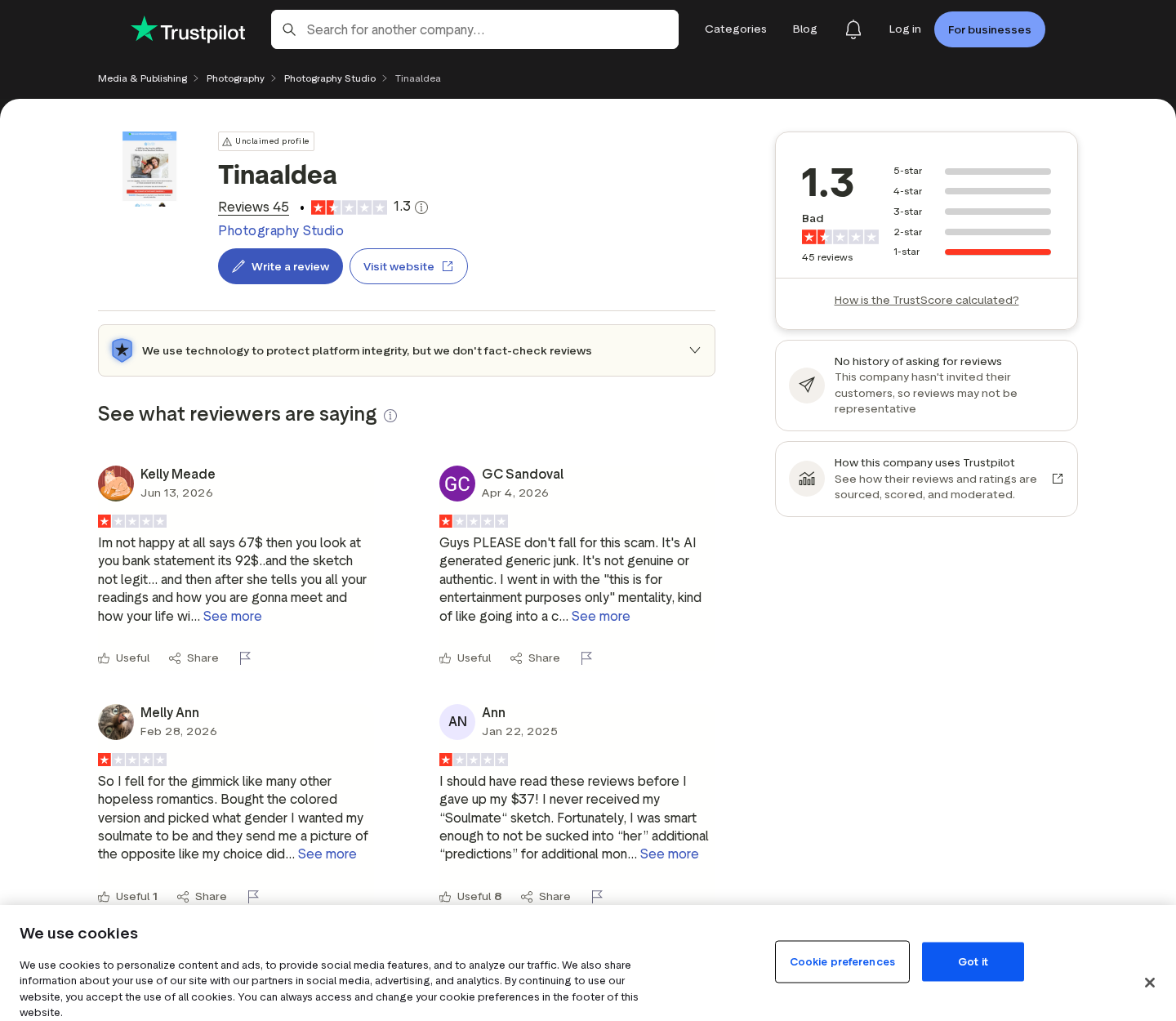
The Trustpilot profile showed a 1.3 score from 45 reviews during our examination, with every displayed rating categorized as one star.
Reviewers alleged incorrect romantic preferences, undelivered drawings, repeated sales messages, added purchases, generic portraits, and difficulty obtaining promised refunds.
Several called their images AI-generated. Those reports are consumer allegations, not forensic proof of the specific production tool used.
A digital portrait can look synthetic, filtered, reused, or template-based without revealing exactly how it was created.
The fair conclusion is that the service exists, but its mystical personalization claims are unverifiable and its complaint pattern creates substantial buyer risk.
How the Soulmate Sketch Funnel Works
Step 1: The advertisement meets an emotional need
Soulmate promotions commonly appear when users browse relationship advice, spirituality, astrology, entertainment, or emotionally charged social-media content.
The offer does not need to prove a technical benefit. It only needs to make curiosity stronger than skepticism for a few minutes.
A lonely person may wonder whether the portrait resembles someone nearby. A partnered person may buy it as amusement or a test.
The seller benefits from both reactions because the initial commitment is framed as a modest, entertaining purchase.
Step 2: A questionnaire creates the feeling of personalization
The visitor selects interests, age, preferred background, zodiac sign, and contact details before seeing the payment step.
These questions make the future picture feel tailored. They also supply enough visual categories to generate or select a plausible portrait.
A requested gender, approximate age, and ethnicity can guide an artist, template library, image tool, or automated workflow.
None of those answers demonstrate psychic perception. They are ordinary input variables collected directly from the buyer.
Step 3: Scarcity and social proof move the visitor toward $37
The page displays a sale timer, a reduced price, warnings about impersonators, and a claim involving more than 23,000 customers.
These elements address hesitation from several directions. The timer creates urgency, while popularity suggests that many people already trusted the service.
The official-site warning can also make the current page feel safer without verifying the underlying psychic claims.
Consumers should distinguish proof that a page is official from proof that the service’s promises are objectively true.
Step 4: The base purchase opens additional sales opportunities
The site states that buyers can pay extra for a detailed description of the pictured person’s qualities.
Faster delivery is another upgrade. Later communications may promote predictions, spiritual guidance, rituals, blocks, or related readings.
Several reviewers described messages suggesting that spiritual obstacles threatened their romantic future unless they purchased more help.
That allegation is important because fear-based follow-up selling can turn a playful $37 purchase into a much larger sequence of payments.
Step 5: A portrait arrives with an interpretation that invites connection
A face that looks broadly attractive or familiar can encourage the customer to search memory for a match.
Humans naturally find meaning in ambiguous information. General personality descriptions often feel specific because readers connect them with their own experiences.
This effect does not require deliberate dishonesty by every creator. It is a predictable feature of subjective readings.
The site itself says results are open to interpretation and may not be unique, which sharply limits any objective promise.
Step 6: Dissatisfied buyers enter a refund process with mixed instructions
The terms say customers receive a 30-day money-back guarantee and can request a refund through the listed Tina Aldea email.
A separate refund page first encourages a free revision, then directs remaining refund requests through ClickBank Order Support.
It uses orders@tinapsychic.com, while other pages display info@tinaaldeaofficial.com. Multiple addresses can confuse a time-sensitive request.
ClickBank’s retailer role may help because customers can pursue an order through an established transaction platform rather than relying only on the creator.
Step 7: Email marketing can continue after delivery
The intake form asks visitors to agree to emails containing the sketch and related content. The terms also discuss marketing texts for consenting users.
Future messages can revive curiosity with urgent predictions, unseen insights, or a new paid service linked to the original reading.
Unsubscribe links can stop ordinary marketing email. Text recipients can use the stated STOP instruction where applicable.
Never let a spiritual deadline override financial judgment. A genuine emergency does not depend on buying a psychic add-on before a countdown expires.

Are the Soulmate Sketches Made With AI?
Customers repeatedly make that allegation
Several Trustpilot reviewers said the portraits looked AI-generated, generic, filtered, or nearly identical to another image.
One reviewer reported selecting a male soulmate and receiving a female portrait. Another described being addressed by the wrong name in follow-up messages.
Such reports are consistent with automation, template mistakes, weak quality control, or mishandled customer records.
They do not independently establish which program created every picture or whether a human edited the final file.
Visual clues alone are not conclusive
Modern image generators can produce smooth portraits, but filters and digital painting techniques can create similar textures.
Conversely, an image that looks hand-drawn may be generated, traced, heavily processed, or assembled from stock material.
Metadata can be stripped during delivery. Watermarks claiming personal authorship provide attribution, not evidence of the complete creation process.
A reliable determination would require original working files, timestamps, revision layers, process documentation, or a controlled comparison across multiple orders.
The legal disclaimer matters regardless of the tool
The terms say the service is entertainment and that sketches may not be unique. That wording permits much less personalization than the emotional promotion suggests.
Even a fully hand-drawn portrait would not prove that the pictured person is destined to become the purchaser’s romantic partner.
The essential consumer issue is the gap between the impression sold and the limited promise accepted at checkout.
Debating the brush or software can distract from that more basic mismatch.
Why Psychic Personalization Feels Convincing
The buyer supplies much of the useful information
The intake answers reveal appearance preferences and demographic boundaries before the service produces an image.
Follow-up messages can use the customer’s name, zodiac sign, hopes, and purchase choices to create a feeling of personal recognition.
This is not secret knowledge. It is data intentionally entered into the funnel and available for automated personalization.
Broad statements invite the reader to complete the story
Descriptions such as loyal, emotionally deep, independent, cautious, or ready for change can fit enormous numbers of people.
The customer remembers accurate-feeling parts and may overlook contradictions. This tendency is especially strong when the topic matters emotionally.
A familiar jawline or hairstyle can trigger comparison with coworkers, former partners, friends, celebrities, or people seen briefly.
Urgent obstacles create a reason to buy again
After an optimistic reading, a message about blocked energy or disappearing opportunity introduces anxiety.
The next paid ritual or report then appears to protect the hopeful outcome already imagined.
This sequence can repeat because mystical claims have no measurable completion point. A new obstacle can always be introduced.
Set a fixed entertainment budget before opening spiritual sales emails and never borrow money for a promised romantic result.
What the Policies Say
Entertainment-only wording sharply limits the promise
The terms state that sketches, readings, tarot, and numerology are for entertainment and do not replace medical, psychological, or legal care.
They say outcomes cannot be guaranteed, delivery times are estimates, results are subjective, and sketches may not be unique.
A shopper should read those statements before paying, not after receiving an image that feels generic.
The guarantee has more than one contact route
One page directs refund seekers to info@tinaaldeaofficial.com, while another lists orders@tinapsychic.com and a ClickBank support process.
The dedicated page says ClickBank refunds usually process within five to seven business days after submission.
Send requests through the retailer portal and the official service address, then retain case numbers and automatic confirmations.
Digital delivery leaves a useful evidence trail
The order confirmation, downloaded portrait, attached reading, delivery time, sender address, and subsequent promotions can all support a dispute.
Do not delete disappointing files. Their metadata and content may show mismatched preferences, duplicated material, or missing promised components.
Export relevant messages as files or PDFs instead of relying only on screenshots that omit headers and dates.
Company, Address, and Fulfillment Checks
The landing page identifies Superclicks LLC
The footer names SUPERCLICKS LLC and displays 109 East 17th Street, Cheyenne, Wyoming 82001.
Consumers should compare that company with the receipt, ClickBank order record, card descriptor, privacy policy, and support response.
An address in a footer does not verify psychic ability or prove that artwork is created at that location.
ClickBank acts as the transaction retailer
The site states that ClickBank is the retailer for products sold through the page and gives its Boise, Idaho corporate address.
It also says ClickBank’s role is not an endorsement, approval, or review of the product claims.
That distinction helps: the processor can handle order support, but it does not validate a soulmate prediction.
Digital fulfillment avoids warehouses but not accountability
No physical package is necessary. The seller fulfills the purchase by emailing an image, reading, or download link.
This makes postal addresses less important than functioning email delivery, accurate customer data, secure payment records, and responsive refund handling.
Check spam and promotions folders, but do not accept endless non-delivery excuses when the promised timeframe has passed.
The contact information changes across connected pages
The main footer lists info@tinaaldeaofficial.com and telephone number 914-290-6551. Refund material also displays orders@tinapsychic.com.
Connected pages use Tina Aldea, Tina Psychic, and related domain names. Save the exact page used for your purchase.
Changing presentation is not proof of fraud, but it makes careful recordkeeping necessary when seeking a remedy.
What to Do if You Paid Tina Aldea or Saw Extra Charges
- List every transaction. Match the advertised $37 purchase, upgrades, expedited delivery, descriptions, readings, and unfamiliar amounts against separate confirmation emails.
- Save the digital evidence. Preserve the intake choices, portrait, reading, delivery message, promotional claims, upsell pages, receipts, and subsequent spiritual offers.
- Request the stated remedy. Use ClickBank Order Support and the published email addresses, quote the 30-day guarantee, and specify each charge involved.
- Cancel future marketing. Unsubscribe from email, reply STOP to opted-in texts, and do not purchase urgent rituals or blockage removals.
- Dispute unauthorized additions. Tell the payment provider which payment you approved, which you did not, and provide the corresponding checkout record.
- Change reused credentials. If the purchase password appears anywhere else, replace it and enable multifactor authentication on the email account.
- Report manipulative or unresolved conduct. Contact the FTC, your state attorney general, or the consumer authority serving your location.
- Check technology after unsafe advertising. Use Malwarebytes to scan for unwanted software and AdGuard to reduce malicious pop-ups, trackers, and redirects.
Is Your Device Infected? Run a Free Malware Scan
Slow performance, constant pop-ups, or strange behavior? These are classic signs of a malware infection. The fastest way to find out is to scan your device with Malwarebytes Free — one of the most trusted malware removal tools available.
The free version detects and removes the most common threats, including:
- Adware — the cause of those annoying pop-ups
- Browser hijackers — unwanted redirects and changed homepages
- Trojans and spyware — hidden programs stealing your data
- Potentially unwanted programs (PUPs) — software you never asked for
👉 Select your device below — Windows, Mac, or Android — then follow the simple steps to download Malwarebytes, scan your system, and remove any threats it finds. The scan usually takes 5 to 20 minutes.
Run a Malware Scan with Malwarebytes for Windows
Malwarebytes is one of the most popular and trusted anti-malware tools for Windows — and it’s completely free for removing infections. It catches threats that many antivirus programs miss, including adware, browser hijackers, and trojans. Follow the steps below to scan and clean your PC in just a few minutes.
Download Malwarebytes
Click the button below to download the latest version of Malwarebytes for Windows from the official source. The free version is all you need — it will scan your computer and remove adware, browser hijackers, and other malicious software at no cost.
Download MalwarebytesOfficial installer for Windows 11 and 10. Your download starts right away.Want real-time protection? See Malwarebytes Premium Malwarebytes Free for WindowsScans and removes malware at no cost
-
Install Malwarebytes
When the download finishes, open your Downloads folder and double-click the MBSetup file. If Windows shows a User Account Control pop-up, click “Yes” to allow the installation.

Follow the On-Screen Prompts to Install Malwarebytes
The setup wizard will walk you through a few quick screens:
-
Choose where you’re installing the program — “Personal Computer” or “Work Computer” — then click Next.

-
Malwarebytes will now install on your device. This usually takes under a minute.

-
When installation is complete, the “Welcome to Malwarebytes” screen will open automatically.

-
On the final screen, click Open Malwarebytes to launch the program.

-
Enable “Scan for Rootkits”
Before scanning, turn on rootkit detection so Malwarebytes can find even the most hidden threats. Click the Settings gear icon on the left side of the screen.

In the settings menu, find “Scan for rootkits” and click the toggle so it turns blue.

Done? Click “Dashboard” in the left pane to return to the main screen.
Start the Scan
Click the blue Scan button. Malwarebytes will automatically update its virus database and start checking your computer for malware.

-
Wait for the Scan to Finish
The scan checks your entire system for browser hijackers and other malicious programs, so it can take 5 to 20 minutes depending on your computer. Feel free to do something else — just check back occasionally to see the progress.

-
Quarantine the Detected Threats
When the scan is done, you’ll see a list of everything Malwarebytes found — malware, adware, and potentially unwanted programs. Click the “Quarantine” button to remove all of them at once.

Malwarebytes will now remove the malicious files and registry entries and move them safely into quarantine.

-
Restart Your Computer
Some threats can only be fully removed after a reboot. If Malwarebytes asks you to restart, click Yes. Once you’re logged back in, Malwarebytes has finished removing the threats it found.

That’s it — your Windows PC is now clean of trojans, adware, and other malware, and should be back to running smoothly.
If you are still having problems with your computer after completing these instructions, then please follow one of the steps:
- Run a computer scan with ESET Online Scanner
- Ask for help in our Windows Malware Removal Help & Support forum.
Run a Malware Scan with Malwarebytes for Mac
Malwarebytes for Mac is a free on-demand scanner that removes the malware other security software tends to miss — adware, browser hijackers, and unwanted programs included. Cleaning an infected Mac with Malwarebytes has always been completely free, and it’s our go-to recommendation. Follow the steps below to scan and clean your Mac in just a few minutes.
-
Download Malwarebytes for Mac
Click the button below to download the latest version of Malwarebytes for Mac.
Download MalwarebytesOfficial installer for macOS. Your download starts right away.Want real-time protection? See Malwarebytes PremiumMalwarebytes Free for MacScans and removes malware at no cost -
Open the Malwarebytes setup file
When the download finishes, open your Downloads folder and double-click the setup file to begin the installation.

-
Follow the On-Screen Prompts to Install Malwarebytes
The Malwarebytes for Mac Installer will guide you through a few quick screens. Click “Continue” and keep following the prompts until the installation completes.



When the installation is complete, Malwarebytes opens to the Welcome to Malwarebytes screen. Click “Get started“.
-
Select “Personal Computer” or “Work Computer”
Malwarebytes will ask what type of computer you’re installing it on. Click either Personal Computer or Work Computer, whichever applies.

-
Start the Scan
Click the “Scan” button. Malwarebytes will automatically update its detection database and begin checking your Mac for malware.

-
Wait for the Scan to Finish
Malwarebytes will scan your Mac for adware, browser hijackers, and other malicious programs. This can take a few minutes, so feel free to do something else — just check back occasionally to see the progress.

-
Quarantine the Detected Threats
When the scan is done, you’ll see a list of everything Malwarebytes found. Click the “Quarantine” button to remove all the threats at once.

-
Restart Your Mac
Malwarebytes will now remove all the malicious files it found. Some threats can only be fully removed after a reboot — if Malwarebytes asks you to restart, allow it. Once you’re logged back in, your Mac is clean.

That’s it — your Mac is now free of adware, rogue browser extensions, and other potentially harmful software.
If you are still experiencing problems while trying to remove a malicious program from your computer, please ask for help in our Mac Malware Removal Help & Support forum.
Run a Malware Scan with Malwarebytes for Android
Malwarebytes for Android automatically detects and removes dangerous threats like malware and ransomware so you don’t have to worry about your most-used device being compromised. Aggressive detection of adware and potentially unwanted programs keeps your Android phone or tablet running smooth.
-
Download Malwarebytes for Android.
You can download Malwarebytes for Android by clicking the link below.
Get Malwarebytes for AndroidOpens Google Play in a new tab.Want real-time protection? See Malwarebytes Premium for AndroidMalwarebytes for AndroidScans your phone and removes malware at no cost -
Install Malwarebytes for Android on your phone.
In the Google Play Store, tap “Install” to install Malwarebytes for Android on your device.

When the installation process has finished, tap “Open” to begin using Malwarebytes for Android. You can also open Malwarebytes by tapping on its icon in your phone menu or home screen.

-
Follow the on-screen prompts to complete the setup process
When Malwarebytes will open, you will see the Malwarebytes Setup Wizard which will guide you through a series of permissions and other setup options.
This is the first of two screens that explain the difference between the Premium and Free versions. Swipe this screen to continue.
Tap on “Got it” to proceed to the next step.
Malwarebytes for Android will now ask for a set of permissions that are required to scan your device and protect it from malware. Tap on “Give permission” to continue.
Tap on “Allow” to permit Malwarebytes to access the files on your phone.
-
Update database and run a scan with Malwarebytes for Android
You will now be prompted to update the Malwarebytes database and run a full system scan.

Click on “Update database” to update the Malwarebytes for Android definitions to the latest version, then click on “Run full scan” to perform a system scan.

-
Wait for the Malwarebytes scan to complete.
Malwarebytes will now start scanning your phone for adware and other malicious apps. This process can take a few minutes, so we suggest you do something else and periodically check on the status of the scan to see when it is finished.

-
Click on “Remove Selected”.
When the scan has been completed, you will be presented with a screen showing the malware infections that Malwarebytes for Android has detected. To remove the malicious apps that Malwarebytes has found, tap on the “Remove Selected” button.

-
Restart your phone.
Malwarebytes for Android will now remove all the malicious apps that it has found. To complete the malware removal process, Malwarebytes may ask you to restart your device.
That’s it — your Android phone is now clean — no more malicious apps, adware, or browser redirects.
If you are still having problems with your phone after completing these instructions, then please follow one of the steps:
- Restore your phone to factory settings by going to Settings > General management > Reset > Factory data reset.
- Ask for help in our Mobile Malware Removal Help & Support forum.
Stay Protected: Block Ads and Malicious Sites
Now that your device is clean, keep it that way. Most infections start with a malicious ad or a fake download button — so blocking them at the source is your best defense.
We recommend AdGuard, which blocks malicious ads, phishing pages, and dangerous redirects before they can reach you.
👉 Download AdGuard and browse safely
Do not pay another fee to “unlock” a refund, release a drawing, remove a spiritual block, or stop a threatening prediction.
If the emails cause fear or compulsive spending, block the sender and speak with someone you trust before making any further payment.
Frequently Asked Questions
Is Tina Aldea’s soulmate sketch scientifically real?
No reliable scientific method can reveal a future partner’s face through psychic energy, zodiac information, or an online preference form.
The site’s own terms classify its output as subjective entertainment and say results cannot be guaranteed.
Is every Tina Aldea portrait generated by AI?
Many reviewers allege AI-generated or generic output, but appearance alone cannot prove the tool used for every order.
The more defensible concern is that customers report weak personalization while the terms admit sketches may not be unique.
How much does the soulmate sketch cost?
The base price displayed during our review was $37, reduced from a stated $61.67.
Expedited delivery, a detailed description, and later spiritual services can raise the total substantially.
Can I obtain a refund through ClickBank?
The Tina Aldea refund page directs customers to ClickBank Order Support and describes a 30-day guarantee.
Use the order number and purchase email, request a refund, and retain the case confirmation.
Why did I receive a person of the wrong gender or background?
A mismatch can result from data-entry mistakes, automation, template selection, or poor quality control.
Save the original intake selections and delivered image because their contradiction supports a revision or refund request.
Are messages about spiritual blocks or urgent rituals trustworthy?
There is no objective way to verify such a block, and urgency can pressure recipients into repeated purchases.
Do not pay from fear. Step away, block the campaign if necessary, and seek grounded advice from someone independent.
The Bottom Line
Tina Aldea sells a real digital entertainment service, but the promise of psychically revealing a destined partner is not scientifically verifiable.
The entertainment disclaimer, possible non-unique output, low independent rating, AI allegations, upsells, and refund complaints make the $37 offer much less reassuring.
Treat it as speculative amusement, cap spending before checkout, and use ClickBank’s documented refund route when the delivered service does not match the purchase.

Join the discussion
0 commentsShare your experience or ask a question about this article.
Discussion
Start the conversation
Have a question or something useful to share? Add the first comment.