


A remote job ad promises commissions for simple work you can do from home. After you apply, the conversation moves to WhatsApp.
The recruiter tells you the first tasks involve promoting products, and the site already looks set up for the work.
Overview
An Instagram job ad led to a WhatsApp recruiter
An Australian job seeker reported finding a remote-work ad on Instagram and applying. A person who contacted them on WhatsApp then directed them to a platform called Ting.
The work was described as clicking buttons to promote products. The recruiter said these tasks would earn commissions, giving a familiar explanation for why the applicant would get paid.
The applicant identified the site as mrctng[.]online and remembered a yellow lightbulb on the page. The name and site gave the offer the appearance of a business.
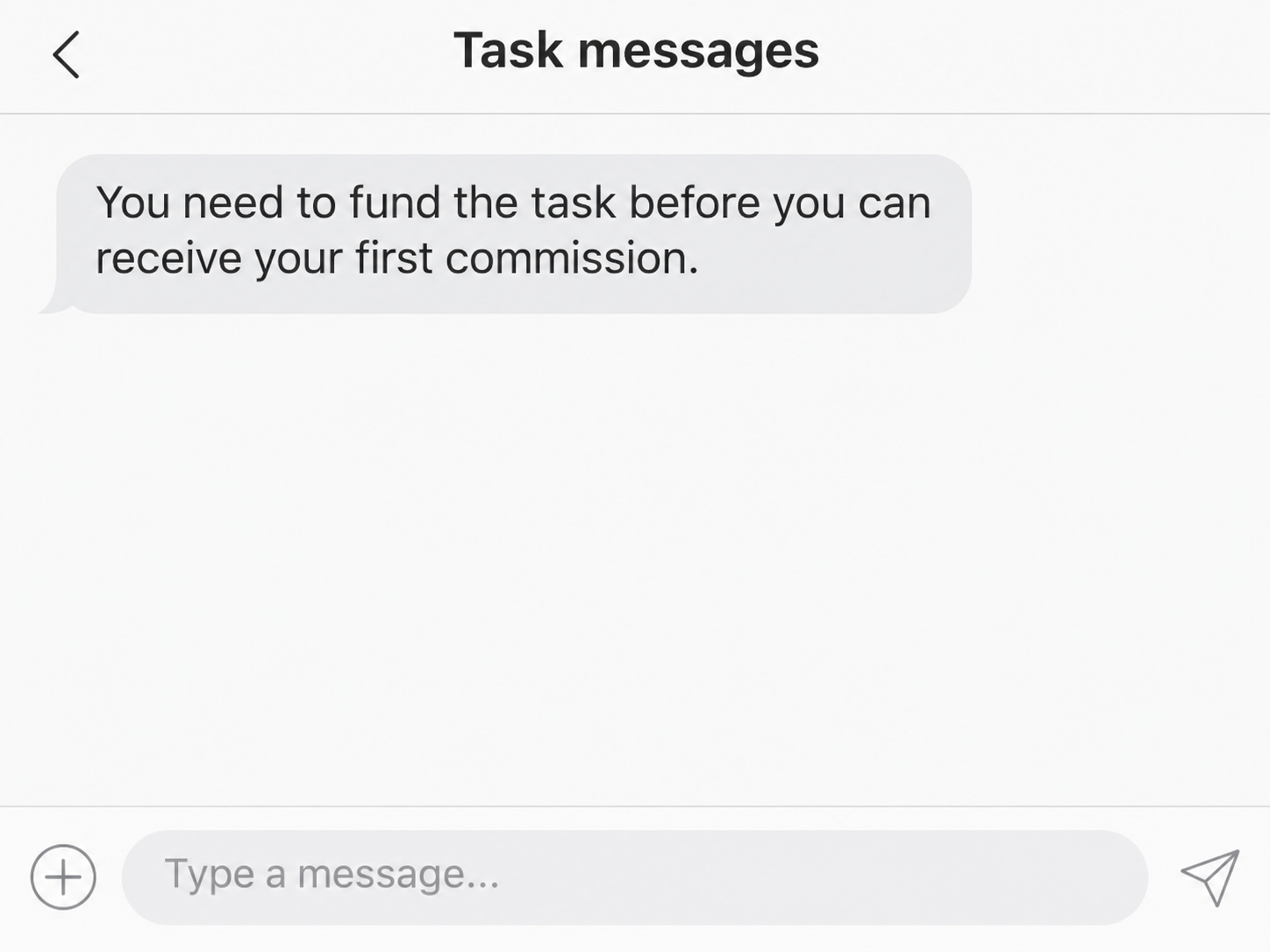
The arrangement changed when the applicant was asked to put in their own money before receiving their first payment. They said they blocked the contacts and sent nothing.
The deposit is the point where the offer breaks down
Scamwatch’s recruitment fraud alert describes fake recruiters sending people to platforms that claim to pay commissions. Applicants are pressed to top up their accounts before earning or withdrawing money.
The report describes a payment demand before an initial commission. Other task scams sometimes make a small payment first, but this applicant did not say they received one.
The lead image illustrates the reported WhatsApp request. The applicant did not provide a public capture showing the wording of the original message or the amount requested.
Here is what the account gives you to check:
- The Instagram ad where the remote-work offer first appeared.
- The WhatsApp messages that followed the application.
- The Ting name and the address the applicant identified.
- The claim that product promotion would earn commission.
- The requirement to pay before receiving the first commission.
The public site could not show us the job dashboard
The reported address displayed a human verification screen during our check. It used the Ting name, but the screen did not reveal any task, balance or withdrawal page.
That distinction leaves room for a useful warning. The applicant describes a deposit request that fits a documented scam. The accessible screen does not show how payments were processed.
The applicant did not report losing money, receiving a commission or entering a payment account. There is also no verified identity for the person who contacted them on WhatsApp.
If you encountered another site with the same display name, compare the full address and what it asked you to do. Common names can refer to unrelated services.
How the Ting Task Scam Works
Step 1: A remote-work ad makes the first contact feel expected
The person in this case had responded to an ad, so a follow-up on WhatsApp did not arrive completely out of the blue. They were expecting someone to reply.
A real company might advertise online, but an advertisement can also be created under an invented brand. Verify the job through the organization that would actually employ you.
Save the original ad before leaving the social platform. Its account name, destination and wording can help you show how the conversation began if the ad disappears.
If you used a quick application, check which fields it asked you to fill in. General contact details and an identity document are different kinds of exposure.
Step 2: The recruiter gives the clicks a job description
Calling the work product promotion makes simple button presses sound like marketing. The promise of commission supplies a reason to keep clicking and a way to explain an eventual payment.
Ask what service someone is buying from you and who the employer is. A platform logo and a recruiter’s explanation do not tell you whether a genuine client exists.
Some fraudulent dashboards put commissions in large numbers next to each task. An amount on a work page is a claim until a payment arrives in your own account.
This case never reached a verified payout. The applicant’s decision to stop came from the request to put money in before anything came out.
Step 3: The platform asks you to fund a task
The recruiter said the worker had to advance money before receiving the first payment. That would make the applicant the source of the deposit behind their supposed earnings.
In documented versions of this scam, the request might be called a top-up, recharge or order balance. Those names describe how someone wants you to think about a transfer.
Check who receives the money and what the agreement actually says. An employer that owes you a commission already has a reason to pay you for the completed work.
When the only route to being paid is to send money yourself, close the conversation. A promise that the amount will come back with a commission is still a promise.
Step 4: Another demand can follow once your money is in
Scamwatch’s guide to jobs and employment scams explains that task platforms may ask for another deposit or show increasing earnings. It describes a broader pattern beyond the Ting account.
The applicant in this case stopped before a transfer. There is no basis for saying the site later asked this person to pay for a larger order or tax.
If you already paid, the same basic check still applies. Compare what actually left your account with any real payments you received, using the provider’s own transaction history.
That comparison also helps when someone says you need to clear a balance. You can explain what happened to your bank without paying to see another dashboard screen.
How to Check a Work Offer Before Completing Tasks
Find the company that would actually pay you
Start with the employer’s name, what it sells and the role it advertised. Search for the company independently and compare the job with its own careers page.
If the recruiter claims to be a contractor, ask the employer to confirm the relationship. Use a published contact and give the position title from the original advertisement.
A real company with a similar name can exist while the job is invented. Check the address you were sent and whether genuine staff use it for recruiting.
Ask who issues the agreement, who pays and how pay is calculated. You can get those details before opening a random website or completing a trial task.
Separate a real marketing job from an on-screen tally
Advertising work can include reviews, product descriptions and campaign reporting. It should be possible to explain what business hired you and what work that business expects.
A button with a commission attached does not establish that anything was promoted or sold. Ask what happens outside the platform when you complete the task.
If someone says you must buy products to make the job work, pause and identify the financial arrangement. A purchase with your money differs from work that earns wages.
Ask for written terms through an independently verified contact. Refusing to fund an undocumented task does not create a debt just because a recruiter says it does.
Check where the contact moves after the ad
Save the ad and the account that posted it while they are still available. If the ad connected to a message thread, record both account names.
The move to WhatsApp separates the later demands from the original listing. If the platform asks you to prove what followed, the invitation helps connect the two conversations.
Keep the messages about compensation and the first payment request. If someone changes the description later, use the original wording to explain what they promised before asking for money.
Avoid sharing identity documents or bank details to make a report on social media. Send sensitive information only if an official provider tells you how it accepts it securely.
Work out which information you already gave them
Expect follow-up offers if you shared your number. If you reused a password on the task site, change it wherever it also works.
Read the original notice if a recruiter asked you for a code. The service that sent it may explain which action the code would authorize.
If you attached a résumé, check which contact details and work history it contained. Someone might cite those details in a later message to sound like another recruiter.
Keep a record of any identity document you sent. Depending on the document, your bank or an identity support service can help assess what to secure.
Use the password reset history in your real email account to see which services might need attention. Report messages you did not request directly to the service that sent them.
Review any permissions the ad asked you to grant to your social account. Remove unfamiliar connected apps through the platform if you approved access during the application.
Save a bank or wallet receipt before you close the chat
If money already moved, open your payment app or bank independently. Record the exact time, amount and recipient as shown by the provider that handled it.
When a dashboard shows a bonus and a deposit together, report the two separately. The display can promise a commission alongside money you can actually trace out of your account.
If support asks for the chronology, include both the date of the ad and the moment the payment was requested. This shows what you were told before you transferred funds.
Someone who appears in the group offering recovery can use details from your complaint. Continue through the platform, bank or exchange you have already contacted.
Check what the ad actually promised before you applied
An Instagram advertisement can name an employment role without naming a company. A screenshot of the ad can show exactly what you were told before WhatsApp entered the picture.
Compare the pay described in the advertisement with the rules the recruiter supplied later. Flag the first message where your earnings became conditional on sending your own money.
If the contact switches accounts, record who introduced the new person and when. That gives the platform a way to connect the accounts without assuming they share an operator.
Describe the point where you stopped, too. If you refused the deposit before the platform issued payment details, the platform should know the report concerns a demand and attempted recruitment.
What to Do if You Have Fallen Victim to This Scam
-
Stop taking tasks that require money and preserve the ad, WhatsApp chat and full website address. Save the request that tied your first payment to another deposit.
-
Contact the provider you used to send money and request its fraud team. Give it the recipient, date, amount and any payment or transfer reference.
-
Tell the provider which transactions you approved and which you did not. The account might require different protections if someone also obtained your login or verification codes.
-
Report the ad through Instagram and report the recruiter through WhatsApp. Save whatever reference each platform gives you for the original advertisement and conversation.
-
Send a report through Scamwatch if you are in Australia. Include the timeline and save the reference for later contact with your bank.
-
Decline any paid offer to recover the funds and check updates through your provider. Never use a new number sent by someone who approached you after the report.
If you stopped before giving money or sensitive information, report the ad and block the recruiter. Check new offers independently when they refer to the same application.
A person who paid can still report the scam even if the dashboard has disappeared. The bank or exchange can use its own transaction record.
Frequently Asked Questions
Is Ting a real employer for these advertised tasks?
The public account identifies a specific job offer and domain, rather than every business with that name. Decline this offer because it requires paying to receive a commission.
Does an ad on Instagram confirm that the job is genuine?
An ad can be bought by an account that has no connection to the company it names. Confirm the position and recruiter through a separate, verified contact.
Why would the site need a deposit for product promotion?
Requiring applicants to fund their tasks makes them the source of the money. An explanation about commissions cannot make the required deposit safe.
Did the applicant lose money in this reported case?
The applicant said they blocked the contacts before sending money. There is no confirmed payout or loss in their account of what happened.
Should I complete the human verification to see my balance?
Leave the site if it belongs to the recruiter who asked you to pay. Your bank or exchange can verify a real transaction without access to that dashboard.
What if another person claims they earned money there?
A reported payout is a separate transaction from the money they ask you to send. Check the employer and never rely on another person’s screenshot to approve a deposit.
The Bottom Line
Walk away from the Ting offer when a recruiter asks you to fund a task before receiving your first commission. Keep the original ad and request to show what changed.
If you already paid, contact the bank or platform that handled your payment. Report the actual transfer, and keep the supposed earnings separate from the amount you can verify.

Join the discussion
0 commentsShare your experience or ask a question about this article.
Community experiences
Did this happen to you?
Your experience could help someone recognize the same scam. Submit a private report for our team to review.
I experienced this tooReports are reviewed before publication. Sharing publicly is always your choice.
Discussion
Start the conversation
Have a question or something useful to share? Add the first comment.