

The Typkur Hypersonics Pro vacuum cleaner has recently gained popularity through aggressive social media marketing campaigns touting its advanced features like infrared dust detection, automatic speed control, and powerful suction. However, many satisfied customer reviews appear suspiciously uniform while independent product reviews are concerning.
This article will analyze Typkur’s claims, marketing tactics, customer feedback, and company background to determine if this product is truly as revolutionary as advertised or simply an overhyped product.
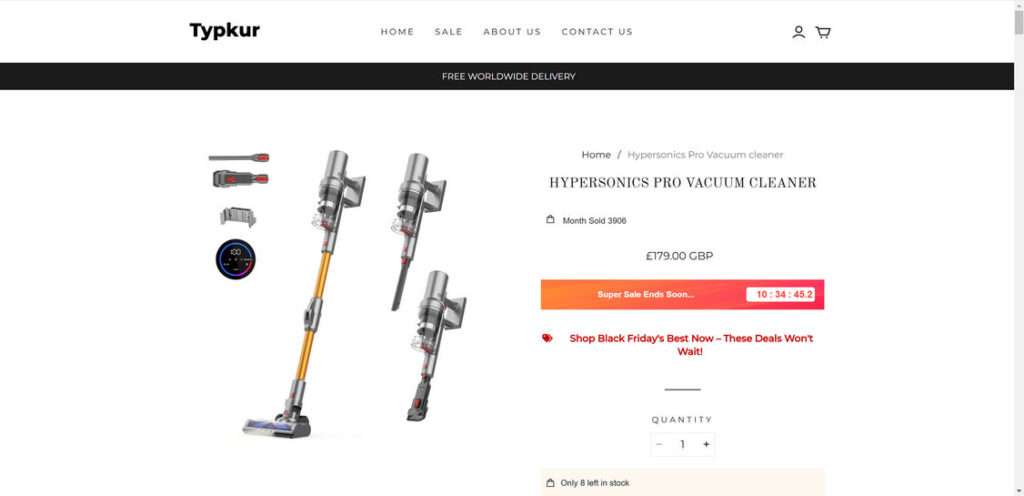
Marketing Claims and Features
Typkur markets the Hypersonics Pro as a high-tech cordless vacuum with exceptional power and convenience. Advertisements boast these key features:
- Infrared dust detection to sense and adapt to debris automatically
- Automatic speed control to optimize suction for floor type
- Powerful suction from 13,000 to 27,000 PA
- Up to 50 minutes of battery run time
- Quiet operation at 53 dB
- Large 1 liter dust cup capacity
- Advanced filtration with HEPA filter
- Flexible brush head swivels 180°
- Wall-mountable and self-charging
These specifications present the Hypersonics Pro as an innovative upgrade from traditional vacuums. However, many of these marketing claims prove misleading or exaggerated upon further inspection.
Performance Falls Short in Independent Testing
While Typkur promises powerful suction and convenience, independent tests reveal underwhelming performance. According to Reddit users, the suction is nowhere near the advertised 27,000 PA and struggles with common debris. The dust cup fills up quickly and the battery life fails to reach 50 minutes of cleaning.
Maneuverability is also subpar with a heavy and bulky design. The flexible brush head does not swivel as easily as depicted. Overall, testers find the Hypersonics Pro lacks the innovation and effectiveness promoted in its marketing. It compares poorly to premium models from established brands.
Difficulty Getting Refunds for Faulty Units
An alarming number of customers report receiving defective Hypersonics Pro units with flawed batteries or motors. However, seeking a return or refund proves extremely difficult.
According to complaints, Typkur’s customer service rarely responds to emails regarding faulty vacuums. Many consumers say they were asked to provide lengthy videos documenting the issues, an onerous process. Even after jumping through hoops, buyers struggled to get return shipping labels or refunds.
Making matters worse, Typkur appears to operate from China so customers must pay high return shipping fees themselves. The lack of support for defective products is concerning.
Misleading Rating Claims
To build credibility, Typkur claims the Hypersonics Pro has almost a perfect 5-star rating on Trustpilot. However, a search reveals no reviews or ratings for this vacuum cleaner on Trustpilot.
The complete lack of an online presence on a major review site contradicts the company’s claims. This tactic seems aimed at deceiving customers who will assume the vacuum is highly rated by other users.
Aggressive Marketing Tactics
Potential customers should be wary of the high-pressure sales tactics used to promote the Hypersonics Pro vacuum. Tactics include:
- Countdown timers warning the deal will expire soon
- Claims of dwindling limited stock
- Huge discounts like 40% off retail price
- Free worldwide shipping with purchase
These tactics encourage hurried decision making by creating false urgency. They may pressure consumers into purchasing an overpriced or unsuitable product. Legitimate companies do not need to resort to such aggressive gimmicks.
Lack of Company History or Physical Address
Typkur does not provide any information about their business registration, history, physical address, or leadership team. The website and ads mention no parent company.
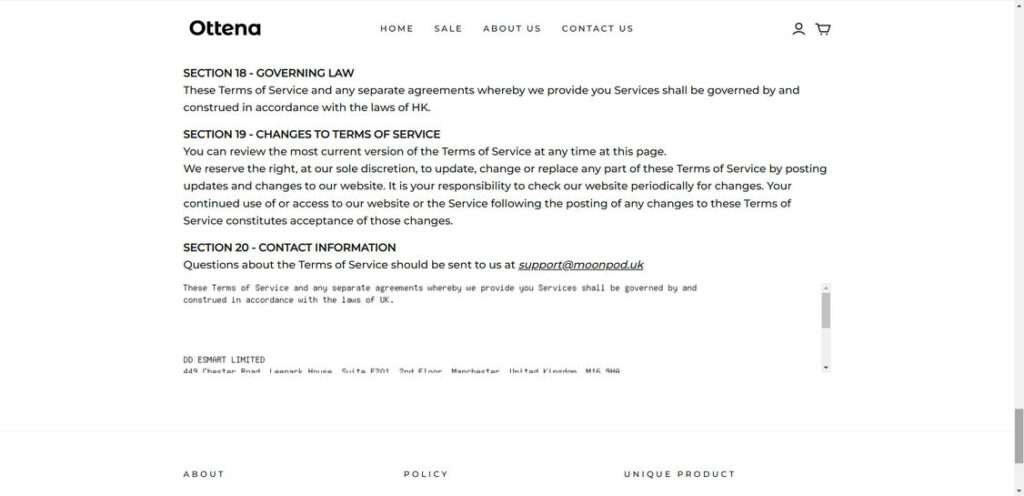
This lack of a paper trail makes it impossible to verify Typkur’s legitimacy or trustworthiness. No customer service phone number is provided either, only an email address. These are hallmarks of a fly-by-night operation.
Potential Dropshipping Operation
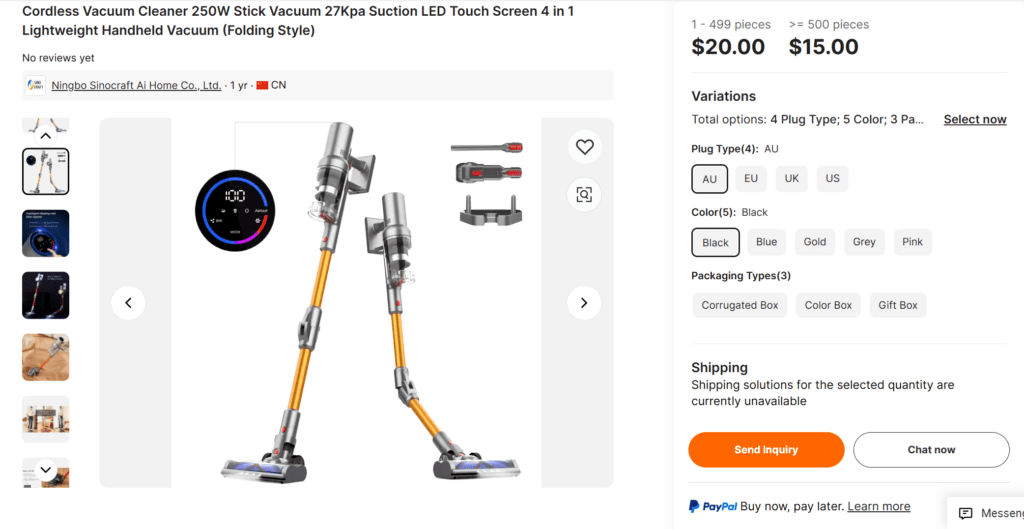
Given the lack of company details and numerous shipping complaints, Typkur may be a dropshipping operation. This means they simply import cheap vacuum cleaners from Chinese suppliers like Alibaba then resell them at a markup.
Dropshippers rarely stand behind the quality of the products they market. This would explain the Hypersonics Pro’s poor performance and the refusal to issue refunds. Most customers receive their vacuums in unmarked boxes direct from China.
Key Takeaways
In summary, there are compelling reasons to be wary of the Typkur Hypersonics Pro vacuum cleaner:
- Does not live up to powerful suction claims based on independent testing
- Company very difficult to deal with regarding returns and refunds
- Makes false claims of near perfect ratings on Trustpilot
- Employs manipulative sales tactics like countdown timers and scarcity claims
- Lacks any verifiable company history, address, or contact information
- Possibly a dropshipping outfit reselling cheap Chinese vacuums at a markup
Given these red flags, the Typkur Hypersonics Pro appears to be a scammy, overhyped product not worth its premium price tag. Customers should be very cautious about providing payment information or making a purchase until transparent independent testing confirms the vacuum delivers on its promises. Savvy consumers are advised to thoroughly research sellers before buying.
The Bottom Line
The Typkur Hypersonics Pro cordless vacuum cleaner has not yet proven itself to be a legitimate high-performance cleaning product. Misleading marketing claims, lack of company details, and numerous customer complaints raise too many doubts. We recommend considering better-established, honest brands with a reputation for standing behind their vacuums when spending hundreds of dollars. Avoid making a costly purchase mistake that could be difficult to undo.
This article is for informational purposes only and should not be relied upon for financial or business decisions. We identify potential scams using research, user experiences, and expert analysis. However, all claims should be independently verified. Mistakes may occur, and legitimate products could be flagged. We strive for accuracy but make no warranties regarding the completeness or reliability of the information.

If you are the owner of the website or product in question and wish to offer clarifications regarding your business or website, please reach out to us via our Contact form.

Join the discussion
0 commentsShare your experience or ask a question about this article.
Discussion
Start the conversation
Have a question or something useful to share? Add the first comment.