

Fraudulent text messages claiming to be from Virginia Credit Union (VACU) have been circulating, aiming to steal sensitive personal and financial information from recipients. This clever scam uses familiar branding and urgent messaging to convince victims their account is at risk, tricking them into clicking malicious links.
This fraudulent activity not only impacts VACU members but serves as a timely reminder about the prevalence of scams distributed via text. With phishing and smishing attacks on the rise, it’s crucial we educate ourselves on how to identify and avoid potential threats.
By understanding the hallmarks of this VACU text scam and learning best practices, we can keep our information safe. This article will provide an in-depth overview of how the scam works, what red flags to watch for, steps to take if you clicked a suspicious link, and how to bolster your defenses moving forward.
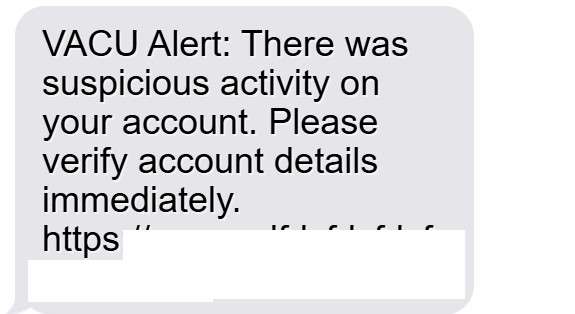
Scam Overview: Anatomy of the VACU Alert Scam Text
The VACU alert scam text aims to trick recipients into believing there is an urgent issue with their Virginia Credit Union account. This convinces victims to thoughtlessly click on malicious links that expose sensitive personal and financial details.
The scam message is disguised to appear as if it originates from VACU. The text will include familiar branding such as the credit union’s full name, “VACU,” or even masking the sending number to mimic an official customer service line.
The message copy itself is designed to instill fear and get recipients to act quickly by claiming there is a problem with their account that needs immediate attention. Some examples include:
- “VACU Alert: There was suspicious activity on your account. Please verify account details immediately.”
- “Urgent: VACU has detected unauthorized transactions on your account. Log in now to secure your funds.”
- “ALERT: Your VACU account is frozen. Click below to unlock your account.”
Despite the urgency implied, the issue referenced is completely fabricated. In reality, there is no problem with the recipient’s account.
The scam message includes a link to “resolve” the problem, urging the victim to click it. But it directs them to a fake website impersonating VACU’s real login page. If entered, login credentials and other sensitive information are harvested by scammers.
This is known as phishing, a tactic used to steal personal information for monetary gain. Scammers cast bait (the fraudulent text) to “fish” for victim information using spoofed sites.
In some cases, the scam link may download malware onto a victim’s device, granting fraudsters access to contacts, data, or allowing them to lock the device for ransom.
Once scammers obtain login credentials, they can drain a victim’s accounts, apply for credit cards in their name, or sell the information on the dark web. Robocalls, identity theft, and more spam texts often follow phishing attacks.
How the VACU Text Scam Works: Step-by-Step
The scam capitalizes on fear and urgency to trick users into giving away sensitive information quickly. Let’s break down the scam step-by-step:
1. Recipient receives a text message.
A text is sent from an unknown number to potential victims. The number may even spoof a legitimate customer service line from VACU or another financial organization.
2. The message impersonates a security alert from VACU.
The text copy impersonates VACU, addressing the recipient directly and claiming there is suspicious activity regarding their account. Familiar branding like “VACU Alert” helps make the message appear credible.
3. The text pressures urgent action, citing account security.
Scare tactics convey that there is an immediate threat to their funds if the issue isn’t resolved right away by verifying account details. This creates a false sense of urgency.
4. A link is provided to “secure” the account.
The message includes a link, typically branded with familiar VACU phrasing like “Secure Account” or “Reset Login.” This adds perceived legitimacy to clicking the link.
5. The link directs victims to a fake VACU login page.
Clicking the link sends the victim to a spoofed VACU login page. To the average user, the page looks identical to the real thing.
6. Victims enter account details, exposing sensitive information.
Tricked into thinking the page is VACU’s real login portal, victims enter their username, password, PIN, and any other requested info.
7. Scammers steal the entered account details.
The fake login page is a phishing site harvesting all data input by victims. Scammers now possess usernames, passwords, PINs, and other info.
8. Scammers drain accounts and commit identity theft.
With the stolen details, scammers can now access victims’ accounts, stealing funds or personal information to open fraudulent accounts. Victims’ identities and finances are now severely compromised.
This simple but manipulative sequence allows scammers to dupe ordinary people into handing over the keys to their financial lives. Awareness of the scam mechanics is key to spotting and avoiding it.
What to Do If You Click a Suspicious Text Link
If you receive a text that looks like it’s from VACU and you clicked the link, don’t panic. Here are the steps to take if you suspect you may have fallen for the scam:
1. Contact VACU immediately. Call a verified VACU number, not the phone number on the potential scam text. Inform them you suspect fraud and they can check for suspicious account activity.
2. Reset your VACU account login credentials. Work with VACU to change your username, password, PIN, security questions, and any other login details. Creating new secure credentials prevents fraudsters from accessing your account.
3. Review accounts and logins associated with the exposed credentials. If you reuse the same username and password across accounts, fraudsters can access those too. Change any credentials that may have been compromised.
4. Enable multi-factor authentication wherever possible. Adding protections like biometrics, security keys, or verification codes to logins blocks scammers.
5. Contact banks and credit card companies tied to compromised accounts. Alert them of potential fraud and have replacement cards issued.
6. Monitor bank statements and credit reports closely. Watch for any unauthorized charges or accounts opened in your name. Report discrepancies immediately.
7. Beware of related spam texts or calls. Scammers may follow up a successful phishing attempt with more communications. Ignore further texts claiming account issues.
8. Report the scam text. Forward it to spam reporting numbers for your wireless carrier like 7726 for AT&T or SPAM (7726) for Verizon. You can also report it to the FTC.
Being proactive reduces the odds of financial loss or identity theft following a phishing scam. Alert VACU and monitor accounts diligently in the weeks following any incident.
Frequently Asked Questions About the VACU Scam Text
1. What is the VACU scam text?
The VACU scam text is a fraudulent text message sent to random phone numbers posing as Virginia Credit Union (VACU). The text claims there is suspicious activity on your VACU account and provides a malicious link, tricking victims into exposing sensitive personal and financial information.
2. What does the VACU scam text say?
The VACU scam text uses familiar branding like “VACU Alert” and claims there is an urgent issue that requires you to verify account details or secure your account. Some examples include:
- “VACU Alert: We’ve detected unauthorized transactions. Click below to verify account activity.”
- “Urgent: VACU has flagged suspicious login attempts on your account. Log in now to prevent account lockout.”
- “ALERT: Your VACU account is frozen. Click link below to regain account access.”
3. What is the goal of the VACU scam text?
The goal is to trick recipients into clicking the link and entering sensitive personal and financial information like account usernames, passwords, PINs, or social security numbers on a fake VACU website controlled by scammers to steal identities.
4. How does the VACU text scam work?
- You receive a text impersonating VACU claiming account issues
- The text pressures you to click a link to secure your account
- The link sends you to a fake VACU login page to steal your info
- Scammers drain your accounts and commit identity theft
5. What are red flags of the VACU scam text?
Red flags include:
- SMS notifications about account problems from VACU or financial institutions
- Spelling/grammar errors
- Requests for sensitive personal/financial data
- Links to unusual/mismatched URLs
6. What should I do if I receive the VACU scam text?
If you receive the suspicious text, do NOT click any links. Delete the text immediately. To verify legitimacy, call VACU directly using the number on their official website, not the text. Report the scam text to phone carriers.
7. What if I clicked the link in the VACU text?
If you clicked the link, call VACU to check for unauthorized account activity. Reset your VACU account credentials and enable multi-factor authentication. Review any other accounts associated with exposed usernames/passwords and change those login details immediately. Monitor your statements closely.
8. How can I avoid falling for the VACU scam text?
To avoid the scam, never click links in unsolicited texts regarding account problems. Manually type in web URLs. Use contact info directly from company websites, not texts. Don’t provide personal/financial information via text. Turn on spam filters and report texts claiming to be from VACU.
9. How can I get help if I lost money to the VACU scam?
If you lost money, call VACU and banks associated with compromised accounts immediately. File reports about unauthorized charges or accounts opened fraudulently. Consider filing identity theft reports with the FTC and your local police department. Contact credit bureaus to monitor for other fraud.
10. How do I report the VACU scam text?
To report the VACU scam text, forward it to SPAM (7726) for major phone carriers. File complaints with the FTC and FCC to aid prevention efforts. Report it to local authorities if money was stolen.
The Bottom Line: How To Identify and Avoid VACU Scam Texts
Staying vigilant against increasingly sophisticated mobile phishing and smishing (text phishing) cons protects our hard-earned money and identities. Keep these tips in mind to detect and prevent falling prey to fraudulent texts like the VACU alert scam:
- Beware texts mentioning account problems: Financial institutions won’t discuss account issues via unsolicited texts. Links promising to “verify” or “secure” your account should be considered highly suspicious.
- Look for poor spelling/grammar: Scam texts often contain typos, weird phrasing, or bad grammar. Legitimate businesses proofread official communiques carefully.
- Hover over links before clicking: On smartphones, press and hold links to preview the URL destination. Fake links usually won’t match an official website.
- Call using a known number: If a text implicates account security, call customer service directly – don’t use contact info provided in the text.
- Use contact info from the source website: Get the official customer service phone number or support email address from the company’s website to inquire.
- Conduct web searches: Search for the company name and phrases from the text to uncover similar reported scams. Results build awareness.
- Don’t give info to unverified sources: Never provide sensitive personal or financial data via text. Legit businesses won’t ask for it via SMS.
- Enable security settings: On both iPhones and Android phones, enable spam filters and block settings to prevent scam texts.
- Report scam texts: Forward dubious texts to SPAM reporting numbers for phone carriers or official bodies like the FTC to aid prevention efforts.
With scam tactics constantly evolving, maintaining vigilance requires dedication. But taking preventative steps and responding appropriately when targeted can help protect finances and identity from compromise via mobile scams.
Heeding warning signs, verifying legitimacy through multiple channels, and contacting companies directly is advised. We must all strengthen our scam awareness to combat rising mobile phishing threats.

Join the discussion
0 commentsShare your experience or ask a question about this article.
Discussion
Start the conversation
Have a question or something useful to share? Add the first comment.