

In today’s world, earning money online through simple tasks like watching videos seems too good to be true. Unfortunately, many fake websites advertise exactly that to scam job seekers out of their time and money.
Let’s dive into the details of this video job scam to understand how it works and protect yourself from falling victim.
An Overview of The Video Job Scam
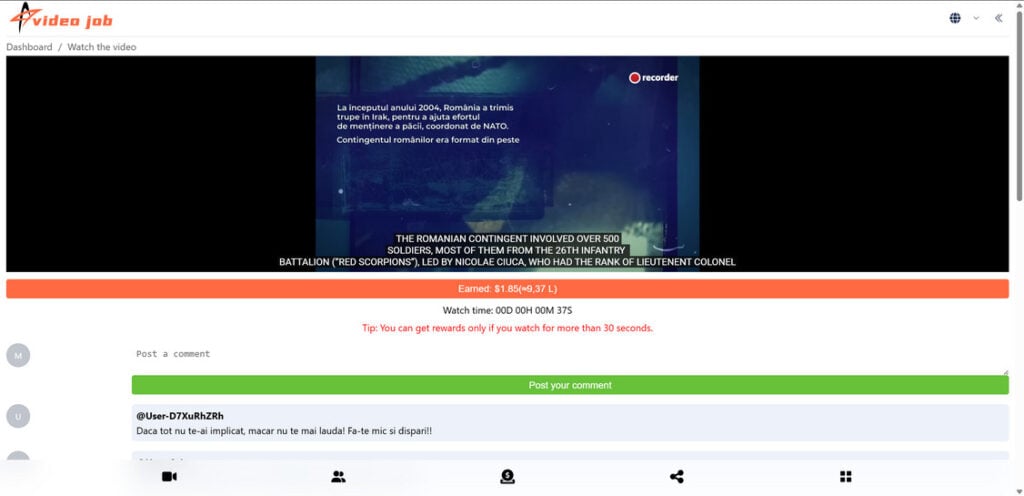
In the video job scam, fraudsters create networks of websites advertising ways to earn money by watching videos, sharing links, and completing simple tasks. These networks use similar website templates and designs with the “Video Job” logo prominently displayed.
Here are some examples of the scam video job websites:
- Videoehjob[.]click
- Videoblrjob[.]top
- Videoadzjob[.]click
- VideoJob[.]Click
- Videojcjob[.]click
At first glance, the websites look professional and legitimate. They make claims like:
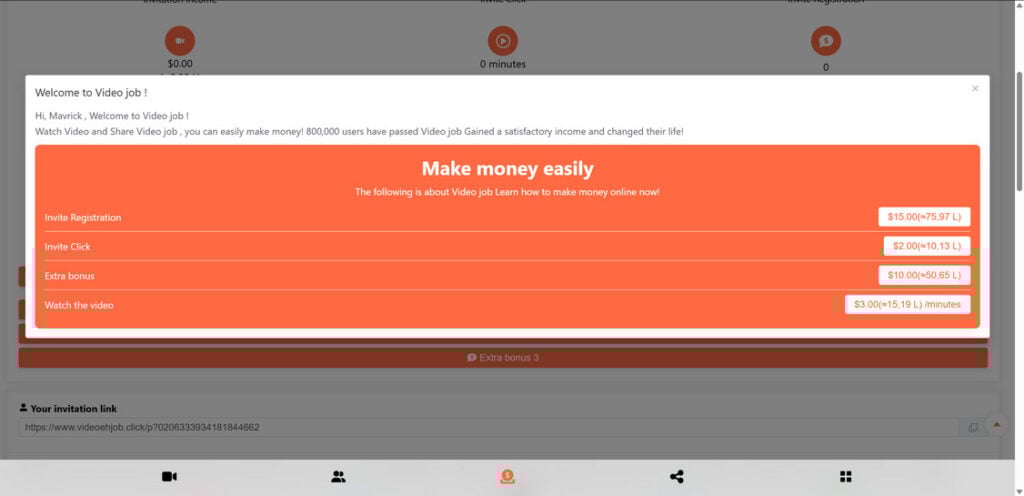
- Earn up to $500 per day just by watching videos
- Get paid $3 for every minute you spend watching videos
- Receive a $15 sign-up bonus
- Refer friends and earn bonuses
- No investment required
However, these websites are complete scams designed to profit from unsuspecting job seekers by:
- Getting victims to sign up with their personal information
- Making victims spend time watching pointless videos and completing fake “tasks”
- Generating ad revenue from high traffic and video views
- Collecting referral commissions when victims invite others
While the scammers behind these networks profit, the victims never get paid as promised.
How The Video Job Scam Works
The video job scam follows simple yet deceptive techniques to target job seekers, luring them in with promises of easy money. Here is an inside look at their step-by-step process:
Step 1: Place Legitimate-Looking Job Ads
The scammers place online advertisements on job boards, social media, and search engines touting flexible, work-from-home opportunities. The ads promise substantial earnings for easy video watching tasks.
This hooks job seekers looking for convenient ways to make extra money online. Clicking these ads leads victims to the network’s scam websites.
Step 2: Make Visitors Sign Up
Once on the website, visitors see enticing claims of high video watching income potentials. After scrolling through the website’s sections, a sign-up box pops up insisting visitors register for a “free account” to start earning.
To sign up, users must provide their name, email address, phone number, and payment information. Little do they know this gives scammers access to personal data for malicious purposes.
Step 3: Funnel Victims Into Watching Videos
After signing up, users gain access to their video watching “dashboard.” The dashboard displays rows of videos, predominantly ads, for them to start watching.
Each video is 10-30 seconds long but there are countless playlists to click through. A counter ticks up, tracking time spent watching. Victims believe this brings them closer to earning the advertised payout.
Step 4: Make Unattainable Bonus Offers
Sprinkled around the website users find offers for sign-up, referral, and task bonuses. For example, 15forsigningup,15 for signing up, 15forsigningup,10 per referral, and $5 for watching 100 videos.
But victims never actually obtain the bonuses. The thresholds are unattainable, and the website never delivers on the offers. They are there merely to string victims along.
Step 5: Collect Referrals
One prominent method the scam employs is demanding referrals. The website urges users to share their referral link via social media and email to earn attractive incentives.
This exponentially grows the scam’s reach as unsuspecting contacts of victims sign up, falsely believing the claims. Each referral means more personal data for scammers to exploit.
Step 6: Make Withdrawals Impossible
As victims put in time watching videos, sooner or later they try to withdraw their supposed earnings. But the website throws up roadblocks demanding, unfulfillable requirements before withdrawing.
Even for users who meet the requirements, the website simply does not have a functional withdrawal mechanism. The scammers have no intention of paying anyone.
In the end, victims cannot collect any of the promised payouts or referral bonuses, no matter how long they interact with the scam website.
What to Do If You Are a Victim of The Scam
Finding out you have fallen prey to the elaborate video job scam can be disheartening. But there are important steps you should take right away to limit the damage and safeguard yourself further:
- Stop engaging with the website – Delete your account to prevent spending any more time on it.
- Contact your bank – If you paid or provided financial information, alert your bank about potential fraud. Have them monitor your accounts closely for suspicious charges.
- Change passwords – The scammers may have accessed other account passwords. Change these immediately to deny further access.
- Place fraud alerts – Consider placing fraud alerts with credit bureaus to protect your financial data and identity.
- Warn your contacts – Let loved ones know about the scam in case the fraudsters try to reach them through your referral links.
- Report the websites – File complaints about the video job websites with the FTC, online job boards, social media networks, and authorities to get them shut down.
- Learn about scams – Become aware of common online job and money-making scams to avoid being victimized again. Look for warning signs like easy money promises, limited company details, poor website quality, etc.
- Look for real remote work -channels. There are legitimate websites like [LIST HERE] that offer authentic remote work opportunities. Vet companies thoroughly before supplying your personal information.
Frequently Asked Questions About The Video Job Scam
1. What is the video job scam?
The video job scam is a fraudulent scheme where networks of websites pretend to hire people for easy video watching jobs. They promise viewers can earn money by watching, sharing, and liking videos but never pay out. These scams try to profit from stealing personal data and earning ad revenue.
2. Who runs the video job scam networks?
The people behind video job scams are cybercriminals and con artists who set up networks of fake websites promoting the job opportunity. They conceal their true identities and whereabouts to avoid legal consequences.
3. What are some examples of video job scam websites?
Some websites connected to this scam include Videoehjob[.]click, Videoblrjob[.]top, Videoadzjob[.]click, VideoJob[.]Click, and Videojcjob[.]click. They have very similar templates and the same Video Job logo.
4. How does the video job scam work?
The scam works by advertising online to lure job seekers, making them sign up and give personal details, funneling them into watching pointless videos, collecting referral traffic, and blocking withdrawals.
5. What tricks do they use to lure people in?
They promise viewers can make $500+ daily just by watching videos. They offer $3 per minute watched, $15 signing bonuses, extra referral bonuses, and require no investment. These are lies to entice victims.
6. What happens when you sign up for a video job scam website?
Signing up requires giving the scammers your personal information including name, email address, phone number, and payment details. They can use and exploit this data.
7. Why do the scammers make people watch videos?
The videos generate ad revenue for the scammers. Also, watching useless videos wastes the time victims could spend on income generating activities.
8. How do referral bonuses work in the scam?
The scam websites encourage victims to share referral links and promise bonuses for getting others to sign up. This spreads the scam further.
9. Can you really withdraw the money you earn?
No, the websites make it impossible to withdraw earnings. The scammers have no intention of paying anyone. Victims never get the money.
10. What should you do if you are a victim of a video job scam?
Immediately stop engaging with the site, alert your bank, change passwords, place fraud alerts, warn contacts, report the websites, learn about scams, and find legitimate remote work.
11. What are the warning signs of a video job scam website?
Warning signs include promises of guaranteed pay for easy work, limited company details, poor website quality, pushy referrals, and inability to withdraw earnings. Avoid these.
The Bottom Line
The promise of getting paid to watch videos or complete simple internet-based tasks is very alluring. But as the video job scam demonstrates, if an opportunity appears too good to be true, it likely is.
These fraudulent video job networks prey on job seekers’ needs to make quick money online. They lure victims in with tantalizing claims of easy earnings then profit through ad views, personal data collection, and referrals while never paying.
Spotting their familiar templates and questionable claims early on is key to avoiding their traps. Any website promising guaranteed income for extremely simple video watching tasks should raise red flags.
Your time has real value. Instead of falling for scams, focus your efforts on legitimate remote work and money-making opportunities that pay fair wages. With awareness and vigilance, we can prevent these fraudsters from deceiving more innocent job seekers.








