


A WhatsApp message arrives about your Vrbo stay. The sender knows your travel details and seems to be following up on a payment you expected to make.
You pull up the reservation, recognize the amount and start answering. Before sending anything else, check how that conversation connects to the booking you actually made.
Overview
A real reservation gives the message credibility
The Vrbo WhatsApp scam impersonates someone handling your stay and uses familiar booking information to make a request for card details seem routine.
The reservation may be genuine while the conversation is fraudulent. Recognizing the property, dates or amount doesn’t establish that the person messaging you can collect payment.
This warning concerns the impersonating message. It doesn’t mean Vrbo, the real property owner or every person using WhatsApp is involved in fraud.
The card request is the point of danger
In a public report, a traveler described a WhatsApp contact with correct trip details and the expected amount. The booking reference was reportedly wrong.
The traveler shared card information, and the issuer subsequently blocked attempted charges. That account doesn’t establish where the sender obtained the reservation information.
Vrbo independently warns that scam WhatsApp messages can pressure recipients into providing private information, including payment details. You should verify the request through your established booking route.
Check these details before responding
- Open the existing reservation through your own Vrbo account.
- Read the payment schedule supplied when you booked.
- Contact the host through the established reservation conversation.
- Compare the actual payment route with the new request.
- Keep card numbers and security codes out of chat.
If you’ve already shared card details, contact the issuer promptly. Checking whether your accommodation is still booked is a separate task from protecting the card.
Why the Correct Amount Can Make You Lower Your Guard
You’re expecting to hear about your vacation. A message that mentions it can feel more relevant than an unrelated fraud alert or an obviously random sales pitch.
The timing can make the request fit your plans. Perhaps the stay was booked weeks ago, and you remember that a payment was due later.
Vrbo’s guest terms allow payment at booking or later according to the schedule presented at checkout. A later payment date is not, by itself, evidence of fraud.
The important question is whether this particular request belongs to that arrangement. An expected payment doesn’t authorize an unfamiliar WhatsApp contact to collect your card information.
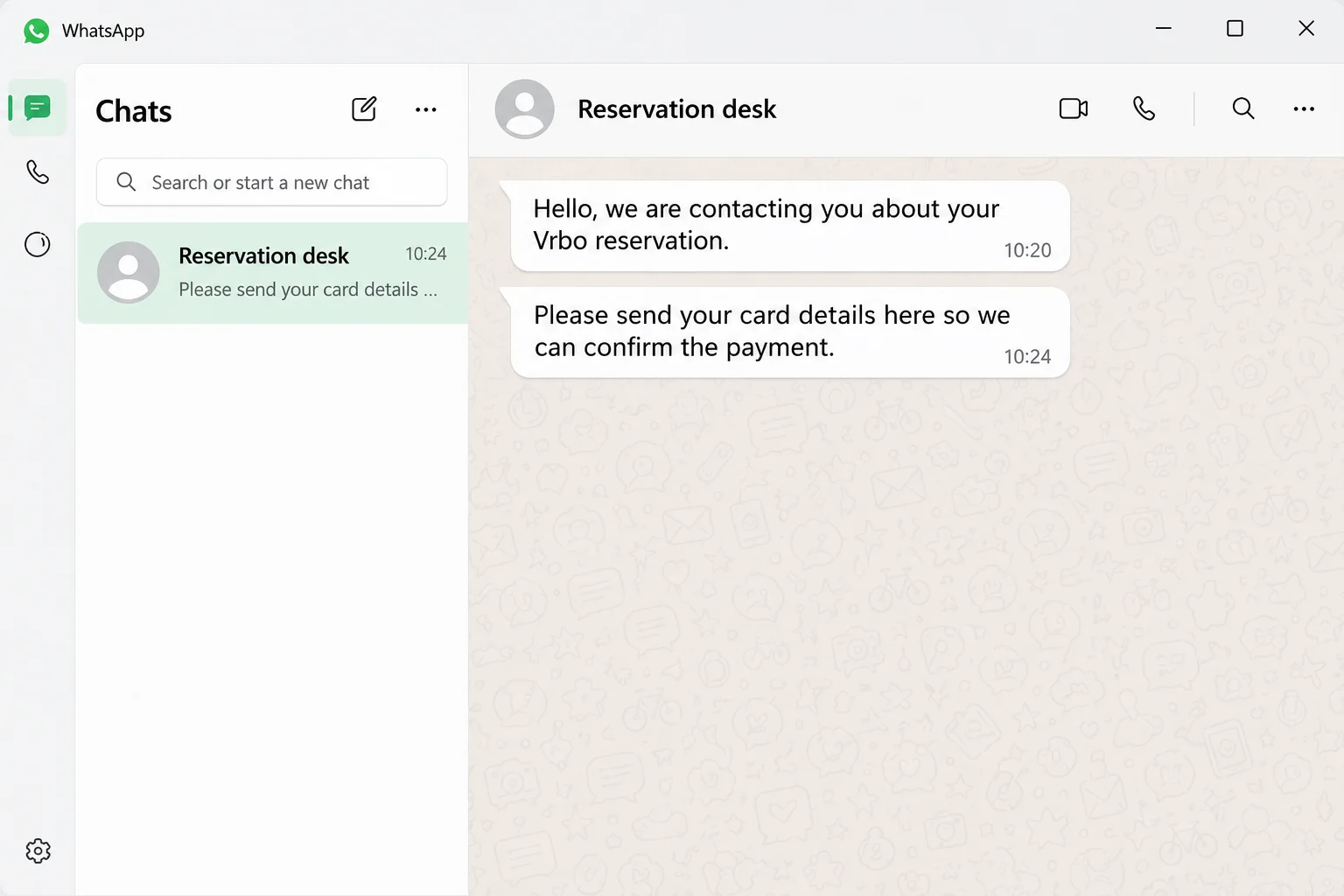
The fictional chat illustration shows that distinction: the sender invokes a Vrbo reservation, then asks for card details inside the conversation.
You can acknowledge that a balance is due without following the new instructions. Return to the booking and find the method you originally agreed to use.
How the Vrbo WhatsApp Scam Works
Step 1: The sender connects the message to an existing trip
The contact presents the conversation as an ordinary part of managing your stay. Instead of introducing a new purchase, they refer to a booking you’ve already made.
Information you recognize can carry the argument for them. You may stop questioning the sender once they mention the right amount or the place you’re visiting.
A reported Vrbo impersonation attempt followed this pattern. The recipient believed the person requesting payment details was the property owner.
Don’t confirm extra details just because the stranger already knows some. A familiar reservation fact isn’t a reason to disclose the remaining information they ask for.
Step 2: A payment you expect becomes the reason to act
The request can seem especially plausible if the original booking didn’t charge your card immediately. The contact appears to be closing an unfinished part of the transaction.
Look for the actual due date in the confirmation or your booking account. A message about a balance should agree with the arrangement recorded there.
According to Vrbo’s guest terms, payment processing can involve third-party providers, including providers used by some travel partners.
That doesn’t make every unfamiliar payment page fraudulent. It makes independent confirmation of the specific collection method essential before you enter card information.
Ask the verified host or Vrbo support to explain any difference. Don’t let the new WhatsApp contact supply the only explanation for its own request.
Step 3: The conversation moves your card outside the verified process
The sender asks you to provide information in chat or follow instructions that haven’t been confirmed through your reservation. This is where an apparently helpful conversation becomes dangerous.
Vrbo’s scam guidance specifically covers SMS and WhatsApp messages that pressure people into revealing private information.
A chat name, property photo or familiar greeting doesn’t verify the recipient of your card details. Those appearances don’t create the protections of a legitimate checkout.
Keep the conversation in the established booking channel while you check. If a payment route is authorized, you should be able to confirm that independently.
Step 4: Providing the details creates a separate card-security problem
Once card information has been disclosed, the issue extends beyond the original conversation. The recipient may try to use that information for transactions unrelated to the stay.
In the reported incident, the issuer blocked attempted charges. The account doesn’t document a completed financial loss, and a block doesn’t establish that the card remains safe.
Tell the issuer what information you entered or sent. Be specific about the card number, expiration date, security code or any verification code you disclosed.
A message saying the first attempt failed isn’t a reason to try another card. Resolve the original exposure before supplying a second payment method anywhere.
Step 5: You have to verify the booking separately from the message
A fraudulent request doesn’t automatically cancel a genuine reservation. However, you still need to know whether a legitimate payment remains due.
Open the trip through your existing account and check its status. Contact the host from there instead of using a number or link provided by the suspicious sender.
Explain what happened and ask whether the WhatsApp request was authorized. Keep the answer in your reservation conversation so you have a record if further problems arise.
Compare the reference against your original confirmation as well. In the reported incident, the wrong booking number was noticed only after the recipient had shared the card.
A correct reference wouldn’t make the chat safe either. Use the comparison to explain the discrepancy to support, rather than as your only test of authenticity.
Don’t cancel the stay merely because an impersonator makes you anxious. First establish the booking’s actual status, payment schedule and available options through genuine support.
How Did They Know About the Reservation?
That’s an understandable question, especially when the amount and travel details match. It is also a question the message itself cannot reliably answer.
The public report attracted theories about compromised accounts and booking systems. Those comments don’t establish how the information reached the sender in that incident.
Vrbo’s safety guidance explains that a compromised email account can expose guest inquiries and enable fraudulent payment requests. That’s one documented possibility, not a diagnosis of every case.
Don’t assume your personal inbox was hacked simply because a stranger knew your trip details. Equally, a familiar message shouldn’t persuade you to dismiss an unexpected security alert.
If you see unfamiliar logins or changes, report those specific findings to the relevant account provider. Keep observed account activity separate from guesses about a data leak.
The immediate decision doesn’t require solving that investigation. You can refuse the card request and protect your payment method while the booking provider examines the report.
WhatsApp Messages and Genuine Booking Communications
WhatsApp is a communication service, not a certificate that someone represents your accommodation. A real business can use it, and an impersonator can contact you there too.
The request matters more than the app icon. Arrival instructions and a demand to send a card’s security code create very different risks.
Vrbo’s off-platform booking guidance says reservations and payments must follow its booking and payment flows.
Its guest terms also recognize payment arrangements authorized through the service. Check your own reservation rather than assuming one universal process covers every property.
For help, use Vrbo’s genuine contact page or the app. The company warns that fake support numbers also appear online.
Don’t replace an unverified chat with an unverified search advertisement. Start from the service you already used and navigate to support from there.
What to Do if You Have Fallen Victim to This Scam
-
Stop sending information to the WhatsApp contact. Save the conversation and the sender’s visible account details first. Don’t send another card or a code to complete the verification.
If the sender continues demanding an answer, leave the conversation. You can check a real payment deadline without allowing that person to supervise the process.
-
Call your card issuer through a trusted channel. Use its banking app or the number on your card. Explain that card information was disclosed through an impersonating reservation message.
Ask whether the card should be blocked and replaced. Tell the issuer about any declined attempts as well as posted charges; those are different transaction states.
-
Describe any payment you actually authorized accurately. If you entered a payment or approved a code, provide the amount, merchant details and time.
Ask which dispute or fraud-reporting process applies. Don’t report every genuine booking charge as fraudulent simply because the separate WhatsApp request was suspicious.
-
Confirm the trip through your established booking account. Review the reservation’s payment schedule and status. Ask the verified host whether any legitimate balance remains outstanding.
If the host’s reply doesn’t resolve the discrepancy, contact Vrbo support independently. Keep the support reference and the written answer about how payment should be handled.
-
Report the impersonation to both relevant services. Send Vrbo the reservation reference privately through genuine support and explain how the unsolicited contact approached you.
Use WhatsApp’s reporting and blocking controls for the suspicious account. Keep a separate copy of the conversation rather than relying on the chat remaining accessible.
-
Secure any login information you disclosed. If a linked page requested your Vrbo or email password, change the affected credentials through the genuine service.
Check the account’s available security settings and recent activity. Sharing card details alone doesn’t prove someone knows your email password, so match your response to what happened.
-
Keep evidence in one place for follow-up. Save the original booking confirmation, the suspicious message, any payment-page address and the bank’s transaction records.
Record the order of events while you remember it. Your bank and booking provider may need different details, but the same timeline can help both.
Before You Travel, Check These Practical Details
Make sure you can access your reservation after any account-security changes. Keep the verified host contact and genuine arrival instructions available without returning to the suspicious conversation.
If your card was replaced, ask whether that affects an outstanding legitimate booking payment. Update it only through the method confirmed by the real provider.
Tell other people on the reservation about the impersonation attempt. Another traveler might otherwise respond to a similar message believing they’re helping finish the arrangements.
If the verified host hasn’t replied, ask platform support how to handle the outstanding question. Tell them when your legitimate payment or arrival is due.
Keep the original payment instructions available during that conversation. This lets the representative compare the agreed arrangement with the new request instead of relying on your recollection.
Before ending the support exchange, write down what you were advised to do next. Check whether a follow-up is needed from you, the host or the issuer.
For a declined charge, retain the amount and merchant description shown by the bank. Those details can help distinguish attempted misuse from a genuine accommodation payment later.
Avoid posting the full reservation number or unredacted confirmation publicly when asking for advice. Give those details privately to the bank or genuine booking support when needed.
Frequently Asked Questions
Is a WhatsApp message about my Vrbo stay always fake?
The app alone doesn’t establish that. Verify the sender and request through your existing reservation, and keep sensitive card information out of the conversation.
What if the sender knows the correct amount?
That makes the message persuasive, not authenticated. Compare its instructions with your original payment schedule and confirm the collection method through the verified booking contact.
Does paying later mean the booking was suspicious?
Vrbo’s terms allow later collection according to the checkout schedule. The question is whether the new request belongs to that agreed payment arrangement.
Did Vrbo or my email account definitely get hacked?
The reported message doesn’t establish either conclusion. Report specific unfamiliar account activity if you find it, and let the relevant provider investigate the information exposure.
Am I safe if my issuer declined the charges?
A decline may prevent that transaction, but the card information was still disclosed. Ask the issuer what protection or replacement is appropriate for your account.
Should I cancel my accommodation immediately?
Check the genuine reservation and contact support first. A scam message doesn’t establish that the stay is canceled, and a legitimate payment may still be due.
The Bottom Line
Don’t send card details to an unverified WhatsApp contact about your Vrbo trip. Confirm the payment method through the reservation you already hold.
If you’ve shared the information, contact your card issuer now. Then check the booking separately with the real host or Vrbo support and preserve the message.

Join the discussion
0 commentsShare your experience or ask a question about this article.
Community experiences
Did this happen to you?
Your experience could help someone recognize the same scam. Submit a private report for our team to review.
I experienced this tooReports are reviewed before publication. Sharing publicly is always your choice.
Discussion
Start the conversation
Have a question or something useful to share? Add the first comment.