

A payment notification says money has already been deposited into your bank account. It looks calm rather than threatening, includes a payee name and reference number, and says the deposit may take up to 48 hours to appear.
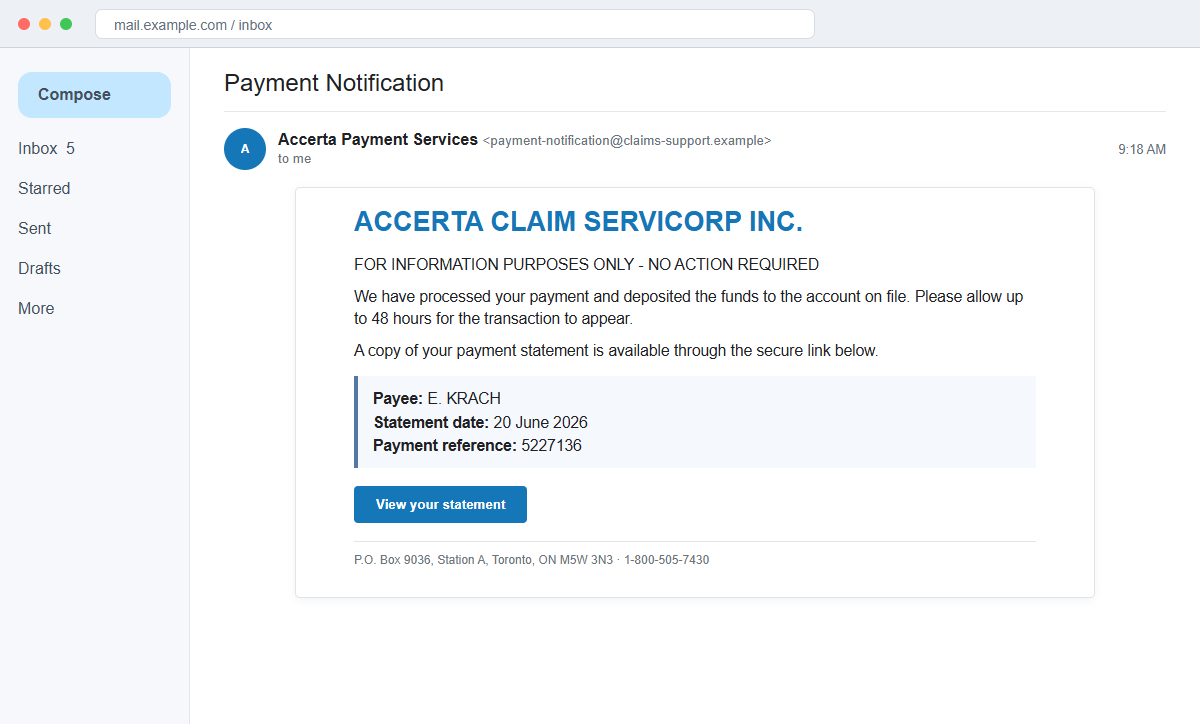
The We Have Processed Your Payment email scam uses that believable delay to make a statement link feel useful. The link does not show a payment.
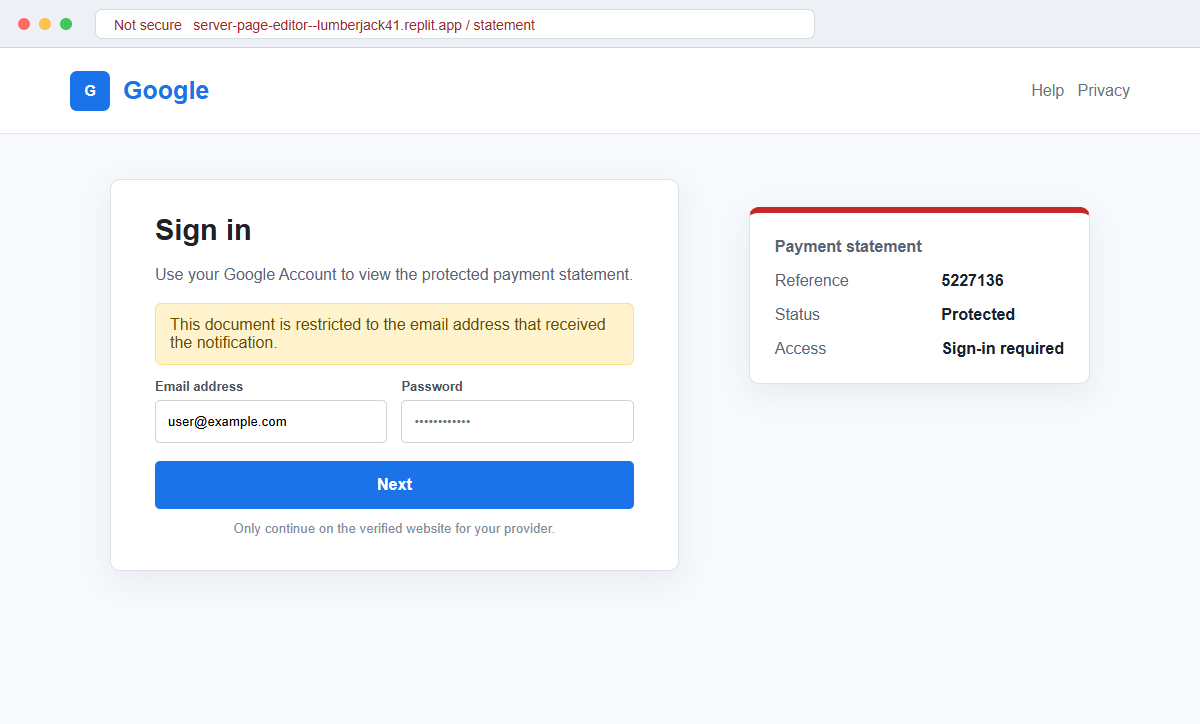
It opens a copied Google sign-in page that records the email address and password entered there.
The message borrows the name and contact details of AccertaClaim ServiCorp Inc., a real Canadian claims administrator. That accurate company information is camouflage, not evidence that Accerta sent the email.
Do not use the statement link or call a number merely because it appears in the message. Open the real benefit portal, bank, or plan account independently and verify whether any payment exists.
Overview
The message announces money without asking for immediate action
The subject may simply say Payment Notification, while the first line says the email is for information purposes only and that no action is required. That relaxed language can lower the recipient's defenses.
A few lines later, however, the reader is invited to log into an account to view the statement. The supposed optional step is the campaign's actual destination.
Real company details make the fictional deposit look traceable
The email may list AccertaClaim ServiCorp Inc., its Toronto mailing address, a toll-free number, and an email contact. It can also include a payee name, statement date, and payment reference number.
Accerta is a real organization, but its official portal runs on an accerta.ca address and uses an Access ID. A page on an unrelated Replit subdomain asking for Google credentials is not part of that system.
The statement link leads to credential theft, not financial information
The linked page imitates Google and requests an email address and password. Any values submitted are delivered to the operator of the fraudulent page rather than to Accerta, the bank, or the recipient's employer.
A stolen inbox can expose benefit messages, financial alerts, personal records, contacts, and password-reset links. The criminals may then impersonate the victim or try the same password on other services.
- The subject says Payment Notification.
- The email opens with FOR INFORMATION PURPOSES ONLY.
- It claims a deposit was made to the recipient's bank account.
- The payment may supposedly take up to 48 hours to appear.
- A payee name, statement date, and reference number are shown.
- AccertaClaim ServiCorp Inc. is named without authorization.
- The recipient is told to log in to view a statement.
- The link opens a Replit-hosted page unrelated to Accerta.
- The landing page imitates Google sign-in.
- Email credentials, not an Accerta Access ID, are requested.
Why an Unexpected Payment Can Be More Persuasive Than a Warning
Many phishing messages threaten account closure or suspicious activity. This one takes the opposite route by offering a pleasant surprise and telling the reader that no urgent response is necessary.
Curiosity supplies the pressure. A person who does not recognize the payee may want to learn whether the deposit is a benefit reimbursement, insurance claim, refund, payroll adjustment, or administrative error.
The 48-hour delay explains why no money appears in online banking. It prevents the missing deposit from immediately disproving the story and encourages the recipient to use the statement link for more information.
Reference numbers create an impression of an existing case, but an attacker can generate any sequence of digits. A useful reference must be recognized by the real administrator when contacted through its official portal or published telephone number.
Accerta's real web service displays its own branding and asks registered users for an Access ID. Google credentials would not be needed to view an Accerta statement, especially on a domain outside accerta.ca.
The company address and telephone number can be copied from public pages. Accurate footer information proves only that the sender performed a simple search, not that the message passed through the company's systems.
What Happens After the Fake Google Form Receives a Password
The fake page sends the entered email address and password to infrastructure controlled by the campaign. It may show an invalid-password error to collect a corrected entry or a second password.
A redirect to Google, Accerta, or another legitimate site can follow. Reaching a real page afterward does not undo the earlier submission and should not be mistaken for successful account access.
The attacker can test the mailbox immediately and may trigger a multi-factor prompt. A second page, telephone call, or push notification may describe the code as necessary to open the statement.
Once inside, criminals can search for banking, benefit, healthcare, identity, shopping, and password-reset messages. Private attachments and existing conversations help them build more convincing follow-up fraud.
Forwarding rules and filters may quietly preserve access. Security notices can be hidden while copies of selected messages are sent to an outside address controlled by the attacker.
A reused password increases the exposure. The same combination may work on cloud storage, social media, shopping, workplace tools, or a benefit portal even though the fake page displayed Google branding.
How the We Have Processed Your Payment Email Scam Works
Step 1: A payment notification arrives without a known claim
The recipient receives a message saying a payment was processed and deposited. No earlier application, claim decision, or authenticated plan conversation is needed for the lure to appear.
The campaign relies on the possibility that the recipient manages several benefits, reimbursements, or accounts and may not remember every expected transaction.
Step 2: A no-action headline lowers suspicion
The email says it is informational and that no action is required. That wording feels safer than an urgent warning and can make the message resemble an automated financial notice.
The contradiction appears later when a statement can supposedly be viewed only by logging in through the embedded link.
Step 3: Payment details create a paper trail that does not exist
A payee name, date, reference number, mailing address, and contact information are displayed. These details make the deposit appear connected to an administrative record.
None authenticates the message. The real organization must recognize the transaction through a channel reached independently of the email.
Step 4: The 48-hour delay neutralizes the missing deposit
If online banking shows no incoming payment, the email already has an explanation. The recipient is encouraged to wait or open the statement rather than treat the mismatch as proof of fraud.
A real bank or plan portal should show pending activity through its own application. The email link is unnecessary for that check.
Step 5: The statement link opens a copied Google sign-in
The destination is hosted on an unrelated Replit subdomain and asks for an email address and password. It is not an Accerta portal and does not use the administrator's real identity system.
A familiar Google design can make the request feel like document sharing, but visual branding is easily copied. The registered domain remains the important clue.
Step 6: Credentials and second-factor approvals are captured
Submitting the form hands the password to the attacker. A live relay may use it against the real provider while the victim is still waiting for a statement to load.
If a code or approval request arrives, do not provide or approve it. Contact the provider through its official application and report the attempted sign-in.
Step 7: The mailbox supports account takeover and impersonation
The attacker reads messages, resets linked accounts, adds forwarding, and contacts people who trust the address. Financial and benefit correspondence can expose further targets.
The original payment story may disappear, but the stolen mailbox can remain useful for invoice fraud, identity theft, shopping fraud, or more phishing unless every access path is reviewed.
Company and Checkout Checks
Check the real Accerta or benefit portal
Type the known portal address or use a saved bookmark. Accerta's genuine service uses an accerta.ca domain and an Access ID, which is materially different from a Google form on Replit.
Look for the payment reference and statement inside the authenticated account. Do not copy it into a page reached from the suspicious email.
Confirm the deposit with the bank or plan sponsor
Use the banking application, employer benefit contact, or claims administrator reached through existing records. Ask whether the named payee and reference belong to a real transaction.
A transfer delay is not a reason to skip verification. The sender must be able to identify the underlying claim or benefit without collecting an email password.
Compare domains rather than company information
Expand the sender address and preview the statement link. Public telephone numbers and mailing addresses can be copied, while the destination domain reveals where the login actually occurs.
An unrelated Replit address is not transformed into an Accerta service by a logo, footer, or HTTPS padlock.
Inspect the account if the page was opened
Review recent sign-ins, devices, sessions, forwarding rules, filters, delegates, recovery details, and connected applications. Search for password-reset or security messages you did not initiate.
Contact the provider immediately if credentials or a code were submitted. Preserve the original email, headers, destination URL, and time of interaction.
Warning Signs to Check Before You Act
- A payment arrives without a recognizable claim or case.
- The message says no action is required but includes a login link.
- A 48-hour delay explains why the deposit is missing.
- The payee name is unfamiliar.
- A reference number cannot be verified in the real portal.
- Public company contact details are used as proof.
- The statement link opens a Replit subdomain.
- Google credentials are requested for an Accerta payment.
- The page does not ask for the real portal's Access ID.
- The official bank or benefit account shows no payment.
- A password error appears after correct credentials are entered.
- An unexpected multi-factor prompt follows the visit.
A real payment can be confirmed without surrendering an email password to a hosting subdomain. Verify the deposit and the login page as two separate things.
What to Do if You Have Fallen Victim to This Scam
- Change the exposed password immediately. Open the Accerta website, your benefit portal, bank, employer, or claims administrator through a known address through a saved bookmark or its official application, not through the We Have Processed Your Payment message. Set a long password through the real provider after that we-have message. Change matching or closely related passwords on other accounts.
- Treat the password entered after the processed payment notification as compromised. Set a long password through the real provider after that we-have message. Change matching or closely related passwords on other accounts. Audit the authentication methods registered after this we-have case. Remove unknown telephone numbers, recovery addresses, app passwords, and security keys.
- End the access created through the processed payment notification. Sign out all other sessions from the Google account page and the named organization’s official portal, revoke unfamiliar OAuth grants, and reconnect trusted mail applications only after the password change. This closes tokens that can survive a simple reset.
- Review the mailbox for changes connected with the processed payment notification. Remove unknown forwarding addresses, delegates, inbox rules, filters, and automatic replies. The mailbox history surrounding this we-have incident may expose attacker activity. Inspect sent mail, deleted items, trash, and recovery messages.
- Protect the wider account chain. Prioritize email, payment, and document-sharing accounts. The mailbox involved in that we-have message may unlock other accounts through reset links. Change those credentials before an intruder does.
- Verify the claimed payment and plan account independently. Contact the employer, plan sponsor, claims administrator, or bank through a known number. Accerta's real online service uses an Access ID on an accerta.ca address, not a Google password entered on a Replit page. Review benefit statements and deposits for activity you do not recognize.
- Check the device used to open the processed payment notification. Use Malwarebytes after that we-have message whenever an attachment or browser add-on was opened. Review installed software before returning to banking or email.
- Reduce the chance of reopening a related page. AdGuard or another reputable DNS and content blocker may stop known phishing hosts and malicious advertisements tied to the processed payment notification. Keep checking destination addresses after this we-have case. New campaign domains can appear faster than blocklists update.
- Report the phishing message. Use the mail provider's Report Phishing control and notify your email provider, Accerta through its official website, employer or plan administrator, and the organization security team. Keep the original headers for this we-have incident, not only a cropped screenshot. Administrators can use them to trace and block related messages.
- Warn finance contact, email administrator, and affected customers through a separate channel. Explain that the processed payment notification may have exposed the account and ask them to distrust recent file shares, password requests, invoices, payment changes, or urgent replies until the timeline is confirmed.
- Expect follow-up fraud based on the processed payment notification. Anyone citing this we-have incident while promising recovery must be verified independently. A demand for money first is a warning sign. Seek support for this we-have phishing attempt through known channels. A provider or incident responder verified for this we-have phishing attempt is safer than an unsolicited fixer.
Frequently Asked Questions
Is the We Have Processed Your Payment email real?
No. The documented campaign impersonates Accerta and leads to a fraudulent Google-style login page that collects email credentials.
Is AccertaClaim ServiCorp Inc. a real company?
Yes, Accerta is a real Canadian claims administrator, but the organization has no verified connection to this phishing message or its Replit page.
Why does the message contain Accerta's correct address and telephone number?
Those details are public and can be copied. Verify the sender and transaction through an accerta.ca service reached independently.
Why has the payment not appeared in my bank?
The claimed 48-hour delay is part of the lure. Ask the bank or plan administrator whether any real payment is pending.
What if I clicked but did not enter a password?
Close the page, report the email, and verify the account independently. Check for unexpected downloads, but credential theft is less likely if nothing was submitted.
What if I entered my Google or email password?
Change it immediately, revoke sessions, inspect mailbox rules, secure linked accounts, and contact the provider or organization security team.
The Bottom Line
The We Have Processed Your Payment email scam turns an unexpected deposit into a reason to visit a fake Google sign-in page. The statement never exists on that page.
Accerta's real name, address, and telephone number are borrowed credibility. The unrelated Replit domain and request for an email password reveal the actual operation.
Verify payments through the bank, plan sponsor, or official Accerta portal. If credentials were submitted, secure the mailbox and linked accounts before the stolen address becomes a gateway to further fraud.

Join the discussion
0 commentsShare your experience or ask a question about this article.
Discussion
Start the conversation
Have a question or something useful to share? Add the first comment.