


Your household’s internet bill says how much data was used. Someone tells you it can also show every search you made, and the two records start sounding like one.
A billing statement, a browser history, and a router log answer different questions. Before drawing conclusions, find out which record the person is actually looking at.
Overview
The bill measures a service, not the words you searched
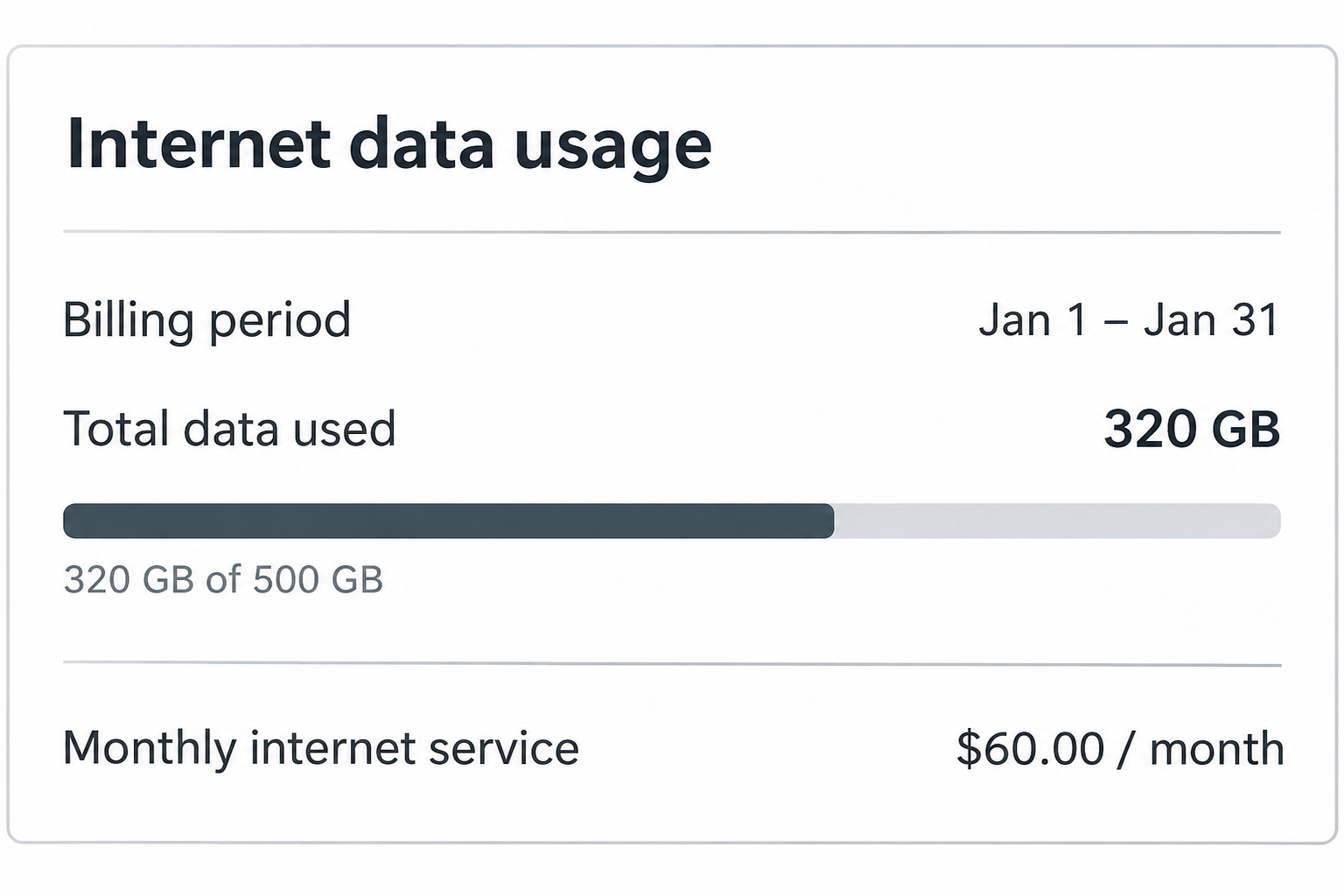
A typical home internet bill describes your plan, billing period, charges, and sometimes usage. A monthly total doesn’t show the search terms behind the bytes.
Xfinity’s data usage guide describes an account usage view for eligible users. It distinguishes home internet usage from per-line mobile usage, not searches or browser history.
If someone shows you a spike in the usage chart, it can be a reason to check your own devices. It doesn’t identify which activity produced the spike.
Network records are separate from billing
A router, filtering service or administrator may keep its own logs. What’s available depends on the actual equipment, setup, permissions and retention, not who pays the bill.
A record may show a device connected, a time or a destination. That is different from revealing the full contents of a secure web request.
An ordinary network observer cannot read the search terms inside a properly protected HTTPS request simply by seeing the traffic cross the network.
Someone can know a search without seeing it on the bill
A shared browser profile, a synchronized account or a monitored device can carry records that aren’t on the bill at all. Those are the first distinctions to check.
Private browsing limits what a browser keeps locally under certain conditions. It doesn’t turn off another service’s records or change a device administrator’s authority.
- Ask whether this is the bill, provider portal, router dashboard, browser, or account history.
- Separate usage totals, destination information and actual search terms.
- Check only equipment and accounts you are authorized to use.
- Treat monitoring on a work or school device as a separate question.
The Difference Between Usage Totals and a Browsing Record
What a bill and account usage meter can show
The bill is tied to what your provider charges for the account. Its details can include the monthly service price, discounts, fees, and applicable charges for data use.
Some providers show the amount used in a portal rather than printing it on the bill. Find the data usage section before concluding what any specific provider displays.
If a provider breaks usage down by time or device, that breakdown still concerns traffic volume. A large download, streaming session or automatic backup can generate similar totals.
A point on a chart doesn’t tell you which activity happened. Consider what other devices were connected before assigning the whole household’s traffic to one person.
Mobile accounts may include details for individual lines, whereas a household broadband bill covers the connection. A call record isn’t a list of searches either.
A label like activity doesn’t make the screen a browser history. Check whether its entries are actually counts, charges, connection times, sites or full page addresses.
Why a domain name is not a search query
A browser connects to a destination, then sends a request for something it wants. Knowing the name of the destination is different from seeing the request it received.
The IETF’s HTTP standard describes HTTPS as securing HTTP communication with the authenticated destination. With ordinary end-to-end HTTPS, the request isn’t readable in transit.
That includes a query sent as part of the protected communication. What the website itself receives is different from what another person watching the network can read.
Network data may still show facts such as connection times and addresses, and some setups can expose names associated with destinations. Don’t equate every possible clue with exact browsing history.
A visit to a search site doesn’t show what you typed in its search box. A request to a news site doesn’t identify the article or explain why it opened.
Several sites can also share network infrastructure. That’s another reason not to confidently attach a particular user’s activity to one network address alone.
What can make a computer different from an ordinary network connection
On an organization-managed device, software can enforce policies or record activity on the device itself. In that situation, normal protections in transit aren’t the entire story.
An authorized organization can also configure managed network inspection or content filtering. Ask the administrator what is monitored instead of assuming every work or school system behaves identically.
Don’t try to bypass such a setup to test it. The relevant questions are whether you own the device, whose account is active, and which rules apply.
At home, a child safety service might report categories or blocked destinations. Check the service and whose device it covers; the report is not evidence from the provider’s invoice.
If a security warning says the browser can’t verify who it’s connected to, don’t continue just to see what gets logged. Ask the service or administrator for help first.
Ask what counts as a record of one visit
A connection alone doesn’t necessarily represent a choice to visit a site. An app can fetch an update or a page can load images and services from other hosts.
Likewise, the amount of traffic may include both what you loaded and what software sent in the background. Neither side of the total automatically becomes a personal browsing log.
A router might give a label to a connected device, but that doesn’t tell you who was using it. Different people can use one device at different times.
If you’re looking at a filtering report, check the date, clock and type of event. A blocked request doesn’t show that a person successfully opened the page.
If Someone Knows the Exact Words You Searched
Start with the account and the device you used
If somebody quotes the words of a specific search, a usage meter is an unlikely explanation. Start by checking where you typed the query and which account was signed in.
Browser activity may be local to a profile or shared through synchronization settings. A second device on the same account can be a more relevant clue than the router.
The search service may also record activity separately when you’re signed in. Read its account settings rather than assuming removing an entry from the browser erases the service’s record.
If it’s a shared device, take note of bookmarks, downloaded files and accounts left open. Even without a saved browser history, those can reveal something about your session.
Pop-up suggestions don’t always mean a person searched for that exact phrase. Autocomplete can draw on popular terms or other data, so examine the actual screen before deciding.
What Incognito does and doesn’t change
Google’s Chrome guide describes a separate Incognito session and what Chrome does not retain afterward. Downloaded files and saved bookmarks are not automatically removed.
Incognito isn’t a second internet connection. It doesn’t change provider billing, which organizations manage the network, or the visibility of activity to services you use.
A private browser window is not an anonymous account. If you sign yourself into a website, that website can still process requests under the identity you supplied.
For a shared family device, separate user profiles and clear sign-out habits can address the actual concern. That is different from trying to hide activity from the network.
What to Do If You Want to Check the Claim
- Identify the screen or statement somebody described. Read the heading and fields rather than relying on descriptions like activity, details or history.
- If it’s an account you manage, open your provider’s current billing or usage help directly. Compare its documented fields with the values on the actual screen.
- If the concern is an exact search, review your own browser profile, synchronization choices, signed-in sessions and search-account activity. Do not inspect somebody else’s private records.
- If a filter or managed device is involved, ask the authorized administrator what records it keeps. Don’t make changes to testing or filtering settings you aren’t responsible for.
- If something suggests unauthorized access to your account, use the service’s security controls and support channel. A data spike alone is not enough to diagnose account compromise.
Make a clear record of what you saw
On a device and account you control, describe the evidence in plain language. A data total, a router event and a browser history entry are not interchangeable.
If an item shows a time but no person, leave the person unknown. Several devices or users could have contributed to what’s visible around the same time.
For unexpected usage, review your plan and ask where the amount came from. You don’t need to disclose your search terms to question a charge.
If you found an unexpected account session, preserve useful times and device names privately. Sign in through the service’s actual site to check recent security activity.
Do not give a stranger access to prove a billing claim
A caller might claim to see your web searches and offer to fix a problem remotely. An accurate plan name or date doesn’t prove authority over your device.
Contact the provider through its verified app or the number on your existing bill. Don’t use the call to share a password, approve an unexpected login, or install software.
If the dispute is with somebody who manages a shared account, ask which provider feature they mean. Establish the facts without accusing someone of reading information you haven’t seen.
Separate questions about billing, retention and account privacy
When you ask a provider for help, be specific about what you want to know. A usage explanation is not the same question as what records the company retains.
Ask who can view any available history and whether the access is inherited from an account role. A relative who pays a bill doesn’t automatically have an administrator login everywhere.
If you manage a shared account, review who can sign in to its own portal. Share service access only as needed rather than giving somebody your personal browser profile.
If you’re trying to understand a workplace or school policy, ask what it documents on managed equipment. Don’t treat a consumer internet bill as evidence about that organization’s monitoring.
A service’s own activity page can show searches after you move to another network. Checking the account controlling that history is more useful than comparing two different router bills.
If several accounts use the same service, check the profile icon before drawing a conclusion from a history entry. Shared computers make the wrong identity easy to overlook.
Frequently Asked Questions
Can the person who pays for Wi-Fi see my searches on the bill?
Ordinary internet billing records are not a list of search terms. The payer may see plan or usage information, depending on what the provider gives that account.
A shared computer or synchronized profile is a separate question. If someone has exact search words, check the source of that information rather than assuming it came from billing.
Is the Wi-Fi router the same as the provider’s account portal?
No, the router is equipment that connects devices to the network. A provider portal typically presents subscription, service or usage information to authorized users.
Some providers offer controls for their equipment through the same app. Even then, check the specific feature, since settings and logs aren’t automatically part of a bill.
Does every router store a complete list of sites?
No, that depends on the equipment and configuration. Some interfaces mainly show connected devices or system events, while separate filters can collect other information.
Even a destination log isn’t necessarily a history of every page or query. Check the actual fields instead of assuming that a label describes everything.
Can somebody on the same Wi-Fi read a secure search request?
Ordinary network observation doesn’t expose the content of a properly secured HTTPS request. What the site receives, or what’s recorded on your own device, is a separate matter.
A managed device or authorized inspection setup can change the situation. Check the applicable monitoring policy if you’re using equipment or an account you don’t own.
Does Incognito keep anything from being written to the bill?
Incognito changes what Chrome retains for that browsing session, not whether the internet connection carries data. A provider that counts usage can still count the traffic.
Downloads and bookmarks may also remain on the device. If you use a shared system, understand the browser’s limits before assuming it leaves no record.
Does a high data total mean somebody has accessed my account?
A high total alone doesn’t show that anyone accessed your account. Routine activities like large updates or a backup can generate substantial traffic.
Check for evidence relevant to the account, such as an unfamiliar session or changed setting. Ask your provider about unusual charges separately if the issue is billing.
The Bottom Line
A Wi-Fi bill isn’t your search history. Read the fields in the actual record and keep billing data, network observations, and activity within a browser or account separate.
If the concern is an exact search or an unexpected login, start with your own account and device. On managed equipment, ask the authorized administrator about the records that apply.

Join the discussion
0 commentsShare your experience or ask a question about this article.
Community experiences
Did this happen to you?
Your experience could help someone recognize the same scam. Submit a private report for our team to review.
I experienced this tooReports are reviewed before publication. Sharing publicly is always your choice.
Discussion
Start the conversation
Have a question or something useful to share? Add the first comment.