

Online shopping scams targeting popular brands have become increasingly common in recent years. One major retailer frequently targeted by scammers is Wilko, a British high street staple known for household goods, pet supplies, beauty products, and more. This article will examine the rise of fake Wilko websites, how these scams operate, warning signs to watch for, and steps you can take to avoid falling victim.
Overview: How the Wilko Scam Works
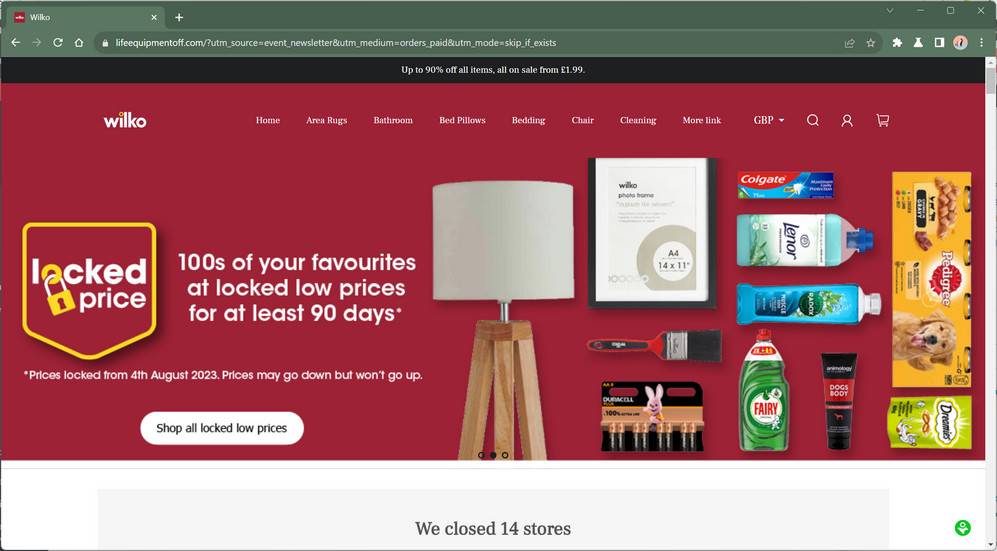
Scammers are creating sophisticated fake e-commerce sites designed to mimic the real Wilko website. They utilize the legitimate Wilko name, branding, logos, product images, and more to appear authentic. These imposter sites are advertised heavily on social media platforms like Facebook, Instagram, and Tiktok using paid ads to attract unsuspecting shoppers.
The scam websites accept orders, and process payments, but never deliver the promised goods. Customers who place orders through these fraudulent sites report the following disappointing outcomes:
- Nothing at all – The most common result. Orders simply vanish after payments clear and are never received.
- Cheap knock-offs – Some customers receive low-quality replicas made with inferior materials that do not match product descriptions.
- Used or damaged goods – In some cases, victims receive items that are clearly used, broken or tampered with.
- Completely wrong products – Orders arrive with random products that were not ordered, indicating no order accuracy.
In addition to scamming shoppers out of their money, these sites also steal personal and financial data provided during checkout such as names, addresses, phone numbers, and credit card details.
Research suggests these Wilko scam sites trace back to organized cybercriminal networks based primarily in China. The sophisticated groups manage clusters of fraudulent stores with the intent of stealing money and information.
How the Wilko Scam Works
The criminals running these fake shopping websites go through elaborate lengths to make their scam sites appear credible to potential victims. Here is a step-by-step look at how they operate:
Building the Fake Website
- Scammers register a domain name extremely similar to the real Wilko’s, typically with minor typos or extra letters added. For example, “wiliko-uk.com” or “wilkoshopping.co.uk.”
- The scam site is designed to mimic the legitimate Wilko site down to the smallest details. The same branding, colors, fonts, navigation menus, footer links, etc. are copied over.
- Wilko’s official logo and product photos are stolen and used illegally throughout the fake store. Some images may be edited slightly to avoid detection.
- The site has a homepage, category pages, product pages, a shopping cart, and a checkout process made to function like a real ecommerce store.
Luring In Victims
- Scam sites rely heavily on social media ads to attract targets. Fake Wilko ads run on Facebook, Instagram, Tiktok and other platforms.
- These ads tout deals up to 90% off, flash sales, clearance items and other phony promotions aimed at baiting bargain hunters.
- Links take users straight to the scam site rather than the real Wilko store. The goal is keeping victims within the fraudulent site.
Processing Orders and Payments
- The site lets users browse for products, add items to a cart, and enter personal + payment data at checkout.
- Shoppers must submit full name, address, phone number, and credit card or other payment details.
- No actual products are ever shipped out. After payments are processed, orders simply disappear.
Stealing Personal and Financial Data
- In addition to payments, users’ names, addresses, and contact info entered on the site are harvested.
- Entered credit card numbers, CVV codes, and expiration dates are collected.
- This sensitive data is used for wider identity theft or sold on the dark web to other cybercriminals.
- Email addresses may be added to phishing scam mailing lists for future attacks.
As you can see, a great deal of planning goes into crafting an elaborate facade to steal from unsuspecting online shoppers. Being aware of these sneaky techniques is key to spotting and avoiding fake sites.
Warning Signs of a Fake Wilko Website
While scam sites go to great lengths to appear legitimate, their façade tends to break down upon closer inspection. Watch for these red flags when shopping online:
- No customer service contact info – No phone number, email, live chat or physical address provided.
- Copied legal pages – Terms of Service, Privacy Policy, etc. may be plagiarized from other sites.
- No company transparency – No details about who owns or runs the business.
- Too-good-to-be-true discounts – Up to 90% off and other unrealistic deals used to lure shoppers.
- No social media presence – Brands like Wilko have active social media accounts, which scams won’t.
- Stock photos – Product images lifted from other major retailers rather than original photos.
- Poor website quality – Bad grammar, typos, mangled text, odd fonts and images are red flags.
- Mismatched URL – URL may contain extra words or letters not matching Wilko’s official site.
- Positive review spam – Hundreds of fake 5-star reviews may be posted to trick customers.
- Checkout errors – Common failures during checkout while entering payment details.
When multiple shady indicators add up, it becomes clear the website is not legitimate. Use caution and avoid entering any sensitive data.
Steps to Take if Scammed by a Fake Wilko Site
Unfortunately, scam victimization can happen even to savvy shoppers. If you placed an order through a fraudulent Wilko site and did not receive your items or a refund, take the following steps right away:
- Contact your bank – Notify your bank or credit card provider immediately about the fraudulent charges. Request a chargeback to reverse the payments. Provide order details showing items were never delivered.
- Report the site – Alert authorities to the scam website so they can investigate and work to shut it down. In the UK, report to Action Fraud online or at 0300 123 2040.
- Check credit reports – Request copies of your credit reports and look for signs of any wider identity theft stemming from the scam. Consider freezing your credit until the situation is resolved.
- Reset passwords – If you used the same password on the scam site as other accounts, change it everywhere immediately to prevent further misuse.
- Beware phishing – Scammers may send fake “recovery” emails falsely claiming to offer refunds or other assistance to steal more data. Delete these outright.
- Learn from the experience – In the future, avoid entering payment information on unfamiliar sites, stick to well-known retailers, and watch for the warning signs outlined above.
Tips to Shop Safely Online and Avoid Scams
While online scams are on the rise, there are precautions you can take to protect yourself when shopping on the internet:
- Verify the URL – Double check that website URLs match a company’s official site exactly. Watch for extra letters or words. Only shop at https://www.wilko.com/.
- Look for contact details – Reputable sites will have a phone number, physical address, and customer service options prominently displayed.
- Research unknown sites – Quickly search any unfamiliar shopping sites to check for reviews, scam reports and other feedback.
- Avoid social media ads – Don’t click on ads for stores on social platforms, as these often direct to scam sites. Go directly to a known company site.
- Use credit cards – For added protection, make online purchases only with credit cards, never direct bank transfers. Disputing fraudulent credit charges is easier.
- Check for secure checkout – Ensure the website has full HTTPS encryption during checkout. Look for the padlock icon and “https” in the URL.
- Never wire money – Wiring services like Western Union or MoneyGram are risky for online orders, as transactions can’t be reversed.
- Use strong passwords – Have unique, complex passwords for every online account to prevent criminals from accessing others if one is compromised.
- Beware discounts – Extreme coupon codes, discounts up to 90% off and “free gift” offers are highly suspicious.
- Trust your gut – If a site feels shady or “off,” it’s best to avoid it. There are plenty of legitimate stores to give your business instead.
Frequently Asked Questions about Wilko Scams
Is Wilko closing down or going out of business?
No, Wilko remains a large UK high street chain and is not shutting down. Any claims about Wilko closing are false and likely connected to scam ads for fake Wilko liquidation sales. Wilko continues normal operations.
Are other major retailers being targeted by these scammers too?
Yes, criminals are also creating hoax sites impersonating many other well-known British retailers. Fake websites for brands like B&M, Home Bargains, Boots, and TK Maxx are commonly reported. Shoppers should be suspicious of unfamiliar sites for any popular store.
How can I tell if a Wilko advert I saw online is legitimate or a scam?
Fake Wilko ads often promote suspicious liquidation sales of up to 90% off. They may use the real Wilko logo and stock photos illegally. Verifying that the advertised site’s URL matches the official Wilko domain is key. When in doubt, find the real ad on Wilko’s social media.
I entered my payment information on a scam Wilko site. What type of fraud protection do I have?
Contact your bank or credit card provider immediately about fraudulent charges. Under consumer protection laws like Visa’s Zero Liability policy, debit/credit card users are not liable for unauthorized charges. But act fast, as time limits apply.
Can I get scammed using PayPal on a fake Wilko site?
Yes, even PayPal is not immune to e-commerce scams. PayPal Purchase Protection only covers claims filed within 180 days of the transaction. Unauthorized payments via bank transfer are also not covered. Avoid using PayPal on suspect websites.
Should I report scam Wilko sites to Wilko or UK authorities?
Both. Contact Wilko to make them aware of the intellectual property abuse, as scam sites damage their brand. You can also file reports about the scam website itself with Action Fraud or Trading Standards to prompt investigations.
How can I check if my identity was stolen when shopping on a Wilko scam site?
Monitor your credit reports closely for any suspicious new accounts or charges opened in your name, a sign criminals are misusing your info. Set up credit freezes if needed. Routinely check bank and credit card statements for unknown charges too.
Is it safe to shop at the real Wilko website?
Yes, the legitimate Wilko website (https://www.wilko.com/) is secure for online purchases. Stick to this verified domain and avoid any variations. Wilko also has an active Facebook page with over 1 million followers that promotes real deals.
The Bottom Line
Fake e-commerce schemes imitating trusted retailers like Wilko are proliferating rapidly. The sophisticated scam websites advertise heavily online to intercept shoppers seeking good deals. Be vigilant about confirming site legitimacy before handing over any personal or financial information. If a deal seems too good to be true, it almost always is. Stick to reputable brands you know and trust in order to avoid these online traps. With sound judgment and good security habits, you can shop both safely and affordably.

Join the discussion
0 commentsShare your experience or ask a question about this article.
Discussion
Start the conversation
Have a question or something useful to share? Add the first comment.