

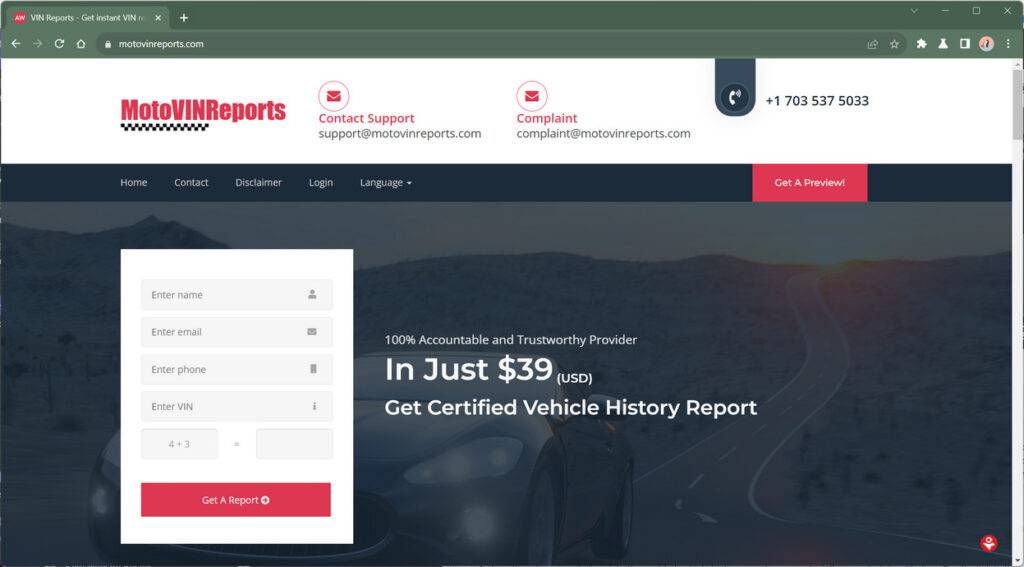
MotoVINReports.com is a vehicle history report scam website that targets people selling their cars online. The scammers pose as interested buyers on sites like Facebook Marketplace, Craigslist, or AutoTrader, and request a vehicle history report from the specific website MotoVINReports.com before agreeing to purchase the car.
However, MotoVINReports.com is not a legitimate vehicle history report site. Instead, it charges unsuspecting car sellers around $39 to generate a fake report, which the scammers never actually view or use to purchase the vehicle. The scammers simply pocket the fee and cease communication.
Read on to learn more about how the MotoVINReports scam works, how to avoid becoming a victim, what to do if you already paid for a report from them, and answers to frequently asked questions.
Scam Overview
MotoVINReports.com is a scam website that trick people into paying for worthless vehicle history reports. The site claims to provide full vehicle history reports for just $39, but the reports provided are fake and lack any real vehicle history information.
This is a common scam that targets people selling their used vehicles online. Scammers posing as interested buyers will request a vehicle history report from the seller, but insist that it must come from a specific website – in this case, MotoVINReports.com.
Once the seller purchases the report for $39, they never hear back from the “buyer.” Meanwhile, the scammers pocket the money made from selling fake reports through their website.
How the Scam Works
Here are the typical steps to this vehicle history report scam:
- You list a used car, truck, or other vehicle for sale online. This could be on Facebook Marketplace, Craigslist, eBay Motors, or any other site that allows private party vehicle sales.
- Soon after listing, you are contacted by an interested buyer via text, email, or through the listing site. The buyer seems eager and ready to purchase your vehicle.
- The buyer then says they want to get a vehicle history report before completing the sale. This is a reasonable request for any used vehicle purchase.
- However, the buyer insists the report must come from MotoVINReports.com. They will not accept reports from well-known sites like CARFAX or AutoCheck.
- You go to the site and are charged $39 for an “instant” vehicle history report.
- After purchasing the report from MotoVINReports.com, you forward it to the buyer.
- Now the scam is complete. The interested buyer disappears once they receive the report. You never hear from them again.
The report itself is fake and lacks any detailed vehicle history information. However, to an untrained eye, it may look legitimate at first glance.
In the end, the scammers behind MotoVINReports.com make $39 and you are left with a worthless report. Meanwhile, your real buyer is still out there waiting.
What to Do if You Have Fallen Victim to This Scam
If you have been targeted by this vehicle history report scam, here are some steps to take:
- Report the incident to the Federal Trade Commission and your State Attorney General’s office. This helps authorities track and prosecute these scammers.
- Report the fake buyer to the site where you listed the vehicle for sale. Provide their username, phone number, email or other details so they cannot victimize others.
- Reverse the credit card charges. If you paid with a credit card, report the incident to your card issuer to reverse the fraudulent charges. Send them any emails or texts between you and the fake buyer as evidence.
- Check credit card statements. Keep an eye out for any other unusual charges from around the same time. Scammers frequently target people across multiple sites and methods.
- Change passwords on your email, online listings and payment accounts. Scammers may try to leverage any information collected during the scam to access your other accounts. Enable two-factor authentication where possible.
- Update listings to say you will only accept reports from CARFAX or AutoCheck. This helps deter new scammers from targeting your sale.
- Learn to spot scammers. Use best practices to identify typical red flags of scammers when selling anything online. Look for eager buyers with vague details, sob stories, verification delays, requests for unrelated personal information and more.
- Spread awareness. Share your experience in online seller groups and forums to help warn others. The more educated sellers are, the harder it becomes for scammers to be successful.
Frequently Asked Questions
Here are answers to some common questions about the MotoVINReports.com scam and other vehicle history report scams:
Why do scammers insist buyers use a specific website for vehicle history reports?
The scam website is owned and operated by the scammers themselves. So any payments go right into their pockets. They cannot make money if buyers purchase reports from legitimate websites like CARFAX.
Are vehicle history report scams illegal?
Yes, these scams involve fraud, deception, and the sale of counterfeit goods or services. The scammers can be prosecuted for crimes like wire fraud, identity theft and selling of counterfeits.
What are signs of a fake or scam vehicle history report website?
Be wary of sites you have not heard of before. Look for poor spelling and grammar, low prices, fakes reviews, limited selection of just VIN reports, and contact information that doesn’t clearly list the business name.
Should I avoid requesting vehicle history reports as a buyer?
No, requesting a professional history report is still a smart buyer practice. Just make sure to only accept reports from reputable, mainstream providers like CARFAX and AutoCheck.
Can I get my money back from a scam vehicle history report?
If you paid by credit card, you can dispute the charges with your card issuer. Citing fraud reason codes like “Counterfeit merchandise” or “Did not receive goods or services” can help with chargebacks. PayPal also offers buyer protection from fraud.
Are other online car sale scams common?
Yes, for popular online sale platforms criminals have developed a wide variety of scams targeting eager sellers. Some pretend to accidentally overpay, some try identity theft via sales contracts, and others simply “buy” the car then disappear with no payment.
Should I report vehicle history scams if I’m not the victim?
Absolutely. If you come across a suspicious site or buyer request, report it even if you did not fall for the scam yourself. This helps authorities locate bad actors and build cases to shut them down. The more reports received, the higher priority a scam gets.
The Bottom Line
Websites like MotoVINReports.com that sell cheap vehicle history reports are almost always scams. Only purchase reports from reputable mainstream providers. If any buyer insists on reports from a lesser-known site, that should be an instant red flag.
Use best practices when selling vehicles online to avoid fraud. Report scammers whenever encountered so they cannot continue ripping others off. Being informed and vigilant is your best protection against vehicle history report scams.

Join the discussion
0 commentsShare your experience or ask a question about this article.
Discussion
Start the conversation
Have a question or something useful to share? Add the first comment.