

A court notice in your inbox can stop an ordinary workday cold. A recognizable law firm name makes it even harder to dismiss.
If you are checking a possible WilmerHale court notice scam, the first thing to establish is where the message actually came from.
Overview
WilmerHale documented the impersonation itself
WilmerHale is a legitimate law firm. The scam involves unauthorized messages using its identity, not wrongdoing established against the firm.
In a notice dated January 21, 2014, it confirmed that purported court-related emails did not originate from WilmerHale.
The firm said the messages encouraged recipients to follow links intended to install malware. It advised avoiding their links and attachments.
That dated warning establishes a documented impersonation. It does not establish that every similarly worded message today belongs to the same campaign.
The age of the evidence matters
This is a guide to recognizing the documented tactic and checking a suspicious message. It is not a claim of a newly discovered 2026 WilmerHale outbreak.
No malware sample was analyzed for this article. There is no basis here to name a payload, declare your device infected, or connect unrelated incidents.
A frightening subject line can deserve investigation without proving a real legal obligation. Verify the claimed matter separately from the email that introduced it.
- The authentic firm warning concerns impersonation and malware links.
- The sender’s display name alone does not establish its origin.
- Opening a suspicious message is not the same action as running a downloaded file.
- Actual legal deadlines should be checked through independent, appropriate channels.
What the example screens demonstrate
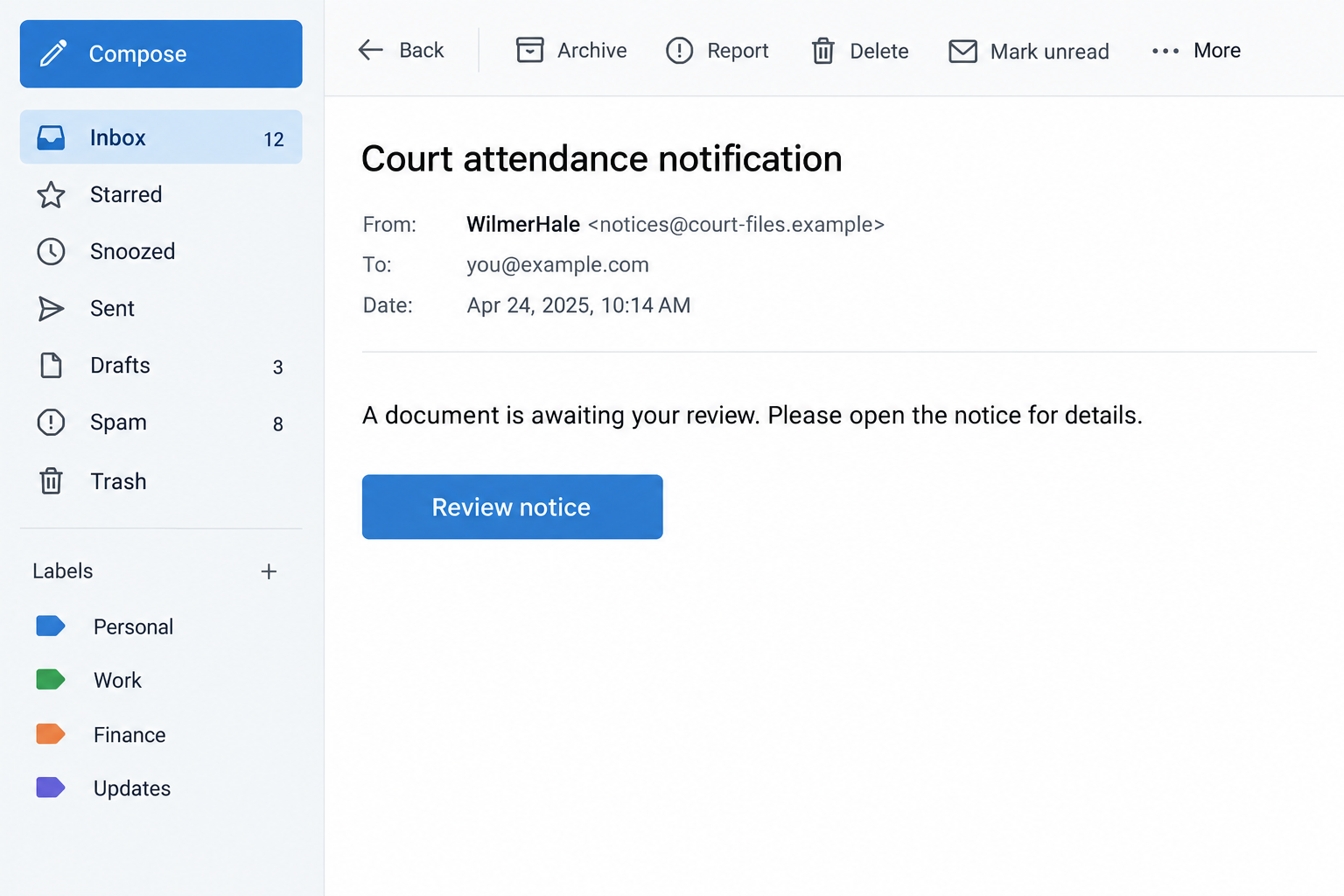
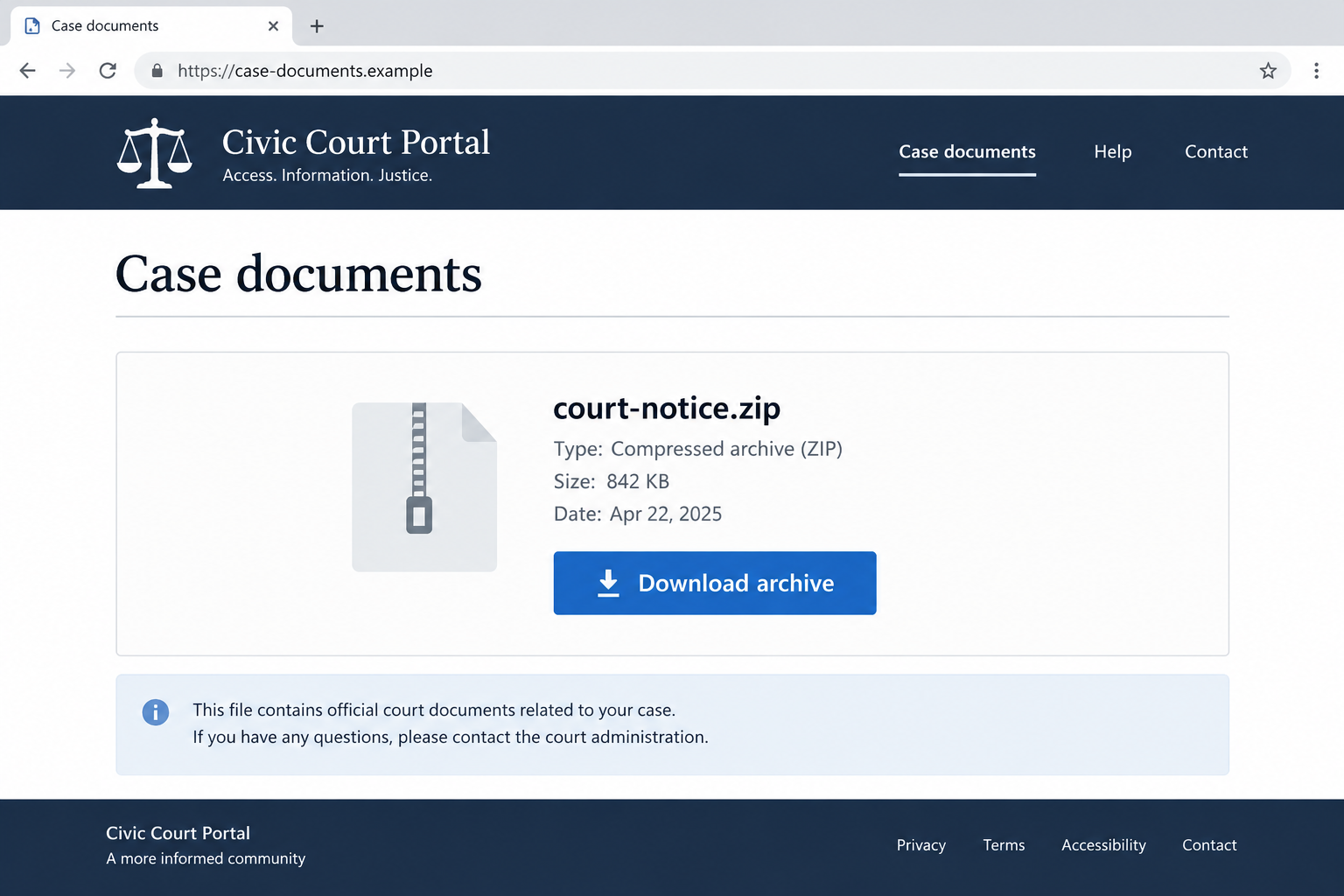
The images here are educational reconstructions using fictional details. They illustrate an inbox lure and a possible document-download stage, not captured evidence of a current attack.
The archive shown in the second example is hypothetical. It should not be read as the file type identified by WilmerHale’s historical notice.
That distinction is important: recognizing a pattern can help you avoid a dangerous interaction, but it cannot replace examining the actual message safely.
How the WilmerHale Court Notice Scam Works
Step 1: A legal-sounding subject creates urgency
The documented messages used court-related subjects, including notices about attendance or a summons. The wording suggested something serious needed immediate attention.
A recipient unfamiliar with legal correspondence may worry that delaying a response will make matters worse. That uncertainty gives the message leverage.
You do not need to decide whether a legal claim is valid while reading an unexpected email. First decide whether its communication channel is trustworthy.
That smaller question is manageable. It lets you preserve the message and consult an appropriate contact without following the sender’s proposed shortcut.
A subject line containing a case number is still only text. Numbers become useful when an independently verified office can confirm what they refer to.
Step 2: The firm name supplies borrowed credibility
A familiar legal brand can make the email look more substantial than anonymous spam. Its presence may encourage you to overlook missing context.
But a sender can type a firm’s name into a display field. A signature, office address, or copied professional biography can also be reproduced.
These details may identify whom the message is impersonating. They do not authenticate who sent it.
Even knowing an attorney with that name would not settle the question. Confirm contact through an established relationship or an independently obtained official office number.
If you already have counsel, use the contact details you normally use. Do not switch to a new number solely because this message supplies it.
Step 3: The message directs you toward supposed documents
Instead of providing safely verifiable context, the lure pushes you to open a link or attachment. The document becomes the apparent route to reassurance.
WilmerHale’s notice specifically warned about links intended to install malware. Other court impersonations can differ, so avoid assuming one universal attachment or delivery method.
Do not open the file to determine whether the notice is authentic. That reverses the order: the unsafe action happens before verification.
On a work account, use the established phishing-report process. Security staff can examine the message with tools and procedures you may not have.
If you need to retain a record personally, preserve visible sender details and the message without activating embedded content. Avoid forwarding risky files casually.
Step 4: A second page can ask for another action
A malicious link does not always reveal its purpose immediately. A page may first look like a document portal, download screen, or login prompt.
Those are possible extensions of email deception, not details confirmed for every historical WilmerHale message. Your response should follow what actually appeared.
If a page asks you to install a viewer, enable content, disable protection, or enter an account password, stop before proceeding.
Legal-sounding language does not make an unexpected software installation necessary. Independent verification can occur without granting the sender access to your device.
A browser padlock only indicates an encrypted connection to that site. It does not certify the site’s relationship with a law firm or court.
Step 5: Fear can keep you inside the sender’s instructions
Once someone has clicked, they may continue because they want to resolve the supposed issue. Each new screen feels like unfinished business.
You can stop at any point. Downloading a file does not oblige you to open it, and opening a page does not oblige you to complete it.
Do not seek reassurance by replying to the same unverified address. A helpful response from that account is still part of the unverified interaction.
Instead, write down what you already did. Whether you viewed, downloaded, executed, or submitted information determines the practical response.
Check the Legal Claim Separately From the Email
Contact the office through an independent route
Locate the firm’s actual contact page yourself. If a specific court is named, find its official directory rather than using the notice’s phone number.
The U.S. Courts scam guidance directs uncertain recipients toward the relevant clerk’s office or appropriate authorities.
Keep your inquiry narrow: ask whether the message, reference, or named sender can be verified. Do not immediately provide confidential documents to an unfamiliar person.
A court clerk and a lawyer have different roles. For advice about your obligations in an actual matter, consult a qualified lawyer.
This article cannot decide whether you have been served or whether a deadline applies. Rules depend on the jurisdiction and circumstances.
Look for a coherent connection to you
Consider what the notice explains about the parties, jurisdiction, and reason you received it. Vague wording is a concern, but detailed wording is not conclusive proof.
Scammers can copy genuine public records. A real case number does not establish that the attached instructions or requested payment belong to that case.
If you recognize the matter, contact someone already involved through known details. Verify the new request, not merely the existence of the underlying case.
Keep the original email and your independent confirmation separate in your notes. That prevents a later review from confusing a claim with evidence.
Do not rely on one cosmetic warning sign
Misspellings can reveal carelessness, but clean writing does not establish authenticity. A polished email can still direct you to an unrelated destination.
Likewise, an unfamiliar address needs investigation rather than instant conclusions about the entire firm. The safe action is to verify without using its supplied links.
Check the full destination domain when it is safely visible. Do not open a link merely because its displayed text resembles an official address.
For example, wilmerhale.document-office.example would belong under document-office.example. That reserved illustration shows how a brand name can appear without controlling the domain.
What to Do if You Have Fallen Victim to This Scam
- Record exactly what happened before taking drastic action.
Note whether you only read the email, opened a site, downloaded a file, ran something, entered credentials, or sent money.
Write down the approximate time and device involved. These facts help a security team assess exposure without guessing from the alarming subject line.
- Report workplace exposure immediately.
If the message reached a business account or device, contact your IT or security team through an established channel. Use its approved reporting method.
Do not erase downloads, reset the machine, or forward attachments widely unless instructed. Those actions can remove evidence or create additional exposure.
- Stop interacting with suspicious downloads.
Do not reopen a file for a second look. If you executed something or see signs of active compromise, seek prompt device-specific help.
On a personal device, an updated Malwarebytes scan can help identify certain malicious files or software. A clean result is useful, but not proof every risk is resolved.
Follow qualified support advice about isolation or restoration when needed. A work device should remain under your organization’s incident-response procedures.
- Protect credentials entered on an unverified page.
Use a separate trusted device to change the affected password. Replace reused passwords and review account recovery details, sessions, and unfamiliar forwarding rules.
Enable available multifactor protection. If you approved an unexpected login prompt or disclosed a code, tell the account provider or your administrator.
- Address any payment or identity disclosure specifically.
If you paid a supposed legal fee, contact the payment provider promptly. Explain the impersonation and ask which recovery or dispute options apply.
If you supplied identity documents, record which ones. Use official identity-theft assistance appropriate to your country rather than a recovery service promoted by the sender.
- Preserve useful evidence without spreading the lure.
Keep the original message, sender information, link text, payment receipts, and relevant screenshots. Give security staff the original email when their process supports it.
Do not publicly upload confidential legal details, identification, or active attachments. A warning to colleagues can describe the subject and sender without forwarding the dangerous content.
- Reduce future risky browsing, without confusing it with verification.
AdGuard can reduce some malicious-ad and unwanted-content exposure while browsing. It cannot determine whether a legal notice is valid or guarantee every dangerous destination is blocked.
Keep your browser and operating system updated. Obtain security tools from their genuine websites, not pop-ups that appear while investigating the suspicious notice.
- Verify any remaining legal concern independently.
Once immediate account or device risks are addressed, contact the genuine office if the underlying issue remains uncertain. Do not simply ignore a potentially real obligation.
Keep records of those independent inquiries. Separating security response from legal verification avoids letting one concern prevent you from addressing the other.
A Practical Inbox Routine for Legal-Looking Messages
Give the person helping you a useful timeline
Include the delivery time, the device used, and the last action you completed. Note whether any security warning appeared and whether you dismissed it.
Do not reopen the message’s destination to recreate missing details. Tell your helper what you remember and mark anything uncertain rather than filling gaps with assumptions.
If several employees received the same notice, identify who interacted with it. Their exposure can differ even when the subject lines match.
Agree on a routine before urgency takes over
Unexpected legal correspondence is easier to handle when there is a routine. You do not need to become a malware analyst or legal expert.
First, preserve. Second, verify the sender elsewhere. Third, decide whether any document can be accessed through a confirmed channel.
For a small business, identify who handles legal mail before the next alarming email arrives. Reception, finance, and managers should know where to route uncertainty.
A designated contact prevents several employees from opening the same attachment independently. It also creates a clearer record if a real matter needs attention.
Do not judge an employee for reporting a click late. Prompt, accurate information is more valuable than making people afraid to admit uncertainty.
The same applies at home. Asking a trusted person to review the situation can help, provided neither of you opens the questionable file to investigate.
When seeking help, describe observable actions rather than assumptions. Saying you downloaded but never opened a file gives better starting information than saying everything is infected.
Frequently Asked Questions
Is WilmerHale itself a scam?
No. The firm is legitimate and published a warning about unauthorized messages using its name. The deceptive conduct discussed here is the impersonation.
Is this a newly confirmed WilmerHale campaign?
No new campaign is established here. The specific firm notice verified for this article is dated January 21, 2014.
Does reading the email prove I installed malware?
No. Reading a message alone does not establish infection. Downloads, execution, credentials entered, and other actions require separate assessment.
Can a real case number make the message trustworthy?
Not by itself. Public details can be copied. Verify both the case and the particular communication through independently obtained contacts.
Should I open an attachment to see who is suing me?
Do not use an unverified attachment as your verification method. Contact the genuine firm, relevant court, or your own lawyer through established channels.
Will deleting the email fix an already opened malicious file?
No. Deleting the message does not undo software execution or exposed credentials. Respond to those actions specifically, with qualified security help when needed.
The Bottom Line
The WilmerHale court notice scam illustrates how a respected name and legal urgency can push someone toward an unsafe link.
Verify the message outside the email. Preserve genuine legal concerns for the appropriate professional, and handle any device or account exposure on its own facts.

Join the discussion
0 commentsShare your experience or ask a question about this article.
Discussion
Start the conversation
Have a question or something useful to share? Add the first comment.