

A message arrives just as colder weather pushes energy bills higher. It offers a government heating grant, a free home-efficiency upgrade, or a final chance to prevent the power from being disconnected.
The timing makes the notice feel personal and urgent. Yet the fastest way to understand it is to slow down and separate the real programs from the sender’s claims.
Overview
The scam borrows language from real energy assistance
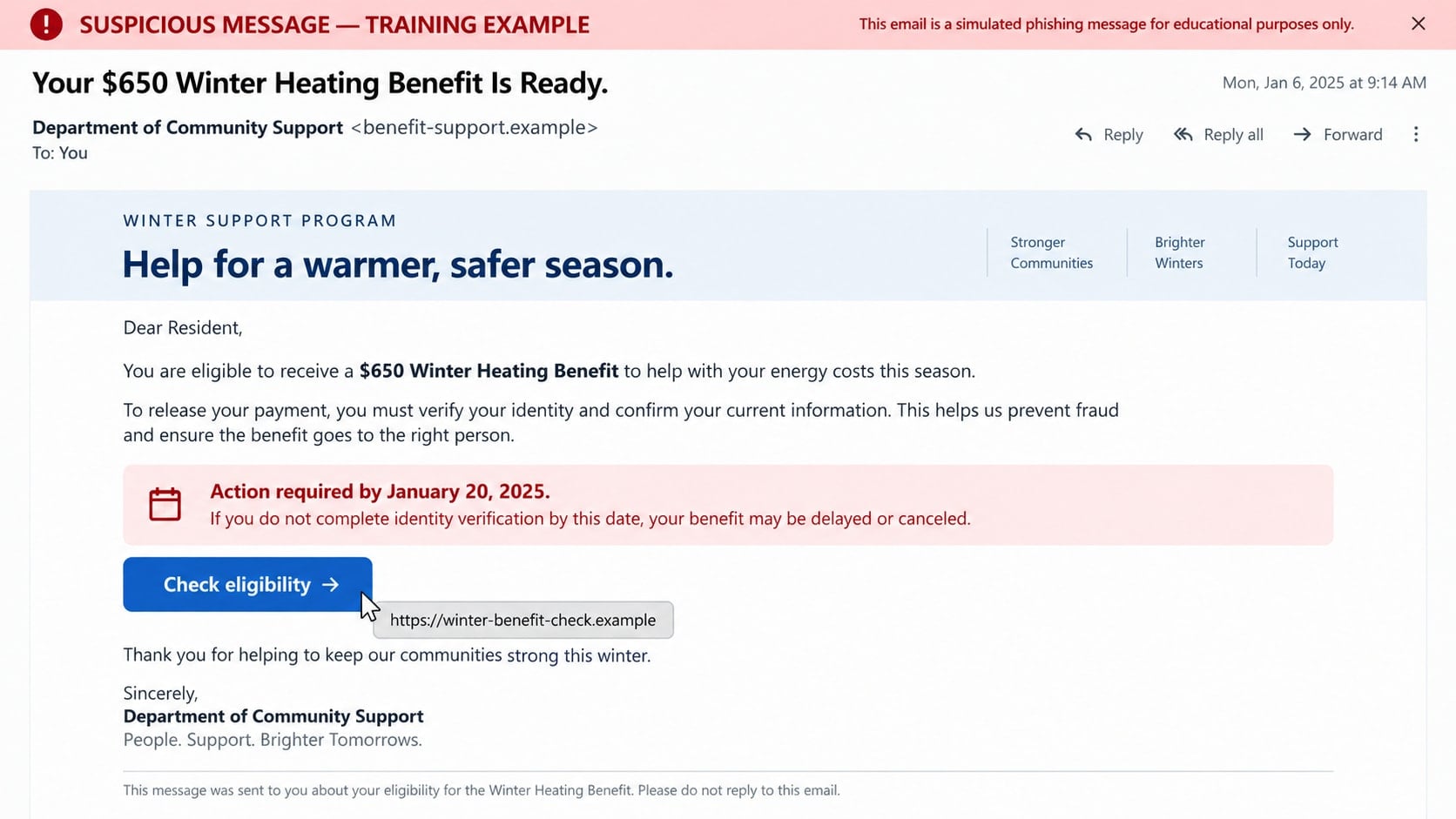
Governments, utilities, and nonprofit organizations do provide legitimate help with heating bills, weatherization, and energy efficiency. A winter environmental scam copies the names and themes of those programs to make an unsolicited offer believable.
The message may promise a grant for insulation, a rebate for a new heating system, solar assistance, an energy-efficiency refund, or emergency help with a past-due utility balance.
Cold weather gives the story a natural deadline
Recipients are told that seasonal funding is almost exhausted, enrollment closes tonight, or service will be disconnected before the next cold spell. The supposed deadline discourages comparison and independent contact.
Utility impersonators use the same pressure from the other direction. Instead of offering help, they claim the customer must pay immediately to keep electricity, gas, or water connected.
The request shifts from assistance to payment or data
A fake application can collect a Social Security number, household income, utility account, date of birth, and bank information. A caller may also demand an application, inspection, reconnect, or processing fee.
Possible harm includes:
- Identity theft using benefit-application information.
- Unauthorized bank or card transactions.
- Gift card, cryptocurrency, or payment-app losses.
- Access to a real utility account.
- Predatory contracts for unnecessary home improvements.
- Malware delivered through a fake bill or application.
- Follow-up scams using the household and income details.
The Main Forms of the Winter Environmental Scam
The phrase can cover several related schemes. Each uses winter costs or environmental programs as the reason a household must respond now, but the immediate objective can differ.
Fake heating grants and benefit applications
An email, text, advertisement, or call promises government money for fuel, electricity, insulation, windows, or a heating system. The recipient is told that almost everyone qualifies and that approval takes only a few minutes.
The application may request sensitive identity information before naming the exact program or agency. Another version charges a fee to apply for assistance that is free through official channels.
Utility shutoff threats
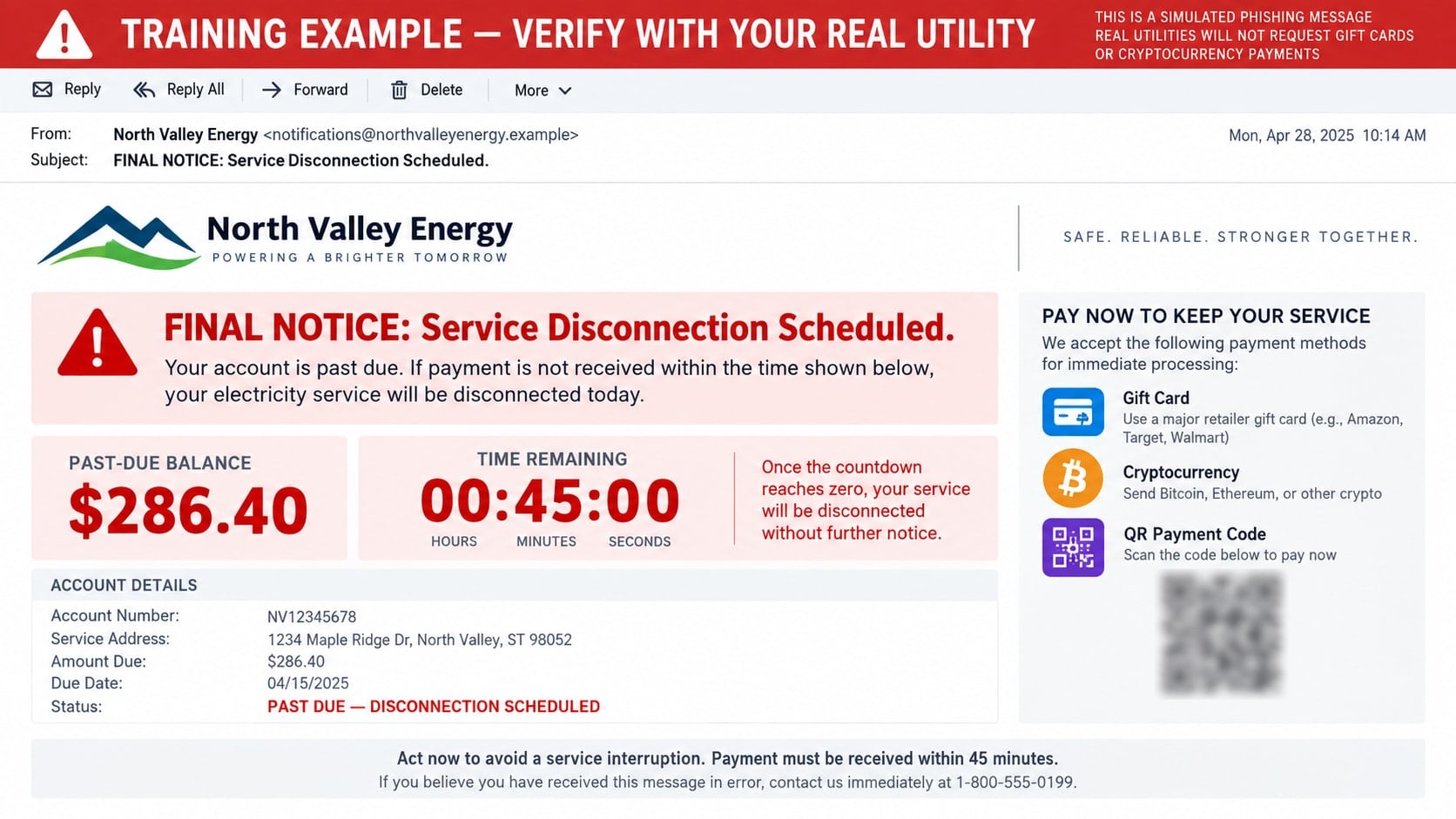
A caller claims the account is overdue and a technician is already scheduled to disconnect service. The customer must supposedly pay through a gift card, transfer, payment app, cryptocurrency kiosk, or special barcode.
The call can appear to come from the utility because caller ID is easy to spoof. Knowing the customer’s name, address, or provider does not make the demand genuine.
Home-efficiency inspection schemes
A salesperson offers a free government-backed energy audit and says the property qualifies for subsidized insulation, roofing, solar equipment, or heating upgrades. The inspection becomes a high-pressure sales appointment.
The visitor may exaggerate problems, misrepresent financing, or request an upfront deposit. Some operators collect identity and homeownership documents, then disappear or submit financing without clear consent.
Fake rebates, refunds, and carbon credits
A message says the household is owed a utility refund or environmental credit. To receive it, the recipient must confirm a bank account, pay a release fee, or sign in through a provided link.
A genuine rebate should be verifiable with the utility, manufacturer, state energy office, or program administrator. A vague green-benefit label is not enough.
How the Winter Environmental Scam Works
Step 1: The criminal selects a seasonal pressure point
During cold weather, high bills and service reliability are already on people’s minds. Scammers build messages around expected concerns, such as fuel costs, storm damage, old heating systems, or expiring assistance funds.
Targets may be chosen broadly by location or more narrowly using homeowner lists, breach data, public property records, and previous responses to home-improvement advertisements.
Step 2: The message claims official authority
The sender adopts the name of a utility, energy department, environmental office, grant center, or community assistance program. Logos and official language are copied to create familiarity.
Sometimes the name is deliberately vague, such as National Energy Support Office. It sounds governmental but does not identify a real agency that can be contacted through an independent directory.
Step 3: Urgency limits independent verification
A grant is available only today, a rebate code will expire, or a disconnection truck is on the way. The recipient is told that calling the normal customer-service number will be too slow.
The pressure makes unusual instructions seem reasonable. It also keeps the target on the phone while the scammer controls every source of information.
Step 4: A form or caller collects sensitive details
A fake grant portal requests identity, household, income, and utility information. A shutoff caller may ask for an account number, recent bill amount, or one-time code supposedly needed to verify ownership.
Home-improvement versions can request mortgage statements, deeds, tax records, or permission to conduct a credit check. The amount of data exceeds what is needed to explain the offer.
Step 5: The target is asked for an irreversible payment
The scammer says ordinary billing cannot be used because the account is in a special enforcement or grant process. Payment must be sent to an individual, loaded onto a card, or transferred through a method with limited recovery options.
In contractor schemes, the first payment may be described as a refundable reservation or materials deposit. Once paid, new fees can appear for permits, inspections, or supply changes.
Step 6: The criminal extends the scheme
A fake approval letter may request a final tax or release charge. A utility impersonator may claim the first payment did not register and demand the same amount again.
Victim information can also be sold to other operators. Later callers may pose as government investigators, refund specialists, or different contractors who already know details from the original form.
Identity, Contact, and Payment Checks
Verify the exact program name
Ask for the program’s complete name, administering agency, eligibility rules, and official application page. Then end the conversation and find that agency through a government website rather than the supplied link.
In the U.S., established resources such as LIHEAP and the Weatherization Assistance Program have defined administrators and processes. Availability varies by location, but an applicant should not need a stranger to reveal where the program exists.
Contact the utility using the bill
Use the customer-service number printed on a recent statement, shown inside the official app, or published on the known website. Do not call the number displayed in a threatening text or on caller ID.
Ask about the balance, service status, notices, payment options, and any active rebate. A real utility representative can review the account without forcing payment to an outside wallet or retail card.
Check a contractor before allowing a visit
Confirm the legal business name, physical address, license, insurance, complaint history, and written scope of work. Contact the licensing authority directly and make sure the record matches the person and company at the door.
Do not sign a financing agreement on a small screen under time pressure. Take the documents away for review and compare at least two independent quotes.
Reject unusual payment instructions
Utilities and grant administrators do not require gift cards, cryptocurrency, cash through a courier, or payment to a personal app account to prevent immediate shutoff. The FTC identifies these payment demands as utility-scam warnings.
If a legitimate bill is overdue, pay through the normal account after independently confirming the balance. The payment destination should match the known utility or authorized processor.
Questions to Ask Before Sharing Information
- What is the precise legal name of the program or company?
- Which government agency or utility administers it?
- Can the offer be found after navigating from an official homepage?
- Why does the application need this specific piece of information?
- Is there a fee, financing agreement, lien, or recurring charge?
- Can the written terms be reviewed without a salesperson present?
- What cancellation rights apply, and where are they documented?
- Why can payment not be made through the normal utility account?
A legitimate program should survive these questions. Evasion, anger, or a claim that verification will cancel the benefit is a reason to stop.
How to Find Real Energy Assistance Safely
Start with a known government portal, state or local energy office, or the utility’s official customer-service channel. Navigate through the site instead of following an advertisement or forwarded message.
Eligibility may depend on location, income, household size, fuel type, or property status. Real programs explain those requirements and identify the organization processing applications.
When a nonprofit or local agency helps with enrollment, confirm its role through the program administrator. Assistance should not depend on buying unrelated equipment or paying a secret processing fee.
Warning Signs in Calls, Texts, and Doorstep Offers
- A caller threatens shutoff within minutes or hours.
- A grant is guaranteed before any eligibility review.
- The program name cannot be found on a government website.
- The sender asks for a Social Security number through an emailed form.
- Payment must be made by gift card, crypto, wire, or personal app.
- A contractor says an inspection is legally required today.
- The representative refuses to provide a written contract.
- The financing terms are hidden behind a promise of “free” work.
- The caller discourages contact with the utility or local authority.
- A refund requires a fee or one-time banking code.
Winter makes delay feel risky, but verification does not turn off service or cancel a genuine public benefit. It prevents a criminal from becoming the only voice in the conversation.
What to Do if You Have Fallen Victim to This Scam
- End contact and document the approach. Save the message, application page, phone number, caller name, payment instructions, contract, and receipts. Photograph any paperwork left at the property.
- Call the real utility. Use a number from a bill or official account. Confirm service status, add a security note if available, change the account password, and ask whether contact or billing information was altered.
- Contact the bank or payment provider. Report the transfer as scam-related and ask whether it can be stopped or recalled. Replace an exposed card and block unauthorized recurring charges.
- Act quickly on gift cards or cryptocurrency. Contact the gift card issuer with the card and receipt, or the exchange used to purchase crypto. Recovery is difficult, but prompt reporting can preserve evidence or stop unused value.
- Protect exposed identity data. If a Social Security number, date of birth, or financial record was submitted, follow the official identity-theft recovery process, review credit reports, and consider a fraud alert or credit freeze.
- Cancel unauthorized home-improvement work. Notify the contractor in writing, review local cancellation rights, and contact the lender if financing was opened. Do not allow further work until the agreement is independently reviewed.
- Secure email and utility logins. Change reused passwords, enable multi-factor authentication, review active sessions, and remove unknown recovery methods or forwarding rules.
- Scan affected devices. Delete unknown grant forms, remote-support tools, or invoice applications. Run a full Malwarebytes scan if a file or program came from the scammer.
- Reduce malicious redirects. AdGuard can help block known phishing and advertising domains, but use it alongside direct navigation to utility and government sites.
- Report the incident. Notify the FTC, state utility regulator, attorney general, local licensing authority, and the impersonated utility or agency. Provide the payment route and domain.
- Prepare for recovery scams. Ignore anyone promising a guaranteed refund for an upfront charge. Legitimate agencies do not sell access to recovered scam funds.
Frequently Asked Questions
Do real government energy grants charge an application fee?
Established assistance programs do not require an unknown caller to collect a secret processing fee. Verify any cost with the agency listed on an official government site.
Can a utility disconnect service without warning?
Rules vary by location, but a surprise caller demanding an irreversible payment is not a reliable notice. Contact the utility through the bill to confirm the account and available protections.
Why does the caller know my utility provider?
Location, public records, data brokers, old bills, and breach information can reveal likely providers. That knowledge does not show access to the account.
Are free home energy audits always fraudulent?
No. Utilities and legitimate programs may offer audits. Confirm the program and contractor independently before scheduling a visit or sharing ownership documents.
What if I gave information but made no payment?
The identity data can still be misused. Secure the accounts involved, monitor credit and utility records, and follow official identity-theft guidance based on what was disclosed.
Should I call back the number in a shutoff message?
No. Use the number on a recent bill, the official app, or the utility’s known website. That prevents the same scammer from answering the verification call.
The Bottom Line
A winter environmental scam can arrive as welcome help or a frightening shutoff notice. In both forms, it uses seasonal pressure and official language to obtain information, payment, or a signature before the household verifies the claim.
Find the utility, agency, or assistance program through a trusted route and let that independent contact guide the next step. Genuine help remains available long enough to confirm who is offering it and what the terms mean.

Join the discussion
0 commentsShare your experience or ask a question about this article.
Discussion
Start the conversation
Have a question or something useful to share? Add the first comment.