

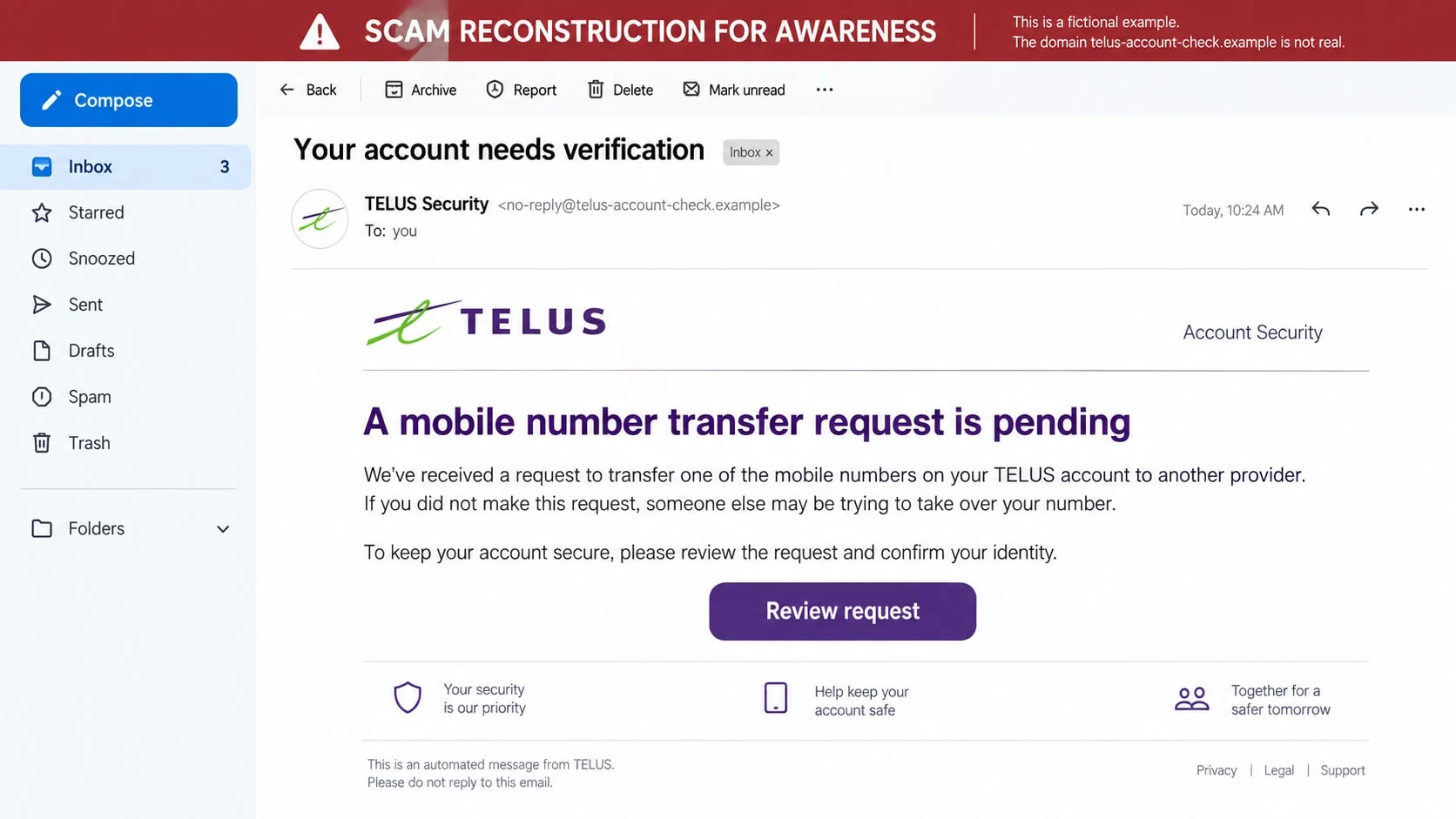
A message says a TELUS account has a pending mobile-number transfer. Another caller offers a discount, asks to confirm a password, or claims a credit is waiting.
These approaches can look different on the surface, but they all depend on the same mistake: trusting the contact route before checking the account itself.
Overview
The message borrows trust from a Canadian telecom brand
TELUS phishing scams impersonate the company through email, text, phone calls, social messages, and copied support pages. The sender may mention a mobile plan, internet service, account credit, device upgrade, or number transfer.
Brand colors and a familiar logo make the approach feel routine. Caller ID and sender names are not reliable proof because both can be spoofed or copied.
The story creates a problem that needs immediate help
One version says a SIM swap or port-out request is waiting. Another warns of an overdue bill, suspicious login, expired promotion, or failed payment method.
The scammer wants the target to believe that delay will disconnect service, lose a discount, or let someone else take the phone number. Fear makes a request for a PIN or one-time code seem like protection.
The real goal is account access, payment, or a phone number
A fake agent may collect a TELUS login, security question, account PIN, card number, or verification code. A successful SIM-swap attempt can move the victim’s number to a device controlled by the criminal.
Possible harm includes:
- Unauthorized changes to the TELUS account or plan.
- Loss of control over a mobile number.
- Password resets for email, banking, and social accounts.
- New devices, upgrades, or charges added to the account.
- Stolen card and billing information.
- Identity theft using address, date of birth, and account details.
- Follow-up calls that use the first stolen details to sound genuine.
Common Forms of the TELUS Phishing Scam
The same criminal group can use several scripts over time. Recognizing the broader pattern is more useful than memorizing a particular number, sender address, or sentence.
Pending number-transfer alerts
An email or text claims someone requested to transfer the recipient’s number to another carrier. The target is asked to click a review button, enter a password, or approve the request.
TELUS can send legitimate notifications when a real transfer request exists, but the customer should verify it through the account or a known support route. The message’s link should not be used to decide whether the request is real.
Fake credits and promotions
A message says an account credit, device rebate, loyalty bonus, or special plan is ready. To receive it, the customer must confirm identity, update a card, or pay a small activation charge.
Credits can be especially persuasive because the recipient may remember a real promotion. The safe check is whether the offer appears in the official account and published TELUS channels.
Impersonated customer-support calls
A caller says a billing error, network problem, or fraud alert requires immediate account verification. The caller may know the customer’s name, address, plan, or recent order from public information and previous data exposure.
The call can move from a harmless confirmation to a request for a security PIN, card details, or one-time code. A representative who asks the customer to read a code from another service is not protecting the account.
Fake login and payment pages
The link opens a site that copies the TELUS sign-in experience. After the username and password, it requests a PIN, one-time code, billing address, and card number.
The page may redirect to the real TELUS site after capturing the information. A normal-looking ending does not undo what was entered earlier.
How the TELUS Phishing Scam Works
Step 1: The criminal chooses a telecom trigger
Mobile service is tied to banking, email, authentication, and family communication. A message about a phone number, SIM, or billing account therefore feels urgent even when the recipient is unsure what happened.
Campaigns may target Canadian numbers broadly or use customer lists that reveal a likely provider. The operator does not need a perfect profile because the brand is familiar to millions of people.
Step 2: A sender name or caller ID creates instant recognition
The text may display TELUS as the sender, while an email uses a copied logo and a friendly security signature. A call can show an apparently valid Canadian number.
Those fields are presentation layers. They do not establish which network, mailbox, or person actually initiated the contact.
Step 3: The message combines danger with a simple solution
The customer is told that a transfer, billing error, or security event is underway. The provided button or phone number is presented as the only way to stop it.
TELUS guidance recommends checking requests through official channels. A criminal instead controls the contact route and tries to keep the target from opening the genuine app or website.
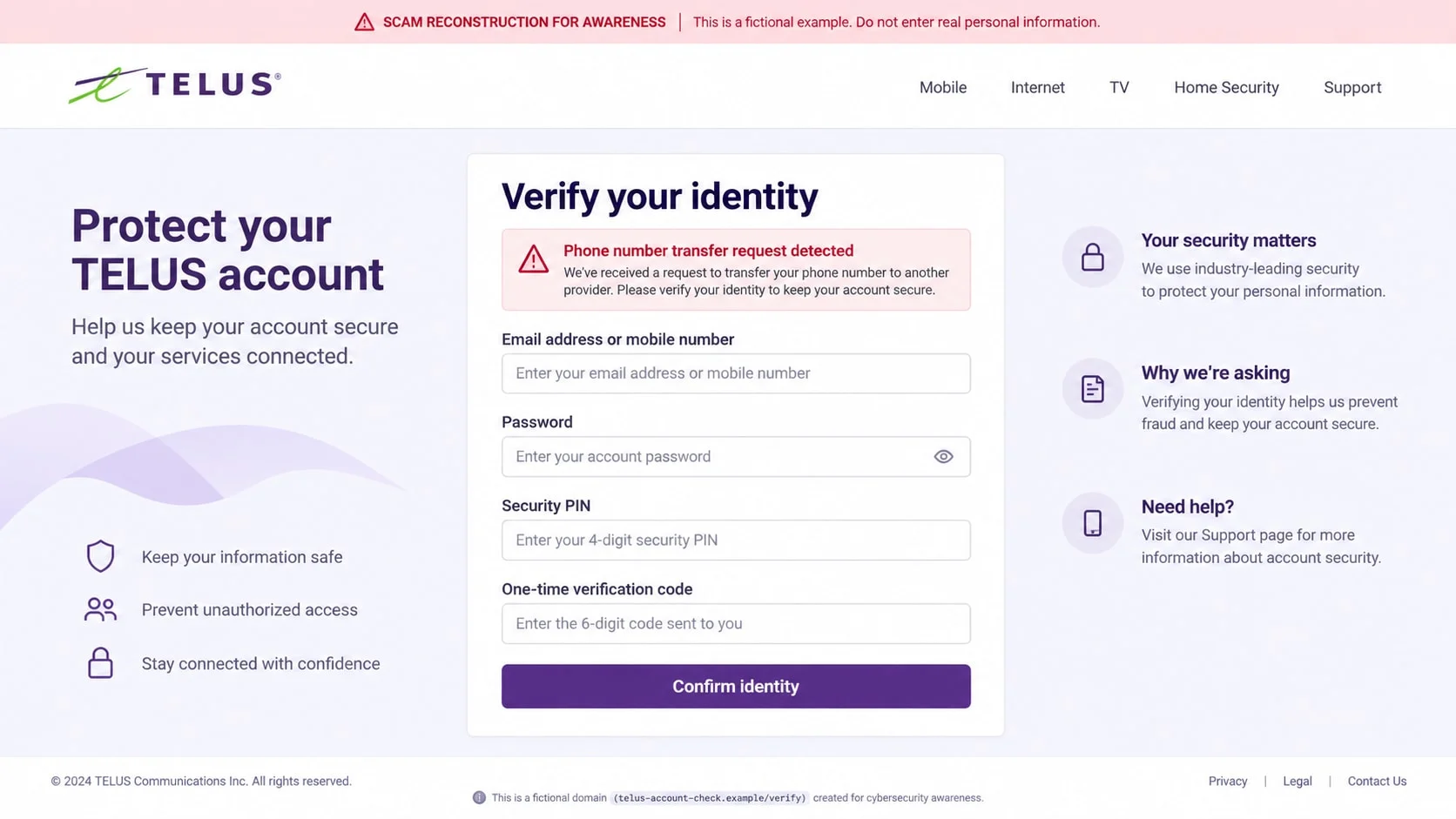
Step 4: A copied portal collects account information
The first screen asks for a mobile number or email and a password. The next screen requests a security PIN, date of birth, billing address, or a code sent by text.
The sequence is deliberate. Each field helps the operator access the account, pass an identity check, or convince another support agent that the caller is the real customer.
Step 5: The attacker attempts a SIM swap or account change
With the details in hand, the criminal may request a number transfer, replace the account email, add a new device, or reset the password. The victim may remain on the fake page while the real account is being changed.
TELUS has explained that a successful SIM swap can give a fraudster control of calls and text messages. That can expose password-reset codes for other accounts linked to the number.
Step 6: A verification code is used as the final approval
The fake page says a code is needed to cancel the transfer or secure the account. In reality, the code may approve the attacker’s login, port request, payment, or password reset.
Never assume the wording in a fake form describes the real transaction. Read the code message from the actual provider and stop if it names a different action, amount, or device.
Step 7: Follow-up support extends the theft
A second caller can claim that the first step failed and request remote access, a new code, or a transfer to a safe account. Accurate details from the first form make the caller sound like an internal investigator.
The attacker may also sell the information to other criminals. A later email could target the victim’s bank, email account, or workplace using the compromised phone number.
Identity, Contact, and Payment Checks
Open My TELUS independently
Use the official app, a saved bookmark, or a known address entered manually. Review active sessions, account messages, device changes, number-transfer requests, and billing details there.
If the alert is absent from the account, the message is not a reliable notice. If it is present, use the contact option shown inside the authenticated account rather than the original message.
Use TELUS’s published contact rules
TELUS maintains a fraud and phishing reporting page with official support routes. It instructs customers to forward phishing texts to 7726 with “SPAM” and report suspicious calls to Customer Care.
That page is a safer starting point than a phone number, email address, or button supplied by an unexpected contact.
Check the sender and destination domain
Expand the sender details and inspect the full email address. For links, focus on the registered domain immediately before the first slash, not on a brand word placed earlier in the address.
A padlock, correct logo, or a page that asks the right questions does not establish ownership. Fake portals can use encrypted connections and carefully copied layouts.
Refuse unusual requests for codes or payment
Do not read a security code to an unsolicited caller or type it into a page reached through a message. Do not pay an activation, unlocking, or fraud-reversal fee to a personal payment account.
If a legitimate account needs a card update, make that change after logging in independently. The provider should not need a customer to disclose a complete card number to a random caller.
Understanding SIM-Swap Risk
A SIM swap is not always fraudulent. Customers may replace a lost SIM, change a device, or transfer a number between carriers. The scam occurs when someone else convinces the provider to perform the change.
TELUS’s guidance notes that a criminal who controls the number can receive calls and texts and use password-reset features for accounts linked to it. The first symptom can be a sudden loss of mobile service rather than a suspicious message.
Use an authenticator app or security key for important accounts when possible. Keep the mobile account protected with a strong, unique password and a recovery method that does not depend entirely on SMS.
Red Flags in a TELUS Message or Call
- A transfer or account problem must be handled within minutes.
- The sender asks for a password, PIN, or one-time code by reply.
- The link opens a domain that is not a known TELUS address.
- The caller begins with a discount, credit, or surprise refund.
- Caller ID shows a familiar number but the call was unexpected.
- The representative discourages use of the My TELUS app.
- The page requests more identity data than the stated issue requires.
- A payment must be made through a personal app, gift card, or crypto.
- The message contains generic account details instead of a real reference.
- The phone loses service soon after an unexpected verification request.
Polished wording is not a safety signal. An independent account check matters more than the message’s spelling, logo, or caller confidence.
What to Do if You Have Fallen Victim to This Scam
- Contact TELUS through a trusted route immediately. Use *611 from a TELUS handset or the official support number and explain that a phishing attempt may have exposed account details or a number-transfer request.
- Ask for a SIM-swap and port-out review. Confirm which changes, devices, emails, recovery methods, and transfer requests were made. Add an account note and restore control of the number if it moved.
- Call the bank and card issuer. Report any card data or code that was entered. Ask about blocking transactions, replacing the card, stopping recurring authorisations, and securing online banking.
- Secure email before other accounts. Change the password from a clean, independently opened page, sign out unknown sessions, review forwarding rules, and replace recovery details that the attacker could control.
- Change reused passwords and PINs. Do not reuse the exposed TELUS password or security answers. Prioritize banking, email, cloud, social, and cryptocurrency accounts linked to the phone number.
- Move critical authentication away from SMS. Use an authenticator app or security key where available. Review backup codes and generate new ones after the account is secure.
- Preserve evidence. Save the message headers, sender, number, link, fake portal, call recording if legally available, transaction, and timing. Do not continue chatting just to collect more details.
- Scan downloaded material. Remove remote-support tools, fake invoices, or carrier apps received during the contact. Run a full Malwarebytes scan if any file or program was installed.
- Reduce malicious redirects. AdGuard can help block known phishing and advertising domains, but it cannot replace independent navigation and account review.
- Report the campaign. Forward phishing texts to 7726 with “SPAM,” report the incident to TELUS, notify the bank, and use Canadian fraud-reporting channels. Include the destination domain and payment route.
- Watch for a second wave. Check account changes, credit activity, mobile service, password resets, and unexpected calls for several weeks. A caller promising to recover the number for a fee is another scam.
Frequently Asked Questions
Does TELUS send security texts?
TELUS may send notifications about genuine account events, including a mobile-number transfer request. Verify the event through My TELUS or a known support route instead of clicking the message link.
Can a TELUS caller ask for my password or card number?
An unsolicited caller should not need a full password, security code, or complete card details. End the call and contact TELUS using an official number.
What is a SIM-swap scam?
It is an unauthorized transfer of a phone number to a SIM or eSIM controlled by a criminal. The attacker can then receive calls, texts, and some password-reset codes.
Why did the caller know my plan and address?
Public profiles, marketing records, data breaches, and previous customer-service interactions can reveal those details. Accuracy does not authenticate the caller.
What if I only clicked the TELUS link?
Close the page and remove unexpected downloads. If no credentials or payment data were entered, risk is lower, but update the browser and scan the device if anything behaved unusually.
Where do I report a TELUS phishing message?
TELUS directs customers to its fraud-reporting page, and phishing texts can be forwarded to 7726 with “SPAM.” Notify your bank and Canadian fraud-reporting services if money or identity data was involved.
The Bottom Line
TELUS phishing scams use number-transfer warnings, fake credits, support calls, and copied login pages to turn ordinary telecom activity into a route toward account takeover.
Ignore the supplied contact path, open My TELUS independently, and treat every one-time code as approval for a specific action. A short pause can protect both the phone number and every account that relies on it.

Join the discussion
0 commentsShare your experience or ask a question about this article.
Discussion
Start the conversation
Have a question or something useful to share? Add the first comment.