


Your website still loads, but an email says its address is about to expire. The notice puts $12.69 next to an unpaid invoice. It sounds like a small fix.
Before you reach for the card, find out who actually renews the domain. That answer may be in an account you haven’t opened in months.
Overview
A small invoice threatens a bigger interruption
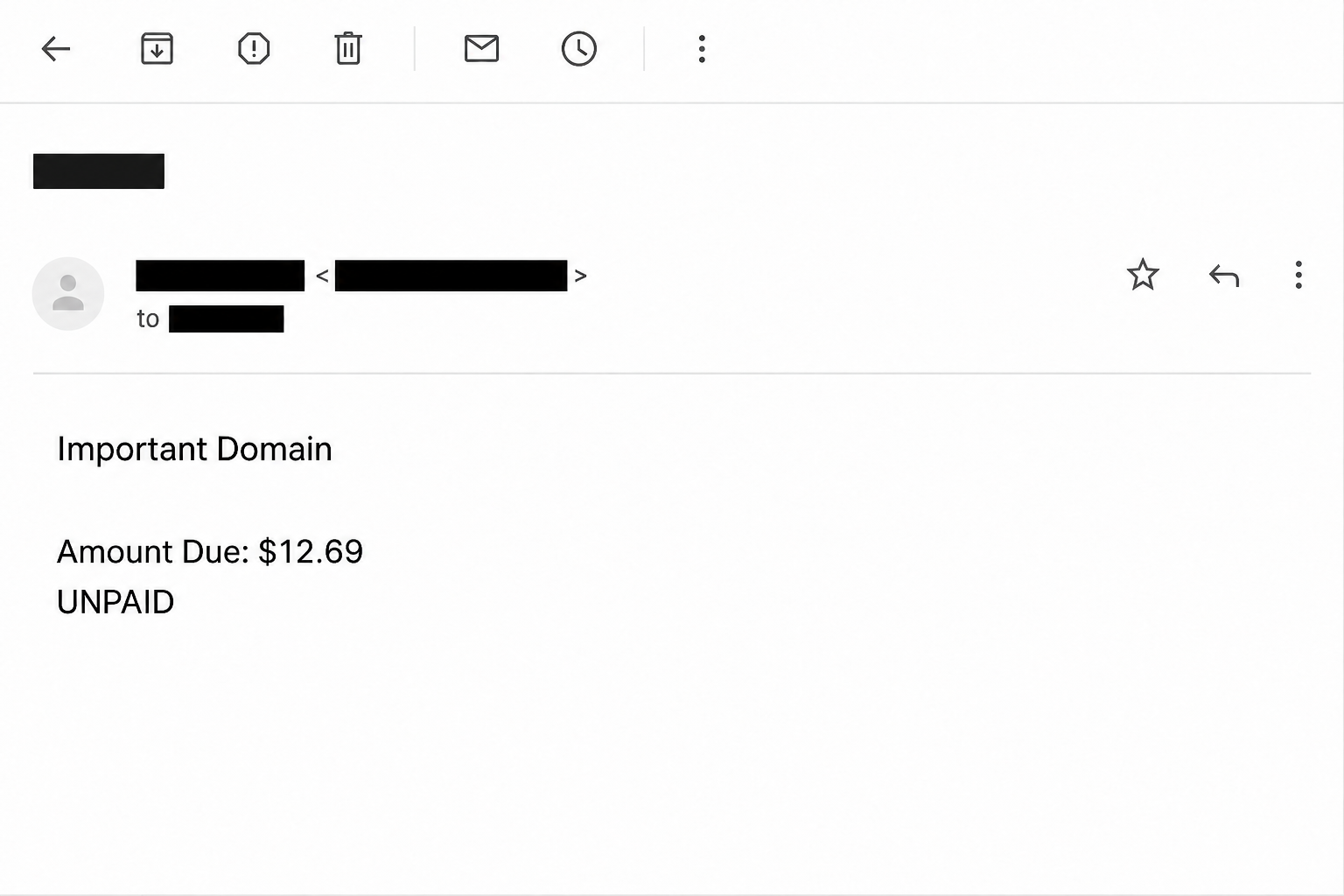
The Wix Domain Expiration email scam tells site owners to renew a domain before service stops. One documented version was headed “Important Domain” and showed $12.69 as unpaid.
It put an invoice date and reference beside the balance. It also named a November 2025 expiration date but did not identify the domain in the sentence announcing its expiry.
A second version focused on the next 48 hours. It warned that website and email services could stop and mentioned the domain going into a redemption period.
The different deadlines belong to the samples. A message you receive today can use a new date or amount without changing the basic approach.
The image above recreates details of the $12.69 notice. It isn’t an invoice from Wix and can’t tell you whether a domain or service is due for renewal.
What the fake checkout collects
The reported link led to an unrelated purchase page. Instead of showing a renewal attached to a verified domain account, it asked for card and billing information.
The form requested the cardholder name, card number, expiration date, and security code. Two consequences are possible: disclosure of usable card details, and a charge if money is collected.
Those aren’t the same event. A failed or missing transaction does not mean the number stayed private, and the reported form does not prove any particular victim was charged.
The $10.99 Wix subscription lure had an unconfirmed destination. In this case, the reported landing page actually showed a card form.
Wix is a legitimate provider. The case concerns a deceptive message and checkout impersonating it, not a finding that the company’s normal renewal process is fraudulent.
Expiration, renewal, and a site plan are different checks
A website can be built at Wix while its domain is registered elsewhere. The service that hosts the pages is not necessarily the company billing for the address.
Wix says its domains are set to auto-renew ahead of expiration. Its domain renewal date instructions show how to see the relevant date for a Wix purchase.
Do not treat a renewal payment date, a registrar’s expiration date, and a website plan renewal as interchangeable. Compare like with like before deciding there is a problem.
Make these details part of a quick independent check:
- The exact domain, including its ending, and the account used by the person who bought it.
- Whether Wix is the registrar or the address is connected from another company.
- The domain’s actual status and expiration date, and whether a renewal is already scheduled.
- The payment method on file and the correct billing record, checked through the provider rather than the email.
- Whether your hosting plan or business mailbox has a separate renewal handled by a different account owner.
How The Scam Works
Step 1: The warning arrives where small bills routinely show up
A domain renews infrequently enough that many people don’t remember the last date or price. A basic renewal amount can sound about right even when the invoice is unfamiliar.
The $12.69 total is small compared with the perceived cost of a broken website or lost email. The modest amount can make reviewing the request feel like wasted time.
For a business owner, the difficult part may be finding the person who holds the registrar login. The email offers a shortcut before you decide to ask.
Rather than approve the invoice quickly, ask which existing contract or account it belongs to. A bill that can’t answer that question hasn’t earned access to your card.
Step 2: The message invokes a real failure but doesn’t establish it
Domains do expire. Some expired domains can stop working or become harder to recover, depending on the registrar and domain ending.
Threatening that outcome gives the message weight. It does not show that the exact address has expired or that its connected email is about to fail.
The first sample pairs a due date with an incomplete domain reference. If you manage multiple websites, that omission makes the notice less usable, not more trustworthy.
The 48-hour version substitutes an even simpler clock. Check the calendar in your own account before assuming the deadline applies to anything you own.
Step 3: The notice attempts to choose who takes your payment
A legitimate registrar already knows which domain and account the payment concerns. You should be able to open that account from a trusted route and see whether anything is due.
The email tries to make a “Renew Domain” button the starting point instead. Its label is reassuring because it promises the task and leaves out the destination.
An invoice number can be generated by anybody. It has meaning for you only after you locate a matching record in the genuine provider’s system.
Don’t type the invoice number or domain into a website promoted by the message to see whether its information changes. That is not independent confirmation.
Step 4: A purchase screen turns a routine bill into card exposure
On the reported landing page, the task became a checkout. Since some legitimate renewals require a new card, the request may still feel consistent with the story.
That is what makes account context so useful. If the card form did not come from the registrar account you opened independently, you don’t know who receives the fields.
An encrypted connection doesn’t establish the merchant’s identity as the provider you intended to pay. It only protects the connection to the party operating that page.
The screen can claim your payment failed, or ask you to try another card. Repeating the attempt could expose another card without doing anything for the domain.
Step 5: The real domain stays on its own renewal schedule
The scam page cannot update the real registrar’s record just because a button says a purchase succeeded. A receipt it issues does not establish any change with the actual provider.
If the domain stays online, that might simply mean it was never close to expiration. If the site goes down, verify the registrar status and hosting separately.
Card misuse also has its own timeline. Unfamiliar transactions may occur outside the fake $12.69 amount or after the renewal scare has passed.
The right response follows the records: one check with the provider that manages the domain, and another with the card issuer if you supplied card details.
What to Do if You Have Fallen Victim to This Scam
-
Close the fake checkout and find your domain through an existing account. Don’t use the original button again or follow a new one that claims to fix the payment.
If someone else manages the address, ask them to confirm the registrar and actual status. Have them share the outcome, not their sign-in details.
-
Contact your card issuer if you entered card data. Use the number on your card or the issuer’s app, rather than a contact offered by the alleged merchant.
Say whether you typed the details, submitted them, approved an authentication prompt, or observed an unfamiliar payment. Ask the issuer about a freeze, replacement, or dispute.
Don’t wait for a $12.69 charge. The issuer can discuss protection even when a fake receipt or a failed payment is your only clue.
-
Save the evidence that identifies the request. Retain the original email, date, alleged amount, invoice reference, and any receipt the page displayed.
Match actual transactions against the bank statement, not the scam page. Don’t include the full card number or security code in a screenshot or support message.
US readers can consult the FTC’s instructions for responding to a scam payment. Recovery options depend on the payment method and the circumstances.
-
Secure any accounts you also shared. If a variant asked for a site or email login and you supplied it, change that password through the genuine service.
Review access and recovery settings with the relevant provider. Changing your site password does not invalidate a card number, and replacing a card does not fix a leaked password.
-
Settle a genuine renewal only after verifying it. If your registrar confirms a due item, handle it through the account you opened independently.
For a Wix-registered domain, check the official Domains page or billing information connected to the correct Wix account. For an outside registrar, use that company’s own established process.
-
Tell coworkers who handle website expenses. Share the amount, subject or heading, and the proper verification route. Don’t send them the live fake payment link.
If a company card was used, notify the person who administers it. They may need to confirm other transactions or update recurring payments after replacement.
-
Report the attempted impersonation. Use Wix’s phishing guidance to find its current reporting route. If your mailbox is managed at work, tell its administrator too.
If you didn’t submit anything, checking the real domain and reporting the message may be enough. A fake card form is not evidence that a device was infected.
Find the Registrar Before Renewing Anything
Work out who owns the billing relationship
Look up the original registration receipt or account. If an agency set it up, check which provider handles renewals and who is authorized to pay.
A domain can appear inside Wix while a separate registrar holds the registration. Wix’s Domains page instructions explain where to review and manage the names associated with a site.
Check the precise domain and the correct account owner before drawing a conclusion. A business may retain an old name, plus newer ones with different endings or separate renewal dates.
Keep your registrar and support information somewhere a second authorized person can find it. An ownership check shouldn’t depend on a single employee noticing an email.
Verify service interruptions with the right provider
A working website is encouraging, but it doesn’t establish that a renewal is months away. Likewise, an outage doesn’t tell you whether payment, hosting, or configuration caused it.
If the registrar shows actual expiration, ask about the domain’s current status and recovery options. Exact timelines and charges can differ, and not every address follows the same process.
Check the email provider separately if the mailbox is affected. A domain can connect several services whose billing records are maintained in different places.
When in doubt, open a new support request using a verified route. A reply to the original warning doesn’t settle which company is entitled to bill you.
Give the person reviewing invoices enough context to say no
The person with the company card may not have the registrar login. Tell them who can verify the renewal and where genuine receipts appear.
Check for a matching invoice before approving a card request. If there isn’t one, the person responsible for the domain can confirm when the provider actually expects a payment.
A renewal may appear under the agency that registered the domain, not the company whose name is on the website. Verify that relationship through records you already have.
Don’t send a card photo to the person who claims they can reconcile the account. Use your organization’s approved payment process, even when the amount seems too small to bother.
Record verified renewal dates so an unexpected notice has something to be compared with. The fraud becomes easier to spot when the calendar is not supplied by the email.
Frequently Asked Questions
Does the $12.69 Wix email show that I owe money?
No. The reported notice used the amount to make the fake renewal look ordinary. Check your actual domain and billing records before paying anything.
Is a 48-hour domain warning always fake?
No. A genuine domain could be close to expiry. What matters is whether the correct registrar independently confirms that status, not how short the notice says the deadline is.
What if Wix hosts my site but another company bills for my domain?
Check the domain at the registrar that manages it. Your Wix subscription may pay for a different service and have a different renewal date.
Should I wait for a suspicious card charge before acting?
No. If you entered your card details on a deceptive page, tell the issuer promptly and follow its recommendations even if no charge is visible.
Can the fake page renew my domain after it collects a fee?
Nothing in this reported checkout established a connection with the genuine renewal account. Confirm any actual change directly with the domain registrar.
Is this a Wix malware download?
Not in the documented sequence. The page sought card details. An unexpected download or installed app would be a separate reason to contact device support.
The Bottom Line
The false Wix expiration notice turns a small invoice into a rushed card decision. Neither the $12.69 total nor a short deadline proves the renewal belongs to you.
Verify the address with the provider that actually manages it. If you supplied card details, speak to your issuer without waiting for the fake checkout to charge you.

Join the discussion
0 commentsShare your experience or ask a question about this article.
Community experiences
Did this happen to you?
Your experience could help someone recognize the same scam. Submit a private report for our team to review.
I experienced this tooReports are reviewed before publication. Sharing publicly is always your choice.
Discussion
Start the conversation
Have a question or something useful to share? Add the first comment.