

Imagine receiving a sudden text message warning you of a toll violation, with threats of legal action and fines if you don’t immediately pay a small amount online. Sounds alarming, doesn’t it? Unfortunately, many people have found themselves in precisely this scenario through a dangerous and sophisticated scam known as the WSDOT Final Unpaid Toll Notice Text Scam.
This article explores the WSDOT Final Unpaid Toll Notice scam text, detailing how it operates, how to avoid it, and what to do if you’ve already fallen victim.
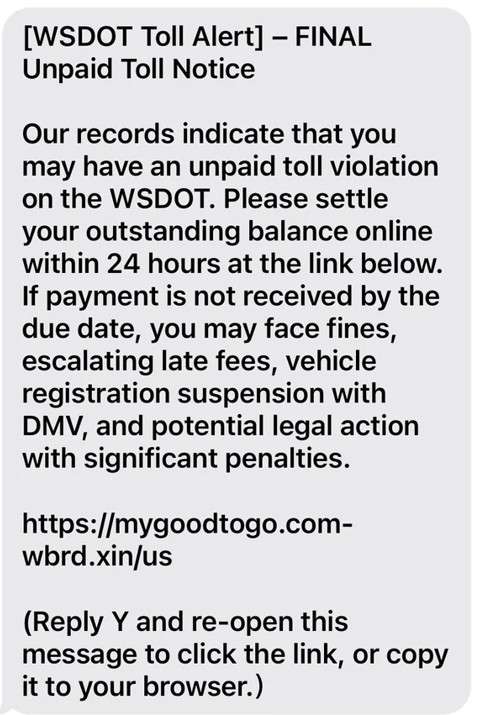
WSDOT Final Unpaid Toll Notice Texts – Scam Overview
The Washington State Department of Transportation (WSDOT) Toll Alert Text Scam is a fraudulent scheme designed to deceive individuals into sharing their sensitive personal and financial information. Scammers send official-looking text messages impersonating the WSDOT or related toll organizations, claiming that the recipient has unpaid toll charges that urgently need settlement. Victims are instructed to click on a fraudulent link to resolve the alleged violation immediately or face dire consequences like hefty fines, license suspensions, DMV registration holds, and even potential legal actions.
The fraudulent text messages typically include a fake sense of urgency, aiming to trigger panic or anxiety in the recipient. Often, the messages are crafted convincingly enough to fool unsuspecting recipients into believing they are legitimate communications from a government entity. The scammers exploit the trusted nature of government organizations like WSDOT, leveraging that trust to extract sensitive personal and financial information from the victims.
The scam text messages frequently contain alarming language like:
- “FINAL NOTICE”
- “Unpaid toll violation”
- “Immediate action required”
- “Vehicle registration suspension”
- “Potential legal action”
In reality, these messages and threats have no real connection to WSDOT. Instead, scammers are exploiting the public’s fear of repercussions from unpaid debts or violations to manipulate and deceive victims.
An example of such a fraudulent WSDOT Final Unpaid Toll Notice Text Scam message reads like this:
[WSDOT Final Unpaid Toll Notice] — FINAL Unpaid Toll Notice. Our records indicate that you may have an unpaid toll violation on the WSDOT. Please settle your outstanding balance online within 24 hours at the link below. If payment is not received by the due date, you may face fines, escalating late fees, vehicle registration suspension with DMV, and potential legal action with significant penalties.
[Fake URL provided here]
(Reply Y and re-open this message to click the link, or copy it to your browser.)
This message illustrates how scammers expertly replicate the language and style of legitimate notices, increasing the likelihood victims will fall prey to the scam.
Upon clicking the provided link, victims are redirected to a fraudulent website that closely mimics the legitimate WSDOT toll payment website. This bogus site prompts victims to enter sensitive personal information, such as their full name, address, phone number, and even their credit card details to pay the supposed toll fee, which typically ranges from 3to3 to 3to6. While this amount may seem insignificant, the real danger lies in the theft of the victim’s personal and financial information, not just the small payment requested.
Once scammers obtain this sensitive information, they can use it for identity theft, financial fraud, unauthorized credit card charges, opening new accounts in the victim’s name, or selling the stolen data on the dark web. In short, what initially seems to be a minor inconvenience and a small payment could quickly escalate into significant financial loss and identity theft.
The WSDOT Final Unpaid Toll Notice Text Scam is widespread and effective because of its simplicity, believability, and the fear tactics used by scammers. Victims often panic due to the threat of immediate legal consequences and, in their haste, fail to verify the authenticity of the message or the website. The scam exploits basic human psychology—fear of penalty, urgency, trust in authority, and a lack of awareness about such scams.
How The WSDOT Final Unpaid Toll Notice Scam Works
Step 1: Receiving the Fraudulent Text Message
The scam begins with the victim receiving a text message purporting to be from WSDOT. The message typically looks official, using language that imitates real government notices. Victims receive threats of fines, registration suspension, and legal action if they don’t pay immediately.
Step 2: Creating Panic & Urgency
The scammers expertly leverage psychological tactics to instill panic and urgency in the recipient. They threaten immediate, severe consequences, including escalating fines and vehicle registration suspension, compelling recipients to act quickly without properly evaluating the legitimacy of the message.
Step 3: Clicking on the Fraudulent Link
Victims who panic often click the provided link, which redirects them to a fake website designed to look exactly like the legitimate WSDOT toll payment website. The use of official-looking logos, colors, and language makes it challenging for victims to realize they’re on a fraudulent site.
Step 4: Collecting Personal Information
On the fake website, victims are asked to fill in a form with personal information such as name, complete address, phone number, and email address. Victims mistakenly believe they’re simply verifying their information for WSDOT to process their toll payment.
Step 5: Collecting Credit Card Details
After entering personal data, victims are asked to provide their credit card information to pay the toll, usually a small amount of 3to3 to 3to6. Victims willingly enter their card number, expiration date, CVV, and billing address, believing it’s a legitimate transaction.
Step 6: Data Theft & Unauthorized Charges
Once the victim submits the information, scammers steal this sensitive data immediately. The scammers now have access to victims’ credit cards, enabling them to make unauthorized purchases, commit financial fraud, and even open new accounts in the victim’s name.
Step 7: Identity Theft & Further Fraudulent Activity
Scammers may use the victim’s personal information for identity theft, applying for loans, credit cards, and other financial products. They can also sell the stolen information on dark web marketplaces, exposing the victims to even more severe long-term consequences.
Step 8: Covering Their Tracks
Scammers frequently change fake websites, phone numbers, and messaging techniques to evade detection by law enforcement. By frequently updating their tactics, scammers maintain anonymity and continue victimizing individuals.
What To Do If You Have Fallen Victim To This Scam
If you’ve clicked the link and shared your information, act immediately:
- Contact Your Bank or Credit Card Company
- Inform them of the unauthorized transaction immediately.
- Request a freeze on your accounts or cards.
- Place a Fraud Alert
- Contact one of the three major credit bureaus:
- Equifax: 1-800-525-6285
- Experian: 1-888-397-3742
- TransUnion: 1-800-680-7289
- Contact one of the three major credit bureaus:
- File a Police Report
- Report the incident to your local law enforcement agency.
- Keep a copy of the police report for your records.
- Report to the FTC
- Visit identitytheft.gov or call 1-877-438-4338 to report identity theft.
- Change Passwords
- Immediately change all passwords related to financial accounts and email accounts.
- Monitor Your Credit Reports
- Regularly review your credit reports and financial statements for suspicious activity.
- Notify WSDOT
- Report the scam directly to WSDOT officials, providing details to help their investigations and public warnings.
Frequently Asked Questions about the WSDOT Final Unpaid Toll Notice Text Scam
1. What exactly is the WSDOT Final Unpaid Toll Notice Text Scam?
The WSDOT Final Unpaid Toll Notice Text Scam is a fraudulent scheme where scammers send fake text messages posing as the Washington State Department of Transportation (WSDOT). The messages falsely claim you have an unpaid toll violation and urge you to click a link to pay immediately. This link leads to a fake website designed to steal your personal information and credit card details.
2. How can I identify if the WSDOT Final Unpaid Toll Notice Text is real or fake?
Real WSDOT messages never threaten immediate legal action, registration suspension, or demand urgent payment through unsolicited text messages. Genuine messages will direct you to the official WSDOT Good To Go website (https://mygoodtogo.com/). Fake messages often contain suspicious URLs, grammatical mistakes, or exaggerated threats.
3. I accidentally clicked the link provided in the scam message. What should I do?
If you clicked the link and provided personal information or credit card details, immediately contact your bank and credit card company to freeze your accounts. Then place a fraud alert with credit bureaus, file a police report, and report the incident to the FTC (Federal Trade Commission) at identitytheft.gov.
4. Does WSDOT ever send text messages about unpaid tolls?
WSDOT or Good To Go may occasionally send text messages to toll customers; however, they will never demand immediate payment via text with threats of severe penalties. Legitimate messages always direct you to their official website (https://mygoodtogo.com/) or official contact channels.
5. How did scammers get my phone number?
Scammers obtain phone numbers through various methods such as data breaches, buying contact lists from third-party sources, or randomly generating phone numbers. If you receive such a message, it doesn’t necessarily mean your personal data has been compromised directly.
6. What happens once scammers have my personal details?
Once scammers have your personal information, they might try to:
- Make unauthorized purchases using your credit card
- Open new financial accounts in your name
- Commit identity theft resulting in long-term financial harm
- Sell your details on dark web marketplaces
7. How can I protect myself from scams like this in the future?
Protect yourself by:
- Never clicking on links from unsolicited texts or emails.
- Verifying any toll or fee notifications directly through official websites or customer service lines.
- Regularly checking your financial statements and credit reports.
- Reporting suspicious messages immediately.
8. Where should I report this scam if I receive a fraudulent text?
You can report fraudulent texts and scams to the following:
- The Federal Trade Commission (FTC): https://reportfraud.ftc.gov
- WSDOT customer support: https://wsdot.wa.gov
- Your mobile carrier’s spam reporting service (forward the message to 7726 “SPAM”).
9. Can I get my money back if I paid scammers?
If you’ve already paid scammers, contact your credit card company or financial institution immediately. Clearly explain the situation and dispute the fraudulent charges. Banks can often reverse unauthorized charges, but it’s critical you act quickly.
10. How can I verify legitimate toll charges with WSDOT?
Always verify toll charges and notifications directly by logging into your secure account at the official WSDOT tolling website: https://mygoodtogo.com, or by calling the official customer service phone number provided on their website.
The Bottom Line
The WSDOT Final Unpaid Toll Notice Text Scam is a dangerous and prevalent fraud that manipulates victims into providing personal and financial information under false pretenses of unpaid toll violations. Awareness, caution, and verification are your best defenses. If you fall victim, prompt action is crucial to mitigate damage. Stay vigilant, always verify, and protect yourself from becoming another victim.








