

A feed card says ZenChain is handing out BTC rewards. The page looks like the Layer-1 you already heard about. Bitcoin-style security. Ethereum-style contracts. One button. Connect to collect.
That is the whole trick. A clone of a real chain. Free Bitcoin as the bait. A wallet connection dressed as a claim. Next week’s copy will use a different hostname. The drain stays the same.
Overview
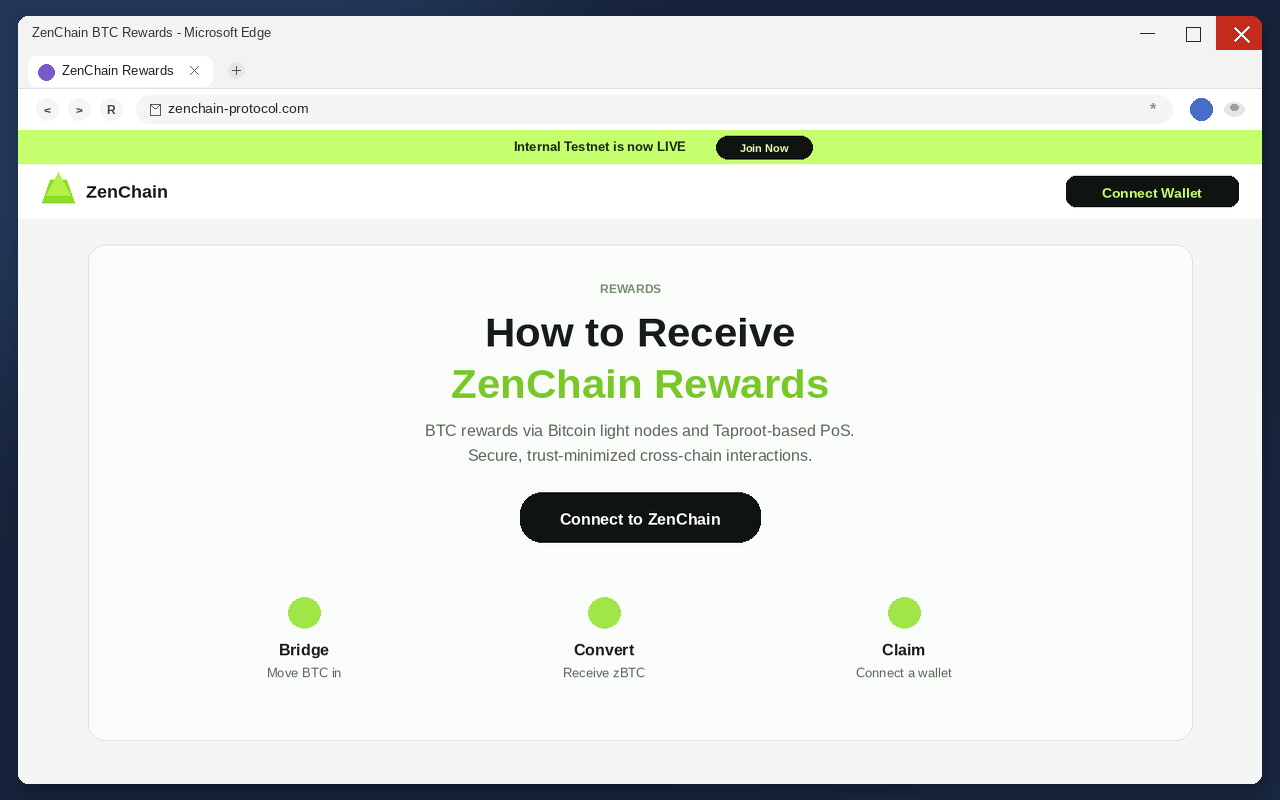
Fake ZenChain Rewards pages are built to steal cryptocurrency. They impersonate the official ZenChain project, promise BTC, and tell visitors to connect a wallet. Connecting is not how you collect Bitcoin. Connecting is how a malicious contract gets a live session with the wallet that already holds your coins.
One example host in this wave sat at zenchain-protocol.com. Treat that spelling as a snapshot, not a blocklist. Operators rotate domains. The next page will add a different extra word, drop a hyphen, or steal a prefix that still contains ZenChain and Rewards. If you learned only that one name, you will miss the next door.
This trap is not the same as the celebrity promo-code fake exchange that used a hyphenated lookalike to take deposits. That older scam wanted a signup, a code, and a deposit. This one wants a connected wallet and a signature.
ZenChain is a real Layer-1. It mixes Bitcoin-style security with Ethereum-style smart contracts. The official project lives at the official ZenChain website. Type that host yourself if you need a real check. The project did not send you this rewards window. A clone did.
Once a wallet is connected, a malicious contract can move assets to an attacker-controlled address. Outgoing transfers can look vague. Some drainers estimate what sits in the wallet and take the valuable pieces first. Crypto transfers generally cannot be reversed. Closing the tab does not claw the coins back. Changing a browser password does not either.
The FTC’s crypto fraud spotlight put numbers on that rail. Since the start of 2021, more than 46,000 people reported losing over $1 billion in crypto to scams. That was about 1 out of every 4 dollars reported lost, more than any other payment method, or about 25% of reported dollar losses. Those figures are not a tally of ZenChain victims. They are why a free-BTC page can pay for ads.
The official-looking rewards clone
The page is not trying to invent a new brand. It is trying to borrow one you already trust. ZenChain. Rewards. BTC. A layout that could pass for a product site. A lock icon in the address bar. That is enough for a tired thumb at 11:40 at night.
Read the host the way a tired person reads it. The real project is zenchain.io. The fake one is almost that, plus a serious-sounding extra chunk. Same first word. One extra syllable that makes the liar look more official, not less. Protocol. Network. App. Quest. Official. Those words sound technical. They sound like a project name. They sound like something a legitimate team would register.
That is why they work. You are not being asked to visit a random string of letters. You are being asked to visit a host that is almost the real one, plus a word that feels like homework. People who have been around crypto for five minutes have seen those extra words on real sites. The clone rents that memory.
A lock icon does not settle it. HTTPS only means the trip to that host is wrapped. It does not mean the host is ZenChain. Encryption can carry a wallet prompt to a criminal as neatly as it carries a login to a bank. If the registered host is not the official site, you are on someone else’s lobby.
Phone browsers make the impersonation easier. The address bar is short. The host gets cut. You see zenchain and stop reading. The extra word hides to the right, or wraps, or sits in a redirect you never inspect. If you did not type the official host yourself, assume you are not there until the full host is in front of you.
Type the official address, or use a bookmark you saved before this link arrived. Do not trust a card in a feed, a comment under a video, or a “rewards are live” message that already contains the destination. The clone’s job is to be the first door you open. The official site does not need that shortcut.
This is not a smear of ZenChain. The official site is still the official site. A real Layer-1 that mixes Bitcoin security with Ethereum contracts has to live somewhere people can type. Clones exist because that somewhere is public. The clone is counting on you never asking whether you typed it.
The BTC bait
The clone does not ask you to wire money on the first screen. It does not ask for a seed phrase on the first screen. It offers Bitcoin. BTC rewards. A giveaway that sounds like a product feature, not a lottery you never entered.
BTC is doing two jobs at once. It is a ticker people already want. It is also a word that makes a stranger’s page feel like infrastructure. Bitcoin rewards via a Layer-1 that talks about Bitcoin security is a gift of a sentence. You already believed the chain was real. The page only has to sell you the door.
Rewards is the other half. Rewards sound like work you already did. Rewards sound like a payout, not a purchase. Rewards sound like something a real chain might run for early users. That is why the label beats “send $500 to this address.” People who would never buy a mystery token will still tap a button that claims to hand them BTC they think they earned.
Urgency does the rest. Live. Now. Join. Collect. The page wants you to finish the connection before you open a second tab. People will wait on a suspicious investment pitch. People will not wait on a reward that is supposedly expiring while they stare at it.
A real project that actually pays something publishes it on a host it has used for months. Docs. An announcement on accounts you already verified. A page you typed. Nobody who is actually sending BTC needs you to panic-connect a wallet because a banner said a testnet was live. The clone needs that panic. Until you hurry, the page is only a picture.
Free BTC on a stranger’s host is not a product. It is a price tag facing the wrong way. The clone never has to name a dollar amount on the landing page. It only has to make Connect feel like collecting. The drainer names the amount later, on-chain, after the permission is already granted.
Connect, then drain
The dangerous sentence is the helpful one. Connect to collect. Connect to receive. Connect to ZenChain. That is the documented ask on these pages. It is also the moment the page stops being a picture and starts being a drain.
Connecting a wallet is a habit now. You have done it on real apps. The prompt looks familiar. The page talks like a product site. The brain files the click under login, not under payment. You are not sending BTC. You are claiming BTC. That is the story the button tells. The story is false.
A connection is not a gift. A connection is a conversation with software you do not control. The clone needs that conversation. Until the wallet is attached, the page cannot spend. After the wallet is attached, the page can ask for a signature, an approval, or a transaction that moves value. The rewards copy is the costume. The permission is the product.
The malicious contract is what you actually sign. It can look like a claim. It can look like a network switch. It can look like a tiny fee. It can look like “enable BTC rewards.” The chain sees a transfer or a spending permission. If you approve it, the money does not come back with a ticket number. There is no bank in the middle that can reverse the rail.
Some drains are loud. The balance hits 0% of what you thought you still had while you are on the page. Some are quieter. An unlimited approval sits in the wallet. Hours later, when you top the account up or when a token you forgot about gets liquid, the same permission spends it. “I connected but I did not see a send” is not a clean bill of health. The approval can be the theft. The transfer can wait.
Some drainers roughly estimate the value of digital assets and decide which to steal first. Stablecoins. Wrapped BTC. Whatever is liquid. The visitor still thinks they are waiting on a rewards result. The chain is already moving value the other way.
- The lure uses the ZenChain name and a BTC rewards pitch.
- The official site is the only real host.
- Any other host that looks close is a clone until you typed the official one yourself.
- The page asks you to connect a wallet to collect BTC.
- A connected wallet can be emptied by a crypto drainer.
- Crypto transfers generally cannot be reversed.
- ZenChain is a real project. The copies are not its rewards desk.
- Type the official site. Do not follow a lookalike from a feed.
How The Scam Works
The lure copies a real Layer-1
The clone does not need to hack ZenChain. It needs a crowd that already wants exposure to a chain that talks about Bitcoin security and Ethereum contracts. That crowd is easy to find. People who missed the last airdrop. People who search “ZenChain rewards” at 1 a.m. People who saw a friend post a screenshot of a claim button.
The link travels on fake or stolen social accounts. It also rides hacked sites, junk advertising networks, pop-ups, banners, junk email, browser-notification spam, and adware. Compromised websites and rogue ads are part of the documented mix. The costume changes. The destination does not have to. One lookalike can catch traffic from ten ugly roads, then die and be replaced by another.
Nearly half the people who told the FTC they lost crypto to a scam said the contact started with an ad, a post, or a message on social media. A ZenChain-shaped rewards page fits that pipe. It looks like news. It looks like a community drop. It looks like something you are late for.
If the post is in your feed, that does not mean ZenChain posted it. Compromised accounts keep their old profile photos. They keep their old followers. They keep the little bits of trust that make a stranger’s link feel like a friend’s tip. Read the destination, not the avatar. If the destination was handed to you, it is already doing the clone’s job.
Search traffic is part of the funnel too. People type the project name plus rewards, BTC, or claim and click whatever looks closest. Junk ads and poisoned results love that habit. A paid card can sit above the official site. A lookalike can rank because it stuffed the same words. Type the official host. Do not let a results page choose it for you.
BTC rewards are the costume
The landing page poses as a ZenChain rewards desk. It does not have to be a pixel-perfect twin of the official site. It has to be close enough that a person who has seen the real brand, or who has only heard the name, accepts the room as the right room.
Lookalike domains are cheap. Register a host that contains zenchain and a serious-sounding extra word. Put a BTC headline on it. Ask for a wallet. The visitor who types with their thumb will forgive the extra syllable. The visitor who is already in a hurry will not open a second tab to compare.
Cloning a real Layer-1 is more effective than inventing a fake token from scratch. A made-up ticker has to sell you on the story. A real chain only has to sell you on the door. You already wanted BTC. You already heard there was a chain mixing Bitcoin security with Ethereum contracts. The lookalike does not need to invent desire. It only needs to stand between you and the real project host for one click.
That is why this family of pages keeps coming back. The real project exists. People keep searching for it. Operators keep standing up hosts that look like the search. When one domain gets reported, the template moves. Learn the official address. Do not learn a blacklist of yesterday’s clones.
Do not confuse this drain with every other trap that borrowed a similar name. A fake exchange that wants a deposit after a celebrity promo code is a different machine. A fake rewards page that wants a wallet connection is this machine. Both steal coins. They do not steal them the same way, and they do not share a cleanup path.
Connect is the permission
Checking whether a public address is eligible for something does not require a blank check. A public address can be read without emptying a wallet. A real program that needs to see a snapshot can do that from chain data. It does not need a surprise approval that can move every token you hold.
The clone needs the connection because the connection is how the drainer gets a chance to speak. Wallet software will show a prompt. The prompt can look like a simple attach. It can look like a signature. It can look like a network switch. It can look like a claim transaction with a tiny fee. Read the prompt the way you would read a wire form, not the way you would dismiss a cookie banner.
If the request is blank, unlimited, unreadable, or different from “look up my address,” reject it. If the page wants a recovery phrase, stop immediately. No official rewards desk needs the words that recreate the wallet. The documented move on this pattern is the connect-and-sign path, not a seed-phrase form, but a page that already lies about its host can lie about the next screen too.
A real check also does not need to happen on a stranger’s domain. If you already use the official site, open that site by typing it. If you are not sure a rewards program exists, the official host is the place to read, not a countdown on a page you met five seconds ago. Hurry is the clone’s favorite lighting.
Do not open a fake rewards page to “just look.” On a phone the address bar is easy to ignore, and looking is how a Connect tap becomes a connected wallet. If a friend forwarded the link, tell them the same thing. The page is the attack, not a preview of an attack.
The drainer spends what the wallet will sign
After the wallet is attached, the malicious tool can transfer holdings to the operator. The holdings in that wallet are the target. The visitor still thinks they are waiting on a BTC result. The chain is already moving value the other way.
The operator does not need your name. They need a destination they control and a signature you thought was a claim. After that, the money is theirs on the same public rules that make crypto useful. No chargeback. No “I did not authorize this” button that a network validator honors. Once the money is gone, there is no getting it back on that rail.
Outgoing transactions are often automated. They may look vague in a wallet history: a contract interaction, a token approval, a transfer you do not recognize. That vagueness is useful. People wait. People assume a claim is pending. People do not screenshot the prompt. By the time they open an explorer, the coins have already hopped.
Follow-up damage is part of the business. People who post about a drained wallet attract recovery agents. Those agents promise a tracer, a hacker, or a special backdoor at the chain. They want an upfront fee, remote access, or the new recovery phrase. That is a second scam standing on the first one. The clone already took what the wallet would sign. Do not pay a stranger to reverse a rail that does not reverse.
Tomorrow’s page will use a different hostname
When one lookalike dies, the template does not have to die with it. A new registration can swap one extra word, one prefix, or one suffix and reuse the same ZenChain costume. Learn the tell, not the one hostname that happened to be live when you read this.
The tell is stable. If the host is not the official project site, it is a clone. If a page that is not that site wants a wallet connection to collect BTC rewards, treat it as a drain until official channels say otherwise. Official channels means the site you typed and the accounts you already verified, not the link that arrived with the rumor.
Airdrops and rewards programs are not automatically scams. Real projects run real distributions. The clone is effective because the real chain exists. That is the unkind part. You cannot protect yourself by deciding every rewards page is fake. You protect yourself by deciding that only the official host is allowed to talk to the wallet.
If a friend forwards a claim link, do not argue about the screenshot. Ask whether they typed the official host. If they did not, the picture is not proof. It is bait with better lighting. Open a new tab. Type the official host. If the real site does not match the rumor, the rumor was the product.
What To Do If You Have Fallen Victim to This Scam
If you connected a wallet to a fake ZenChain Rewards page, assume the attacker can still spend what is left. Work in this order. Do not send more coins to the same address to unlock a claim. Do not paste a seed phrase into any site that offers to reverse the drain. Those are second scams that feed on the first.
- If you only opened the page and did not connect a wallet, stop there. Close the tab. Do not go back to see whether the page still loads. Do not connect a throwaway wallet “just to look.” Looking is how people finish a prompt on a phone. If you need a second pair of eyes, send a screenshot with the link unclicked, or send the URL as text to a person you already know.
- Disconnect the site from the wallet. Open the wallet’s connected-app or connected-site list and remove the fake rewards page, plus any other unknown sessions from the same sitting. Disconnect is not a full fix. It is the first door you shut so the page cannot keep asking for new signatures while you clean up. Stay off the rewards page. Do not reload it to see if the BTC arrived.
- Create a new wallet on a device you trust. Use the official wallet app to generate a fresh recovery phrase. Write it down offline. Do not reuse the old words, and do not edit them. Every account derived from the old phrase can still be reached if a key or an approval is already in someone else’s hands. The new wallet is the only clean room you can still build. Do not import the compromised phrase into a clean app and call that a migration.
- Revoke approvals and spending permissions from the old wallet. Use the wallet’s official approval manager or a reputable blockchain explorer for the network you connected. Remove unlimited token allowances, NFT operators, and anything tied to the clone. Revocation stops future spends that were pre-approved. It does not pull back coins that already moved, and it does not repair an exposed recovery phrase. Hardware wallet users should still revoke. The device does not cancel an approval you already signed.
- Move remaining assets to the new wallet before the operator does. Start with the most valuable and most liquid tokens. Leave enough native coin on the old address to pay network fees. Verify each destination on the wallet screen, not in a message someone just sent you. Do not send more value into the old wallet to “test” a claim or to cover a supposed gas fee from the clone. If an NFT or a staked position cannot move until an unlock date, document it, revoke related spenders, and treat that position as still at risk until it can be migrated.
- Preserve transaction IDs and the rest of the record. Save TXIDs, destination addresses, token contracts, approval events, timestamps, screenshots of the clone, and balances before and after. Export what the wallet and the explorer will give you. This packet is what an exchange fraud team, a cop, an insurer, or a tax person can actually use. Memory is not a record. Do not return to the fake page to capture a prettier picture.
- Report the clone and the drain. File at the FTC fraud report form if you are in a position to use it, and at the FBI Internet Crime Complaint Center. Add the TXIDs. If stolen funds landed at an exchange deposit, send that exchange the hashes the same day. A freeze is not a promise. Delay makes it a fantasy. Tell your wallet vendor through its official support page, not through a reply guy under the rewards post.
- Ignore recovery agents, guaranteed tracers, and anyone who messages you first. A stranger who found your report is not your incident responder. Do not pay an upfront crypto fee. Do not install remote-support software. Do not hand over the new recovery phrase. People posing as exchange staff, law firms, or ZenChain support are hunting the same wallet a second time. Nobody legitimate needs your recovery phrase. Nobody legitimate needs you to send more crypto to get the first batch back. Block them. If you want a human walkthrough after the cleanup, use the MalwareTips support forum on a page you opened yourself.
If you never approved a prompt and you only attached the wallet for a second, still disconnect, still review approvals, and still watch the old address. If you approved anything you did not fully read, treat the old wallet as compromised even if the balance looks the same tonight. Drainers are allowed to be patient. You should not be.
Do not use the official ZenChain site as a place to undo a drain. The official team cannot reverse a foreign chain transfer, and a support impersonator will pretend they can. Open the official ZenChain website only if you already use it, and only by typing the host. Never paste a recovery phrase into any ZenChain-shaped page.
The Bottom Line
Fake ZenChain Rewards pages are a clone of a real Layer-1, not a review of a real project. ZenChain has an official site. The copies add a serious-sounding extra word to the host, promise BTC, and ask you to connect a wallet to collect it. The connected wallet is what they came for. The drainer is how they get paid.
You cannot collect BTC on a stranger’s host without giving that host a chance to talk to your keys. You check a real project the long way: type the official site, ignore the rumor in the feed, and refuse any extra hostname that showed up in an ad, a spam post, or a borrowed account.
If you already connected, disconnect, open a new wallet, revoke, move what is left, save the TXIDs, report the clone, and hang up on anyone who promises a guaranteed recovery for another payment.
Free BTC on the wrong host is not a reward. It is a price tag facing the wrong way. Next week’s clone will have a different hostname. The official address will not. Type it before the button does the rest.

Join the discussion
0 commentsShare your experience or ask a question about this article.
Discussion
Start the conversation
Have a question or something useful to share? Add the first comment.