

Anteater needs exterminators!

Anteater

New Member
Thread author
Mar 7, 2014
7
0
3
74
I have this extension that refuses to be removed:
UTuberAdBlockeR2.3

Permissions

Allow in incognito

EnabledInstalled by enterprise policy.

It is grayed-out and I can't find it anywhere in my computer.
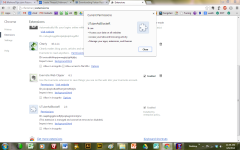
Under permissions, this is what it says:
upload_2014-3-9_11-30-26.png
 

Attachments

hello

Download Shortcut_Module from this link :

http://www.telecharger.sosvirus.net/download/shortcut-module/

save it to your desktop, run it and click on "Clean" after it has verified if it's up to date

ShortcutModuleQNlE.png


Attention : It'll close all the programs opened like IE, Firefox, Word etc...

It'll give a report at the end of the scan , in C:\Shortcut_Module_date_hour.txt , after the reboot of the machine.

attach the log
 
The only thing that downloads from that given address is a shortcut that doesn't open. No report. No scan. Nothing. I scanned my hard drive for a program and nothing came up. Checked programs and downloads. Nothing. When I did a diagnostic, I received a message that there was no program associated with the shortcut.
Should I register and download it from http://www.sosvirus.net/membre/g3n-h@ckm@n/? I saw this link on the shortcut site.
 
Downloaded and re-downloaded it. Only the shortcut button appears but without a program attached.
 
It worked this time. I right-clicked it and selected Open instead of double clicking the icon. Now I have an earlier version that, out of desperation, I right-clicked and selected "Run as Administrator." Now I can't get it off. I AM the administrator.
Man ...I had it open and running and suddenly it disappeared from my desktop. Nothing! Where in the heck did it go? I just tried to download the shortcut module and it failed. Require Administrative permissions!
 
It was the extensions AdBlock that seemed to be the problem. I had blocked the antivirus. I finally was able to open up Shortcut Module and now my computer is so much faster. No more problems with the hijacking. I am so pleased!!!!
 

You may also like...