

EDIT: Posted in Avast Forums
I am using Windows 8 RP 64-bit.
I installed Avast 7 Free about 10 minutes ago, custom installation with Web and Network Shield only.
Changes to Avast Free (Web and Network Shield only):
- Linked to my.avast.
- Activated free license.
- Enabled PUP detection on Web Shield.
- Disabled Social/Recommended features.
- Disabled Generate monthly report.
- Disabled start-up rootkit scan.
Action Center reported that Avast and Windows Defender were both turned off.
Manually switched on Windows Defender.
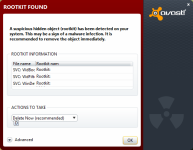
I get an avast pop-up saying rootkit detected (see screenshot).
I chose Ignore.
Generate a log file (extracted from aswAr.log):
I can only assume these are False Positives?
Any help appreciated. I have to dig up my Avast Forums username.
I am using Windows 8 RP 64-bit.
I installed Avast 7 Free about 10 minutes ago, custom installation with Web and Network Shield only.
Changes to Avast Free (Web and Network Shield only):
- Linked to my.avast.
- Activated free license.
- Enabled PUP detection on Web Shield.
- Disabled Social/Recommended features.
- Disabled Generate monthly report.
- Disabled start-up rootkit scan.
Action Center reported that Avast and Windows Defender were both turned off.
Manually switched on Windows Defender.
I get an avast pop-up saying rootkit detected (see screenshot).
I chose Ignore.
Generate a log file (extracted from aswAr.log):
Code:
Service WdBoot [C:\WINDOWS\system32\drivers\WdBoot.sys]  **HIDDEN**
Service WdFilter [C:\WINDOWS\system32\drivers\WdFilter.sys]  **HIDDEN**
Service WinDefend [C:\Program Files]  **HIDDEN**
I can only assume these are False Positives?
Any help appreciated. I have to dig up my Avast Forums username.


 ...so make exclusions in your additional anti-malware applications and in avast...it must supress these alerts then

