Solved Blue screen pop-up

ccap

New Member
Thread author
Aug 24, 2016
4
0
2
59
02536
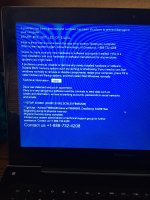
My daughter's computer got hit hard with malware. I used your tips for Zeus and removed what I thought was everything, however she is still getting this pop-up.

I do into task manager and see it says auto update. I end that task and it goes away but it comes back.

Please see attached pic. Any help would be great. Thanks
 

Attachments

  • IMG_39041.jpg
    IMG_39041.jpg
    656.1 KB · Views: 11
Hello,


Please download Farbar Recovery Scan Tool x64 and save it to a flash drive.
  • Plug the flashdrive into the infected PC.
  • Click Start and while holding Shift key on your keyboard click Power --> Restart.
Note: It is important that you keep Shift key pressed while doing this or it won't work.
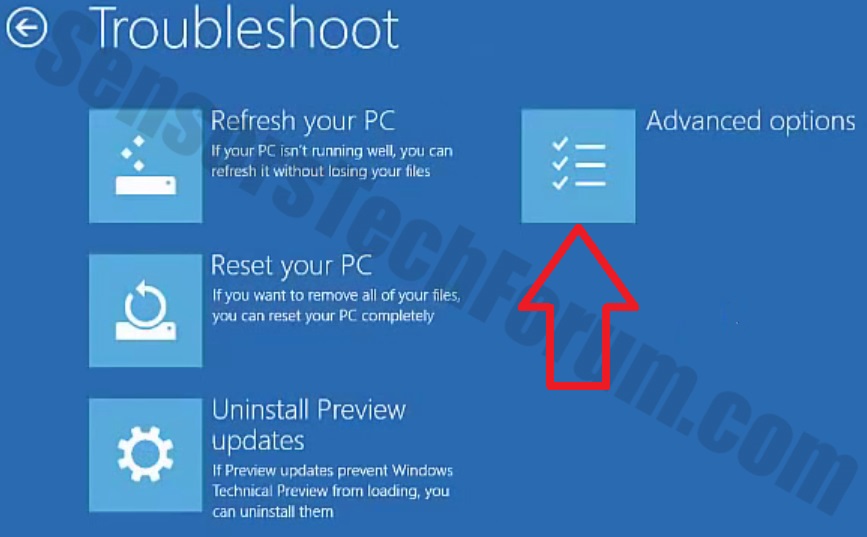
  • Now you should get a window like this where you need to click Troubleshoot.
Windows-10-2.jpg

  • In the next window, click Advanced options and select Command Prompt.
  • Now you should log in into your account and after that Command Promptwindow.
notepad.png
Access the notepad and identify your USB drive

In the Command Prompt please type in:
Code:
notepad
and press Enter.
  • When the notepad opens, go to File menu.
  • Select Open.
  • Go to Computer and search there for your USB drive letter.
  • Note down the letter and close the notepad.


FRST.gif
Scan with Farbar Recovery Scan Tool

Once back in the command prompt window, please do the following:
  • Type in e:\frst64.exe and press Enter.
    You need to replace e with the letter of your USB drive taken from notepad!
  • FRST will start to run. Give him a minute or so to load itself.
  • Click Yes to Disclaimer.
  • In the main console, please click Scan and wait.
  • When finished it will produce a logfile named FRST.txt in the root of your pendrive and display it. Close that logfile.

Transfer it to your clean machine and include it in your next reply.
 
Download attached fixlist.txt and save it to your USB flashdrive as fixlist.txt

>> Boot into Recovery Environment


Start FRST in a similar manner to when you ran a scan earlier, but this time when it opens ....
  • Press the Fix button once and wait.
  • FRST will process fixlist.txt
  • When finished, it will produce a log fixlog.txt on your USB flashdrive.


>> Exit out of Recovery Environment and post me the log please.


Try to boot Windows normally...
 

Attachments

Hello,

From what my daughter is telling me it is working fine. Thank you very much. I am so glad I found this forum. She is away at school and clicked a link and bam all hell broke loose. I was using TeamViewer to get into her machine to start removing all the malware and viruses. It was this site that told me about the other products to use such as hitman pro.

If you have any addition tips on setting up her machine to help prevent this, other than clicking bad links, it would be most appreciated.

Thank you again!
 
Since there are no more problems, we can declare this PC clean
thumbs_up_smiley.gif


Now, we can proceed with post-cleanup procedures. Let's remove my tools and create a new, non infected restore point concurrently deleting old ones.


Step 1. - Creation of system restore point and tools removal.


Download DelFix by Xplode and save it to your desktop.
  • Run the tool by right click on the
    51a5ce45263de-delfix.png
    icon and Run as administrator option.
  • Make sure that these ones are checked:
    • Remove disinfection tools
    • Purge system restore
    • Reset system settings
  • Push Run and wait until the tool completes his work.
  • All tools we used should be gone. Tool will create an report for you (C:\DelFix.txt). I don't need it for review.
Tool deletes old system restore points and creates a fresh system restore point after cleaning.


Step 2. - Tips and tricks to keep your computer clean, safe and in a good shape.


Security tips - highly recommended reading:

Maintenance tips:

Additional software that I personally use and install on all my clients devices:

  • Zemana AntiMalware (paid version highly recommended) - to work as a supplement for your antivirus but with excellent remediation and protection
  • Zemana AntiLogger - keep everything you type on keyboard out of sight of bad guys trying to steal your credantials
  • Malwarebytes' Anti-Exploit - to prevent plenty of mostly exploited vulnerabilities.
  • McShield - to prevent infections spread by removable media.
  • Unchecky - to prevent from installing additional foistware, implemented in legitimate installations.
  • CryptoPrevent - tool for protection against Cryptolocker and similar ransomware infections.
  • Adblock - to surf the web without annoying ads!
  • Qualys BrowserCheck - cloud service that scans your browsers and plugins to see if they’re all up-to-date.


My help is free for everybody.
If you're happy with the help provided and/or wish to show your appreciaton, please consider a donation:
Thank you!​


Stay safe,
TwinHeadedEagle :)