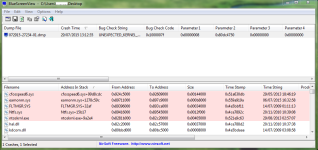
- Briefly explain your current issue(s)
- Bug Check Code : 0x1000007f
- Steps taken to resolve, but have been unsuccessful
- Scan MBAM, Zemana Antimalware, TDSS Killer.
When I Installed Comodo FW PC is shut down and BSOD
UNEXPECTED_KERNEL_MODE_TRAP
Bug Check Code : 0x1000007f
Any idea how to fix this issue?
Operating System: Windows 7 Ultimate SP1 clean install no malware!
AV: ESET NOD Antivirus 8.0.319.1 (use with username and password)
Minidump file is attached the link:
https://app.box.com/s/d0x2z0or872nutvlc8wldgyucmjcfspv
Thanks!
UNEXPECTED_KERNEL_MODE_TRAP
Bug Check Code : 0x1000007f
Any idea how to fix this issue?
Operating System: Windows 7 Ultimate SP1 clean install no malware!
AV: ESET NOD Antivirus 8.0.319.1 (use with username and password)
Minidump file is attached the link:
https://app.box.com/s/d0x2z0or872nutvlc8wldgyucmjcfspv
Thanks!