Question Eset vs Kaspersky-Android

Please provide comments and solutions that are helpful to the author of this topic.
You know I'm a big fan of mobile antiviruses ... 😂
1737923011204.png


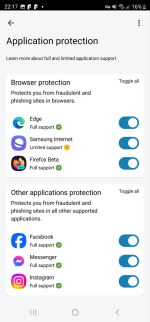
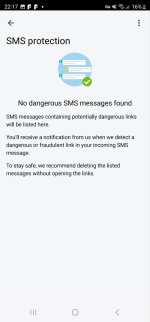
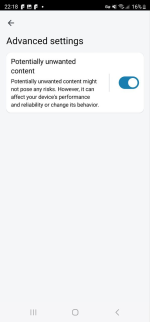
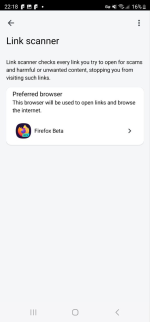
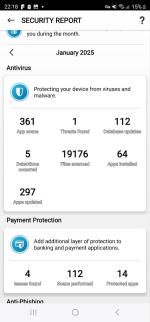
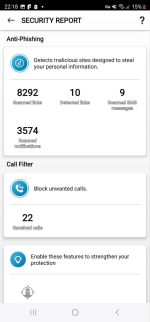
In my opinion, in terms of a beautifully clear interface and the most comprehensive set of phishing protection features, Eset is the best. I'll just leave these screenshots here:
1737922824820.png1737922840721.png1737922864030.png1737922885221.png1737922905014.png1737922927717.png1737922946156.png

But no single solution guarantees ultimate security. For Android, I recommend setting up a secure DNS for example ZERO — Hardened security for highly sensitive environments. anyway - it's an extremely reliable option.

If you also want to get more comprehensive protection from dangerous files, including for Windows, you can pair Symantec.
 
Last edited by a moderator:
edge can install third party extensions (bitdefender, Symantec , checkpoint is a great combo )
I would recommend using Firefox. First of all, it supports ublock better and at the same time you can also install, for example, trafficlight in it. Secondly, I occasionally notice how ublock sometimes freezes and stops filtering on Edge, so I have a lot of distrust for security extensions that are installed in Edge. Besides, installing custom extensions requires using the Canary version, which just might contain unpredictable bugs. Better then to install ublock and security filters in the Stable branch if one wants to use Edge.
 
You know I'm a big fan of mobile antiviruses ... 😂
View attachment 287300

In my opinion, in terms of a beautifully clear interface and the most comprehensive set of phishing protection features, Eset is the best. I'll just leave these screenshots here:
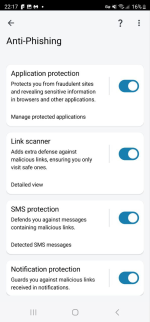
View attachment 287293View attachment 287294View attachment 287295View attachment 287296View attachment 287297 View attachment 287299

But no single solution guarantees ultimate security. For Android, I recommend setting up a secure DNS for example ZERO — Hardened security for highly sensitive environments. anyway - it's an extremely reliable option.

If you also want to get more comprehensive protection from dangerous files, including for Windows, you can pair Symantec.
God, this is crazy!
You can use an Android emulator to load these SecurityApp and please try to be nice to your cell phone.😂
 
I would recommend using Firefox. First of all, it supports ublock better and at the same time you can also install, for example, trafficlight in it. Secondly, I occasionally notice how ublock sometimes freezes and stops filtering on Edge, so I have a lot of distrust for security extensions that are installed in Edge. Besides, installing custom extensions requires using the Canary version, which just might contain unpredictable bugs. Better then to install ublock and security filters in the Stable branch if one wants to use Edge.
I'm using edge and have no issues so far
But yeah Firefox has the full ublock comparable to brave AdBlocking capability Wich is above what edge can offer and since extensions are only available in canary there is a possibility of having bugs as it's more unstable then beta
 
  • Like
Reactions: simmerskool
It's actually legitimately pretty good

I would say intercept x and Symantec mobile are the best free av software for Android as there is no bloat and very little resource usage
But some phones especially Chinese ones have multi av engine av pre installed (gen digital + Chinese engines ) so that's a good one too but in general if you install apps only from the play store and popular ones then you probably don't need an av and anything risky you can restrict it via work profiles , other means
Always trust pre installed Chinese engines that come with your Chinese phone.
 
I installed RoboKiller last year to answer calls and block scams, works pretty well, but the renewal subscription price increased a lot, I paid it reluctantly as I like filtering calls.
Google caller android 15 default pixel phone filter does wonders without installing anything else.

If not on my contact list then it enters the verify human AI dialogue where the caller must solve a simple math equation
 
I installed RoboKiller last year to answer calls and block scams, works pretty well, but the renewal subscription price increased a lot, I paid it reluctantly as I like filtering calls.
You may try the "Phone by Google" app if Google is not a problem. Phones have settings to block or silence "unknown" calls. I guess you can also block calls from your contacts.
 
Always trust pre installed Chinese engines that come with your Chinese phone.
XD it uploads your data to ccp meanwhile av software isn't really needed in android as everything is isolated based on permissions and you can set a different profile to the possibly malicious apps