Advice Request Essential security options for Windows 11 PC

Please provide comments and solutions that are helpful to the author of this topic.

zkSnark

Level 5
Thread author
Verified
Well-known
Forum Veteran
Jan 13, 2019
241
794
368
I am using Windows 11 on my laptop and the only security options I use are Bitlocker encryption for Drives plus Kaspersky Total Security (default settings).

While browsing this forum, I see different posts about various security options available to harden the PC. So I would like to know if I need any additional security programs beside the two security configurations I use above. Please suggest. Thanks!
 
I am using Windows 11 on my laptop and the only security options I use are Bitlocker encryption for Drives plus Kaspersky Total Security (default settings).

While browsing this forum, I see different posts about various security options available to harden the PC. So I would like to know if I need any additional security programs beside the two security configurations I use above. Please suggest. Thanks!
What you are using is great. I would enable anti banner in Kaspersky's settings. You can also benefit from a second-opinion scanner such as NPE to run periodic scans.

I would also use NextDNS system-wide with OSID list enabled. Other than that, you're good to go.
 
What you are using is great. I would enable anti banner in Kaspersky's settings. You can also benefit from a second-opinion scanner such as NPE to run periodic scans.

I would also use NextDNS system-wide with OSID list enabled. Other than that, you're good to go.
I use NordVPN while browsing. So do I need to use NextDNS?
 
  • Like
Reactions: Mystic
I use NordVPN while browsing. So do I need to use NextDNS?
Sorry I was not very clear. The use of NextDNS is good from a privacy standpoint and it does help by blocking many ads and trackers and even it helps eliminate Windows tracking (if you enable Native tracking protection in NextDNS config).

Personally I do not use VPN unless I'm browsing over a public hotspot. I'm not sure if a VPN would override your DNS settings though.
 
Sorry I was not very clear. The use of NextDNS is good from a privacy standpoint and it does help by blocking many ads and trackers and even it helps eliminate Windows tracking (if you enable Native tracking protection in NextDNS config).

Personally I do not use VPN unless I'm browsing over a public hotspot. I'm not sure if a VPN would override your DNS settings though.
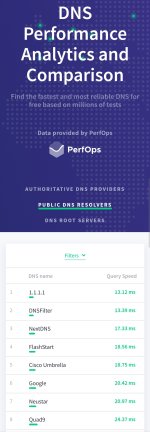
As per Dnsperf website, Cloudflare's DNS is faster than NextDNS. So I have changed my ISP's DNS to Cloudflare's DNS (1.1.1.1). Will this work?
 

Attachments

  • Screenshot_20220915-224419_Brave.jpg
    Screenshot_20220915-224419_Brave.jpg
    754 KB · Views: 190
As per Dnsperf website, Cloudflare's DNS is faster than NextDNS. So I have changed my ISP's DNS to Cloudflare's DNS (1.1.1.1). Will this work?
Nice results, but please note that the question of whether to use NextDNS or not is about privacy and ad blocking, not about packet delivery speed.

I am not saying that Cloudflare is bad, but, they are different goals, one is focused on speed and the other focused on privacy.
 
Do you suggest NextDNS or Adguard?
NextDNS offers more for less, the free version has an query limit of 250.000 DNS queries, but you will never reach it unless you use the same configuration ID on 4 or more devices thats actively used by many people.
 
  • Like
Reactions: Kongo
Nice results, but please note that the question of whether to use NextDNS or not is about privacy and ad blocking, not about packet delivery speed.

I am not saying that Cloudflare is bad, but, they are different goals, one is focused on speed and the other focused on privacy.
Does NextDNS and Adguard do the same things? If yes, which one is better?
 
  • Like
Reactions: Mystic
Does NextDNS and Adguard do the same things? If yes, which one is better?
Essentially, Yes you can enable the same blacklists. But as @scansaid, the free tier of NextDNS is generous and it allows you to use it on as many devices as you need as long as you do not exceed the DNS queries limit (never happened to me). Adguard DNS, on the other hand, only allows you to use the DNS on a limited number of devices in the free plan. As far as I remember you are limited to use it on two device.
 
Also, you can try Control D DNS, which doesn't limit the number of queries in any tier. However, you have less control in the free tiers.
 
  • Like
Reactions: zkSnark
So I would like to know if I need any additional security programs beside the two security configurations I use above.

No.
  • For Windows, an anti-malware software.
  • Ad-blocker for your browser.
  • Password manager for your logins.
  • Authenticator app, or FIDO2-compliant security key for MFA/2FA.
  • And a backup for your personal files (cloud-sync or/and offline copy)

Any other "security" or "privacy" free/paid services are a scam.
 
Hi! It's great to hear that you are already taking steps to secure your Windows 11 PC with Bitlocker and Kaspersky Total Security. However, there are a few additional security programs you may want to consider:

1. Two-factor authentication: Using two-factor authentication (2FA) adds another layer of security by requiring a secondary verification step to access your accounts. You could use an app like Authy, Google Authenticator, or Microsoft Authenticator.

2. Malwarebytes: While Kaspersky Total Security is a great all-around security program, sometimes it’s worth having a second opinion from a different provider. Malwarebytes is one of the best malware detection and removal programs on the market and can help protect your PC against viruses and spyware.

3. VPN: If you regularly use your laptop for public Wi-Fi or work remotely, a virtual private network (VPN) can help keep your data secure by encrypting your internet connection.

4. Windows Firewall: While Kaspersky Total Security comes with its own firewall, it’s worth checking that Windows Firewall is also enabled. Windows Firewall can help protect your PC from unauthorized access by blocking incoming traffic.

Remember, these programs can be additional layers of protection, but no security program is foolproof. Make sure to also practice safe computing habits like not opening suspicious emails or links, regularly updating your software and operating system, and using strong passwords.
 
  • Like
Reactions: zkSnark