

How to delete windows.old folder?
- Thread starter TheTRUTH
- Start date
You are using an out of date browser. It may not display this or other websites correctly.
You should upgrade or use an alternative browser.
You should upgrade or use an alternative browser.
- Status
- Not open for further replies.

Right click on it and then press delete? It should then skip the Recycle Bin and then permanently delete (could take a while).
I
illumination
- Open Disk Cleanup by clicking the Start menu,all apps, windows administrator...
- In the Disk Cleanup dialog box, on the Disk Cleanup tab, click Clean up system files. ...
- Select the Previous Windows installation(s) check box, and any other check boxes for the files you want to delete, and then click OK.
Last edited by a moderator:


being honest i dont recommend deleting this folder as windows some times uses some of the data that is stored there, for my personal experience one time with windows 7 i decided to erase that folder... then after restart i found that some stuff was missing... with windows 8 was even worse after delete... some apps were not working the way it has to... for some reason windows doesnt let you erase that folder via right click, so my advice is to make a clean install
D
Deleted member 178

Well by simply delete through right click or add to custom list with your favorite cleaning tool beside on built in Disk Cleaner for Windows.
But better remove after revert to Windows option expire within 30 days.
But better remove after revert to Windows option expire within 30 days.

OS: Windows 10 Home 64-bit - Unable to remove Windows.old folder.
The first time I upgraded from 8.1 to 10, the Windows.old folder removed successfully with Disk Cleanup. After a clean (post-upgrade) installation, the folder cannot be deleted with either Disk Cleanup or CCleaner.
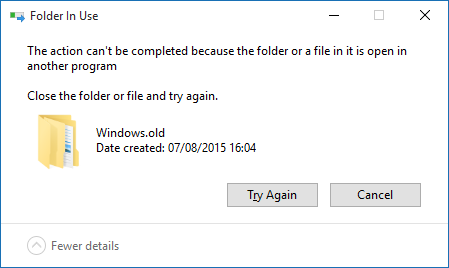
Right-click delete, message:
Folders under Windows.old
Update:
Windows 10 is broken.
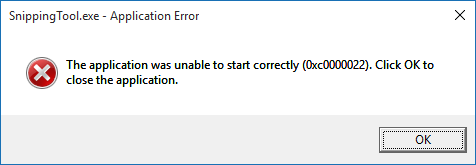
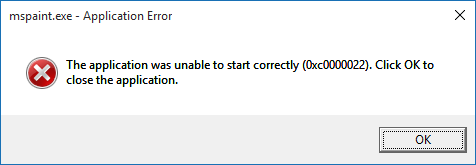
The first time I upgraded from 8.1 to 10, the Windows.old folder removed successfully with Disk Cleanup. After a clean (post-upgrade) installation, the folder cannot be deleted with either Disk Cleanup or CCleaner.
Right-click delete, message:
Folders under Windows.old
Code:
C:\Windows.old\Program Files\Windows Defender
MpClient.dll
MpRtp.dll
MpSvc.dll
MsMpEng.exe

C:\Windows.old\WINDOWS\Fonts (with 7 items)

C:\Windows.old\WINDOWS\System32 (with 361 items)

C:\Windows.old\WINDOWS\SysWOW64 (with 41 items)

C:\Windows.old\WINDOWS\WinSxS (with 460 items)
amd64_microsoft-windows-...
wow64_microsoft-windows-...
x86_microsoft.windows....
Update:
Windows 10 is broken.
It identified only the "C:\Windows.old\Program Files\Windows Defender", but nothing is removed. See update.Use CCleaner, u just have to tick the option.
 Windows is broken.
I
illumination
Just the upgrade and not a clean install, I had the same issue, it broke windows 10 doing the upgrade, certain built in windows features would not work, like sfc scans ect. So I did a clean install now everything is working as should.It identified only the "C:\Windows.old\Program Files\Windows Defender", but nothing is removed. See update.

I wanna share this one from another forum, I printed this one and this worked for me.
Windows.old Folder - Delete - Windows 7 Help Forums
Windows.old Folder - Delete - Windows 7 Help Forums
This was a clean install, and I used the Media Creation Tool.Just the upgrade and not a clean install, I had the same issue, it broke windows 10 doing the upgrade, certain built in windows features would not work, like sfc scans ect. So I did a clean install now everything is working as should.
Just 5 hours ago: Running Windows 10 Home
Now: Running Windows 8 Core
Last edited:
- Status
- Not open for further replies.
You may also like...
-

-
Ending Soon Ashampoo UnInstaller 15 Limited offer for free
- Started by Brownie2019
- Replies: 0
-
 Security News DefenderWrite Tool Let Attackers Inject Malicious DLLs into AV Executable Folders
- Started by Khushal
- Replies: 7
-

-
Expired Wise Program Uninstaller PRO~1yr for free
- Started by Brownie2019
- Replies: 1