

Advice Request How to Reset MS Edge Browser Font?

Please provide comments and solutions that are helpful to the author of this topic.

lokamoka820

Level 37
Thread author
Verified
Well-known
Mar 1, 2024
2,654
3
7,888
3,569
Banana Republic
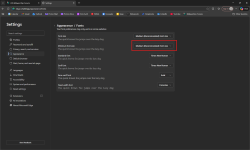
I was checking my Microsoft Edge browser settings as a routine procedure and noticed that the "Minimum Font Size" in the "Appearance/Fonts" section was "Custom" and I never changed it, so I examined the drop-down menu items and selected the recommended option as shown in the screenshot:
Screenshot 2025-12-16 171955.png

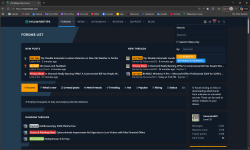
The result was that the font became too large and uncomfortable to look at, and when I went back to the mentioned settings to restore it to its previous state, the "custom" option was not available. Here's how the browser font looks now:
Screenshot 2025-12-16 171836.png

Is there a solution to this problem?
 
  • Like
Reactions: Parkinsond
I was checking my Microsoft Edge browser settings as a routine procedure and noticed that the "Minimum Font Size" in the "Appearance/Fonts" section was "Custom" and I never changed it, so I examined the drop-down menu items and selected the recommended option as shown in the screenshot:

View attachment 293841

The result was that the font became too large and uncomfortable to look at, and when I went back to the mentioned settings to restore it to its previous state, the "custom" option was not available. Here's how the browser font looks now:

View attachment 293840

Is there a solution to this problem?
What you’re seeing is normal behavior in Edge and not a security issue.

What “Custom” means
Edge shows Custom for Minimum font size whenever the stored value doesn’t exactly match one of the predefined presets (Small/Medium/Large, etc.). That can happen if:

  • Edge was updated and the old numeric value (e.g. 11 px) no longer maps cleanly to a preset.
  • A profile/sync/import from another browser brought in a different minimum size.
  • An extension or experiment once tweaked font settings.

It doesn’t indicate malware or damage; it’s just a preference value that’s “between” the standard options.

Solution / what to do

If everything looks normal now that you set it to Medium (Recommended), you’ve effectively “fixed” it.

If you want to be extra sure everything is clean and default:

  • Go to edge://settings/appearance/fonts and leave:
    • Font size: Medium (Recommended)
    • Minimum font size: Medium (Recommended)
  • Optionally, reset all Edge settings:
    • Open SettingsReset settings
    • Click Restore settings to their default valuesReset

(That reset will revert things like startup page, new tab, search engine, content permissions, disable extensions, etc., but it keeps your favorites, history and saved passwords.)

Bottom line
Seeing “Custom” there by itself is not a problem. Setting it back to a recommended value or resetting Edge settings is all that’s needed.
 
I solved the problem through trial and error, so if anyone is interested, here's what I did:
  • Close the Microsoft Edge browser completely (check the Task Manager to make sure that nothing related to the Microsoft Edge browser is running in the background).
  • Delete the folder: C:\Users\{UserName}\AppData\Local\Microsoft\Edge
  • Delete the key: HKEY_LOCAL_MACHINE\SOFTWARE\Microsoft\Edge
  • Delete the key: HKEY_CURRENT_USER\Software\Microsoft\Edge
 
Last edited:

You may also like...