Basic Security LoLs Security Configuration 2019

Last updated
Jan 21, 2019
Windows Edition
Pro
Security updates
Check for updates and Notify
User Access Control
Always notify
Real-time security
Kaspersky Internet Security 2019 19.0.0.1088 (trial 30 days)
Firewall security
About custom security
* Windows bloatware removed with this script https://github.com/Sycnex/Windows10Debloater/
* harden Windows settings with SysHardener v1.5 https://www.novirusthanks.org/products/syshardener/
* o&o Privacy apply all recommended
* AppCheck Anti-Ransomware (Free version) 2.5.19.1


Periodic malware scanners
Kaspersky Internet Security 2019 19.0.0.1088 (trial 30 days)
Malware sample testing
I do not participate in malware testing
Browser(s) and extensions
Google Chrome
uBlock Origin
Windscribe
Night Eye - Dark mode
Enhanced Steam
Momentum
Sticky Password extension
Tampermonkey
The Great Suspender
IDM Integration Module
Reddit Enhancement Suite
Maintenance tools
Process Hacker
File and Photo backup
AOMEI Backupper Free For GDPR Compliance
Regular backup sync to external HDD for My Document folder
System recovery
AOMEI Backupper Free For GDPR Compliance (System backup image partition)
every 2 month because this PC being use 24/7, its rarely off.
Risk factors
    • Gaming
    • Browsing to popular websites
    • Streaming audio/video content from shady sites
    • Browsing to unknown / untrusted / shady sites
    • Working from home
Computer specs
Intel i5 6600K
16GB RAM
Samsung and Corsair SSD
more..
Notes by Staff Team
  1. This setup configuration does not have a backup plan. We strongly recommend to add a backup solution for your data so that you can restore it in the case of an emergency.
    Backing up allows the recovery of data that has been lost due of a malware attack (eg. ransomware) or a hard disk crash. In such events you might lose family photos, your music collection, documents, or financial data. Backups are fast and simple to perform so it should be done on a regular basis.

Attachments

  • Capturexx.PNG
    Capturexx.PNG
    17.9 KB · Views: 310
@LoLs:
  • Please specify the exact version number of Avast.
  • As for "Virus and Malware Removal Tools", You may add: HitMan.Pro Fre, Norton Power Eraser, and MalWareBytes 4 Windows Free.
  • As for "Disk Imaging Backup", You may add Macrium Reflect Free or AOEMI Backupper, both are free and reliably.
  • If You run manual backups of important data to external devices, please note it in Data Backup field.
Please kindly reflect Your changes editing Your config, and announcing them here, thanks for sharing Your config :giggle:
 
i did, Google chrome with uBlock Origin, Windscribe extension, etc. Thanks

Oops! I'm with @Moonhorse - check out Avast hardened mode. And you could add Hard_Configurator, which has a Avast hardened mode profile built in. Nice.
 
Updated
I did fresh install to Windows 10 Pro 1809 x64 Build 17763.253 last saturday
Install testing Kaspersky Internet Security 2019 19.0.0.1088 (trial 30 days), the reason i'm on trial for testing av performance and becuz i'm applying for GA from here MalwareTips Giveaway - Kaspersky Internet Security Giveaway. And i like it,. lucky or not from that GA i think i will keep using this KIS.

This what i like from Kaspersky, When im doing cryptocurrency mining i can add that application connection rules to specific ip only

Screenshot (8).png


and deny read/write access to os and personal data

Screenshot (9).png


also i did this
* Windows bloatware removed with this script Sycnex/Windows10Debloater
* harden Windows settings with SysHardener v1.5 Harden Windows Settings with SysHardener | NoVirusThanks
* o&o privacy and apply all app recommended setting
* add AppCheck Anti-Ransomware (Free version) 2.5.19.1 and set real time , mbr and exploit protection on
* add AOMEI Backupper free version to sync my document folder (weekly). I'm not connecting my backup hdd 24/7 because its my only backup lol

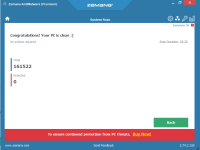
I was installing Zemana AntiMalware 3.0 Beta, but i removed because there is no real time protection on that version, and i cant see on demand scan for specific files on windows content menu.

I'm often mining cryptocurrency., i'm looking for free version for sandbox program if anyone know.

Thanks for help

 
Last edited:
  • Like
Reactions: harlan4096