Malwarebytes Anti Malware

FUZZZY

New Member
Thread author
Jun 12, 2014
3
6
4
60
Hi, I have purchased and installed Malwarebytes Anti Malware which I found as a free software was great but since I puchased it the real time protection that purchasing it activates seems to have really slowed down my laptop and I would like to know can I limit the resources it uses or can i just turn the extra bits off. Thanks in advance for any help offered
 
Hi Fuzzy,
Have you
Kaspersky and Malwarebytes
the two programs
in the respective exception list
towards together?

sorry my english
is not so good
also
if I drive like to Scotland
 
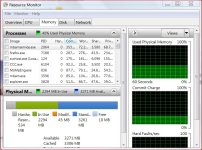
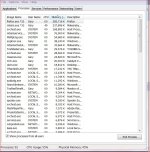
Hi! FUZZY ! MBAM does use a lot of resources when you have it running in real time, but I don't think it should slow down your laptop a lot. You can turn off some of the MBAM extras, but then you don't have the real time protection. I'm wondering how much RAM do you have? You can see in my screen shot that MBAM does use a lot of RAM. I have 6GB of RAM. I run MSE and MBAM Pro. I don't notice a slow laptop. Type Resmon in your start orb and see what is going on in your computer! You can also open task manager and see what's going on with memory and CPU
https://forums.malwarebytes.org/index.php?/topic/111367-excessive-memory-usage-of-mbamserviceexe/
Capture48.JPG
 

Attachments

  • Capture48.JPG
    Capture48.JPG
    140.7 KB · Views: 426
Last edited:
  • Like
Reactions: Xtwillight
I would use MBAM as On demand only.Consider enabling UAC.Thanks for sharing your config :)