maxsun H510ITX mobo audio driver

Status
Not open for further replies.

Cleo

Level 7
Thread author
Verified
Well-known
Forum Veteran
May 25, 2020
300
1,458
569
27
Armidale
HI MalwareTips.
I was grabbing the install files for my new mobo but my AVs keep blocking this audio driver.
The direct link is hxxp://drivers.maxsun.com.cn/MB/driver/VA1.80/network/realtek/network_Realtek_w10_64(.)exe

What do you think?
 
Last edited by a moderator:
This is an SFX installer.

  • None of the contained files are detected by any antivirus product.
  • No malicious behavior seen in a sandbox run.
  • Some of the antivirus vendor's detection names indicate a problem with Batch files, I checked those too, but there is not much noteworthy inside, one batch file executes the setup silently but that's not an issue in itself.
  • INF files look fine.
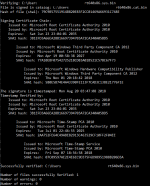
I verified the x86 and x64 drivers and their catalogue files. The signatures are valid. See image below for SignTool output of the x86 driver.

verifieddriver.png

Conclusion: File is clean.

This was probably a false positive chain reaction. Bitdefender's is part of so many engines, that their false positives have impact on many other antivirus products. Once so many products detect a file, others will more likely follow.

I submitted the file to Bitdefender, they declared it clean too. Most of these detections should go away within the next day. What's your antivirus product?
 
This is an SFX installer.

  • None of the contained files are detected by any antivirus product.
  • No malicious behavior seen in a sandbox run.
  • Some of the antivirus vendor's detection names indicate a problem with Batch files, I checked those too, but there is not much noteworthy inside, one batch file executes the setup silently but that's not an issue in itself.
  • INF files look fine.
I verified the x86 and x64 drivers and their catalogue files. The signatures are valid. See image below for SignTool output of the x86 driver.

View attachment 263645

Conclusion: File is clean.

This was probably a false positive chain reaction. Bitdefender's is part of so many engines, that their false positives have impact on many other antivirus products. Once so many products detect a file, others will more likely follow.

I submitted the file to Bitdefender, they declared it clean too. Most of these detections should go away within the next day. What's your antivirus product?
Thanks for that Struppigel.
I was interested in what triggered VirusTotal giving it the "overlay" warning flag.

I'm using Webroot SecureAnywhere and AviraAV. I don't mind them (after uninstalling Avira's bloat) but I don't think I need both at once. I'll renew Webroot I think.
Thanks again. C.

 
Where did you see a warning for overlay?
Overlay only means there is appended data. Having an overlay is normal for installers.
 
Where did you see a warning for overlay?
Overlay only means there is appended data. Having an overlay is normal for installers.
What I'm seeing is just under the file name on the VT page that you linked: "direct-cpu-clock-access overlay peexe runtime-modules"
 
This is not a warning but a tag. It is additional information that people with VT intelligence can use to search files. E.g. I can put in queries including tag: overlay to search specifically for files that have appended data.
 
Status
Not open for further replies.