MBAM hoax?

Status
Not open for further replies.

enaph

Level 30
Thread author
Verified
Honorary Member
Top Poster
Well-known
Forum Veteran
Jun 14, 2011
1,843
2
12,353
2,879
Null Island
Please read:
http://forums.malwarebytes.org/index.php?showtopic=88498
http://forum.safegroup.pl/viewtopic.php?f=44&t=4282 [Polish site - use Google Translate]
http://www.anti-malware.ru/forum/index.php?showtopic=18301 [Russian site - use Google Translate]
 
Probably its their heuristics or aka Shuriken, seems its was probably react with the name as malicious but since its an empty file its like there is a problem for that.
 
I think it has to do with how MBAM is designed to detect malware. Its good
that it detected the file at a location that it should not be at.

Why it did not get detected when placed at the desktop? I don't know but
I ll take a (wild) guess. It could be because malware named svchost.exe
don't usually show up at the desktop as it does often at the C Drive.

Why it did not get detected in D Drive? Again, I ll take a wild guess. The
quick scan( I never run the other scan) dont check D Drive.

Pablozi, just guessing, OK.

Bo
 
Only, It's difference Malwarebytes and Other Antivirus in the Diagnostic Policy. Not Hoax! :)
 
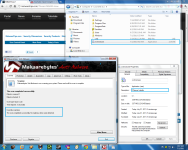
Interesting way of protecting a system.svchost.exe. is a windows related file so no one will name a file like that unless they want to exploit a system.The important thing that we should note is that this isn't the main way for MBAM to flag a threat.To prove my point I've downloaded the Ccleaner installer and place it in %WINDIR% (C:/) ... I have also renamed Ccleaner to svchost.exe , so now if MBAM was to flag a threat only by looking at his name and path we should have a detection.

[attachment=534]

Code:
Malwarebytes' Anti-Malware 1.51.0.600
www.malwarebytes.org

Database version: 6991

Windows 6.1.7601 Service Pack 1
Internet Explorer 9.0.8112.16421

7/1/2011 9:07:05 AM
mbam-log-2011-07-01 (09-07-05).txt

Scan type: Quick scan
Objects scanned: 1
Time elapsed: 3 second(s)

Memory Processes Infected: 0
Memory Modules Infected: 0
Registry Keys Infected: 0
Registry Values Infected: 0
Registry Data Items Infected: 0
Folders Infected: 0
Files Infected: 0

Memory Processes Infected:
(No malicious items detected)

Memory Modules Infected:
(No malicious items detected)

Registry Keys Infected:
(No malicious items detected)

Registry Values Infected:
(No malicious items detected)

Registry Data Items Infected:
(No malicious items detected)

Folders Infected:
(No malicious items detected)

Files Infected:
(No malicious items detected)

Cyber criminals aren't playing according to the rules so all the vendors should use all the techniques available in order to better defend a system.I'm sure that other vendors use this kind of technique in order to prevent/detect a threat and as long as it's "another way" of detecting malware everything is ok.
The main problem when using this type of detection could be a FP..but I have been using MBAM for 2 years now and I have never seen a FP from MBAM.
 

Attachments

  • 1.png
    1.png
    362.1 KB · Views: 838
bo.elam said:
Why it did not get detected in D Drive? Again, I ll take a wild guess. The
quick scan( I never run the other scan) dont check D Drive.

Pablozi, just guessing, OK.

Bo

I did a full scan of D drive.
 
pablozi said:
I did a full scan of D drive.
Did you try to do a scan of a C: drive with KIS also to see if it will detect the file ? Apparently Avast is using the same detection technique as MBAM.
 
Yes. I did. KIS 2012 says it is clean.
 
MBAM has some weird heuristics and white-listing but somehow it works. The product has good detection. The only problem is when people use it as their only real time protection thinking that it is better than an AV.
 
  • Like
Reactions: Malware1
This is exactly why i use multiple on demand scanners! ;) Over lapping layers, what one misses the others usually find.
 
Status
Not open for further replies.

You may also like...