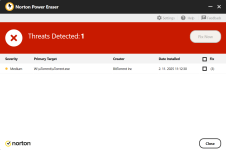
Question NPE detects itself has medium risk!

Please provide comments and solutions that are helpful to the author of this topic.

The_King

Level 12
Thread author
Verified
Top Poster
Well-known
Forum Veteran
Aug 2, 2020
552
1
10,282
1,069
The Delta Quadrant
Hallo good people and Happy New year!

I randomly scan my PC once a month or so with NPE and KVRT.

Today NPE shows me 26 "false positives" including itself! o_O (I hope its false positives! :LOL: )
Screenshot 2026-01-02 171315.jpg


Several Microsoft .exe files including winlogon.exe!
Screenshot 2026-01-02 171031.png


KVRT and Windows defender shows the system is clean.

Just want to check if anyone else is experiencing this issue with the latest version of NPE?

First time in years I seen so many false positive from NPE on my system.

Screenshot 2026-01-02 103618.jpg


Screenshot 2026-01-02 103841.png


Edited - More information
I sent a few of the .exe files to Virustotal and they show all clean in including winlogon.exe and npe.exe.
Screenshot 2026-01-02 at 11-01-30 VirusTotal - File - b71e814a2f66ed26e8fd0cfad89208616c9e4a18...png
 
Last edited:
Hallo good people and Happy New year!

I randomly scan my PC once a month or so with NPE and KVRT.

Today NPE shows me 26 "false positives" including itself! o_O (I hope its false positives! :LOL: )

Several Microsoft .exe files including winlogon.exe!

KVRT and Windows defender shows the system is clean.

Just want to check if anyone else is experiencing this issue with the latest version of NPE?

First time in years I seen so many false positive from NPE on my system.

View attachment 294198

View attachment 294199

Edited - More information
I sent a few of the .exe files to Virustotal and they show all clean in including winlogon.exe and npe.exe.
View attachment 294200
Happy New Year.

What you’re describing (NPE flagging a bunch of core Windows executables and even its own EXE) is a classic pattern of a bad/overly aggressive detection update or heuristic “misfire” in a “power eraser” style tool. Norton Power Eraser is intentionally high-sensitivity and can produce false positives, especially compared to normal AV scanning.

That said, I can’t confirm from here whether “the latest NPE” (as of January 2, 2026) is affecting other users too, because that requires checking recent reports/vendor advisories.

What I recommend (safe order / low risk first)

  • Do NOT click “Fix Now” / do NOT remove anything when system files like winlogon.exe, wininit.exe, csrss.exe, svchost.exe are involved. Removing/repairing the wrong thing can break Windows.
  • Download a fresh copy of NPE directly from Norton, then run it again (this rules out a corrupted download/cache). If the “new” copy still flags itself, that strongly supports a false-positive/heuristic issue rather than a real infection.
  • Verify the digital signatures of a few flagged files:
    • Right-click file → PropertiesDigital Signatures
    • Core Windows files should be signed by Microsoft; NPE should be signed by Norton/Gen Digital.
  • Cross-check with additional reputable scans (you already did KVRT + Defender, which is good):
    • Microsoft Defender Offline scan
    • ESET Online Scanner (or another reputable second-opinion scanner)
  • Check system integrity (helps rule out tampering/corruption and is safe):
    • Open an elevated Command Prompt and run: sfc /scannow
    • Then (if needed): DISM /Online /Cleanup-Image /RestoreHealth
  • Report it as a false positive to Norton (this is the most productive step if it’s widespread). Include the detection names and the file paths. If Norton corrects their definitions/logic, this usually goes away quickly.

About your VirusTotal screenshot
A “0/xx detected” result for WINLOGON.EXE strongly leans toward “not malicious,” but it’s not absolute proof by itself. Combined with clean results from Defender + KVRT, it makes a real infection less likely than an NPE detection problem.

If you want to post follow-up info (useful for the thread)
  • Your Windows version/build
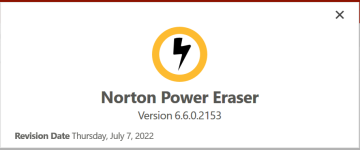
  • The NPE version (from Help/About)
  • The exact threat names NPE assigns to those 26 items (not just the file names)

If you’re unsure and want a definitive check, the safest next step on MalwareTips is to post in the dedicated malware-removal/log-analysis section (FRST logs, etc.) so trained members can confirm whether anything is genuinely suspicious.
 
Same here, only the app from @Trident AiDefender.exe is flagged, nothing else.
That’s to be expected, the executable always has today as compilation date, not many users and no EV signature. So it is normal for tools like NPE to flag it. However you can be sure that the executable covers the highest standards of safety.

-The engine is designed for reduced false positives and does not remove critical files/processes. Wherever parsing of files is required, the engine uses containers.
-The code is designed for memory safety and uses CET, ASLR, DEP and other features out of the box to reduce the potential for exploits.
-Connections happen over a secure protocol
-Elevation happens only when it is necessary
-The UI runs natively in WebView which means the UI by itself runs in containers. This is the reason I chose WebView over Sciter.
 
Last edited:
I run scan with NPE and did not get false positives:

View attachment 294201

Which version do you run? You can use Help - About. Here is mine:

View attachment 294202
I have the same version.
Screenshot 2026-01-02 143949.png


I wonder if the issue is related with my windows 11 version. :unsure:
Screenshot 2026-01-02 150838.png


I downloaded and ran EMSISOFT Emergency Kit (EEK) and ran 2 scans and it shows all clean.

Not panicking at the moment but not sure what is the reason those files are being detected has a threat.


Edited- Last scan I will be doing - Updated first post with more screenshots and info.

ESET online scanner shows all good. I am putting it down to an unknown issue with NPE. Will update if I find anything new.
Thanks all!

Screenshot 2026-01-02 165520.png
 
Last edited:
We may find this as simple False Positives, but this is unacceptable as those are critical Windows Files. Imagine NPE deleting Winlogon, that will spell disaster.
Something is wrong with their detection during the time of scan.
Try updating to the latest version and re-run it.

If this is not yet fixed at this time,then QA of NPE is not doing their job.
 
NPE is characterized by unusually aggressive heuristics. It looks like the exclusion of (obviously) signed, reputable files went haywire during that scan? :unsure:

Have you verified that NPE is uncorrupted?
I have have checked the digital signature and there seems to be an issue that it maybe expired.
Valid to 2024 for NPE and 2025 for winlogon.exe and its 2026! Somebody else can check this and confirm this for NPE.

Not sure if this is the reason for them showing has medium risk threats!

Screenshot 2026-01-03 090131.png
Screenshot 2026-01-03 091218.png


We may find this as simple False Positives, but this is unacceptable as those are critical Windows Files. Imagine NPE deleting Winlogon, that will spell disaster.
Something is wrong with their detection during the time of scan.
Try updating to the latest version and re-run it.

If this is not yet fixed at this time,then QA of NPE is not doing their job.
It does not identify the threat has high or severe and does not give you the option to remove them so I guess that is a positive.
There is no update but I did download NPE again this morning and it still shows the same threats.
Screenshot 2026-01-03 at 09-14-10 inchident - Google Search.png

Anyway this little inchident made me go back to Bitdefender Total Security. Got a 3 device and 3 year sub at great price! I wanted to try Kaspersky but that was almost double the price in my country. Could not risk such a serious infection has I would have to delete the entire OS and start again which is not ideal at the present time.
Screenshot 2026-01-02 at 23-18-16 Bitdefender Central.jpg
Screenshot 2026-01-03 093628.png
 
Last edited:
I also just ran an NPE scan and did not find any FP. It seems the OP is the only one having this too many FP.
Kindly verify the Hash of the NPE that you are using with the official one on Norton site.
Yours could be modified,infected or corrupted as it's being flagged too.
SHA256 4819D87FE9D0D0485FE85A3843A3E3ECD61EBE50A115DAD01EC10275272BE82A
Screenshot 2026-01-03 114901.png

Screenshot 2026-01-03 at 11-50-54 VirusTotal - File - 4819d87fe9d0d0485fe85a3843a3e3ecd61ebe50...png
 
SHA256 4819D87FE9D0D0485FE85A3843A3E3ECD61EBE50A115DAD01EC10275272BE82A
View attachment 294262
View attachment 294263
For me, it worked as expected, scanning through the NPE. I had to log in to my admin account to run the NPE to elevate privileges. The SHA-256 matches my NPE exactly. I believe it is a false positive. (y) Remember that NPE is quite aggressive. But it's worth investigating and finding out why it's generating these FPs reported by NPE on your machine. ;)
1767426771108.png
1767427139318.png
 
Some Windows files has no digital certificate at all!
Every single exe flagged by NPE has an expired digital certificate, I manually verified this for every single exe file in the list.

It seems the .exe files in system32 have expired (2025) digital certificates but the .exe files in winSxS all have valid digital certificates (2026). So Still sticking to my original conclusion that it is an expired digital certificate related issue nothing more than this even though other users are not seeing the same issue.

Whatever digital certificate list my system is using is probably causing these false positives in NPE and other windows exe files.

System is running well 100% stable and verified by several other AV software to be 100% clean. (y)
 
Last edited: