New Update PicView Updates Thread

lokamoka820

Level 37
Thread author
Verified
Well-known
Mar 1, 2024
2,654
3
7,896
3,569
Banana Republic
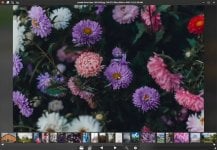
PicView is a fast, free and fully customizable image viewer for Windows 10 and 11.
It supports a vast range of image file types, including WEBP, GIF, SVG, PNG, JXL, HEIC, PSD and many others.
Additional features includes viewing EXIF metadata, image compression, batch resizing, viewing images within archives and comic books, image effects, image galleries, and more.
Enjoy a clean, free, and fast experience with no bloated UI or annoying pop-ups.
Available in portable and installable versions.
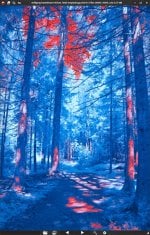
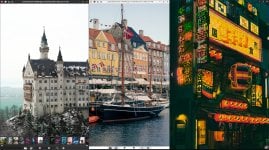
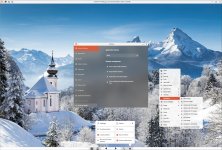
PicView3.0-DarkTheme(1) (03).jpgPicView3.0-galleryAnimation (02).jpguix3-3.0DarkTheme (01).jpgPicView UI overview 3.0(1) (04).jpg
Features:
  • Customizable shortcuts
  • Scroll function built with manga/comics in mind.
  • Toggleable image galleries
  • Resizes window dynamically to fit the image resolution
  • Quickly view EXIF data as you browse through images
  • Interface can be hidden, to just show the image
  • Losslessly compress images by using the Optimize Image button
  • Shows the file name, resolution, the size of the picture and aspect ratio in the title bar
  • Basic editing: rotate, flip, crop, change file type
  • Drag & drop/paste from clip-holder support for files, folders, URLs and archives
  • file history so you can easily pick up the work from where you left off
  • Customizable interface (choose between dark or white theme, pick between 12 accent colors.)
  • View pictures inside archives such as ZIP, RAR, 7z, 7Zip, .iso, .Cab, .Wim, .Tar, BZip2, RAR (requires 7-Zip or WinRAR to be installed)
  • View pictures inside comic book archives such as .cbr, .cb7, .cbt, .cbz, .cba
  • 27 different shader effects (image filters), including negative colors, old movie effects, pencil sketch, etc.
  • Set image as wallpaper or lockscreen (Image effect will be applied as well)
  • Sort files by: name, file size, date created, last accessed, latest edit, file extension and randomized
  • Large file support .jpg, .psd, .3fr, .pgm, .zip, .png, .psb, .arw, .ppm, .7zip, .svg, .xcf, .cr2, .cut, .rar, .webp, .heic, .crw, .exr, .cbr, .ico, .hdr, .dcr, .dib, .cb7, .tiff, .tga, .dng, .emf, .cbt, .gif, .dds, .erf, .wmf, .cbz, .ico, .hdr, .dcr, .dib, .cb7, .bmp, .jxl, .kdc, .wpg, .xz, .jpe, .jp2, .mef, .xbm, .gzip, .jpeg, .heif, .mos, .xpm, .tar, .mrw, .svgz, .wim, .nef, .b64, .iso, .nrw, .qoi, .cab, .orf, .avif, .raf, .raw, .rw2, .srf, .x3f, .cr3
  • Language Support: Chinese, Spanish, Korean, German, Danish, French, Polish, Italian, Russian, Romanian.
 
  • Like
Reactions: simmerskool
PicView 3.1.0
Apr 2, 2025

What's New​

Screenshot 2025-04-02 102303
  • Added a new tab in the Settings window to associate PicView with supported files (#157).
  • Introduced new options to enable or disable confirmation dialogs when moving files to the recycle bin or permanently deleting them (#195).
  • Added a new menu in the Settings window that allows you to open the keybindings file, access the user settings file, or reset settings to their default values.

Improvements​

  • PicView now loads large images progressively, drastically reducing visual loading times for very large files.
  • Added navigation arrows for backward and forward movement in the tab history within the Settings window.

Bug Fixes​

  • When maximized, PicView now displays a restore icon instead of a fullscren icon; clicking it restores the window rather than switching to fullscreen.
  • Fixed incorrect rendering at startup when scrolling is enabled.
  • The scrollbar is now correctly positioned at the right edge in both maximized and fullscreen states.
  • The bottom gallery is now properly sized when scrolling is enabled.
  • Restored the print functionality (#194).
  • PicView now correctly adds or removes gallery thumbnails when toggling the search of subdirectories on or off.
  • Fixed a crash that occurred when toggling subdirectory searches on or off when no image was loaded or navigation was unavailable (#196).
  • When viewing the image gallery, PicView now correctly displays the appropriate translation and function for closing the gallery, depending on whether it is fully opened or in bottom mode.
  • Corrected the behavior of the Esc button, ensuring it now properly closes external windows and exits the Slideshow mode when enabled.
  • Fixed an issue where the update function always downloaded the latest version; it will now indicate when no new version is available.
  • Fixed tool windows exceeding the screen size on smaller resolutions.

Miscellaneous​

  • Replaced parts of the previous color scheme with new, improved colors.
  • Implemented various style improvements and fixes.
  • Adjusted the slider, for setting navigation speed when holding down the key, to have better tick intervals.
  • Refined the grammar and phrasing for both English and Danish translations.
  • PicView now defaults to the Dark Theme when no settings are present, regardless of the system theme.
  • Added missing translations in the Open file and Save as dialogs.
 
  • Like
Reactions: simmerskool
PicView 3.1.1
Apr 14, 2025

What's New​

  • Added pinning and unpinning functionality to the recent file history, when you right-click to open the context menu.

Bug fixes​

  • Fixed being unable to save settings, when no settings file is present (#137).
  • Fixed the Keybindings window closing when attempting to unbind a key with the Esc key.

Miscellaneous​

  • Minor UI improvements
  • Optimized reliance upon external libraries; reducing file size ~2mb.
 
  • Like
Reactions: roger_m
PicView 3.1.3
May 26, 2025

What's new

  • New setting to adjust window spacing when Auto-fit window is enabled.

Improvements

  • Reduced memory usage when navigating between pictures.
  • Real-time setting updates: The Open files in the same window option now takes effect immediately without requiring a restart
  • Enhanced drag-and-drop: Preview now shows thumbnails first, followed by the full image for faster feedback.
  • Improved error handling: When the settings .json file is corrupted, default settings now load instead of causing a crash.

Bug fixes

  • Fixed incorrect zoom panning when the image was rotated.
  • Fixed incorrect rotation being applied to HEIC images (#207).
  • Fixed hover buttons fading out prematurely while the cursor remains over them.
  • Fixed incorrect gallery thumbnail option being preselected in the Gallery settings tab.
  • Fixed file history failing to load or save when write permissions are missing in the installation directory.
  • Fixed the File history button from incorrectly cancelling the "Open with" dialog.
  • Fixed layout issue where space was reserved for the bottom gallery even when it was hidden.
  • Fixed the window title not restoring the original URL after closing the crop view. It previously showed Clipboard image instead.
  • Fixed the window not restoring properly when pressing Esc to exit the slideshow.

Translations

  • Improved Chinese translations by @jasoneri in #206.
  • Fixed incorrect translations in text box context menus.

Miscellaneous

  • Added Cancel and Reset buttons to the batch resize window.
  • Added a context menu to the settings window.
  • Added the "Search in Subdirectories" toggle button in the Settings window.
  • Disabled the Side by side and the toggle bottom gallery buttons, when functionality is unavailable.
  • Various minor UI improvements.
  • Better temporary files cleanup.
 
PicView 3.1.4
Jun 20, 2025

🚀 What's New​

  • Mouse Side Buttons Customization:
    You can now change how the mouse side buttons work. Choose to navigate file history or switch between directories. Find this setting under the Mouse tab in the settings window (#199).

🛠️ Improvements​

  • Directory Navigation:
    • Improved navigation between directories. If Search subdirectories is enabled, PicView moves to the next directory in the list; if off (or if there are no directories in the list), it navigates as before.
    • PicView now remembers your startup directory (including subdirectories) and restores it on the next launch.
  • Performance:
    • Preloader has been fine-tuned for better performance and lower memory usage.

🐞 Bug Fixes​

  • Fixed incorrect saved settings path when saving in portable mode (#213).
  • Corrected cases where keybindings and file history were not saved when there was no write permission.
  • Restoring the window from a maximized state now correctly keeps its position when auto-fit is enabled.
  • Fixed start-up menu text alignment and missing text issues.

🌐 Translations​

👏 New Contributors​

📝 Miscellaneous​

  • Updated to Avalonia 11.3.1.
  • Now using ZLinq and ZLinq.FileSystem to reduce memory allocation and possibly improve performance.
  • Future versions managed via Scoop will now preserve configuration files (#15555).
  • Experimental settings (not yet available in the UI—edit UserSettings.json directly):
    • Disable the file watcher (not recommended, untested).
    • Choose preload amount and direction (forward/backward).
 
  • Like
Reactions: harlan4096
PicView 3.2

🎉 First official release where the macOS version is no longer in beta​

PicView macOS screenshot

⏱️ Performance​

  • Reduced memory usage
    • Image loading has been optimized to reduce Large Object Heap (LOH) allocations and minimize garbage collection overhead. This significantly reduces memory usage when navigating between images.
  • Faster gallery loading
    • The thumbnail loading logic has been improved. It will now load faster in larger directories with more images.
    • Gallery loading now halts more efficiently when changing directories and reloads faster after the initial image is loaded.

🛠️ Improvements​

  • Window position and state memory
    • The Batch Resize window now remembers its last position.
    • The Image Info window remembers both size and position.
    • The Settings window now remembers the last selected tab and its position.
  • Improved window startup
    The main window startup procedure has been optimized to reduce flickering and feel smoother.
  • Adjusted minimum window size
    When the bottom toolbar is hidden, the minimum window size is now reduced (#205).

🖼️ Image Info Window​

  • Resizable layout
    The Image Info window is now resizable and adjusts the layout of text and icons dynamically to utilize the available space.
  • Editable Exif data
    • You can now edit text-based Exif fields like Author, Copyright, Subject, Title, Comment, etc.
    • Date and time pickers for Date Taken, Created, Modified, and Last Access text boxes are planned for the next major release.
  • Improved UI feedback
    • A loading indicator is now shown during renaming, resizing, and saving operations.
    • The Exif rating buttons, Remove image data button, and Exif text fields are now disabled when Exif data is not supported for the viewed image.

🖼️ Batch Resize Window​

  • Persistent settings
    • The Quality, Compression, and Conversion fields now persist across sessions (#204).
    • Resizable layout and full persistence of all values are planned for the next major release.

⚙️ Settings​

  • New option: Disable file history
    You can now choose whether PicView should remember previously opened files (#230).
  • Additional background color option
    A new background color has been added to the appearance tab in the Settings window.

🐞 Bug Fixes​

  • Fixed RAW camera image loading issues (#238, #221, #234).
  • Fixed certain cases where navigating to the next folder didn’t work.
  • Fixed inability to copy an image while in crop mode.
  • Fixed gallery thumbnail size sliders not saving changes (#237).
  • Fixed an issue where horizontal flip wasn’t applied when saving an image (#229).
  • Fixed incorrect image orientation for certain RAW camera files at startup.
  • Fixed zoom level not updating correctly in the title bar when zooming.
  • Fixed confirmation dialog settings not being saved for when deleting or moving files to the recycle bin.
  • Fixed Open last file button not always loading the correct file.
  • Fixed gallery toggle not resizing properly when UI visibility changes.
  • Fixed infinite recursion when attempting to load a missing file from history.
  • Fixed crash when starting a slideshow (#239).
  • Fixed blank image rendering after duplicating a file.
  • Fixed rotation context menu appearing when right-clicking the title bar to rename.
  • Fixed image rotation not filling the window correctly at 90° or 270° angles.
  • Fixed first/last image navigation buttons not working correctly.
  • Fixed PicView not recalling directory structure when navigating between folders.
  • Fixed gallery thumbnails being added when new images appear in the viewed directory while the gallery is initially disabled.
  • Fixed the Clear effects button in the Image effects window not properly displaying the Cancel button afterward.
  • Fixed Copy base64 context menu options, for an individual gallery item not working.

🪟 Windows Updates​

  • Window scaling/DPI
    Added DPI awareness manifest file for improved high-DPI support on Windows. (#197)

🍏 macOS Updates​

  • Fixed layout issues when restoring windows from fullscreen or maximized state.
  • Fixed macOS window buttons not working in fullscreen.
  • Fixed crash when loading gallery thumbnails.
  • Fixed issues where the tool windows wouldn’t become active after reopening.
  • Fixed startup position not centering correctly when Auto-fit window is enabled.
  • Fixed GIFs not being properly recognized on macOS.
  • Fixed macOS native menu items such as Image optimization, Open with, Delete file, etc., not being disabled when no valid file or image is available.
  • Fixed window not showing when opening a new file on macOS, when window is minimized.

Known macOS bugs:​

  • The option to open files in a new window, requires a restart to take effect.
  • The native menu does not persist when switching from the main window to a tool window

🗺️ Translations​

📝 Miscellaneous​

  • Added hotkey bindings for file sorting options in the Keybindings window.
  • The option to toggle whether the background color fills the entire window or just behind the image now defaults to filling the entire window.
  • Updated ZLinq and ZLinq.FileSystem to version 1.5.2.
  • Updated Avalonia to version 11.3.3.
 
PicView 3.2.0.1

🐞 Bug Fixes​

  • Fixed zoom panning when shift key is held down (#242).
  • Fixed maximized layout issue.
  • Fixed a crash when using zoom function in the startup menu.
  • Fixed backspace and tab key not working for setting customize shortcuts (#248).
  • Fixed loading issue when the local file path contains special characters (#243).
  • Fixed not being able to save images, that are not files, such as clipboard images, not properly generating random file name (#244).

🗺️ Translations​

📝 Miscellaneous​

  • Updated Magick.NET to version 14.8.2.
  • Updated Avalonia to version 11.3.5.

ℹ️Heads up​

While this is a small update - a new major update is being worked on.
 
PicView 4.1.0
Dec 28, 2025
This update adds improvements to the Print Preview, expanded macOS support, and better stability and performance.


Highlights​


  • PDF Export: Save any image as a PDF directly from the Print Preview window.
  • Archive Navigation: Added support for navigating to the next/previous archive file, such as .cbz files [#273].
  • Searchable Shortcuts: Keybindings in the Application Shortcuts window are now searchable [#280].
  • Improved RAW Support: Manually constructed Exif profiles for formats like .cr2 that previously lacked data [#272].
image


Image Information​


  • Scaling Improvements: The Image Information window now scales more effectively when resizing.
  • Exif Handling: Added support for reading Exif information by manually constructing profiles for files like .cr2 [#272].
  • Bug Fix: Fixed a crash occurring when the day of the week (-ddd) was included in the OS date format [#268].

Print Preview​


  • Save as PDF: Added a standard Save as PDF option to convert images directly to PDF.
  • Print Sources: Fixed an issue where only images saved as local files could be printed.
  • Visual Fix: Fixed a bug where image effects were not applied when opening the print preview window.

macOS Updates​


  • Clipboard Support: Added support for copying files directly to the clipboard.
  • UX Improvements: * The cursor position now stays on the next/previous buttons when changing images.
  • Added cursor movement support when clicking rotation on the macOS titlebar.
  • Feature Parity: Added the Print Preview window version for macOS.

Navigation​


  • Closing: The application can now be closed from fullscreen by pressing Esc [#269].
  • Lock zoom: Added an option to not change the zoom level when changing image [#287].

Bug Fixes and Performance​


  • Crop Tool: Fixed multiple bugs in the Crop functionality [#284].
  • Stability: Fixed null reference exceptions and blank screen issues when opening unreadable files at startup.
  • UI Polish: Fixed the hoverbar fading in while the gallery is open.
  • Logic Fixes: Corrected keybinding mappings for scroll and rotate actions.
  • Performance: * Optimized file extension checks [#278].
  • Refactored debug logging methods [#279].
  • Maintenance: Updated to Avalonia 11.3.10.
  • Localization: Updated Korean translations by @VenusGirl in #266
 
  • Like
Reactions: Jonny Quest
PicView 4.1.1
Jan 13, 2026
What's new:
  • You can now drag the window automatically when mouse is held down when the UI is hidden, without interfering with image panning.
  • Updated image scaling logic to use BitmapInterpolationMode.None for nearest neighbor settings.
Maintenance:
  • Updated Magick.NET to 14.10.1
  • Updated Magick.NET.AvaloniaMediaImaging to 1.1.9
  • Updated Svg.Controls.Skia.Avalonia to 11.3.9.1
  • Updated copyright year to 2026
 
PicView 4.1.2
Feb 5, 2026
What's new:
  • You can now disable the zoom previewer pop-up from showing when zooming.
  • Added Slovenian localization by @anderlli0053 in #298
Bug fixes:
  • Fixed the Save and Save as buttons not doing anything in the Effects window #295
  • Fixed startup crash when the screen was not recognized. It will now fall back to a dummy 1920 x 1080 screen #293
  • Fixed window not centering when the Auto-fit window was enabled during folder/archive startup
  • Fixed the zoom previewer showing up unintended.
Windows:
  • Fixed right-click menu icons not displaying in Window's Explorer @tangturtle in #303
Miscellaneous:
  • Moved the archive navigation right-click menu items into the Navigation section.
Maintenance:
  • Updated Avalonia to 11.3.11
  • Updated SharpCompress to 0.44.1
 

You may also like...